 CTF思路
点击放大
exploitfarm - ExploitFarm is an attacker and flag submitter for
项目说明
<h1><img align="left" src="frontend/public/logo.png" width="170" /><br />ExploitFarm 👾</h1>
<a href=" alt="GitHub release (latest by date)" src=" <img alt="GitHub" src=" <img alt="GitHub top language" src=" <img alt="Code" src="
You can see a demo here
<br />
What is ExploitFarm?
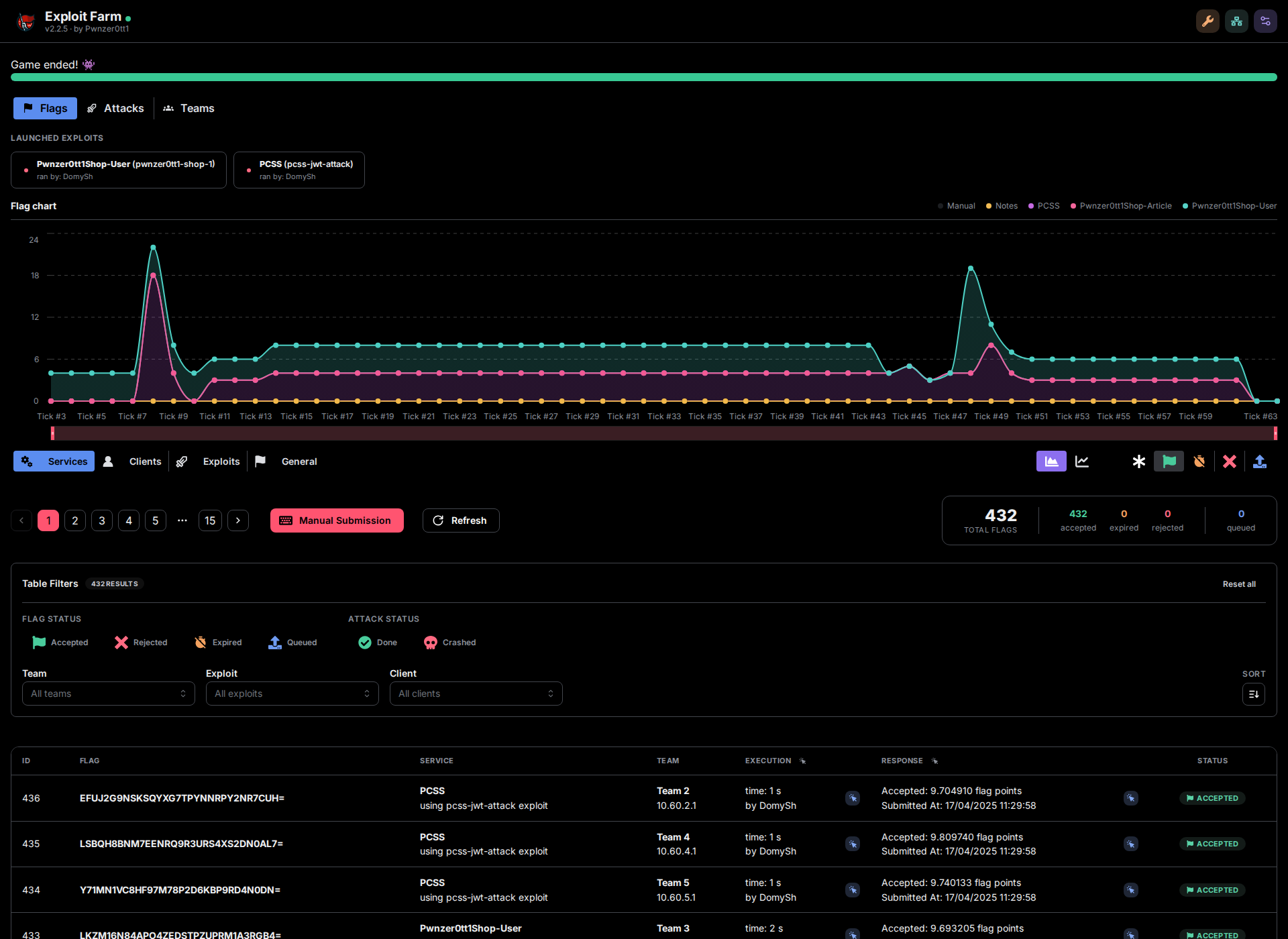
Exploit Farm is an attack distributed platform that allows you to easly share and execute exploits in a distributed way in A/D competitions.
The aim of this attacker is to provide an easy way to replicate attacks and submitting flags to the competition platform, collecting as many data from attacks as possible to
allow players to analyze and impro exploits and have a clear view of the attack status, and where them could fails.
The design is inspired by Destructi, but it is being de from scratch, only some very small parts are being reused.
!ExploitFarm Web Interface
How it works
There is a main central server of exploitfarm that will be responsible for get configurations, send exploits to clients, recei and send to the platform, and store all data from attacks. The server doen't attack, it mainly coordinates the attacks and submit flags.
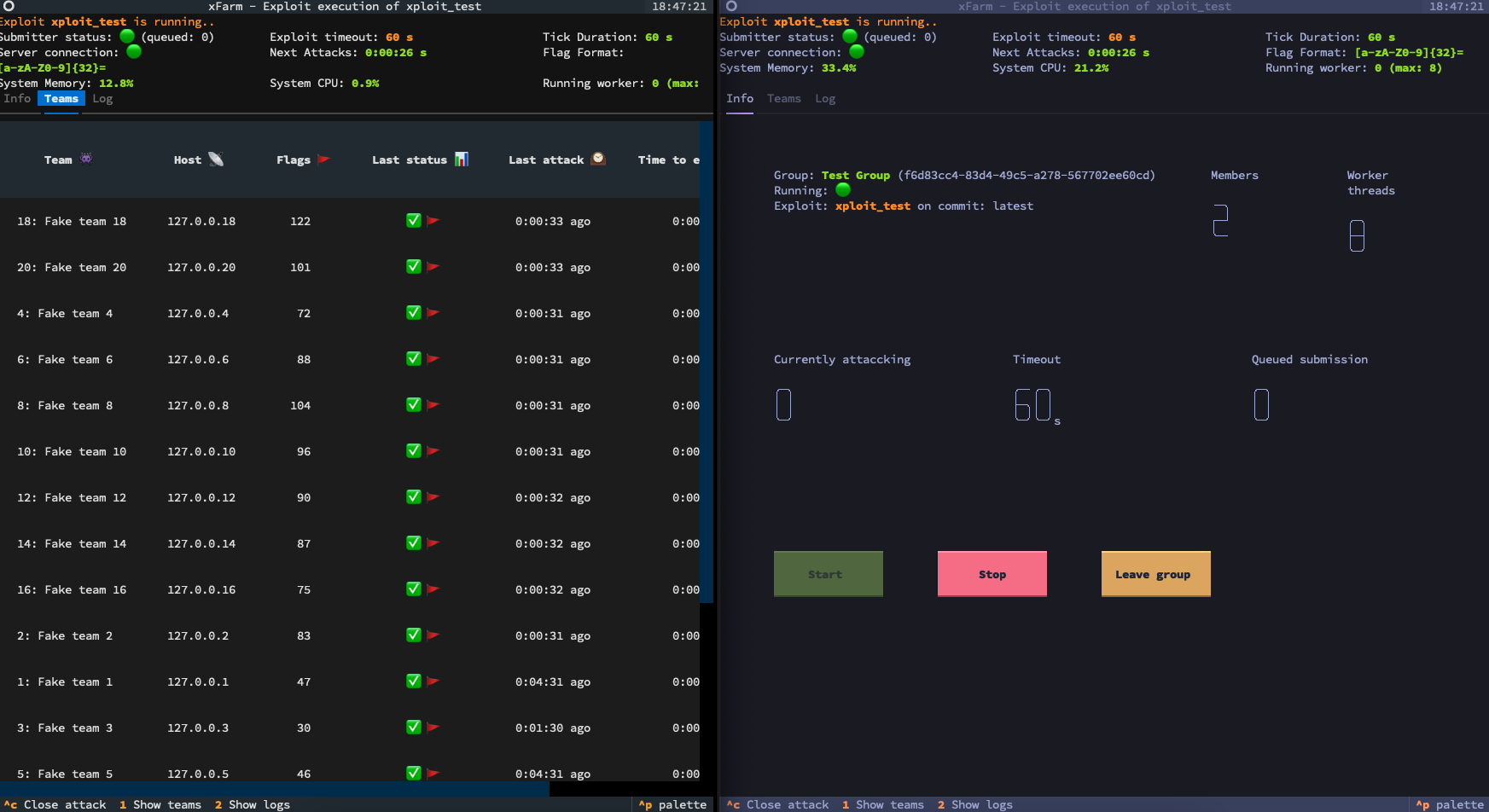
Other computer can install the exploitfarm client (using xfarm command) that connects to the main server, helps you to create the exploit folder. Here you can write your exploit, test replicate to all teams with some easy commands and an easy to use tui. All you need to focus is on the exploit, the exploitfarm will take care of the rest.
Getting Started
Ser
First of all, you need to start the server. You don't have to change anything in the code, and the server has to be configurated during his execution, not before.
You can start the server with the following command:
If you can't execute the bash script, you can clone this repository and execute the run.py command:
This will start the server and the database. The server will be a at , see python3 run.py --help for more options.
The backend's Swagger/OpenAPI docs are served at /api/docs (e.g. ); you can also browse a static snapshot of them on the demo deploy without running a server.
Here will be required the setup configuration before set the server to running state.
Things that you should configure:
1. The flag regex to extract the flag from the output of the exploit
2. The tick duration of the a/d competition
3. The teams that will be competing
4. A password authentication if exploitfarm is exposed to the internet
5. The submitter delay to slow down the requests to the platform if requested by the organizers
6. The flag submit limit to avoid sending too many flags to the platform (and cause a timeout of the requests causing fails flag submit)
7. The submitter code that has to be used to submit the flags to the platform (that should be created following some requirements described below)
Optional but recommended options:
1. Setting the start_time you will get all stats based on real ticks number, and can start the attacks together changeng the attack mode and adding also a small delay to avoid mismatching the tick
2. Setting the end_time you can stop the ser the competition ends, and avoid the server to be running for a long time
3. The services that are active in the competition, so you can filter the attacks by service (can be added also during exploit initialization)
All the option described above can be changed also during the running state of exploitfarm server, and all the clients will be dynamically updated with the new configurations. Changing the configuration could require a re-calculation of some stats if needed and will trigger an addictional attack execution.
Submitter requirements:
ExploitFarm will execute the python code you provide to submit the flags to the platform.
Once executed if will search for a submit function that will be executed later to submit the flags. This function must require as first positional paramether (that must be called flags) the list of the flags to submit. This function could have also other kwargs that will be recognized by exploitfarm and could be costumized using the exploitfarm api. you can also add a type annotation and if this is one of [str, int, float, bool] the value will be casted to the correct type and also checked when required in input from the server. If other types or no type is used the value that could be passed will be any value. The default paramether that will be passed will be also the default paramether that will be used by the server. If the type mismatch the default value, the argument will be required to be passed by the server.
Example:
To submit this code you will need to submit the string of the code, set in kargs argument in the API a string, otherwise the submitter insertion will fail.
If you need you can also customize the magic_number and arguments, but with a compatible type, other parameter can be of any type.
A guide is a on the web interface to help you to create the submitter code, errors will be showen when writing or editing the code also.
The docker image already ships these, so a submitter can import them without declaring anything:exploitfarm, requests, httpx, aiohttp, pydantic, dateutil, psutil.
pwntools is not included: a submitter that needs it - or any other library - has to declare it, see
below. Declaring one of the libraries abo costs nothing and is good practice: an already
a library is resol, without contacting any package index, so the submitter keeps
working on a game network with no internet access. Only a genuinely missing library needs the server to
reach an index.
#### Submitter dependencies (isolated en)
If a submitter needs a library that is not in the image, just declare it: ExploitFarm installs it in a
en dedicated to that submitter, **without restarting the server, rebuilding the image or
editing ExploitFarm's sources**. Two submitters can therefore depend on different of the same
library without interfering with each other.
Dependencies can be declared in two places, which are merged together:
1. In the Dependencies box of the submitter editor (or the requirements field of the submitter API),
one requirement per line, exactly like a requirements.txt file.
2. Inside the submitter code itself, so a submitter file stays self-contained and can be shared as-is,
using a PEP 723 script metadata block (or a top level
__requirements__ = ["requests"] list):
Both are read statically, the code is ne to discover them. A requirement written in the
Dependencies box wins over the same package declared by the code, so a can always be pinned
ser without touching the submitter.
The en is (re)built automatically whenever the declared requirements change, right before the
next submission, and it can also be installed, rebuilt or deleted by hand from the Dependencies panel,
which shows the installed packages and the full installation log. While an en is broken nothing
is submitted and nothing is expired, so no flag is lost to FLAG_EXPIRATION because of a dependency
problem that can still be fixed.
NOTES:
host.docker.internal instead of localhost to connect to the server. This is caused by docker network isolation.Client setup
We highly recommend using uv to easily create an en to execute your exploits.
You can install xfarm client using u:
Note that using -p 3.14t you can use python without GIL, giving a better performance to your exploits.
Anyway, if you want to run auto-setup scripts, you should install exploitfarm in a en:
You can use uv to create a en and install the exploitfarm client in it:
Or finally you can install it normally with standard pip:
On windows remember to use python -m xfarm instead of xfarm.
!ExploitFarm Web Interface
The client is both a python library with some utilities to help you to write the exploit and a command line tool to interact with the exploitfarm server.
Consider using XFARM_HOST en to get the host of the team to attack passed by xfarm to your exploit when writing the exploit if you are not using python.
The flags has to be printed on the stdout, and xfarm will extract the flags using the regex set on the server.
Before writing your exploit, init your project with the following command:
Here will be required if not already set the server host, port, your nickname (that will be used for stats), and the password if the server is authenticated.
These informations will be automatically required by xfarm if never set, and stored following the XDG Base Directory Specification (config in ~/.config/exploitfarm/, cache in ~/.cache/exploitfarm/, etc.).
Once the initial configuration is done, xfarm will require to write the name of the exploit, the language used and the service that you are attacking. If the service is not in the list, you can add it writing the service name.
The exploit name will be used to create the folder of the exploit. During the initialization you can choose also the exploit template to use. A default static template is always a, and if the server has custom templates xfarm will show only the templates compatible with the selected language. The selected template will create the initial exploit source and set the default run file and interpreter.
Every time you run xfarm init, the client synchronizes the local template cache with the server. If the server is not reachable, or the synchronization fails, xfarm will continue using the templates already sa without failing the initialization.
In the exploit folder you will find the initial source generated from the selected template and a config.toml file that you can customize to change interpreter or the main file of the exploit.
To change other paramether please use xfarm init -e in the exploit folder.
You can create a custom exploit template from an existing file or folder with:
If you are inside the template folder you can use xfarm template add .. The TUI will ask for the template name, description, language, run file and interpreter.
To list or edit the templates from the terminal client:
The <host> will be passed to the XFARM_HOST en , and will be used to test the exploit. The attack will be executed once and if some flags are found they will be printed on the screen and also submitted to the server as a manual submission.
Exploit Execution En
To protect your exploit source code and maintain a clean workspace, exploits are ne directly in their project directory. Instead, xfarm starts the execution by copying your exploit files into a temporary __xfarm_run__ folder and runs the exploit from there. This guarantees:
A Git-like ignores system is a: You can use a .ignore (only in the root of the exploit folder) to specify files/directories that shouldn't be copied into the __xfarm_run__ directory and when using xfarm push.
This will start the TUI and replicate the attack to all the teams registered on exploitfarm server.
if the TUI is heavy for your system, you can use xfarm -I startto start the exploit showing only the logs in the output.
You can pick a fixed number of concurrent attack threads with --pool-size, or let the client size the pool for you with --auto: it continuously adapts the thread count to the machine's live CPU/memory capacity, growing while there's headroom and demand and backing off only under real pressure. See docs/autotune.md for how the algorithm works.
---
Group Attacks
Group attacks allow multiple machines to collaborate on executing the same exploit(s), spreading the workload automatically across all connected nodes. This is ideal when a single machine doesn't ha threads or network bandwidth to attack all teams within a tick.
This feature is was initialy has been modified during time and changed more time, consider it as a beta feature.
1. Create a Group
A group is a named attack pool managed by the server. Create one from any machine with the client installed:
You will be prompted for a group name. Alternatively, create one directly from the Web UI under the *Attack Groups* section. You can list all existing groups at any time:
This shows each group's name, UUID, and whether a local worker is currently running for it.
---
2. Associate Exploits to the Group
Before any node can start attacking, you need to tell the group which exploits it should run. This is done via the Web UI:
1. Open the *Attack Groups* tab.
2. Select the group you created.
3. Click Manage Exploits ( in the *Assigned Exploits* tab or as an action button).
4. Search for and check the exploits you want to assign — note that each exploit can only belong to one group at a time.
5. Save.
> Note: An exploit needs at least one pushed source before the group can execute it. The association can be changed at any time while the group is running — added exploits start automatically, and updates will be pulled by the workers.
---
3. Push the Exploit Source
Each exploit that the group will execute must have its source code pushed to the server. From inside the exploit folder:
This uploads the current source code snapshot. Workers will automatically download it on their next attack cycle. You can push updates at any time — running attacks using the old will be killed and restarted with the new code automatically.
---
4. Join the Group from Each Node
On every machine that should participate in the attack, run:
An interactive TUI will let you:
1. Select the group to join.
2. Choose how many concurrent attack threads to use.
You can also specify these directly:
Instead of a fixed thread count you can pass --auto (here --queue becomes the upper bound): each worker auto-tunes its threads to its own machine's capacity and the ser the shared load proportionally. Auto-mode and the upper bound can also be toggled per worker from the Web UI. See docs/autotune.md for details.
To run the worker in the background:
> The group starts attacking automatically as soon as at least one node has joined and at least one exploit with a pushed source is assigned. No manual start/stop is needed.
---
5. Update an Exploit
To roll out a new of an exploit to all nodes while the group is running, simply push again from the exploit folder:
The ser the new source, notifies all connected workers, kills in-flight attacks for that exploit, and immediately starts the new . No restart or rejoin is required.
To add or remo from a running group, use the Manage Exploits button in the Web UI — changes take effect instantly.
---
6. Monitor & Stop
To stop a background worker:
xfarm start will by default use cpu_count*10 thread pool to manage the attacks and apply an execution timeout based on the time a for the attack allowing all teams to be attacked. See docs/attack-scheduling.md for exactly how targets are scheduled and how that timeout is computed. For problems with the ram usage, is highly recommended to use zram on linux to compress the ram to avoid trashing.
If you write the exploit on python you can use also exploitfarm library. Is highly recommended to use from exploitfarm import *, this will set the print python function by default to flush=True.
Functions in exploitfarm library:
See ad features of exploitfarm in the xfarm PyPi page here
---
Made with ❤️ by Pwnzer0tt1
---
Copyright (c) 2024 Pwnzer0tt1
项目信息
开发语言:Python
Star 数:69
技术要点
该项目属于CTF思路方向的开源资源,代码结构清晰,适合安全研究人员学习参考。项目围绕ExploitFarm is an attacker and flag submitter for A/D CTF展开,提供了可运行的实现,对理解相关安全机制、工具原理与攻防技术具有较高的研究价值。
从技术实现角度看,此类项目的核心在于对底层原理的深入理解与工程化落地。开发者在研究过程中可以结合官方文档与社区讨论,梳理项目的初始化流程、核心模块职责与数据流转,逐步掌握其中的技术细节与设计思路。
使用与学习建议
1. 下载源码压缩包,解压到本地环境。
2. 根据项目类型准备对应的运行环境与依赖。
3. 按照 README 中的步骤完成配置与部署。
4. 在隔离的测试环境中运行验证,避免影响生产系统。
免责声明
本资源来源于开源社区,仅供安全研究、技术学习与合法授权范围内的攻防演练使用,请勿用于任何非法或侵害他人权益的用途。使用本项目产生的一切后果由使用者自行承担。
| 资源标题 | exploitfarm - ExploitFarm is an attacker and flag submitter for |
| 所属分类 | CTF思路 |
| 发布作者 | admin |
| 发布时间 | 2026-10-06 00:01:51 |
| 下载权限 | 免费下载 |
| 附件数量 | 2 个下载链接 |
| 浏览次数 | 186 |
| 讨论数量 | 0 |
| 主题状态 | 正常讨论中 |