 CTF思路
点击放大
cybersec-toolkit - One command installs 670+ security tools on Debian
项目说明
<!-- mcp-name: io.github.26zl/cybersec-toolkit -->
![CI]()
![Integration]()
![Security]()
![OpenSSF Scorecard]()
![Last commit]()

![Docker image]()
![Glama score]()
<p align="center"><em>“I am a friend of , not of fortune.”</em><br>— Gjergj Kastrioti · Skanderbeg (1405–1468)</p>
__A security toolkit that AI agents can dri rules you set.__ One command installs 670+ security tools on Linux or Termux. An MCP (Model Context Protocol) server lets Claude Code, Codex, Gemini CLI, OpenCode, and other MCP clients discover, recommend, and run those tools through a go execution path, inside a disposable Kata Containers VM by default. 872 Agent Skills supply the methodology for CTF, pentest, bug bounty, DFIR, and blue-team work.
| Component | What you get |
| --------- | ------------ |
| Installer | 670+ tools in 18 modules, 14 profiles, and 12 install methods for Debian/Ubuntu/Kali/Parrot, Fedora/RHEL, Arch, openSUSE, and Termux |
| MCP server | 15 tools for discovery, advice, and go execution; external targets and script execution are off by default |
| Sandbox | One Kata Containers VM per session by default; --local runs the server on the host |
| Agent Skills | 872 skills (31 project-authored, 841 curated), also installable as a Claude Code plugin |
> __What makes it different:__ most toolkits stop at _installing_ tools. Here an AI can also _drive_ them: infer the problem type, pick tools from every module and profile, and work through the problem with you step by step. When you explicitly authorize it, the same toolchain runs an autonomous solver loop. __Companion by default; autonomous only when you ask.__ It complements Kali, Parrot, or BlackArch rather than replacing them: it runs on the machine you already ha included.
Quick start · How it works · Trust & safety · Installer · MCP server · Agent Skills · De · License
Quick start
__1. Install the tools__ on a supported Linux distro or on Termux:
__2. Connect an AI client.__ The tracked configs for Claude Code (.mcp.json), Codex, Gemini CLI, and OpenCode start the ser scripts/mcp-launch.sh, with external targets and script execution disabled. Choose where the tools run:
| Mode | Tools run | Host needs | One-time setup |
| ---- | --------- | ---------- | -------------- |
| Sandbox (default) | In a disposable Kata VM, from the sandbox image | Linux with K 23+ with a Kata runtime, Node.js 22+ | make sandbox-image, then npm --prefix sandbox ci --ignore-scripts |
| Host (--local) | As your user, with the tools install.sh installed | uv | Add --local to the launcher, or set CYBERSEC_SANDBOX_MODE=local in the client's env |
Kata needs KVM: on macOS, on Windows, and in nested , use host mode.
__3. Restart the client.__ The 15 tools appear (/mcp in Claude Code). Then ask for what you need, for example "triage this binary" or "map the attack surface of my lab at 10.10.0.0/24".
How it works
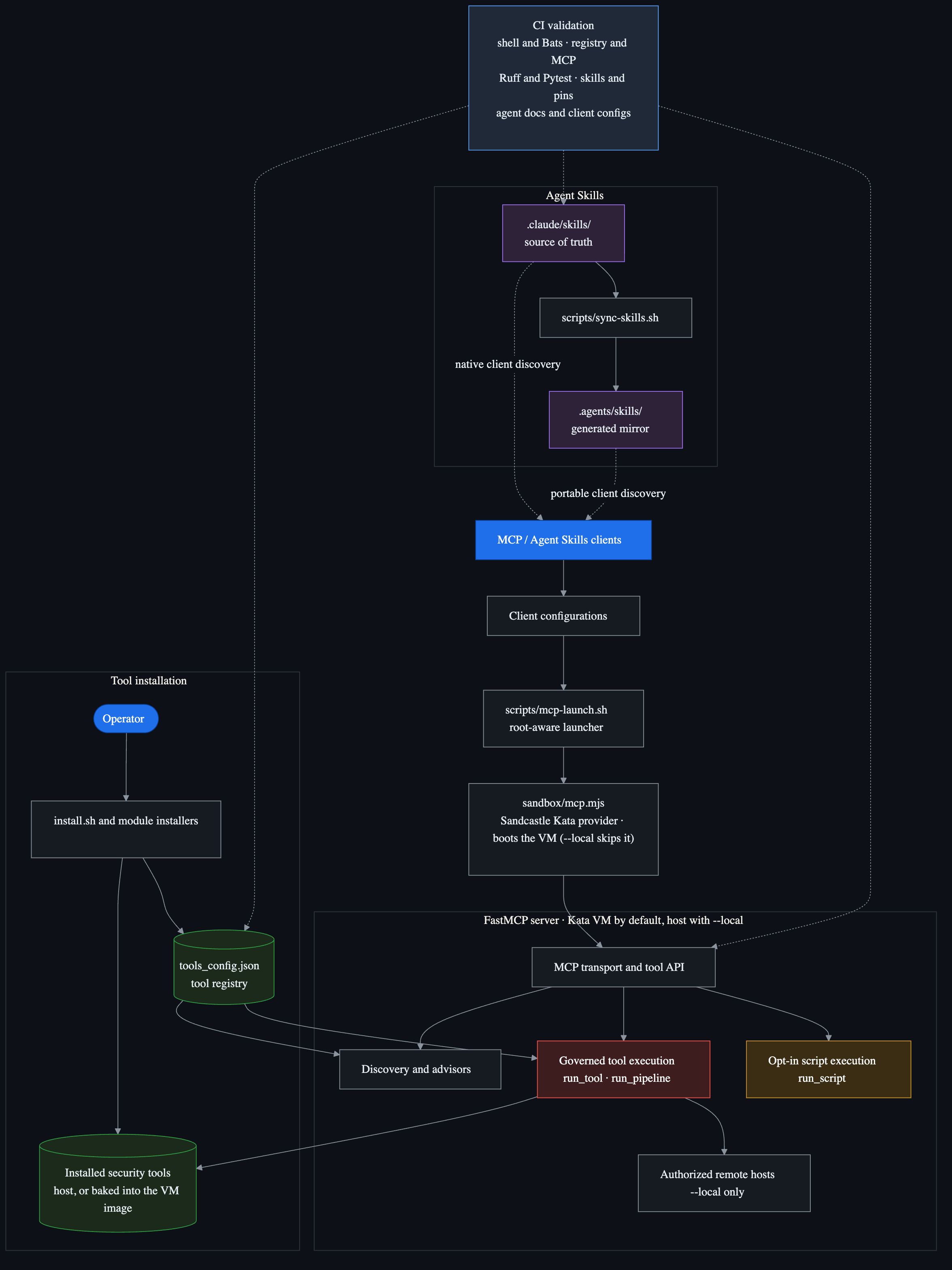
Two entry points share one tool registry. An __operator__ runs the bash installer to put tools on disk: on the host, or into the sandbox image at build time. An __AI agent__ talks to the MCP server, which runs inside a Kata VM by default, to discover, recommend, and execute those tools through one go path. tools_config.json is the single source of truth that the modules define and the MCP ad read; CI keep the Python and bash sides in sync.
<!-- Rendered from assets/how-it-works.mmd so it displays consistently e.
Re-render with:
npm_config_cache=/tmp/cybersec-npm-cache npx --yes \
--package -js/mermaid-cli@11.16.0 mmdc \
-i assets/how-it-works.mmd -o assets/how-it-works.png -t dark -b "#0d1117" -s 3 -->
!How it works: an operator runs the bash installer to put tools on disk; an AI agent drives the MCP server, which runs in a Kata VM by default, to discover, recommend, and execute them. The installer and MCP server meet at the tools_config.json registry and the installed tools, with security.py go tool execution and CI keeping the Python and bash sides in sync.
Solid arrows are runtime or installation actions; dashed arrows are and context relationships. Client configurations enter through the root-aware launcher, which boots the a Sandcastle Kata provider (sandbox/kata.mjs) — or, with --local, starts the server on the host. security.py governs run_tool and run_pipeline through the allowlist, argument checks, and network policy without in a shell. run_script is a separate, disabled-by-default capability that runs arbitrary code. Agent Skills stay outside the execution path: .claude/skills/ is canonical, and scripts/sync-skills.sh generates .agents/skills/ for clients that read the portable mirror. Mermaid source: assets/how-it-works.mmd.
Trust & safety
What runs, and what is gated:
CYBERSEC_MCP_ALLOW_EXTERNAL=0 rejects network targets that do not resolve to private or loopback ranges, and CYBERSEC_MCP_ALLOW_SCRIPTS=0 disables run_script. External scopes and scripting are explicit opt-ins.mcp_ser.py): registry allowlist, no shell (create_subprocess_exec, never shell=True), argument sanitization, a per-tool blocked-flag denylist (e.g. sqlmap --os-shell, nmap -iL, file-list and target-injection flags), target and network policy, rate limiting, output caps, and timeouts. The policy knows enough CLI grammar to tell a target from a header, wordlist, output path, or target-list flag. Tool output reaches the model without terminal escape sequences or LLM control markers, and lines addressed to an AI reader are flagged.CYBERSEC_SANDBOX_WORKSPACE mount, no Docker socket, a non-root user with every capability dropped, and memory, CPU, and process limits. It is destroyed when the client disconnects. Startup fails closed instead of falling back to the host; --local is the explicit opt-out.CYBERSEC_MCP_ALLOW_EXTERNAL is a preflight check on resol, not a firewall (set CYBERSEC_SANDBOX_NETWORK=none or use a filtered network). Inside the VM, and on your host in --local mode, allowed tools run with the server user's permissions, and some of them spawn child processes or load plugins.0600), rotating log under the user's state directory (~/.local/state/cybersec-tools-mcp/audit.log by default). Script bodies are ne, only their SHA256 and length, and credential-shaped strings are redacted from tool arguments. A sandboxed ser its records to the same host log, and records are hash-chained, so an edited or deleted record inside a chain shows up in make audit- (limits).$SUDO_USER) for cloned-repo builds and pip/cargo/gem installs; binary releases are SHA256- when checksums are published.--include-c2 (the redteam and full profiles set it); the MCP layer reflects this and ne them.SECURITY.md, the supply chain model, and the disclaimer.Installer
Requirements
A supported Linux distro (Debian/Ubuntu/Kali/Parrot, Fedora/RHEL, Arch, openSUSE) or Termux. Runtimes (Python, Go, Ruby, Java, Rust, Node.js), de, pipx, and build tools are installed automatically. The installer does not run on macOS or nati; use WSL or Docker.
--enable-docker (C2 frameworks, MobSF, BeEF, BloodHound, TheHi). Install it yourself: Docker Engine docs.gh auth login session automatically, also under sudo. Alternatively, pass a personal access token (no scopes needed) through sudo, which otherwise drops it: sudo --preser=GITHUB_TOKEN ./install.sh.Install
__From the latest release__ (pinned; recommended):
__From main__ (newest tools and fixes, including unreleased work):
With no flags, the installer covers the standard tools of all 18 modules. C2/phishing tools and Docker images stay opt-in; --profile full --enable-docker installs e the current platform supports. To install a subset:
<details>
<summary><strong>All flags</strong></summary>
--tool installs only the named tool, without the full dependency setup. Dry-run time estimates count install entries across methods, so they can exceed the de-duplicated 670+ tool registry.
</details>
<details>
<summary><strong>Why a full install takes 15-45 minutes</strong></summary>
The time goes to I/O-bound work that no scripting language can speed up:
| What takes time | Why |
| --- | --- |
| System packages (apt/dnf) | Downloading and unpacking .deb/.rpm packages and resolving dependencies |
| Go tools | Downloading modules and compiling each binary |
| pipx (Python) | Creating one isolated venv per tool and downloading wheels |
| Cargo (Rust) crates | Compiling from source |
| Git clones | Cloning each repository |
| Binary releases | Downloading pre-built binaries from GitHub |
./install.sh --dry-run prints the li breakdown. pipx, Go, git, and binary installs run in parallel (-j 4 by default); the system package manager and Cargo run sequentially. To go faster: install a profile or --module instead of e, --skip-cargo to avoid Rust compilation, -j 8 for more parallel jobs, and an apt-cacher-ng proxy for repeated installs.
</details>
Docker and Podman
The prebuilt image is the installer on Ubuntu, not a sandbox. Its default command is a dry run of the full profile:
Build it yourself with docker build -t cybersec-toolkit ., or run a throwaway install through the bundled Compose file with docker compose run --rm installer --profile ctf. On Apple silicon, add --platform linux/amd64 to docker build and docker run. Podman works as a drop-in replacement (podman compose needs a compose provider). The image grants the toolkit user passwordless sudo so the installer can manage packages; treat code inside it as root-capable.
Termux (Android)
Profiles
| Profile | Modules | Description |
| ------- | ------- | ----------- |
| full | All 18 | Complete security toolkit |
| ctf | misc, crypto, pwn, re, stego, forensics, cracking, web, mobile, blockchain | CTF competitions |
| redteam | misc, networking, recon, web, enterprise, pwn, mobile, cracking, cloud, wireless, re, crypto | Offensi |
| web | misc, networking, recon, web, llm | Web application testing |
| osint | misc, recon | OSINT gathering |
| forensics | misc, forensics, blueteam, re, stego, cracking | Digital forensics and incident response |
| pwn | misc, pwn, re, crypto | Binary exploitation and reverse engineering |
| mobile | misc, mobile, web, re | Mobile application security testing |
| cloud | misc, cloud, containers, networking, recon | Cloud and container security auditing |
| blockchain | misc, blockchain, web, crypto | Smart contract auditing and blockchain security |
| wireless | misc, wireless, networking | WiFi, Bluetooth, and SDR security |
| lightweight | misc, networking, recon, web, cracking | Hobby ethical hacking essentials (HTB, THM, bug bounty) |
| crackstation | misc, cracking, crypto | Hash cracking |
| blueteam | misc, blueteam, forensics, re, mobile, containers, networking, cloud, recon | Defensi, IR, malware analysis |
Modules
| Module | Tools | Description |
| ------ | ----- | ----------- |
| misc | 40 | Post-exploitation, social engineering, wordlists, resources, C2 (Docker + Loki) |
| networking | 57 | Port scanning, packet capture, tunneling, MITM, protocol tools |
| recon | 82 | Subdomain enumeration, OSINT, DNS, automated recon frameworks |
| web | 60 | scanning, fuzzing, SQLi, XSS, CMS scanners, API testing |
| crypto | 15 | RSA attacks, cipher analysis, hash attacks, constraint solving |
| pwn | 36 | Exploit frameworks, binary exploitation, fuzzing, payload generation |
| re | 33 | Disassemblers, debuggers, emulation, Ja re |
| forensics | 57 | Disk/memory forensics, file carving, timeline analysis, log analysis, hardware/serial |
| enterprise | 80 | Acti, Kerberos, Azure AD, credential har, lateral mo |
| wireless | 41 | WiFi cracking, Bluetooth, SDR, rogue AP |
| cracking | 34 | Hash cracking (john, hashcat), brute force, wordlist generation |
| stego | 15 | Image/audio steganography, detection, StegCracker |
| cloud | 22 | AWS/Azure/GCP security auditing, Checkov |
| containers | 15 | Docker/Kubernetes security (Grype, Syft, Kubescape, kubeaudit) |
| blueteam | 36 | IDS/IPS, SIEM, incident response, threat intelligence, hardening, malware analysis (YARA, ClamA, Capa, Loki) |
| mobile | 18 | Android/iOS app testing, APK analysis, MobSF (Docker) |
| blockchain | 15 | Smart contract auditing (Slither, Mythril, Foundry, Aderyn), blockchain forensics, Echidna (Docker) |
| llm | 14 | LLM red teaming, prompt injection, jailbreak testing, AI scanning |
<details>
<summary><strong>Install methods</strong> — preferred order: apt > pipx > go > cargo > binary > gem > Docker > git clone > source</summary>
| Method | Count | Examples |
| ------ | ----- | ------- |
| Git clone | 193 | GitHub repos with auto-setup, resources, wordlists |
| System packages (apt/dnf/pacman/zypper) | 166 | nmap, wireshark, john, hashcat |
| pipx | 137 | sqlmap, impacket, bloodhound, |
| Go install | 62 | nuclei, subfinder, ffuf, httpx |
| Binary release | 51 | gitleaks, chainsaw, findomain, FLOSS, Capa, Loki, Syft, Kubescape |
| Build from source | 23 | massdns, duplicut, AFLplusplus, honggfuzz |
| Docker | 13 | Empire, MobSF, BeEF, BloodHound, TheHi, PentAGI |
| Cargo (Rust) | 8 | feroxbuster, RustScan, pwninit, yara-x-cli |
| Ruby gem | 6 | wpscan, e, brakeman |
| npm | 5 | promptfoo, apk-mitm, surya, solgraph |
| Special | 5 | Metasploit, Foundry, Steampipe, patator (curl-pipe installers), crypto ven |
| Snap | 1 | zaproxy |
</details>
Post-install scripts
All scripts support --help and need root on Linux (sudo); Termux needs no root.
| Script | Purpose | Example |
| ------ | ------- | ------- |
| scripts/.sh | Check which tools are installed | sudo ./scripts/.sh --module web --skip-heavy |
| scripts/update.sh | Update all installed tools | sudo ./scripts/update.sh --skip-system |
| scripts/remove.sh | Remo by module | sudo ./scripts/remove.sh --module enterprise --yes |
| scripts/remove.sh --deep-clean | Purge caches and build artifacts | sudo ./scripts/remove.sh --deep-clean --yes |
| scripts/backup.sh | Back up and restore tool configs | sudo ./scripts/backup.sh backup |
--deep-clean removes the Go module/build cache, the Cargo registry, pip/pipx/npm/gem caches, orphaned pipx ven symlinks, and log files. Add --remo to also purge Rustup toolchains.
<details>
<summary><strong>Tool locations</strong></summary>
Non-system tools land in /usr/local/bin/ on Linux and $PREFIX/bin on Termux; system packages use their default location (/usr/bin/).
| Method | Binary location (Linux) | Binary location (Termux) | Data location |
| ------ | ----------------------- | ------------------------ | ------------- |
| pipx | /usr/local/bin/ | $PREFIX/bin/ | /opt/pipx/ or ~/.local/pipx/ |
| Go | /usr/local/bin/ | $PREFIX/bin/ | /opt/go/ or ~/.go/ |
| Cargo | /usr/local/bin/ (symlinked) | $PREFIX/bin/ (symlinked) | ~/.cargo/ |
| Git repos | /usr/local/bin/ (symlinked) | $PREFIX/bin/ (symlinked) | /opt/<repo>/ or ~/tools/<repo>/ |
| Binary releases | /usr/local/bin/ | Skipped (glibc incompatible with Bionic) | -- |
The . file records what was installed, how, and when.
</details>
<details>
<summary><strong>Optional Docker images</strong> (<code>--enable-docker</code>)</summary>
If --enable-docker is set and Docker is missing, the installer stops and asks you to install Docker first.
| Image | Module | Flag | Description |
| ----- | ------ | ---- | ----------- |
| bcsecurity/empire | misc | --enable-docker --include-c2 | Empire C2 |
| spiderfoot/spiderfoot | misc | --enable-docker | SpiderFoot OSINT |
| beefproject/beef | web | --enable-docker | BeEF browser exploitation |
| opensecurity/mobile-security-framework-mobsf | mobile | --enable-docker | MobSF |
| specterops/bloodhound | enterprise | --enable-docker | BloodHound CE |
| trailofbits/echidna | blockchain | --enable-docker | Echidna smart contract fuzzer |
| checkmarx/kics:latest | cloud | --enable-docker | KICS infrastructure-as-code scanner |
| sagemath/sagemath:latest | crypto | --enable-docker | SageMath (Coppersmith, Groebner bases, cur) |
| strangebee/thehi | blueteam | --enable-docker | TheHive IR platform |
| thehi/cortex:latest | blueteam | --enable-docker | Cortex analysis |
| zeek/zeek:latest | blueteam | --enable-docker | Zeek network analysis |
| wagga40/zircolite:latest | blueteam | --enable-docker | Zircolite E |
| /pentagi:latest | llm | --enable-docker | PentAGI autonomous pentesting |
</details>
Distro support
__Debian/Ubuntu/Kali is the primary target__ and has the strongest test co: Kali and Parrot get the full apt set, while plain Debian/Ubuntu skip a handful of Kali-only packages. Fedora, Arch, and openSUSE skip the packages their repositories do not carry (the - entries in lib/distro_compat.tsv, several dozen per distro) and run in the integration workflow.
| Platform | Status |
| -------- | ------ |
| __WSL__ | Supported for installs and MCP use; the wireless module and kernel-le are skipped. No dedicated CI job, so release-critical changes in a local WSL distro. See Windows Defender false positives if the repo lives on a Windows-mounted path. |
| __ARM__ (aarch64/armv7) | Supported, with automatic skips for x86-only binary releases and build-from-source tools. No dedicated CI job. |
| __Termux__ (Android) | Supported without sudo. Docker, snap, binary releases, and build-from-source are skipped (Bionic incompatible). No dedicated CI job. |
| __Windows__ (native) | Not supported. Use WSL. |
| __macOS__ | The installer is not supported; use the Docker image. The MCP server runs on macOS in host mode (--local). |
| __Other Linux distros__ | Distros without apt/dnf/pacman/zypper (NixOS, Gentoo, Void, Alpine, Slackware, …) are detected and blocked with a clear error. Use the Docker image. |
Supply chain model
The installer downloads and runs code from the internet. On Linux it runs as root (sudo); on Termux it runs in the app's user sandbox.
--require-checksums or the --production preset fails those tools instead of installing them un. --fast disables all checksum , including for releases that publish checksums, and cannot be combined with the strict flags; keep it out of CI and production.--skip-source skips its installer on a fresh host, so Rust tools compile from crates.io.setup.py is not executed.make, as root on Linux. Review what you build.uv with a 3-day exclude-newer window, and Dependabot waits the same 3 days. This does not apply to the security tools themselves, which follow their upstream release channels.latest. --production does not pin or them.--production does not pin Git clones, language-package registries, or build-from-source tools; those track their upstream release channels.
Windows Defender false positives
On a Windows-mounted path (e.g. C:\Users\<you>\..., or any folder from Windows while you work in WSL), Microsoft Defender and other A may quarantine indi files. IOC tables, sample obfuscated PowerShell, malware-analysis snippets, and exploit strings in .claude/skills/, writeups/, and parts of mcp_server/ contain the same byte patterns real attackers use. Common include Trojan:Script/Wacatac.B!ml, HackTool:*, and generic Heur.*. These are false positives for a security toolkit.
<details>
<summary><strong>Workarounds</strong></summary>
1. __Exclude the repo folder__ (recommended on a personal dev box), from an elevated PowerShell:
2. __Restore files from quarantine__ Security → Virus & threat protection → Protection history → "Allow on device". This is per file and does not prevent re-detection.
3. __Keep the repo inside the WSL filesystem__ (e.g. ~/cybersec-toolkit). Defender does not scan WSL2's disk by default. scripts/sync-wsl.sh does this for the MCP server.
Files removed by Defender show up as D in git status; restore them with git checkout -- <path> once the exclusion is in place.
</details>
MCP server
The ser MCP-capable clients read access to the 670+ tool registry, install status and recommendations, and go execution of installed tools. The agent knows every tool, which ones are a, and how to chain them.
Supported clients
| Client | Integration | Status |
| ------ | ----------- | ------ |
| Claude Code | .mcp.json (tracked) + .claude/skills/ | Nati included |
| Claude Desktop | claude_desktop_config.json | Configuration example documented |
| OpenCode | opencode.jsonc (tracked) + .agents/skills/ | Li |
| Codex | .codex/config.toml (tracked) | Nati included |
| Gemini CLI | GEMINI.md + .gemini/settings.json (tracked) | Nati included |
| GitHub Copilot | .mcp.json (CLI) + .github/copilot-instructions.md | CLI li; VS Code documented |
| Hermes Agent | User ~/.hermes/config.yaml | Li |
| OpenClaw | User ~/.openclaw/openclaw.json + .agents/skills/ | Li |
| DeepSeek Harness (dsh) | $DSH_HOME/settings.yaml + .agents/skills/ | Configuration example documented |
| Cursor / Cline / Goose | Client MCP settings + Agent Skills | Compatible through MCP; skills supported |
| Continue | Client MCP settings; rules/prompts for context | Compatible through MCP |
| LM Studio (>=0.3.17) | mcp.json; manual or MCP-provided context | Compatible through MCP |
| Ollama | MCP host in front of it | Compatible through an MCP host |
| Open WebUI | MCP-to-OpenAPI bridge | Compatible through an MCP host or bridge |
Per-client setup is in docs/AI_CLIENTS.md; coordinating several agents across any MCP client is in docs/ORCHESTRATION.md.
The server is published to the official MCP Registry as io.github.26zl/cybersec-toolkit and listed on Glama:
<a href=" width="380" height="200" src=" alt="Cybersec Toolkit MCP server on Glama" /></a>
What the AI can do
| Tool | What it does |
| ---- | ------------ |
| list_tools | List/filter all 670+ tools by module, method, or install status (includes URLs) |
| check_installed | Check if a tool is installed (6 detection strategies) |
| get_tool_info | Full details: method, module, URL, install/update/remo |
| get_module_info | Deep-dive a module: all tools, install status, which profiles use it |
| get_profile_tools | See every tool a profile installs, grouped by module |
| suggest_for_ctf | Curated tool recommendations for 14 CTF challenge categories |
| suggest_for_bounty | Bug bounty tool recommendations for 7 target types with methodology and common vulns |
| guided_assessment | Companion-first sol for an authorized target: classifies the target/finding, returns triage gates, recommends skills, picks tools from all modules/profiles, and guides step by step; opt-in autonomous starts an auto-solver loop over run_tool, run_pipeline, and the separately gated run_script |
| get_c | Map a CVE id or nickname (e.g. log4shell) to curated skills, registry tools, modules, and live NVD/KEV/EPSS lookup commands |
| recommend_install | Natural-language → profile/module/tool recommendation |
| list_profiles | All 14 profiles with tool counts and install commands |
| run_tool | Execute installed tools safely (sanitized args, network policy, rate limiting, audit logging); supports remote execution over SSH |
| run_pipeline | Pipe tools together without a shell (strings binary \| grep flag) |
| run_script | Explicit opt-in Python/Bash execution, with per-script ven |
| manage_remote_hosts | Add, remove, list, and test SSH remote hosts for remote tool execution |
<details>
<summary><strong>Usage examples — full workflows, offense to defense</strong></summary>
The agent can query every tool and its install state, chain go tool calls, parse the output, and pivot on what it finds. Script execution requires a separate opt-in.
#### External recon → attack surface (needs CYBERSEC_MCP_ALLOW_EXTERNAL=1, authorized scope only)
amass / subfinder → resolves and probes with httpx → fingerprints with whatweb → runs nuclei templates → content discovery with ffuf, then ranks hosts by exposure and proposes next steps/go?url= — weaponize it"__ — with curl, then builds an SSRF / OAuth-token-theft PoC and probes for an exploitable callback#### Web exploitation
sqlmap to confirm and dump (destructive --os-shell/--os-cmd are policy-blocked), then run_script to automate the auth bypass and pull just enough for a PoC#### Acti / internal
bloodhound, kerberoasts with impacket (GetUserSPNs.py), cracks the TGS in hashcat, then lateral mo with netexec, all on a Kali box over SSH (manage_remote_hosts, host mode)secretsdump.py against the DC#### Binary exploitation & re
checksec / readelf, finds gadgets with ROPgadget, leaks libc via a puts@plt call, then writes the full pwntools chain in venv="pwntools" and pops a shell locallyobjdump / radare2 disassembly piped into targeted analysis, then a run_script reimplementation to behavior#### Crypto
e, several ciphertexts"__ — detects the attack (Håstad / common modulus / Wiener) and solves it with pycryptodome + sympy in a ven plaintext#### Blue team · detection engineering
sigma-clichainsaw over the EVTX with Sigma rules, then summarizes hits by host and timelineyara signatures and runs them recursively#### DFIR · malware triage
pslist, netscan, malfind) and chains them into one narrativetshark / tcpdump extraction → suricata rules → flags periodic callbacksfile → strings → capa / yara, then extracts IOCs for enrichment#### Cloud · containers · ops
prowler / scoutsuite and surfaces only the high-se findingsgrype image scan plus kubescape config checksget_profile_tools("redteam") against install status and emits the exact install commands#### Mobile · wireless · blockchain
apktool / jadx decompile → MobSF-style checks, then greps for keys and endpointsaircrack-ng / hashcat against itslither / mythril and explains the findingsrun_tool and run_pipeline are argument-sanitized, network-policed, rate-limited, and audit-logged, and destructi (--os-shell, -rf, --exploit, …) are blocked. run_script is off by default: enabling it runs arbitrary code with the server user's filesystem and network permissions (inside the VM by default, on your host with --local), and the external-target policy does not constrain it. Use only against systems you are authorized to test.
</details>
Sandbox and host mode
scripts/mcp-launch.sh starts the ser a Kata Containers you pass --local or set CYBERSEC_SANDBOX_MODE=local. The VM is created by a Sandcastle isolated-sandbox provider (sandbox/kata.mjs) that pins the Kata runtime; the same provider can also back a Sandcastle agent-orchestration loop instead of an MCP client. Startup fails closed: a missing runtime, sandbox image, K, Node.js, or launcher dependency stops the server with the reason instead of falling back to the host. ./install.sh --doctor reports sandbox readiness. Setup, tuning, and the threat model are in docs/SANDBOX.md.
file, git, binutils, nmap, curl, and Python. Tools installed on the host are not inside it, and check_installed and the ad report the guest's tools. Bake a profile into the image instead, and rebuild after pulling ser, because the image carries its own copy of the server:CYBERSEC_SANDBOX_WORKSPACE names an absolute directory, which appears as /workspace (read-only with CYBERSEC_SANDBOX_WORKSPACE_RO=1). Pass guest paths to run_tool.CYBERSEC_SANDBOX_NETWORK=none for offline analysis, or a filtered Docker network to scope egress.no-new-pri, and 2 GB / 2 vCPUs / 512 processes by default. Raw-socket scans (nmap -sS, -sU, OS detection) need CYBERSEC_SANDBOX_CAP_ADD=NET_RAW.manage_remote_hosts) and ven ~/.ctf-venvs/ that you created on the host.Client setup
Claude Code reads the tracked .mcp.json:
The login shell (bash -lc) picks up node and uv from your profile, so profile scripts must not print to stdout, which carries the MCP protocol. Other clients use the same launcher; from any directory:
.codex/config.toml resolves the Git root first, so it works from any subdirectory. If Codex ignores project config, copy the [mcp_servers.cybersec-tools] block into ~/.codex/config.toml.mcp.json (same mcpServers shape as .mcp.json) with an absolute path. MCP over LM Studio's API needs ≥0.4.0 and an MCP-capable endpoint such as /api/v1/chat or /v1/responses.mcpo) and point that host at the launcher.Start with this one server and keep scripts and external targets off unless you have an authorized scope; prefer hosts with human-in-the-loop tool approval. repository instructions live in AGENTS.md; Claude Code reads CLAUDE.md, Gemini CLI reads GEMINI.md.
<details>
<summary><strong>Connect from WSL (e.g. Kali Linux)</strong></summary>
The ser stdio, so a Windows client can launch it inside WSL. This runs it directly in WSL, without the Kata VM (the equi of --local):
Use a clone inside the WSL filesystem, or run scripts/sync-wsl.sh from a Windows checkout to copy the server to ~/cybersec-toolkit in WSL (u create a venv on NTFS). Passing CYBERSEC_MCP_* from Windows needs WSLENV; see mcp_ser.md.
</details>
<details>
<summary><strong>Connect from Docker</strong></summary>
Runs the server in the installer image. This is an ordinary container, not the Kata VM, and its user has passwordless sudo:
</details>
Script execution
run_script lets the agent write and run Python or Bash. Enable it with "CYBERSEC_MCP_ALLOW_SCRIPTS": "1" in the client's env block. Scripts get the ser's filesystem and network permissions (the VM by default, your user in --local mode), and CYBERSEC_MCP_ALLOW_EXTERNAL does not constrain them. Review generated code and scope before opting in.
Python libraries without console scripts live in named ven ~/.ctf-venvs/ (o with CYBERSEC_MCP_), selected per script with the venv parameter. ./install.sh --module crypto creates ~/.ctf-ven with pycryptodome, sympy, gmpy2, numpy, z3, fpylll (+ cysignals, which fpylll needs at import time but does not declare), and cypari2, so the agent can call run_script(code, venv="crypto"). In the sandbox, venvs are guest paths: build the image with TOOLKIT_PROFILE=ctf to get crypto. Some packages need an older Python, for example pwntools:
Without a named ven see FastMCP and the standard library; cd mcp_server && uv sync --extra ctf-core adds requests, pycryptodome, beautifulsoup4, Pillow, and NumPy.
Reusable helpers the agent writes for you (exploits, multi-step solvers, parsers, protocol helpers) are sa manual_scripts/. In companion mode the agent proposes a script and runs it only after you approve; in autonomous mode it writes and runs scoped helpers when tools and pipelines stop making progress. Plain recon and HTTP requests stay run_tool calls.
Test the server
This opens the MCP Inspector for exercising each tool interactively. mcp_ser.md covers Claude Desktop setup and the full ser.
Agent Skills
872 Agent Skills live in .claude/skills/, the canonical tree that Claude Code discovers directly. Skills load on demand for the task at hand instead of occupying context permanently. 31 are project-authored and 841 are curated from open-source projects, each attributed in THIRD_PARTY_NOTICES.md:
add-tool, module-scaffold, writeup-template, mcp-sync-check, security-wordlists, security-payloads, guided-assessment, skill-dependency-audit, skill-curation-router)finding-triage, security-comms, authorization-gate, e) that route findings, communication, authorization checks, and e sanitizationctf-crypto, ctf-pwn, ctf-web, ctf-rev, ctf-forensics, ctf-stego) and 4 bug bounty methodology skills (bounty-recon, bounty-web, bounty-api, bounty-mobile)Source and category index: .claude/skills/SKILLS.md. Ranking and curation: .claude/skills/CURATION.md and curation.json, regenerated with python3 scripts/curate_claude_skills.py --write.
__As a Claude Code plugin.__ The repo doubles as a plugin marketplace, so any project can pull in the skill library without cloning:
The plugin carries the skills only; the MCP server is configured separately (see MCP server).
__In other clients.__ OpenCode, Codex, Gemini CLI, GitHub Copilot, Cursor, Cline, Goose, Hermes, and OpenClaw support Agent Skills through their own paths. scripts/sync-skills.sh mirrors .claude/skills/ into the git-ignored .agents/skills/ for clients that read that location (--check reports drift; make setup runs it). Continue and LM Studio do not document automatic skill discovery; give them selected skill content as rules or context instead. Details: docs/AI_CLIENTS.md.
__Helper-script dependencies.__ Some skills include helper scripts with optional Python imports, declared in .claude/skills/requirements.txt and generated from the import in. scripts/.py checks skill metadata, index counts, curation freshness, and helper-script syntax.
De
Contributions are welcome: testing installs on different distros, adding missing tools, fixing package mappings, improving MCP workflows, writing example use cases, and reporting rough edges from real CTF, lab, bug bounty, pentest, DFIR, or defensive work. Open an issue for bigger changes or send a focused PR for small fixes; CONTRIBUTING.md has the checklist.
make help lists every target; the raw commands are in AGENTS.md. The MCP Python project resol with uv and exclude-newer = "3 days", so fresh releases are ignored for 72 hours to limit the blast radius of a compromised upload; Dependabot and the weekly u workflow use the same cooldown. Run the shell tests on Linux, macOS, or WSL: nati checkouts can rewrite the Bats submodules with CRLF and fail with $'\r'.
Star History
<a href="
<picture>
<source media="(prefers-color-scheme: dark)" srcset=" />
<source media="(prefers-color-scheme: light)" srcset=" />
<img alt="Star History Chart" src=" />
</picture>
</a>
License
MIT License. See LICENSE.
The repository also redistributes third-party components under their own terms, including some under CC-BY-SA-4.0 (ShareAlike, not relicensable to MIT). If you redistribute or adapt bundled content, follow those terms; see THIRD_PARTY_NOTICES.md.
Contribution workflow: CONTRIBUTING.md. Community expectations: CODE_OF_CONDUCT.md. reporting: SECURITY.md.
Disclaimer
This project is provided for educational, defensive, and explicitly authorized
security testing only. Use it only on systems you own or ha permission
to assess, and follow all applicable laws, rules of engagement, third-party tool
licenses, and service terms.
The toolkit includes dual-use offensive and defensi. Some commands can
scan networks, execute exploits, modify systems, or trigger security alerts.
MCP/AI integrations are guarded by safety policies, but users remain responsible
for re scope, prompts, commands, and outputs before running actions.
This repository does not redistribute the security tools themselves; it installs
publicly a, open-source projects from their official upstream sources at
install time. It is intended for lawful, authorized use only.
The project is provided "as is", without warranty. Maintainers are not
responsible for misuse, damage, data loss, service disruption, or legal
consequences from using this toolkit.
Third-party content is bundled under its original license — seeTHIRD_PARTY_NOTICES.md.
项目信息
开发语言:Python
Star 数:65
技术要点
该项目属于CTF思路方向的开源资源,代码结构清晰,适合安全研究人员学习参考。项目围绕One command installs 670+ security tools on Debian/Ubuntu/Kali, Fedora, Arch, openSUSE and Termux. Its authorization-gated MCP server runs them in a disposable Kata Containers VM sandbox for Claude Code, Codex, Gemini CLI, OpenCode and other MCP clients. 872 agent skills for CTF, pentesting, bug bounty, DFIR and red/blue teams.展开,提供了可运行的实现,对理解相关安全机制、工具原理与攻防技术具有较高的研究价值。
从技术实现角度看,此类项目的核心在于对底层原理的深入理解与工程化落地。开发者在研究过程中可以结合官方文档与社区讨论,梳理项目的初始化流程、核心模块职责与数据流转,逐步掌握其中的技术细节与设计思路。
使用与学习建议
1. 下载源码压缩包,解压到本地环境。
2. 根据项目类型准备对应的运行环境与依赖。
3. 按照 README 中的步骤完成配置与部署。
4. 在隔离的测试环境中运行验证,避免影响生产系统。
免责声明
本资源来源于开源社区,仅供安全研究、技术学习与合法授权范围内的攻防演练使用,请勿用于任何非法或侵害他人权益的用途。使用本项目产生的一切后果由使用者自行承担。
| 资源标题 | cybersec-toolkit - One command installs 670+ security tools on Debian |
| 所属分类 | CTF思路 |
| 发布作者 | admin |
| 发布时间 | 2026-10-06 00:02:41 |
| 下载权限 | 免费下载 |
| 附件数量 | 2 个下载链接 |
| 浏览次数 | 434 |
| 讨论数量 | 0 |
| 主题状态 | 正常讨论中 |