 CTF思路
点击放大
recon-deck - Offline pentest workflow tracker — turns nmap outp
项目说明
<di="center">
🎉🛰️ recon-deck v2.5.0 is live! 🎉
The opt-in AI co-pilot release — paste nmap, get an AI-assisted attack plan. 100% offline by default.
</div>
> 🚀 What it brings: 🤖 AI co-pilot — Explain scan output & Suggest next commands (local-first, suggest-ne) · 🧭 cross-host attack plan · 🎓 Exam Mode (one toggle off for exams) · 🌐 web-augmented :online C lookups · 💸 usage & cost analytics · 🧩 stack/ KB. → Full release notes
---
<di="center">
🛰️ recon-deck
From nmap output to an actionable, port-aware recon checklist in under 30 seconds.
Offline. Self-hosted. Every engagement export-ready as Markdown.


![GHCR]()
![Next.js]()

</div>
---
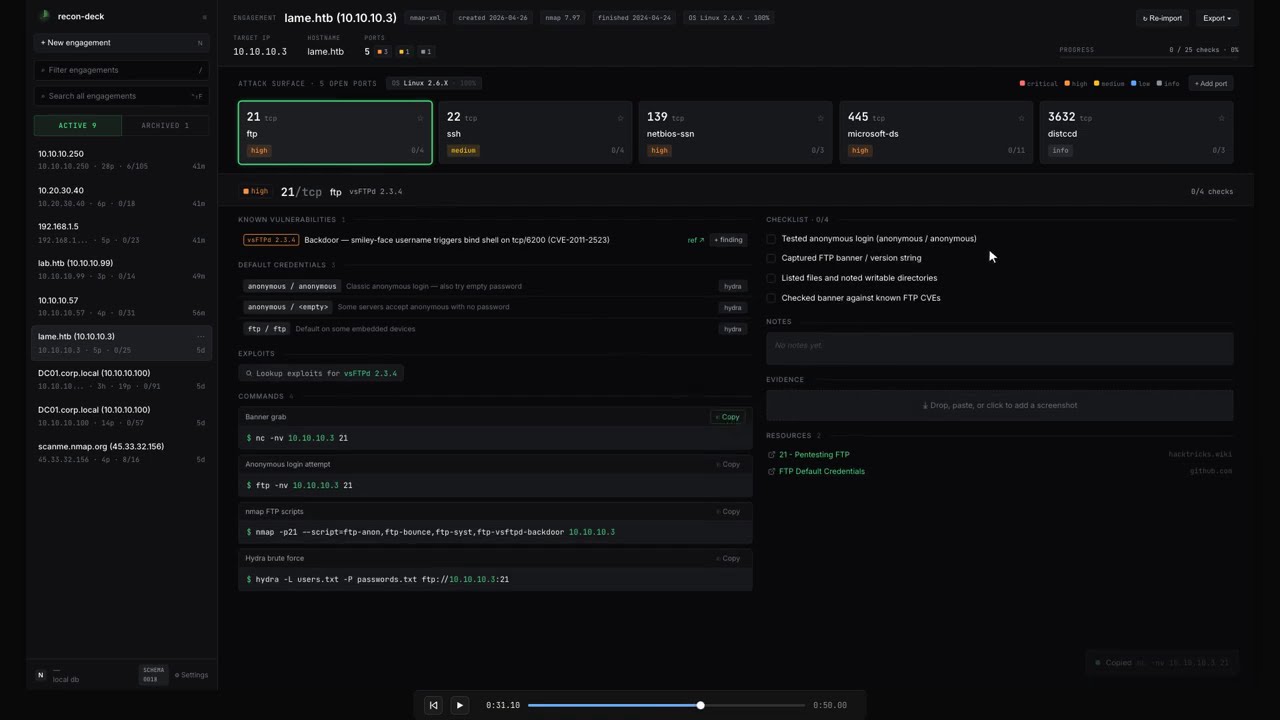
Paste nmap text / XML / greppable output — or drag in an AutoRecon results/ zip — and every open port becomes a card with pre-filled commands (IP interpolated), HackTricks links, tickable checks, e screenshots, and a notes field.
Built for OSCP / HTB students and solo pentesters who currently juggle 8 browser tabs and a scratch Obsidian file per box.
<di="center">
![Watch the 50-second demo]()
<sub><i>▶ <a href=" the 50-second demo</a> — paste nmap → drill into a port → tick checks → switch ports.</i></sub>
<br><br>
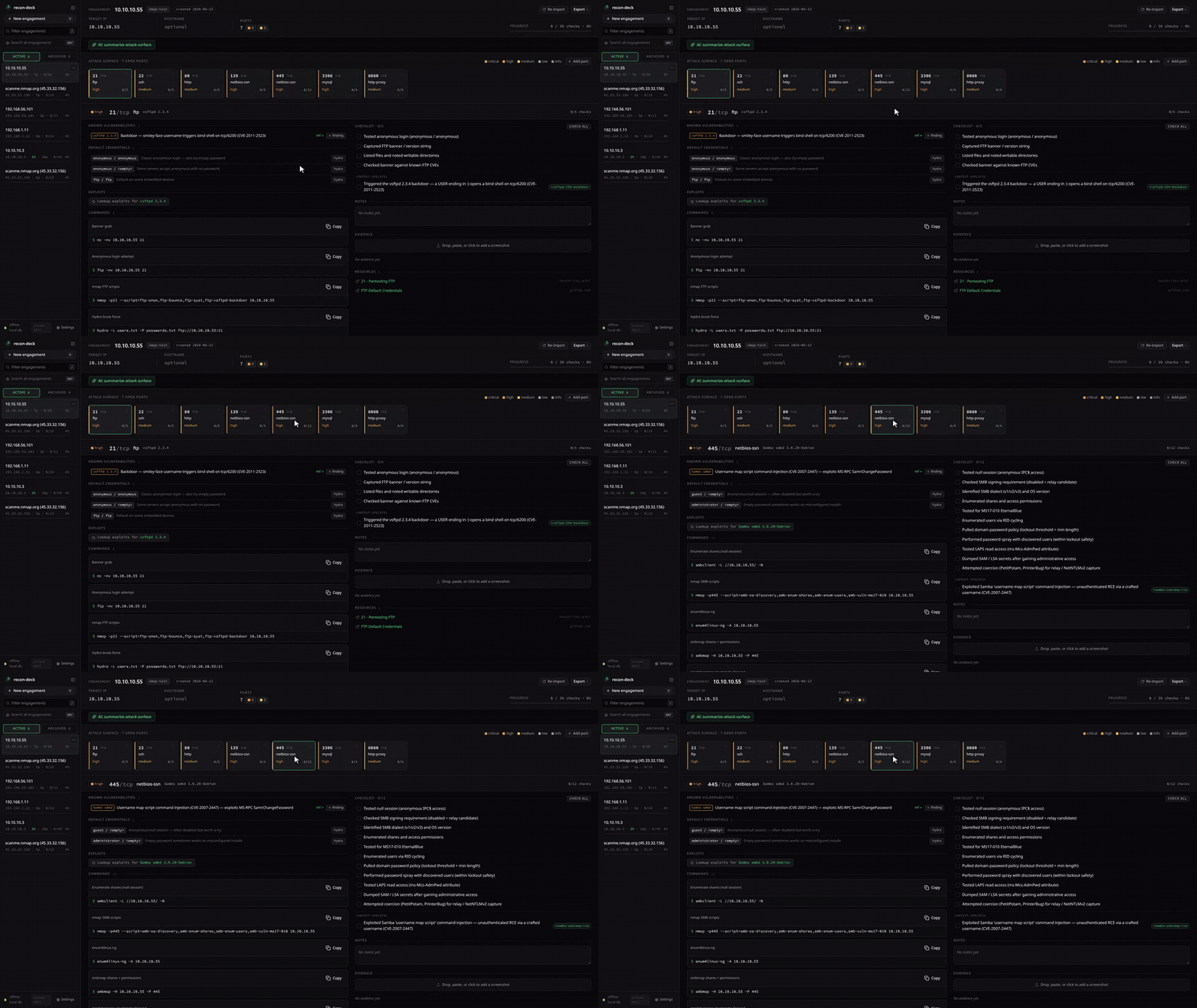
<img src="docs/media/heatmap.gif" alt="recon-deck port heatmap — paste nmap and every open port becomes a risk-colored card with prefilled commands and tickable checks" width="1100">
<br>
<sub><i>Paste nmap → every open port becomes a KB-driven card: prefilled commands, risk colors, tickable checks. <a href="docs/screenshots/">More screenshots →</a></i></sub>
</div>
<br>
---
✨ See it in action
<table>
<tr>
<td width="50%" ="top">
<b>🤖 AI “Explain” <sub>(opt-in)</sub></b><br>
<sub>Local-first co-pilot streams what a service is and what to check next — it only e, never runs.</sub><br><br>
<img src="docs/media/ai-explain.gif" alt="AI explain a port" width="100%">
</td>
<td width="50%" ="top">
<b>🧭 Cross-host attack plan</b><br>
<sub>One ordered plan across every host — which box to hit first, and why.</sub><br><br>
<img src="docs/media/cross-host.gif" alt="cross-host attack plan" width="100%">
</td>
</tr>
<tr>
<td width="50%" ="top">
<b>💸 Bring your own model</b><br>
<sub>Ollama (local) · OpenAI · OpenRouter — even FREE models, with a live cost estimate.</sub><br><br>
<img src="docs/media/model-picker.gif" alt="searchable model picker with pricing" width="100%">
</td>
<td width="50%" ="top">
<b>📊 Usage & cost analytics</b><br>
<sub>Every AI call logged with tokens + cost, per target — all local SQLite, nothing phones home.</sub><br><br>
<img src="docs/media/usage.gif" alt="AI usage and cost analytics page" width="100%">
</td>
</tr>
</table>
---
🆕 New in v2.5.0
> An optional, off-by-default AI co-pilot — local-first , or any OpenAI-compatible cloud (OpenAI / OpenRouter) when you opt in.
Explain scan output & Suggest next commands (KB-grounded). Suggest-ne.:online lookups for current C, with an egress warning./settings/usage, all local SQLite.---
Why recon-deck
| Without it | With it |
|---|---|
| 8 browser tabs per box (HackTricks, payloadsallthethings, gtfobins, …) | One page per port, prefilled commands ready to copy |
| Hand-typing nmap -p- -sV boilerplate per service | KB-dri with {IP} / {HOST} / {PORT} / {WORDLIST_*} placeholders |
| Lost track of which checks you ran on box #7 | Tickable checklist + per-port notes saved in SQLite |
| Markdown report = manual copy-paste from notes | One-click export: Markdown / HTML / JSON / SysReptor / PwnDoc / PDF |
| AutoRecon dump → folder spelunking | Drop the zip, every per-port file routed to the right card |
---
Feature highlights
<details>
<summary><b>📥 Ingest</b> — nmap text / XML / greppable + AutoRecon zip + manual ports</summary>
-oN, -oX, -oG. Multi-host scans become a host-selector chip in the headerresults/ folder zipped; per-port service files, _manual_commands.txt, gowitness screenshots, patterns / errors logs all routed automaticallyNEW and pre ports CLOSED. Header scans: N chip tracks how many imports you've done+ Add port for services nmap missed (DNS zone transfer, alt banners, etc.)</details>
<details>
<summary><b>🎯 Triage</b> — KB-driven port cards, known-vulns, searchsploit, findings catalog</summary>
nxc (netexec), impacket (GetNPUsers, GetUserSPNs, secretsdump), kerbrute, bloodhound-python, PetitPotam, pyWhisker — all wired to the right DC ports (88/135/389/445/464/636/3268/3389/5985) 2.3.4 and friends → vuln + CVE + ref link surfaces on the port cardsearchsploit -t "<product>" per port, cached+ finding button on KB rows pre-populates the modal</details>
<details>
<summary><b>🖼️ E</b> — per-port screenshots, AutoRecon gowitness import, nati</summary>
parent_e so the original always survives</details>
<details>
<summary><b>📤 Export</b> — Markdown, JSON, HTML, CS, PwnDoc, print-to-PDF</summary>
</details>
<details>
<summary><b>⌨️ Workflow</b> — command palette, FTS5 search, keyboard shortcuts, sidebar actions</summary>
⌘K) — every UI action lives in the palette: add finding, re-import, settings, delete, exports, print⌃⇧F) — FTS5 + BM25, hit rows show host context/settings/commands and /settings/wordlists — your snippets surface alongside KB commands</details>
<details>
<summary><b>📚 Knowledge base</b> — YAML KB, in-app editor, hot-reload</summary>
/kb (or wherever you point kb_user_dir); shipped KB li knowledge//settings/kb — paste, against the Zod KbEntrySchema, sa a strict filename allowlistfs.watch on shipped + user dirs flips a dirty flag, next request rebuilds. Edit a YAML in your editor, refresh, see your change/settings/kb — paste, , sa write under a strict [A-Za-z0-9_-] filename allowlist)</details>
<details>
<summary><b>🛡️ Safety</b> — migration backup, host-header allowlist, rate limiter, offline-by-default</summary>
INTO — boot writes data/recon-deck.db.backup-pre-NNNN before any new migration runs. Failure logs surface a copy-pasteable cp rollback linePRAGMA integrity_check + foreign_key_check — either failing aborts boot0.0.0.0/api/* — defense-in-depth for the LAN-exposure case</details>
<details>
<summary><b>🚀 First-run</b> (v2.1.0) — onboarding, sample engagement, update toast</summary>
/welcome 4-step onboarding — scope · tour · local paths · updates. Seeds the app_state singleton with your local_export_dir, kb_user_dir, wordlist_base, and the release-check toggle/settings → First-run — paths preservedis_sample = true. Header surfaces a SAMPLE chip + single-click Discardapi.github.com/repos/kocaemre/recon-deck/releases/latest once per session, toasts a "Release notes" link if a newer tag exists. Installs stay manual< 1280px shows a clean "needs a wider screen" explainer</details>
---
Quick Start
Three ways to run, pick one. All bind to 127.0.0.1:13337 (port picked to dodge the de crowd on 3000/8080), so nothing leaks to your LAN by default; see Exposing to LAN if you need otherwise.
1. One-liner (auto-pulls + starts + opens browser):
2. Docker Compose (recommended for persistent setups):
3. Manual docker run:
Open < paste nmap output, see cards. The -p 127.0.0.1:13337:13337 host-side prefix keeps the app loopback-only — see Exposing to LAN for LAN reachability.
Beta channel (early builds)
Stable is the default. To try the newest pre-release build (new features land here first; may be unstable):
Image tags: :latest and :X.Y.Z are stable; :beta always points at the newest pre-release, and each beta is also pinned at :X.Y.Z-beta.N. Switch back to stable any time with --stable (or pull :latest). To have the in-app update toast track betas, set RECON_UPDATE_CHANNEL=beta (otherwise it only e stable releases).
---
What it is / What it is NOT
For OSCP/HTB students and solo pentesters. Offline by default. Does not run scans — it complements AutoRecon and HackTricks. Think of it as the OSCP-flavored Obsidian for recon: same category as Obsidian, focused on post-scan workflow. An optional, off-by-default AI co-pilot (local-first ; OpenAI/OpenRouter only if you opt in) can explain scan output and suggest commands — with it disabled (the default) nothing leaves your machine, and Exam Mode turns it off with one switch for exams that forbid AI.
It is NOT a reporting platform, a team tool, a scanner, or a mobile app — and it never runs commands for you (the AI co-pilot only *suggests*; you run things yourself). The intent is deliberate and narrow — see ROADMAP.md for the out-of-scope list.
---
Exposing to LAN
By default, the Quick Start binds to 127.0.0.1 on the host — only your local machine can reach the app. To make recon-deck reachable from another machine on your LAN:
Replace 192.168.1.10:13337 with the host:port your LAN clients will use. RECON_DECK_TRUSTED_HOSTS is comma-separated — expand it for every additional host you want to reach the app from.
This activates the host-header allowlist (mitigates DNS rebinding). Requests whose Host: header is not in the allowlist are rejected with HTTP 421 Misdirected Request. See SECURITY.md for the full threat model.
---
Customizing the Knowledge Base
Drop YAML files into /kb/ports/*.yaml () — they o shipped entries with the same port/service at startup. Schema, denylist, and placeholder syntax in CONTRIBUTING.md.
Bind-mounting a host dir? Container runs as UID 1000 — chown 1000:1000 /path/to/my-kb first, or use a named (-:/kb) which inherits ownership automatically.
---
AutoRecon Import
1. autorecon <target> → produces results/<ip>/
2. cd results && zip -r my-target.zip <ip>/
3. Drag the zip onto the import panel
Ser unzip routes e: per-port files (tcp80/…, tcp_22_ssh_*) into the right card, _manual_commands.txt into Manual commands, gowitness/aquatone PNGs into port e, log files (_patterns, _errors, _commands) into an engagement warning panel. Multi-IP zips become multi-host engagements (primary inherits full AR data, secondaries get ports + scripts).
---
Multi-host engagements
One engagement, N hosts (DC + workstations, related boxes, etc.). Hosts chip-switch in the header; heatmap + commands + palette all rescope. Multi-host is detected from XML <host> blocks, text/greppable Nmap scan report for ... boundaries, and AutoRecon multi-IP zips.
---
Re-import + scan diff
Hit Re-import in the engagement header and paste a fresh nmap output. The reconciler:
NEW chip on the heatmap)last_seen_scan_id for re-obserclosed (CLOSED chip, dim tile)scans: N chip in the header so you know multi-import diff context applies1 new · 1 closed · 2 unchanged after import---
Settings
/settings (footer link in the sidebar) covers:
/settings/wordlists) — o {WORDLIST_*} placeholders/settings/commands) — personal snippets alongside KB commands, scopable by service/port/settings/kb) — paste, , save to your user dir; cache in immediatelyEngagement renames are inline on the header (target identity) or via the sidebar kebab (display label). The kebab also exposes Duplicate (deep-copy transaction) and Delete (cascade with confirmation).
---
Exports
Six formats + a print route. All multi-host aware.
| Format | Use |
|---|---|
| Markdown | Obsidian-compatible frontmatter, paste into your vault |
| JSON | Structured dump for scripting |
| HTML | Standalone single-file report, opens offline |
| Findings CSV | Se / host / port / CVE rows for spreadsheets |
| SysReptor JSON | projects/v1 shape with scope[] |
| PwnDoc YAML | Findings + scope, multi-host aware |
| Print-to-PDF | /report route, Ctrl+P → Save as PDF |
---
Backup & Restore
State lives in two — back both up together:
recondeck-data → SQLite DB (history, e, findings, notes)recondeck-kb → your YAML o under /kbSnapshot to tarball:
Restore: stop + rm container, recreate , tar -xzf from inside an alpine container, restart. Migrations re-apply on boot. Pin a specific image tag (ghcr.io/kocaemre/recon-deck:v2.1) for production restores so a :latest jump doesn't surprise you.
Boot also takes a INTO 'data/recon-deck.db.backup-pre-NNNN' snapshot before running pending migrations; on failure the log prints a copy-pasteable rollback line. Schema is forward-only — see CONTRIBUTING.md › "Migration safety and recovery" for the full procedure.
---
Upgrading
Notify-only — no auto-update, no telemetry. Optional release check is opt-in at /settings → First-run.
Docker (easy): the install one-liner is idempotent — re-run it to upgrade. It pulls the new image, removes the prior container (named survive), and starts fresh:
Docker (manual):
Beta: updating a beta install works the same way — re-run the --beta
one-liner (idempotent: pulls the newest :beta, replaces the container,
survive), or pull the image and re-run manually:
On a busy port, the RECON_DECK_PORT env goes on the sh side of the pipe:… | RECON_DECK_PORT=13338 sh -s -- --beta.
Local dev: git pull && npm install && npm run dev. Migrations apply at boot.
How the channels work
There are two channels and they ne each other. Which one you're on is
decided per install.sh run (the --beta flag), not baked into the image —
re-running with a different flag switches you:
| Channel | Pull command | Docker tags it tracks |
| ------- | ------------ | --------------------- |
| Stable (default) | … \| sh | :latest, :X.Y.Z, :X.Y, :X |
| Beta (pre-release) | … \| sh -s -- --beta | :beta, and each build pinned at :X.Y.Z-beta.N |
A stable release ne :beta; a beta build ne :latest or the
short :X.Y / :X tags. Promotion to stable is just a clean (non-pre-release)
tag — the same build that was on :beta becomes :latest.
Switching channels
Stable → beta — safe. Re-run with --beta; your data are reused:
Beta → stable — re-run without the flag (or --stable):
> ⚠️ Downgrade caveat. Database migrations are forward-only. If the beta
> you were running ad the schema past the stable image's schema (the
> Schema badge at the top of this README is the current number), the older
> stable image won't understand the on-disk DB and can fail to boot. Going
> *back* a channel is only safe when both images share the same schema .
> Back up the data first (see Backup & Restore)
> before downgrading across a schema bump. Moving *forward* (stable → beta, or
> up to a newer stable) is always fine.
To have the in-app update toast track betas instead of only stable releases,
set RECON_UPDATE_CHANNEL=beta (notify-only — it ne anything).
Tech Stack
| Layer | Technology |
| ------------- | ------------------------------------------ |
| Framework | Next.js 15.5 (App Router) |
| UI | React 19, Tailwind 4, shadcn/ui |
| Persistence | SQLite + better-sqlite3 |
| Parsers | fast-xml-parser (XML), custom regex (text) |
| KB format | YAML , by Zod |
| Container | node:22-alpine, multi-stage build |
| License | MIT |
Full pins live in package.json. The image is a single multi-stage node:22-alpine build — typical pulled size is under ~200 MB.
---
De
For local hacking outside the container:
Useful scripts:
---
Configuration Reference
| Env var | Default | Purpose |
| --------------------------- | ----------------------- | ------------------------------------------------------------------------------ |
| HOSTNAME | 127.0.0.1 | Bind address inside the container. O to 0.0.0.0 for port-map reach. |
| PORT | 13337 | Port the app listens on (also drives the host-header allowlist default). |
| RECON_DB_PATH | /data/recon-deck.db | SQLite file location. Keep on a mounted for persistence. |
| RECON_KB_USER_DIR | /kb | User KB directory. Onboarding writes this to app_state.kb_user_dir which takes precedence; env var is the fallback. |
| RECON_LOCAL_EXPORT_DIR | _(empty)_ | Engagement header's ://file/… link. app_state.local_export_dir wins; this and NEXT_PUBLIC_RECON_LOCAL_EXPORT_DIR are fallbacks. |
| RECON_DECK_TRUSTED_HOSTS | _(empty)_ | Comma-separated extra hosts allowed by the host-header middleware. |
| NEXT_TELEMETRY_DISABLED | 1 | Disables Next.js telemetry. Preserves the offline guarantee. |
---
Contributing
See CONTRIBUTING.md for KB rules, PR discipline, and what's in/out of scope.
Security
See SECURITY.md for the threat model, offline guarantee, and default-deny postures.
Credits
See CREDITS.md for upstream attribution — HackTricks, AutoRecon, PayloadsAllTheThings, SecLists.
Roadmap
See ROADMAP.md for upcoming candidates, the v2.x future direction, and hard out-of-scope items.
License
MIT.
项目信息
开发语言:TypeScript
Star 数:59
技术要点
该项目属于CTF思路方向的开源资源,代码结构清晰,适合安全研究人员学习参考。项目围绕Offline pentest workflow tracker — turns nmap output into a port-aware, KB-matched recon checklist in under 30 seconds. Self-hosted, single Docker image, no telemetry.展开,提供了可运行的实现,对理解相关安全机制、工具原理与攻防技术具有较高的研究价值。
从技术实现角度看,此类项目的核心在于对底层原理的深入理解与工程化落地。开发者在研究过程中可以结合官方文档与社区讨论,梳理项目的初始化流程、核心模块职责与数据流转,逐步掌握其中的技术细节与设计思路。
使用与学习建议
1. 下载源码压缩包,解压到本地环境。
2. 根据项目类型准备对应的运行环境与依赖。
3. 按照 README 中的步骤完成配置与部署。
4. 在隔离的测试环境中运行验证,避免影响生产系统。
免责声明
本资源来源于开源社区,仅供安全研究、技术学习与合法授权范围内的攻防演练使用,请勿用于任何非法或侵害他人权益的用途。使用本项目产生的一切后果由使用者自行承担。
| 资源标题 | recon-deck - Offline pentest workflow tracker — turns nmap outp |
| 所属分类 | CTF思路 |
| 发布作者 | admin |
| 发布时间 | 2026-10-06 00:04:42 |
| 下载权限 | 免费下载 |
| 附件数量 | 2 个下载链接 |
| 浏览次数 | 308 |
| 讨论数量 | 0 |
| 主题状态 | 正常讨论中 |