剑庭安
首页
黑客安全首页全部安全栏目 黑客技术黑客技术、渗透测试、漏洞利用工具与教程 安全软件安全工具、扫描器、检测与审计软件 病毒分析恶意软件分析、样本、逆向与沙箱 CTF思路CTF 题目、writeup、解题思路与工具 防护思路防御技术、加固、检测响应与蓝队 红蓝攻防红队攻击模拟、蓝队对抗、攻防演练 漏洞知识库漏洞、CVE、PoC、EXP 与安全研究
逆向|反编译
PHP源码PHP 网站源码、程序、系统 APP源码安卓/iOS APP 源码 ASP源码ASP 网站源码与程序 NET源码.NET 网站源码与系统 小程序源码微信/支付宝小程序源码 Dedecms风格模板Dedecms 织梦风格模板 Empirecms风格模板EmpireCMS 帝国风格模板 Discuz商业模板/插件Discuz 商业模板与插件 WordPress主题/插件WordPress 主题与插件 其它源码、模板其它各类源码与模板 游戏源码游戏源码与引擎项目 加密货币源码加密货币、区块链、钱包、USDT/比特币相关源码与工具 手游源码手机游戏源码、服务端、客户端与引擎项目 传奇源码热血传奇、传奇世界、复古传奇等客户端/服务端/引擎源码 页游源码网页游戏、H5 游戏、浏览器游戏源码 端游源码电脑单机游戏、PC 网游客户端/服务端源码
最新万能免驱动支持所有型号打印机下载程序 日历天气老黄历 · 每天同步真实日期与天气
站长工具站长工具 自助开通会员浏览该分类 其他资源qtziy SEO工具SEO工具 站群源码站群源码 泛程序泛程序 蜘蛛模板蜘蛛模板 蜘蛛池蜘蛛池 外链工具外链工具
搜索 自助开通会员🔓 破甲 API
登录 注册
首页 分类列表 防护思路 Cyber-Claude - An AI-powered…
Cyber-Claude - An AI-powered cybersecurity agent inspired by Clau 防护思路 点击放大
作者:admin 发布:2026-10-06

Cyber-Claude - An AI-powered cybersecurity agent inspired by Clau

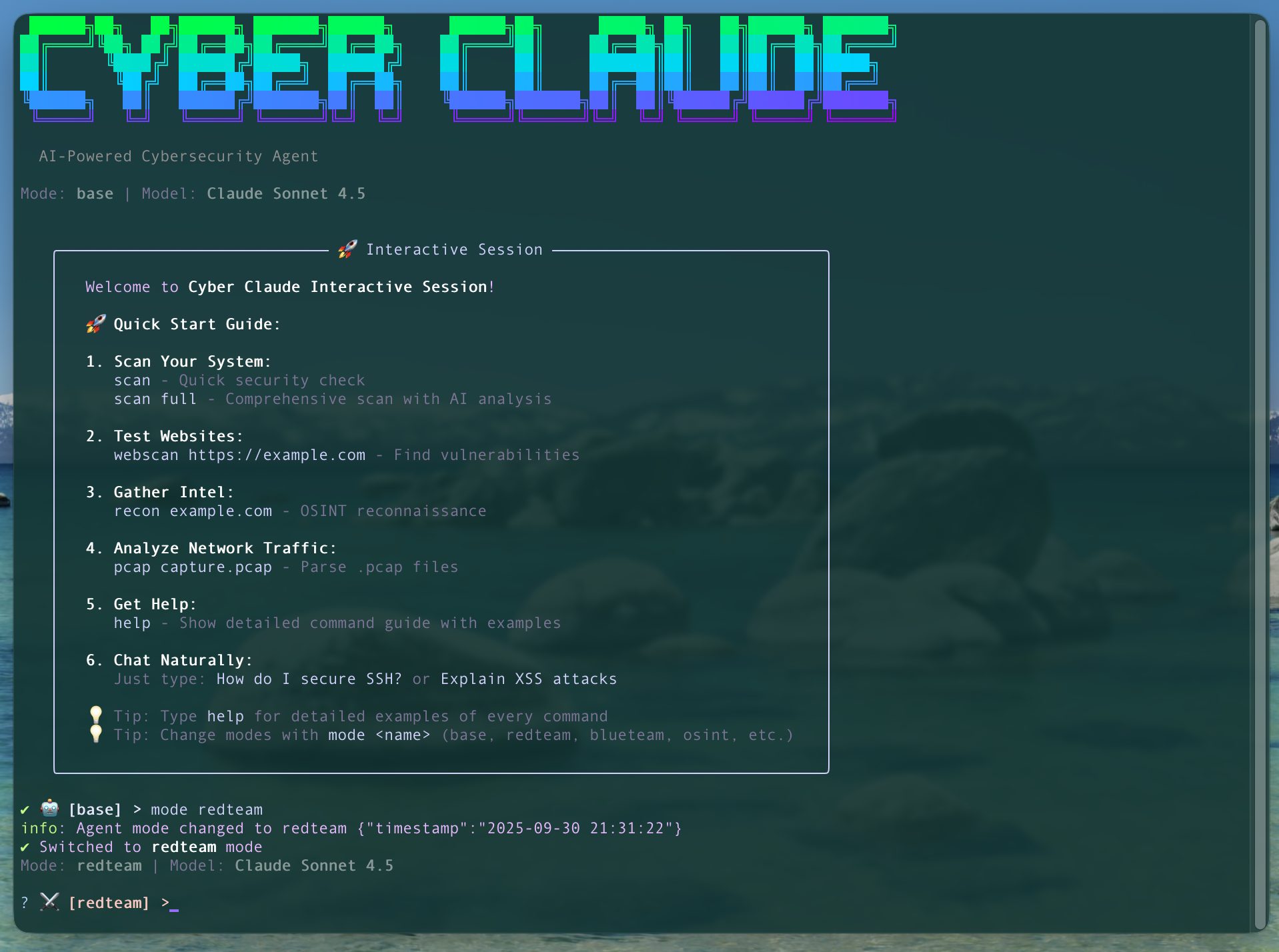
项目说明🛡️ Cyber ClaudeAI-Powered Defensi Agent with Guided Workflows<p align="center"> <img src="docs/images/cyber-claude-demo.pn…
资源可下载 免费下载 0 条讨论
会员资源
开通会员后即可下载全部资源。
登录后开通会员
会员方案
533浏览量
0讨论
2下载链接
可下载资源状态
内容可验证
更新 2026-10-06
人工审核发布
评论区答疑

Cyber-Claude - An AI-powered cybersecurity agent inspired by Clau

项目说明

🛡️ Cyber Claude

AI-Powered Defensi Agent with Guided Workflows

<p align="center">
<img src="docs/images/cyber-claude-demo.png" alt="Cyber Claude Interacti" width="800">
</p>

Perfect for Beginners & Security Professionals

An AI-powered cybersecurity agent built with the Claude Agent SDK, designed exclusively for defensi operations. Features 10 pre-configured workflows for guided security tasks, web application testing, OSINT reconnaissance, network traffic analysis (pcap), system hardening, and AI-powered security analysis.

🎯 NEW: Guided Workflows - Step-by-step security tasks perfect for learning and fast execution!
🔒 Defensi - No exploitation, credential har, or offensi
🤖 AI-Powered - Claude, OpenAI GPT-5.1, Gemini (cloud) or DeepSeek-R1, Gemma (local) for intelligent analysis
🏠 Privacy Option - Run 100% locally with Ollama (no cloud, no API keys, offline capable)

!License
!TypeScript
!Claude
!Tests
!Build
!Co
!

---

🚀 Getting Started (60 seconds!)

Option 1: Cloud Models (Fastest Setup)

Option 2: Local Models (Pri)

First time?

  • Cloud users: Try the "Quick Security Health Check" workflow

  • Local users: Start with gemma3-4b for fast responses, upgrade to deepseek-r1-8b for better analysis
  • ---

    📖 Documentation

    User Guides


  • Complete Workflows & Playbook Guide - Comprehensi to getting the most out of Cyber Claude

  • Agent Modes Guide - Detailed guide to using different agent modes effectively

  • Quick Start Guide - Fast track to getting started

  • Security Policy - Security reporting and best practices
  • Technical Documentation


  • Technical Architecture - Architecture, de, and implementation details

  • Project Structure - Codebase organization and file structure

  • Professional Enhancements - IOC extraction, MITRE ATT&CK mapping, e preser

  • Project Assessment - Independent security audit and assessment
  • History


  • Changelog - history and release notes

  • Capabilities O - Complete feature list and capabilities matrix
  • ---

    🚀 Quick Start

    Prerequisites

    Required:

  • Node.js 18+

  • npm or yarn
  • Choose at least one AI provider:

  • Cloud (API-based):

  • - Anthropic API key (Get one here) for Claude models, OR
    - Google API key (Get one here) for Gemini models
  • Local (Pri):

  • - Ollama (Install here) for DeepSeek-R1 and Gemma models
    - 8-16GB RAM recommended for local models

    Installation

    Basic Usage

    🎯 FASTEST START: Pre-Configured Workflows (Perfect for Beginners!)

    🌟 Interacti (Recommended for Power Users)

    📋 One-Off Commands (For Scripts & Automation)

    ---

    🆕 What's New

    v0.7.0 - Smart Contract Security (NEW!)

    📜 Web3 / Smart Contract Security Scanner

    Full-featured Solidity smart contract detection based on DeFiHackLabs real-world exploit patterns:

    11 Detectors:

  • 🔄 Reentrancy - Cross-function and cross-contract reentrancy

  • 🔐 Access Control - Missing modifiers, unprotected functions

  • 🔢 Integer O - Arithmetic (pre-0.8.0)

  • 📝 State Modification - Unexpected state changes after external calls

  • ⚡ Flash Loan - Flash loan attack

  • 📊 Oracle Manipulation - Price oracle

  • 🎯 Precision Loss - Dition, unsafe downcasts

  • 📞 Arbitrary Call - User-controlled call targets, delegatecall risks

  • 💾 Storage Collision - Non-EIP1967 proxies, missing storage gaps

  • ⏰ Timestamp Dependence - Block timestamp manipulation (SWC-116)

  • 🎲 Weak Randomness - Predictable randomness sources (SWC-120)
  • Real-World Exploit References:

  • Links to DeFiHackLabs exploit reproductions ($200M+ in documented exploits)

  • Includes: Hundred Finance, Qubit Finance, Multichain, Audius, Furucombo, Fomo3D
  • New Agent Mode:

  • smartcontract mode (📜) - Specialized for DeFi security and smart contract auditing
  • ---

    v0.6.0 - Autonomous Agent Mode (De)

    🤖 NEW: Autonomous AI Execution - Ad Users

    The new auto command enables fully autonomous task execution with AI-powered planning and execution:

    Key Features:

  • 🧠 AI Planning - Automatically breaks down tasks into executable steps

  • 🔄 Self-Correction - Reflects on results and adapts strategy

  • 🎯 Multi-Tool - Intelligently selects and chains security tools

  • ⚡ Extended Thinking - Claude's extended thinking for complex planning

  • 🛡️ Safety Controls - Appro for high-risk operations
  • NOTE: MCP (Model Context Protocol) security tools have been removed. Built-in tools provide comprehensi for all scanning needs.

    🔧 NEW: Enhanced Security Toolkit

    Four new npm-based security tools have been integrated to replace the non-functional MCP tools:

    1. DependencyScanner (retire.js)

  • 📦 Scans Ja dependencies for known

  • 🔍 C and se classification

  • 📊 Comprehensi reporting

  • ⚡ No API keys required
  • 2. SSLAnalyzer (ssl-checker)

  • 🔒 SSL/TLS certificate analysis

  • ⏰ Expiration monitoring and alerts

  • 🎯 Risk scoring and security recommendations

  • ✅ Certificate chain
  • 3. ScreenshotTool (Puppeteer)

  • 📸 Automated website screenshots

  • 🔍 Technology detection (React, Vue, WordPress, etc.)

  • 🌐 Full-page or captures

  • 🎨 reconnaissance capabilities
  • 4. ExternalToolManager

  • 🛠️ Auto-detects 12 external CLI security tools (nmap, nuclei, ffuf, sqlmap, etc.)

  • 📊 checking and a status

  • 📚 Installation guides for missing tools

  • 🔄 Tool execution wrapper
  • All tools work out-of-the-box with zero configuration!

    v0.5.1 - Workflows & Enhanced User Experience

    🎯 Pre-Configured Workflows - Perfect for Beginners!

    The flows command provides guided, step-by-step workflows for common security tasks:

    10 Pre-Built Workflows:

  • 🛡️ Quick Security Health Check (2-3 min, beginner) - Desktop security scan

  • 🌐 Website Security Audit (3-5 min, beginner) - OWASP Top 10 assessment

  • 🔍 Domain Intelligence Gathering (3-5 min, beginner) - Full OSINT scan

  • 🚨 Incident Response Triage (5-7 min, intermediate) - Security incident analysis

  • 📡 Network Traffic Threat Hunting (4-6 min, intermediate) - PCAP analysis

  • 🕵️ Full OSINT In (5-10 min, intermediate) - Deep reconnaissance

  • 🔒 System Hardening Guide (10-15 min, intermediate) - Security impro

  • 🎯 Red Team Reconnaissance (10-15 min, ad) - External recon

  • 🚩 CTF Web Challenge Solver (10-20 min, ad) - CTF assistance

  • 📚 Learn OSINT Basics (15-20 min, beginner) - Interacti
  • Why Workflows?

  • 🎓 Beginner-Friendly: Guided step-by-step experiences

  • ⚡ Fast: Pre-configured for common tasks

  • 📖 Educational: Learn security concepts while using them

  • 🎯 Goal-Oriented: Each workflow solves a specific problem
  • v0.5.0 - OSINT Reconnaissance Suite

    🔍 NO API KEYS REQUIRED!

  • 📡 10 Comprehensi Tools: All free, no API keys needed!
  • 🛠️ Included Tools (All FREE):

  • - DNS Reconnaissance - A/AAAA/MX/NS/TXT/SOA records, reverse DNS
    - WHOIS Lookup - Domain registration, age, expiration analysis
    - Subdomain Enumeration - Certificate transparency + DNS brute force
    - Email Har - Website scraping + common patterns
    - Username Enumeration - 35+ platforms (GitHub, Twitter, Instagram, etc.)
    - Breach Data Lookup - Have I Been Pwned integration
    - Technology Detection - Web server, CMS, frameworks (50+ signatures)
    - Wayback Machine - Historical snapshots and domain history
    - IP Geolocation - Country/city/ISP lookup
    - Reverse IP Lookup - Find other domains on same IP

  • 🎯 Professional Features:

  • - Risk scoring and assessment
    - Attack surface identification
    - Data exposure analysis
    - Export to JSON/Markdown
    - No rate limits (free tier APIs)
    - Pri (passive only)

    Professional Features:

  • 🎯 IOC Extraction: Automatic extraction with STIX 2.1 export

  • 🗺️ MITRE ATT&CK: Technique mapping and threat intelligence

  • 🔬 E Preser: Chain of custody with triple hash (MD5/SHA1/SHA256)

  • 📊 Forensics: Forensically sound metadata tracking
  • 📦 Network Traffic Analysis - AI-Powered Wireshark!

  • 🔍 PCAP Analysis: Analyze network capture files with AI-powered insights!
  • 🎯 Wireshark-Inspired Features: Protocol dissection, display filters, statistics

  • 📊 Comprehensi: Con, endpoints, DNS queries, HTTP requests

  • 🚨 Threat Detection: Port scans, suspicious ports, anomaly detection

  • 📈 Export Options: JSON, Markdown, CS

  • 🔬 Analysis Modes: Quick, full, or threat-hunt analysis
  • Previous: v0.3.0 - Web Security Testing + Multi-Provider Support

  • 🔍 Web Scanning: Test web applications for OWASP Top 10

  • 🎯 New webpentest Mode: AI agent specialized in web security analysis

  • 🔒 Ethical Framework: Authorization required, domain blocklists, CTF mode

  • 🔮 Gemini API Support: Use Google's Gemini 2.5 models alongside Claude!

  • 9 Total Models: 6 Claude models + 3 Gemini models to choose from
  • Previous Updates (v0.2.0):

  • ✨ Interacti (REPL) - persistent, no re-typing commands

  • 🤖 Model Selector - choose from multiple AI models

  • 📖 See FEATURES.md for all features
  • ✨ Features

    🎯 Pre-Configured Workflows (NEW!)


    Perfect for beginners and fast task execution!
  • 10 Guided Workflows: Step-by-step security tasks with AI assistance

  • 5 Categories: Security, Reconnaissance, Analysis, CTF, Learning

  • 3 Difficulty Levels: Beginner, Intermediate, Ad

  • Time Estimates: 2-20 minutes depending on workflow

  • Educational: Learn while doing with interacti

  • Examples: Quick security check, website audit, OSINT in, threat hunting

  • Easy Access: cyber-claude flows or just flows in interactive mode
  • 🔄 Interacti


  • Persistent REPL Interface: Like Claude Code - single session, no re-typing

  • Natural Commands: Just type scan, harden, mode redTeam, etc.

  • Command History: Use ↑/↓ arrows to na

  • Mode-Colored Prompts: feedback for current mode

  • Built-in Help: Type help for all commands
  • 🔍 Security Scanning


  • Desktop Security Scan: Comprehensi analysis

  • Web Application Scanning: OWASP Top 10 detection

  • OSINT Reconnaissance: Domain, email, username intelligence gathering

  • Network Traffic Analysis: PCAP file analysis with AI insights

  • Quick Check: Rapid security assessment

  • Network Analysis: Connection monitoring and threat detection

  • Process Monitoring: Identify suspicious activity
  • 🕵️ OSINT Reconnaissance (NEW!)


  • NO API KEYS NEEDED: All 10 tools completely free

  • DNS Reconnaissance: Full DNS record analysis with security posture assessment

  • WHOIS Lookup: Domain age, expiration, registrar info with risk analysis

  • Subdomain Enumeration: Certificate transparency logs + DNS brute forcing (100+ wordlist)

  • Email Har: Website scraping, mailto links, common patterns (info@, support@, etc.)

  • Username Enumeration: Check 35+ platforms (GitHub, Twitter, Instagram, LinkedIn, Reddit, etc.)

  • Breach Data Lookup: Have I Been Pwned integration with password breach checking

  • Technology Detection: Identify web server, CMS, frameworks, analytics (50+ signatures)

  • Wayback Machine: Historical snapshots, first/last archi, change detection

  • IP Geolocation: Country, city, ISP, organization, timezone lookup

  • Reverse IP Lookup: Find other domains hosted on same IP (shared hosting detection)

  • Risk Scoring: Automated assessment based on exposure, age, breaches, attack surface

  • Export Options: JSON and Markdown export for all results
  • 📦 Network Traffic Analysis


  • PCAP/PCAPNG Support: Analyze Wireshark capture files

  • Protocol Dissection: Ethernet, IPv4/IPv6, TCP/UDP, HTTP, DNS, ICMP, ARP

  • Traffic Statistics: Protocol distribution, con, endpoints

  • DNS Analysis: Query extraction and analysis

  • HTTP Extraction: Request/response analysis

  • Threat Detection: Port scans, suspicious ports, anomaly detection

  • Display Filters: Filter by protocol, IP, or port (Wireshark-style)

  • Export Formats: JSON, Markdown, CSV

  • AI-Powered Insights: Threat hunting, pattern analysis, recommendations
  • 🌐 Web Security Testing


  • OWASP Top 10: SQL injection, XSS, CSRF, SSRF detection

  • Security Headers: CSP, HSTS, X-Frame-Options analysis

  • Cookie Security: Secure, HttpOnly, SameSite checks

  • Form Analysis: CSRF token detection

  • CTF Support: Educational challenge assistance

  • Ethical Framework: Authorization required before scanning
  • 📜 Smart Contract Security (NEW!)


  • 11 Detectors: Reentrancy, access control, precision loss, weak randomness, and more

  • DeFiHackLabs Integration: Real-world exploit references from 674+ documented hacks

  • SWC Registry: Maps findings to Smart Contract Weakness Classification IDs

  • Multi-Format Output: Terminal display and Markdown reports saved to scans/

  • AI-Powered Analysis: Deep assessment with remediation code

  • External Tool Support: Integrates with Slither, Mythril, Solhint if installed
  • 🔒 System Hardening


  • Hardening Checks: security configurations

  • Platform-Specific Recommendations: macOS, Linux, Windows

  • Compliance : Security baseline checking

  • AI-Powered Recommendations: Prioritized, actionable advice
  • 🔧 Built-In Security Tools


  • Web Application Scanning: OWASP Top 10, security headers, CSRF/XSS detection

  • Desktop Security: System scanning, network connections, process analysis

  • OSINT Reconnaissance: 10 comprehensi (DNS, WHOIS, subdomains, emails, usernames, breaches, tech detection, Wayback, IP lookup)

  • Network Traffic Analysis: PCAP parsing, protocol dissection, con tracking

  • Hardening : Platform-specific security checks (macOS FileVault, Linux UFW, Windows Defender)

  • Dependency Scanning: Ja detection with retire.js (C, se classification)

  • SSL/TLS Analysis: Certificate , expiration monitoring, risk scoring

  • Reconnaissance: Automated screenshots with Puppeteer, technology detection

  • External Tool Integration: Auto-detection of 12 CLI security tools (nmap, nuclei, ffuf, sqlmap, wpscan, testssl, gobuster, amass, masscan, subfinder, httpx, katana)

  • AI-Powered Analysis: All results analyzed by Claude/Gemini models for actionable insights
  • 🔬 Professional Analysis Features


  • IOC Extraction: Extract IPs, domains, URLs, emails, hashes, CVEs from pcap files

  • STIX 2.1 Export: Share threat intelligence in standard format

  • MITRE ATT&CK Mapping: 20+ technique definitions with automatic mapping

  • E Preser: Forensically sound chain of custody

  • Triple Hash : MD5/SHA1/SHA256 for integrity

  • Case Management: Track analyst, case number, collection method
  • 🤖 Multi-Provider AI Models (NEW!)


  • 12 Models Total: 6 Claude + 3 Gemini + 3 Ollama (local) models

  • Claude Models: Opus 4.1, Opus 4, Sonnet 4.5 (default), Sonnet 4, Sonnet 3.7, Haiku 3.5

  • Gemini Models: 2.5 Flash, 2.5 Pro, 2.5 Flash Lite

  • Ollama Models (Local): DeepSeek R1 14B, DeepSeek R1 8B, Gemma 3 4B

  • Interacti: Choose any model in session with menu

  • Seamless Switching: Switch between Claude, Gemini, and Ollama anytime

  • Use Cases: Opus for complex analysis, Gemini Flash for speed, Ollama for privacy & offline use
  • 💬 Multiple Agent Modes (7 total)


  • Switch On-The-Fly: Change modes without restarting

  • Modes A:

  • - 🤖 base: General security assistant
    - ⚔️ redteam: Offensi perspecti only)
    - 🛡️ blueteam: Defensi focus
    - 🔒 desktopsecurity: Personal computer security
    - 🌐 webpentest: Web application security testing
    - 🕵️ osint: Open source intelligence reconnaissance
    - 📜 smartcontract: Smart contract and DeFi security (NEW!)

    📊 Reporting


  • Beautiful Terminal UI: Gradient colors, ASCII art, formatted tables

  • Export Options: JSON and Markdown reports

  • Se Classification: Critical, High, Medium, Low, Info

  • Actionable Remediation: Clear steps to fix issues
  • ---

    📖 Commands

    cyber-claude (default) / cyber-claude interactive


    Start interacti (NEW!)

    Options:

  • -m, --mode <mode> - Initial mode (base, redteam, blueteam, desktopsecurity, webpentest)

  • --model <model> - AI model (sonnet-4, opus-4, haiku-4, sonnet-3.5)
  • Session Commands:

  • scan / scan full / scan network - Desktop security scans

  • webscan <url> - Web application scan

  • pcap <file> - Analyze network capture file

  • harden - Hardening check

  • mode <mode> - Switch mode

  • model - Select AI model

  • status - Show session info

  • clear - Clear con

  • history - Show command history

  • help - Show help

  • exit / quit - Exit
  • Examples:

    cyber-claude flows 🆕 BEGINNER-FRIENDLY!


    Pre-configured workflows for common cybersecurity tasks - perfect for getting started!

    Categories:

  • 🛡️ Security: Quick health checks, system hardening, security audits

  • 🔍 Reconnaissance: Domain intelligence, OSINT in

  • 📊 Analysis: Network traffic analysis, incident response triage

  • 🚩 CTF: Capture The Flag challenge solving workflows

  • 📚 Learning: Interacti and guided learning paths
  • A Workflows:
    1. Quick Security Health Check (2-3 min, beginner) - Scan your computer for common security issues
    2. Website Security Audit (3-5 min, beginner) - Comprehensi Top 10 assessment
    3. Domain Intelligence Gathering (3-5 min, beginner) - Full OSINT on a domain
    4. Incident Response Triage (5-7 min, intermediate) - Quick security incident assessment
    5. Network Traffic Threat Hunting (4-6 min, intermediate) - Analyze PCAP files for threats
    6. Full OSINT In (5-10 min, intermediate) - Deep-di
    7. System Hardening Guide (10-15 min, intermediate) - Step-by-step security impro
    8. Red Team Reconnaissance (10-15 min, ad) - Professional external reconnaissance
    9. CTF Web Challenge Solver (10-20 min, ad) - Systematic CTF solving approach
    10. Learn OSINT Basics (15-20 min, beginner) - Interacti tutorial

    Options:

  • -l, --list - List all a workflows

  • -c, --category <category> - Filter by category (security, recon, analysis, incident, ctf, learning)

  • -d, --difficulty <level> - Filter by difficulty (beginner, intermediate, ad)

  • -m, --model <model> - AI model to use for analysis
  • Examples:

    💡 Pro tip: Start with "Quick Security Health Check" or "Website Security Audit" to see what Cyber Claude can do!

    cyber-claude auto 🆕 AUTONOMOUS MODE!


    AI-powered autonomous task execution - ad planning and self-correction

    Options:

  • --mode <mode> - Agent mode (base, redteam, blueteam, desktopsecurity, webpentest, osint)

  • --model <model> - AI model to use (default: claude-sonnet-4-5)

  • --thinking - Enable extended thinking for complex planning

  • --max-steps <n> - Maximum steps to execute (default: 20)

  • --max-duration <ms> - Maximum duration in milliseconds (default: 600000)

  • --auto-approve - Auto-approve all steps - USE WITH CAUTION

  • -- - output with progress updates

  • --export <file> - Export execution context to file
  • Examples:

    ⚠️ Ad Feature: Requires understanding of autonomous AI execution. Use flows for guided experiences.

    cyber-claude scan


    Scan your system for security issues

    Options:

  • -q, --quick - Quick security check

  • -f, --full - Full system scan (default)

  • -n, --network - Network connections scan

  • --model <model> - AI model to use

  • --json <file> - Export results to JSON

  • --md <file> - Export results to Markdown
  • Examples:

    cyber-claude harden


    Check system hardening and get recommendations

    Options:

  • -c, --check - Check hardening status (default)

  • -r, --recommendations - Get hardening recommendations

  • --model <model> - AI model to use

  • --json <file> - Export results to JSON

  • --md <file> - Export results to Markdown
  • Examples:

    cyber-claude webscan


    Scan web applications for security

    Options:

  • -q, --quick - Quick security scan (headers only)

  • -f, --full - Full scan (CSRF, XSS detection)

  • -a, --aggressive - ⚠️ AGGRESSIVE scan with payload testing (requires authorization!)

  • --ctf - CTF challenge mode

  • --skip-auth - Skip authorization checks (use only for sites you own)

  • --model <model> - AI model to use

  • --timeout <ms> - Request timeout in milliseconds

  • --test-types <types> - types to test (comma-separated): sqli,xss,cmd_injection,path_tra,ssrf

  • --max-payloads <number> - Maximum payloads per type (default: 10)
  • Examples:

    cyber-claude pcap (NEW!)


    Analyze network capture files with AI-powered insights

    Options:

  • -m, --mode <mode> - Analysis mode: quick, full, or threat-hunt (default: quick)

  • --model <model> - AI model to use

  • -f, --filter <protocol> - Display filter (protocol name, e.g., "tcp", "udp", "dns")

  • --src <ip> - Filter by source IP address

  • --dst <ip> - Filter by destination IP address

  • --port <port> - Filter by port (source or destination)

  • --sport <port> - Filter by source port

  • --dport <port> - Filter by destination port

  • --packets - Display packet list (up to 50 packets)

  • --max-packets <n> - Maximum packets to analyze

  • --stats-only - Show only statistics without AI analysis

  • --extract-iocs - Extract indicators of compromise (IPs, domains, URLs, hashes, CVEs)

  • --export-iocs <file> - Export IOCs in STIX 2.1 format

  • --mitre - Map findings to MITRE ATT&CK techniques

  • --preser - Create forensically sound e package with chain of custody

  • --case-number <number> - Case number for e preser

  • --analyst <name> - Analyst name for e chain of custody

  • --export-json <file> - Export analysis to JSON

  • --export-md <file> - Export report to Markdown

  • --export-csv <file> - Export packets to CSV
  • Examples:

    cyber-claude daemon ✨ NEW in v0.6.0


    Background daemon for scheduled security scanning

    Subcommands:

  • daemon start - Start the daemon (foreground or detached)

  • daemon stop - Stop the daemon

  • daemon status - Show daemon status and statistics

  • daemon jobs - List all scheduled jobs

  • daemon add - Add a new scheduled job

  • daemon remove <job-id> - Remove a job

  • daemon enable <job-id> - Enable a job

  • daemon disable <job-id> - Disable a job

  • daemon run <job-id> - Execute a job immediately
  • Add Job Options:

  • -n, --name <name> - Job name (required)

  • -t, --type <type> - Job type: webscan, log-analysis, c (required)

  • -T, --target <target> - Scan target (URL, log file, C) (required)

  • -s, --schedule <cron> - Cron schedule expression (required)

  • --disabled - Create job in disabled state

  • -o, --options <json> - Job options as JSON string
  • Examples:

    Supported Cron Expressions:

  • * * * * * - Every minute

  • 0 * * * * - Every hour

  • 0 */6 * * * - Every 6 hours

  • 0 2 * * * - Daily at 2 AM

  • 0 0 * * 0 - Weekly on Sunday

  • 0 0 1 * * - Monthly on the 1st
  • cyber-claude web3 ✨ NEW in v0.7.0


    Smart contract security scanning and auditing

    Subcommands:

  • web3 scan <file> - Scan Solidity contract for

  • web3 audit <file> - Full security audit with AI analysis

  • web3 tools - Check a Web3 security tools (Slither, Mythril, etc.)
  • Scan Options:

  • -q, --quick - Quick pattern-based scan (default)

  • -f, --full - Full scan with external tools if a

  • --no-ai - Skip AI analysis

  • --model <model> - AI model to use for analysis
  • Examples:

    Detected :

  • Reentrancy (SWC-107)

  • Access Control issues (SWC-105)

  • Integer O/Underflow (SWC-101)

  • Timestamp Dependence (SWC-116)

  • Weak Randomness (SWC-120)

  • Precision Loss / Rounding Errors

  • Arbitrary External Calls

  • Storage Collision in Proxies

  • Flash Loan Attack

  • Oracle Manipulation

  • Unchecked Return
  • Output:

  • Terminal report with se levels

  • Markdown report saved to scans/ directory

  • Real-world exploit references from DeFiHackLabs
  • cyber-claude chat


    Interactive chat with security agent (one-off con)

    Note: Consider using cyber-claude interactive for a better experience!

    Options:

  • -m, --mode <mode> - Agent mode (base, redteam, blueteam, desktopsecurity, webpentest)

  • --model <model> - AI model to use
  • Chat Commands:

  • /mode <mode> - Switch agent mode

  • /clear - Clear con history

  • /help - Show help

  • /exit - Exit chat mode
  • Examples:

    🎨 Beautiful CLI Interface

    Cyber Claude features a gorgeous terminal UI with:

  • 🌈 Gradient colors for cybersecurity theme

  • 🎭 ASCII art banner with ANSI Shadow font

  • 📦 Boxed messages for important information

  • ⚡ Animated spinners for loading states

  • 🎯 Se indicators with color coding

  • 📊 Formatted tables for scan results
  • 🔐 Security & Ethics

    Defensi Only


  • ✅ Security scanning and assessment

  • ✅ identification

  • ✅ Hardening recommendations

  • ✅ Threat detection and analysis

  • ❌ NO actual exploitation

  • ❌ NO credential har

  • ❌ NO malicious operations
  • Built-in Guardrails


  • Safe Mode: Enabled by default

  • Audit Logging: All actions logged

  • User Consent: Required for system changes

  • Transparency: Explains all actions

  • Ethical Boundaries: Follows responsible disclosure

  • Authorization Framework: Domain blocklists, user consent, legal warnings
  • Alignment with Anthropic's AI Safety Standards


    Cyber Claude is built following Anthropic's guidelines for AI in cybersecurity:
  • ✅ Focus on defensi: Finding , patching, testing security infrastructure

  • ✅ Avoid offensi: No exploitation capabilities or attack automation

  • ✅ Empower defenders: AI-powered analysis helps security teams protect systems

  • ✅ Responsible AI: Ethical guardrails and transparency in all operations
  • 📁 Project Structure

    🛠️ Technology Stack

    Core


  • Claude Agent SDK - AI agent framework

  • TypeScript - Type-safe de

  • Node.js - Runtime en
  • CLI & UI


  • Commander.js - CLI framework

  • Inquirer.js - Interacti

  • Chalk - Terminal colors

  • Gradient String - Beautiful gradients

  • Figlet - ASCII art

  • Boxen - Terminal boxes

  • Ora - Elegant spinners

  • CLI Table 3 - Formatted tables
  • Security Tools


  • systeminformation - Desktop system data collection

  • axios - HTTP client for web scanning

  • cheerio - HTML parsing and analysis

  • - URL and input

  • uuid - Unique identifier generation

  • winston - Logging

  • retire - Ja dependency scanner (C)

  • ssl-checker - SSL/TLS certificate analysis and

  • puppeteer - Headless browser automation for screenshots and web analysis

  • subquest - Subdomain enumeration tool

  • pcap-parser - Network traffic analysis from PCAP files

  • whois-json - WHOIS lookup functionality
  • 🔧 De

    📚 Resources

  • Claude Agent SDK Documentation

  • Building Agents with Claude

  • Research Notes - Detailed research on cybersecurity agents
  • 🎯 Roadmap

    Phase 1: Core Agent ✅


  • [x] Basic CLI with beautiful UI

  • [x] Claude Agent SDK integration

  • [x] Chat interface

  • [x] Desktop security scanner

  • [x] System hardening checker

  • [x] Reporting system

  • [x] Multi-provider support (Claude + Gemini)

  • [x] Interacti (REPL)
  • Phase 2: Web Security Testing ✅


  • [x] Web application scanning

  • [x] OWASP Top 10 detection

  • [x] Security header analysis

  • [x] Ethical scanning framework

  • [x] CTF challenge support

  • [x] Authorization and guardrails
  • Phase 3: Enhanced Features ✅


  • [x] MITRE ATT&CK mapping (20+ techniques)

  • [x] Autonomous agent mode with AI planning and execution

  • [x] IOC extraction and STIX 2.1 export

  • [x] E preser with chain of custody

  • [x] OSINT reconnaissance suite (10 tools)

  • [x] PCAP network traffic analysis

  • [x] Pre-configured workflows (10 guided tasks)

  • [x] Log file analysis (6 formats, 15+ anomaly types) ✨ NEW in v0.6.0

  • [x] database integration (NVD/C) ✨ NEW in v0.6.0

  • [x] Multi-provider smart fallbacks ✨ NEW in v0.6.0

  • [x] Ad web detection (SQLi, XSS, Command Injection, Path Tra, SSRF) ✨ NEW in v0.6.0

  • [x] Scheduled scanning (daemon mode with cron scheduling) ✨ NEW in v0.6.0

  • [x] Smart contract security scanning (11 detectors, DeFiHackLabs integration) ✨ NEW in v0.7.0

  • [ ] Security posture dashboard
  • Phase 4: Ad Capabilities (In Progress)


  • [ ] Custom security rules engine

  • [ ] Incident response playbooks

  • [ ] Threat intelligence feeds integration

  • [ ] Compliance frameworks (CIS, NIST, SOC 2)

  • [ ] Automated remediation suggestions

  • [ ] Team collaboration features
  • Phase 5: Agent Enhancements (Future)


  • [ ] Subagents for parallel analysis

  • [ ] Long-term memory and context management

  • [ ] Custom tool creation framework

  • [ ] Plugin system for community extensions

  • [ ] Multi-language support (Python, Go, Rust)

  • [ ] API for programmatic access
  • 🤝 Contributing

    Contributions are welcome! Please read our Code of Conduct before submitting a pull request.

    Quick steps:
    1. Fork the repository
    2. Create a feature branch (git checkout -b feature/amazing-feature)
    3. Follow the code style and run tests (npm test)
    4. Commit your changes (git commit -m 'Add amazing feature')
    5. Push to the branch (git push origin feature/amazing-feature)
    6. Open a Pull Request

    Contribution Guidelines:

  • All contributions must maintain defensi security operations

  • No exploitation, credential har, or malicious capabilities

  • Follow existing code patterns and documentation standards

  • Add tests for new features

  • Update documentation as needed
  • 📄 License

    Apache 2.0 License - see LICENSE for details

    ⚠️ Disclaimer

    Defensi Only: This tool is designed exclusively for defensi operations. It does not and will not include exploitation capabilities, credential har, or any features that could be used for unauthorized system access.

    Authorization Required: Users are responsible for ensuring they ha written authorization before scanning any systems. Unauthorized security testing is illegal in most jurisdictions.

    No Warranty: The authors are not responsible for misuse of this tool. Use at your own risk and in compliance with all applicable laws and regulations.

    Educational Purpose: This tool is intended for security professionals, researchers, and educators to impro security posture.

    ---

    Built with ❤️ using Claude Agent SDK

    For questions or feedback, please open an issue on GitHub.

    🎯 Workflow Examples

    Quick Security Audit (Interacti)

    Red Team Assessment

    Web Security Testing (NEW!)

    Quick One-Off Scan

    🔑 Model Selection Guide

    Comprehensi Comparison

    | Model | Provider | Speed | Quality | Cost | Best For | RAM Req. |
    |-------|----------|-------|---------|------|----------|----------|
    | Claude Opus 4.1 | Cloud | Slow | ⭐⭐⭐⭐⭐ | $$$$ | Complex forensics, deep threat analysis | N/A |
    | Claude Opus 4 | Cloud | Slow | ⭐⭐⭐⭐⭐ | $$$$ | Ad red team ops, thorough audits | N/A |
    | Claude Sonnet 4.5 | Cloud | Fast | ⭐⭐⭐⭐ | $$ | Daily security checks, general analysis | N/A |
    | Claude Sonnet 4 | Cloud | Fast | ⭐⭐⭐⭐ | $$ | Balanced performance for most tasks | N/A |
    | Claude Haiku 3.5 | Cloud | Fastest | ⭐⭐⭐ | $ | Quick scans, batch processing | N/A |
    | Gemini 2.5 Pro | Cloud | Moderate | ⭐⭐⭐⭐ | $$ | Complex reasoning, thinking model | N/A |
    | Gemini 2.5 Flash | Cloud | Very Fast | ⭐⭐⭐ | $ | Fast scanning, cost-effective | N/A |
    | Gemini Flash Lite | Cloud | Fastest | ⭐⭐ | $ | Simple checks, high | N/A |
    | DeepSeek R1 14B | Local | Slow* | ⭐⭐⭐⭐ | Free | Pri, offline analysis | 16GB |
    | DeepSeek R1 8B | Local | Moderate* | ⭐⭐⭐ | Free | Balanced local performance | 8-10GB |
    | Gemma 3 4B | Local | Fast | ⭐⭐ | Free | Quick local scans, learning | 4-6GB |

    Note: DeepSeek-R1 models use extended reasoning (thinking) which can take 2-15 minutes on complex questions.

    Use Case Recommendations

    #### 🔒 Pri Work (Sensitive Data, Compliance)

  • Best: deepseek-r1-14b or deepseek-r1-8b (local)

  • Why: All data stays on your machine, no cloud transmission

  • Caveat: Slower responses, requires patience
  • #### 💰 Cost-Sensitive / High

  • Best: gemini-2.5-flash-lite or gemma3-4b (local)

  • Why: Lowest API costs or completely free (local)

  • Good for: Batch scanning, automated workflows
  • #### ⚡ Speed-Critical Operations

  • Best: haiku-3.5 (cloud) or gemma3-4b (local)

  • Why: Fastest responses

  • Good for: Quick health checks, rapid triage
  • #### 🧠 Complex Security Analysis

  • Best: opus-4 (cloud) or deepseek-r1-14b (local)

  • Why: Best reasoning and depth

  • Good for: Threat hunting, research, forensics
  • #### 🎯 Balanced Daily Use (Recommended)

  • Best: sonnet-4.5 (default)

  • Why: Great quality, reasonable cost, good speed

  • Good for: Most security tasks, interacti
  • #### 🌐 Offline / Air-Gapped En

  • Best: deepseek-r1-14b or deepseek-r1-8b

  • Why: No internet required after model download

  • Good for: Secure facilities, disconnected networks
  • Task-Specific Recommendations

    | Task | Cloud Option | Local Option | Notes |
    |------|-------------|--------------|-------|
    | Quick security scan | haiku-3.5 | gemma3-4b | Fast triage |
    | Full system audit | sonnet-4.5 | deepseek-r1-8b | Balanced depth |
    | Web scan | sonnet-4 | deepseek-r1-8b | Good reasoning |
    | PCAP analysis | opus-4 | deepseek-r1-14b | Complex patterns |
    | OSINT reconnaissance | gemini-2.5-flash | gemma3-4b | Fast enumeration |
    | Incident response | opus-4 | deepseek-r1-14b | Thorough in |
    | CTF challenges | opus-4.1 | deepseek-r1-14b | Creati |
    | Learning/tutorials | sonnet-4 | deepseek-r1-8b | Clear explanations |

    🔮 Google Gemini Support

    Cyber Claude now supports Google Gemini models! Use Gemini for fast, cost-effecti analysis.

    Quick Start with Gemini:
    1. Get API key: Google AI Studio
    2. Add to .env: GOOGLE_API_KEY=your_key_here
    3. Use: cyber-claude scan --model gemini-2.5-flash

    A Gemini Models:

  • gemini-2.5-flash - Most balanced (recommended for Gemini)

  • gemini-2.5-pro - Most powerful thinking model

  • gemini-2.5-flash-lite - Fastest & most cost-efficient
  • 📖 Full Guide: See GEMINI_INTEGRATION.md for complete details!

    🏠 Ollama (Local Models) Support

    Cyber Claude now supports Ollama for running AI models locally! Perfect for privacy, offline use, and zero API costs.

    Quick Start with Ollama:
    1. Install Ollama: ollama.com
    2. Pull a model: ollama pull deepseek-r1:14b
    3. Start Ollama: ollama serve (runs on port 11434 by default)
    4. Use with Cyber Claude: cyber-claude scan --model deepseek-r1-14b

    A Ollama Models:

  • deepseek-r1-14b - DeepSeek R1 14B (recommended) - Best reasoning for complex security analysis

  • deepseek-r1-8b - DeepSeek R1 8B - Faster, balanced performance

  • gemma3-4b - Gemma 3 4B - Quickest for simple scans
  • Why Ollama?

  • 🔒 Privacy: All data stays on your machine

  • 💰 Cost: No API fees, unlimited usage

  • 🌐 Offline: Works without internet connection

  • ⚡ Performance: Fast local inference (with sufficient RAM)
  • System Requirements:

  • 16GB RAM recommended for 14B models

  • 8-10GB RAM sufficient for 8B models

  • 4-6GB RAM for 4B models
  • ⚠️ Performance Characteristics:

    DeepSeek-R1 Models (Extended Reasoning):

  • 🧠 Uses "thinking" process before answering (like o1/o3)

  • ⏱️ Response times: 2-15 minutes for complex questions

  • ✅ Best for: Deep analysis, thorough in, complex reasoning

  • ❌ Not ideal for: Quick scans, rapid iteration, simple questions

  • 💡 Tip: Ask focused questions, break complex tasks into steps
  • Speed Comparison:

  • gemma3-4b: 5-30 seconds (instant feel)

  • deepseek-r1-8b: 1-5 minutes (extended reasoning)

  • deepseek-r1-14b: 2-15 minutes (deep reasoning)
  • When to Use Each:

  • gemma3-4b → Quick scans, learning, rapid testing

  • deepseek-r1-8b → Balanced analysis, moderate complexity

  • deepseek-r1-14b → Complex in, forensics, critical decisions
  • Configuration (Optional):
    Add to .env only if Ollama runs on a different port:

    Example Usage:

    🔧 Troubleshooting:

    Timeout Errors:

    Connection Errors:

    Memory Issues:

    📋 Quick Reference Card:

    | Need | Use This | Command |
    |------|----------|---------|
    | Fast scans | gemma3-4b | cyber-claude scan --model gemma3-4b |
    | Balanced analysis | deepseek-r1-8b | cyber-claude webscan example.com --model deepseek-r1-8b |
    | Deep in | deepseek-r1-14b | cyber-claude pcap capture.pcap --model deepseek-r1-14b |
    | Privacy critical | Any Ollama model | All processing happens locally |
    | Offline work | Any Ollama model | No internet needed after download |
    | Learning/practice | gemma3-4b | Fast iteration for trying things |

    项目信息

    开发语言:TypeScript

    Star 数:99

    技术要点

    该项目属于防护思路方向的开源资源,代码结构清晰,适合安全研究人员学习参考。项目围绕An AI-powered cybersecurity agent inspired by Claude Agent SDK, designed exclusively for defensive security operations.展开,提供了可运行的实现,对理解相关安全机制、工具原理与攻防技术具有较高的研究价值。

    从技术实现角度看,此类项目的核心在于对底层原理的深入理解与工程化落地。开发者在研究过程中可以结合官方文档与社区讨论,梳理项目的初始化流程、核心模块职责与数据流转,逐步掌握其中的技术细节与设计思路。

    使用与学习建议

    1. 下载源码压缩包,解压到本地环境。

    2. 根据项目类型准备对应的运行环境与依赖。

    3. 按照 README 中的步骤完成配置与部署。

    4. 在隔离的测试环境中运行验证,避免影响生产系统。

    免责声明

    本资源来源于开源社区,仅供安全研究、技术学习与合法授权范围内的攻防演练使用,请勿用于任何非法或侵害他人权益的用途。使用本项目产生的一切后果由使用者自行承担。

    资源标题Cyber-Claude - An AI-powered cybersecurity agent inspired by Clau
    所属分类防护思路
    发布作者admin
    发布时间2026-10-06 00:09:02
    下载权限 免费下载
    附件数量2 个下载链接
    浏览次数533
    讨论数量0
    主题状态正常讨论中

    本资源免费,登录后即可在本页「下载链接」区域获取全部附件。

    请在评论区留言说明具体链接,或联系作者补档。楼主更新后本页会同步最新的下载地址。

    请先阅读正文中的授权说明;未注明的默认仅限站内学习交流,禁止直接搬运到其他站点二次售卖。
    还没有讨论,快来抢沙发~
    登录 后才能参与讨论
    下载链接
    会员才能下载
    登录后开通会员
    同分类推荐
    暂无同类资源
    免费登录即可下载
    查看会员
    放大预览

    © 2026 剑庭安 - 网站开发定制 SEO 优化蜘蛛池代做 在线看手相算命. 保留所有权利。

    Powered by 酷像SEOv3.0

    网站地图 Sitemap.xml
    首页 全部分类 黑客安全 逆向|反编译 精品源码 站长工具自助开通会员其他资源SEO工具站群源码泛程序蜘蛛模板蜘蛛池外链工具创意乐园 搜索 会员服务 登录 注册