 防护思路
点击放大
项目说明
<di="center">
🛡️ Security Operations Centre 🛡️
A home lab project :)
!GitHub repo size
!GitHub last commit
!Open Source
!Issue Skill
![SoCHomeLab]()
This repository documents the steps I took for building a personal, modern, free and open source Security Operations Centre (SoC) lab at home!
Whether you're a blue team rookie or a seasoned cyber geek, this lab will help you level up your home defense game
Features at a glance
</div>
<di=center>
*See these in action in the PoC Video!*
<br>
| Section | Contents |
|------|------------------------|
| 1 | Problem Statement |
| 2 | Techical O |
| 3 | Pre Requisites |
| 4 | Learning Outcomes |
| 5 | Software Installation |
| 6 | Software Configuration |
| 7 | Future Enhancements |
<br>
1. Problem Statement
</div>
Building a Security Operations Centre (SoC) at home presents challenges such as limited resources, tool integration, and complexity. This project provides a practical, cost-effecti for setting up a modern SoC lab using open source technologies. Beginners can use this lab to showcase their knowledge and gain hands-on experience, while seasoned professionals can simulate and experiment with security solutions before deploying them in production en.
<di=center>
<br>
2. Technical O
!Technical Image
</div>
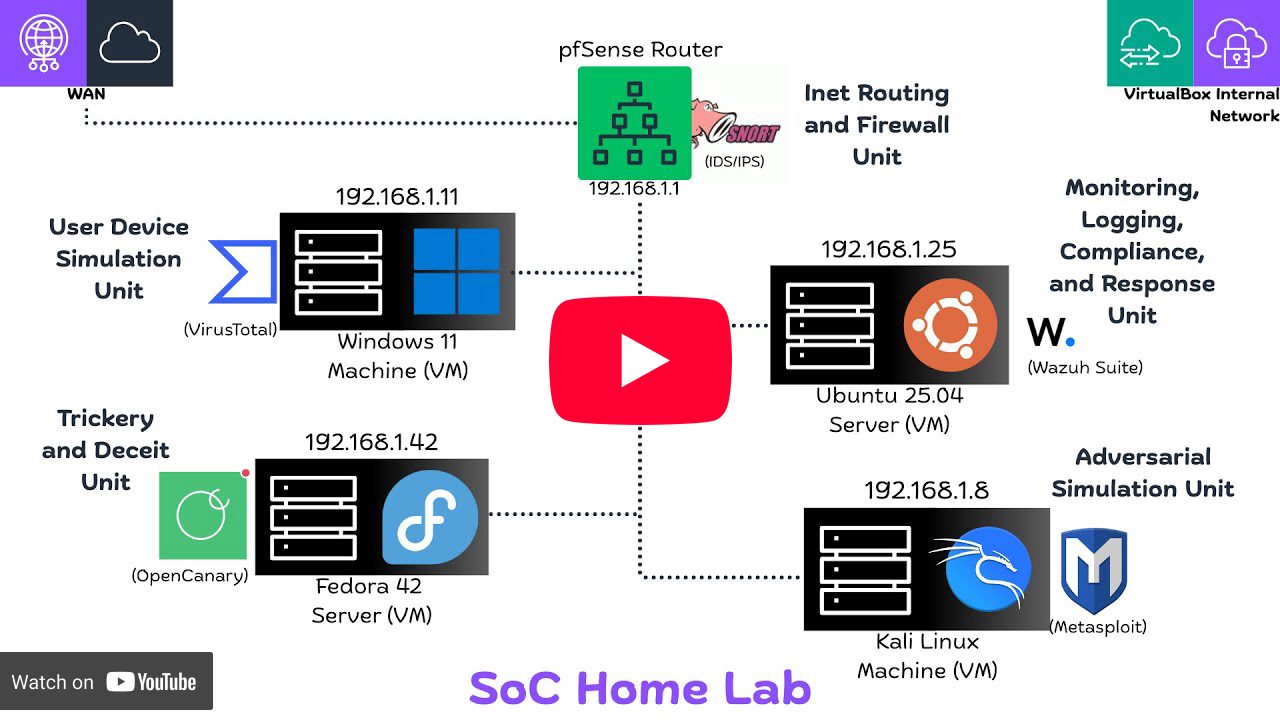
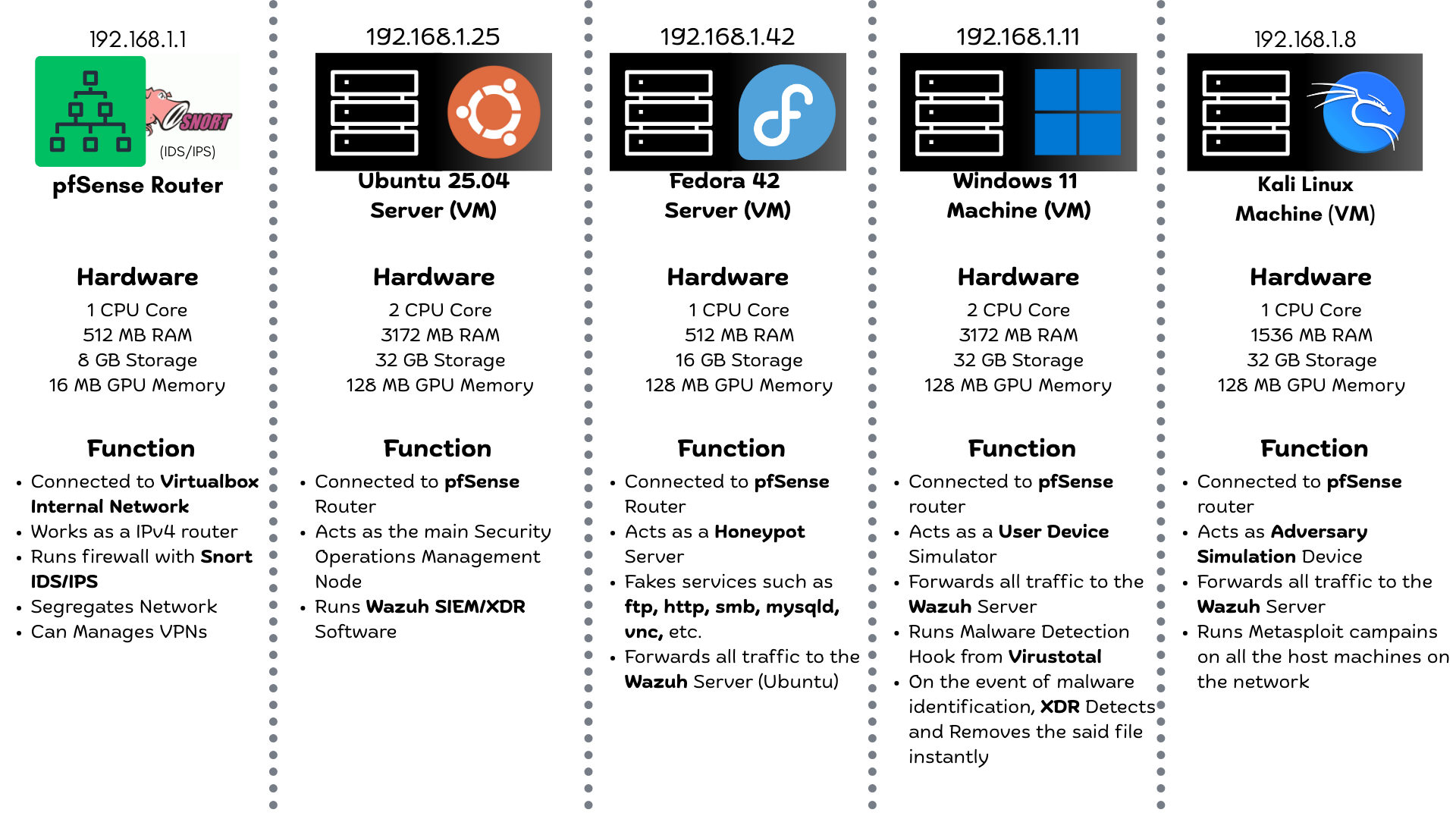
This home lab Security Operations Centre (SoC) setup uses to host fi machines, each with a specific role:
192.168.1.1): Acts as the network gateway, routing traffic from *WAN* port and into your 's *Internal network*. Runs firewall and _IDS/IPS_ via *Snort*, can manage VPNs, and create DMZ to segregate the internal network192.168.1.25): Running *Wazuh* *SIEM/XDR* for security operations management, the main machine managing the *SoC*192.168.1.42): Honeypot ser services and forwarding traffic to the *Wazuh* server192.168.1.11): Simulates a user device, runs malware detection, and forwards events to the _SIEM_192.168.1.8): Ad simulation device for running attack campaigns and testing detection capabilities<di=center>
<br>
3. Pre Requisites
Hardware Requirements
</div>
You do need a beefy computer to run every component mentioned in this Lab, if you happen to fall short in some areas, like memory for example, you could sacrifice one of the units like honeypot to make space for other devices that matter more
<di=center>
| Component | Minimum Specifications |
| ---- | ---- |
| Processor | Intel i5 10th Gen / AMD Ryzen 5 3600|
| Logical Processors (Threads) | 8|
| Memory | 16 GB DDR4 (at least 8GB free memory is required)|
| Storage Space | At least 128 GB free required|
Software Requirements
<table>
<tr>
<td align="center" width="120">
<img src="assets/vbox.png" alt=" Logo" width="72" height="72"><br>
<a href=" </a>
</td>
<td align="center" width="120">
<img src="assets/pfSense.png" alt="pfSense Logo" width="72" height="72"><br>
<a href=" pfSense</a>
</td>
<td align="center" width="120">
<img src="assets/ubuntu.png" alt="Ubuntu Logo" width="72" height="72"><br>
<a href=" Ubuntu Server</a>
</td>
</tr>
<tr>
<td align="center" width="120">
<img src="assets/win.png" alt="Windows Logo" width="72" height="72"><br>
<a href=" Windows 11</a>
</td>
<td align="center" width="120">
<img src="assets/fedora.png" alt="Fedora Logo" width="72" height="72"><br>
<a href=" Fedora Server</a>
</td>
<td align="center" width="120">
<img src="assets/kali.png" alt="Kali Logo" width="72" height="72"><br>
<a href=" Kali Linux</a>
</td>
</tr>
</table>
<br>
4. Learning Outcomes
By the end of this lab, we learn:
</div>
</div>
* Understand the architecture and components of a modern Security Operations Center (SoC).
* Configure and manage a network en using pfSense (an open-source router with *FreeBSD OS*).
* Deploy and manage Wazuh as a SIEM/XDR solution.
* Implement a honeypot using OpenCanary (on *Fedora/Red Hat*) to detect and analyze malicious activity.
* Gain experience with *Ubuntu Server* administration.
* Simulate ad attacks using *Kali Linux* and analyze the effecti of security controls.
* Gain hands-on experience with *malware detection* and *incident response*.
* Learn how to integrate different security tools and technologies for comprehensi detection and pre.
* Learn how to set up *NetBIOS* in Windows.
<br>
<di=center>
5. Software Installation
</div>
Step 5.1 🤖: Install Oracle
Follow specific instructions for your main operating system to setup and install , detailed walkthrough for this part is not covered
Step 5.2 📀: Download the Iso files
Download the guest operating systems image files (.iso) from the links gi
Step 5.3 🛜: Setting up the pfSense router
512 MB of memory and 8 GB storage.* Adapter 1: Attached to
Bridged Adapter (WAN)* Adapter 2: Attached to
Internal Network (LAN)WAN and the second adapter (LAN) as LANStep 5.4 🪟: Setting up Windows 11 Machine
3172 MB of RAM and 32 GB of storage.Internal Network (_same network as LAN in pfSense_).ipconfig to the IP address and internet connectivity.Step 5.5 🐉: Setting up Kali Linux Machine
Internal Network (Same Network as LAN in pfSense)Step 5.6 🌐: Setting up Fedora Server (Honeypot)
512 MB of memory and 16 GB storage> - Make sure to hit y, as it's not the default selection
Step 5.7: Setting up Ubuntu Server (Wazuh SIEM/XDR)
* Create a new Ubuntu Machine in , allocate
3172 GB memory and 32 GB storage* Attach the first network adapter to
Internal Network (Same Network as LAN in pfSense)* Boot up the Ubuntu Server and update the packages
* Install wazuh manager
> ⚠️ Once the assistant finishes the installation, the output shows the access credentials and a message that confirms that the installation was successful
<br>
6. Software Configuration
6.1 Configuring Wazuh Dashboard on Ubuntu
TROPHY
> 🏆 For further steps, refer to the SIEM Ser.md for detailed instructions! 🏆
6.2 Setting up Windows Machine
#### 6.2.1 Setting up Wazuh Agent
#### 6.2.2 Setup Malware Removal XDR with Wazuh using
#### 6.2.3 Setup SMB Disco for attacks with Kali Linux
> 🏆 For further steps, refer to the Windows Agent/README.md for detailed instructions! 🏆
6.3 Setting up Fedora Server
#### 6.3.1 Setting up OpenCanary Honeypot
#### 6.3.2 Setting up Wazuh Agent
#### 6.3.3 Forwarding OpenCanary logs to Wazuh
> 🏆 For further steps, refer to the Honeypot Ser.md for detailed instructions! 🏆
6.4 Setting up Kali Linux Machine
#### 6.4.1 Setting up Wazuh Agent
#### 6.4.2 Attacking Mysql Service
#### 6.4.3 Attacking Ftp Service
> 🏆 For further steps, refer to the Ad/README.md for detailed instructions! 🏆
6.5 Settin up pfSense Router
#### 6.5.1 Installing and Configuring Snort Firewall
> 🏆 For further steps, refer to the Ad/README.md for detailed instructions! 🏆
<br>
7. Future Enhancements
This project is designed with modularity and flexibility in mind, ensuring seamless integration of future enhancements. Potential additions include:
* OpenCTI Integration: Enhance threat intelligence capabilities by integrating OpenCTI.
* DMZ Zones: Create dedicated DMZ zones for user and ad simulation, improving network segmentation and security.
* Additional Security Tools: Incorporate tools like Sysmon and Suricata to further enhance monitoring and detection capabilities as needed.
* Android Machine Integration: Incorporate an Android machine for mobile application security testing and reverse engineering.
* Acti: Implement Acti to simulate a real enterprise en.
项目信息
开发语言:Python
Star 数:10
技术要点
该项目属于防护思路方向的开源资源,代码结构清晰,适合安全研究人员学习参考。项目围绕Yet another SoC Lab展开,提供了可运行的实现,对理解相关安全机制、工具原理与攻防技术具有较高的研究价值。
从技术实现角度看,此类项目的核心在于对底层原理的深入理解与工程化落地。开发者在研究过程中可以结合官方文档与社区讨论,梳理项目的初始化流程、核心模块职责与数据流转,逐步掌握其中的技术细节与设计思路。
使用与学习建议
1. 下载源码压缩包,解压到本地环境。
2. 根据项目类型准备对应的运行环境与依赖。
3. 按照 README 中的步骤完成配置与部署。
4. 在隔离的测试环境中运行验证,避免影响生产系统。
免责声明
本资源来源于开源社区,仅供安全研究、技术学习与合法授权范围内的攻防演练使用,请勿用于任何非法或侵害他人权益的用途。使用本项目产生的一切后果由使用者自行承担。
| 资源标题 | SoC-Home-Lab - Yet another SoC Lab |
| 所属分类 | 防护思路 |
| 发布作者 | admin |
| 发布时间 | 2026-10-06 00:12:03 |
| 下载权限 | 免费下载 |
| 附件数量 | 2 个下载链接 |
| 浏览次数 | 329 |
| 讨论数量 | 0 |
| 主题状态 | 正常讨论中 |