 防护思路
点击放大
AI-Driven-WiFi-Security-Analyzer - This project is a defensive, instructor-friendly i
项目说明
AI-Driven WiFi Security Analyzer (Defensive)
This project is a defensi implementation of an AI-assisted WiFi security assessment dashboard with end-to-end automation.
Important Ethics and Legal Notice
What This Project Delivers
🎯 New: Professional SOC Dashboard (React + Flask)
🔬 Core Analysis Features
- Strength and weak-pattern auditing.
- Generated defensi for policy hardening.
Architecture
🌐 Frontend (React + Tailwind CSS)
frontend/src/components/: Reusable UI components (Header, MetricCard, AlertCard, etc.)frontend/src/pages/: Dashboard pages (Dashboard, NetworkScanner, PasswordAnalyzer, etc.)frontend/src/App.jsx: Main application with routing logicfrontend/package.json: Frontend dependencies (React, Tailwind, Chart.js)🔌 Backend (Flask API)
backend.py: Flask API ser to analyzer modules🧠 Analysis Engine (Python)
app.py: Legacy Streamlit dashboard and workflow orchestration.src/analyzer/scanner.py: Passi discovery and parsing.src/analyzer/risk_ai.py: Model training/loading and risk scoring.src/analyzer/password_audit.py: Defensi quality and pattern analysis.src/analyzer/traffic_analysis.py: Traffic feature anomaly detection.src/analyzer/defensi.py: Benign behavior simulation dataset generator.src/analyzer/alerts.py: Real-time security alert generation.src/analyzer/adapti.py: Historical run tracking and trend insights.src/analyzer/automation.py: End-to-end automated assessment runner.src/analyzer/reporting.py: Report generation and file export.📊 Legacy Streamlit Dashboard
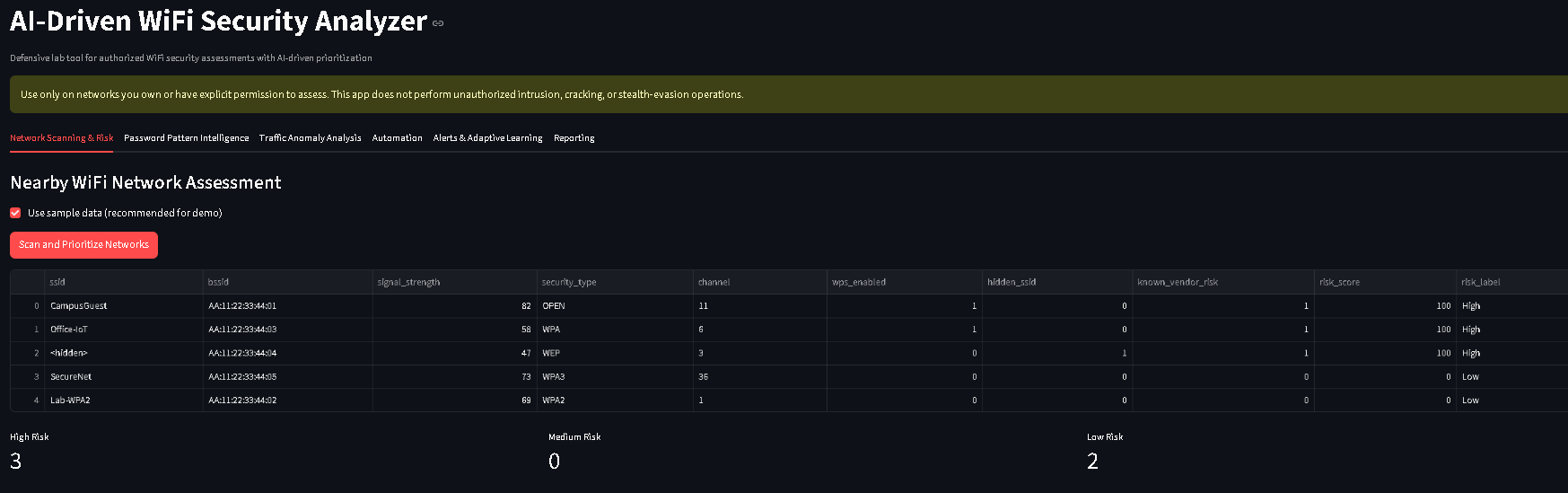
#### Network Scanning & Risk
Real-time network discovery, AI-driven risk prioritization, and status metrics.
!Network scanning o
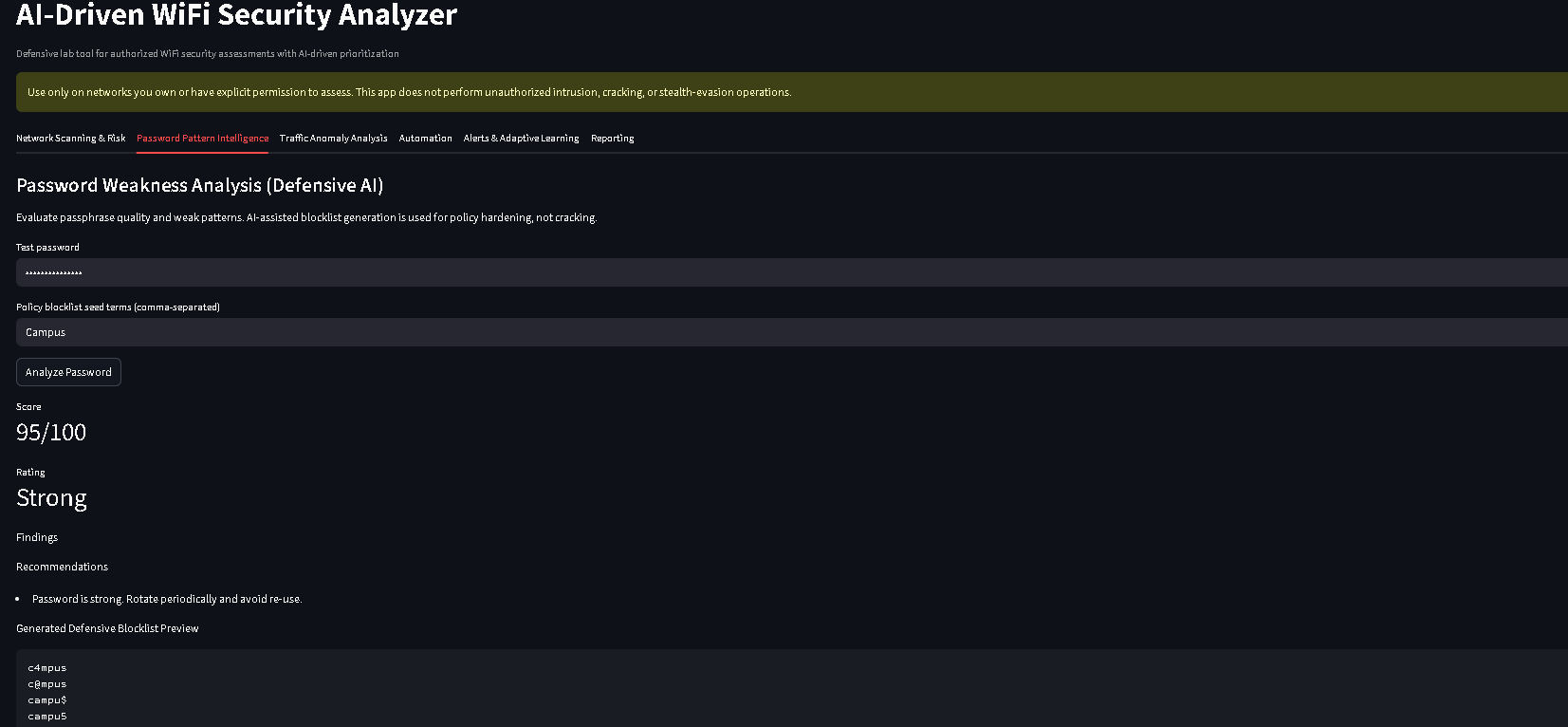
#### Password Pattern Intelligence
Defensi strength analysis with AI-generated hardening blocklist suggestions.
!Password intelligence screen
#### Reporting
Automated markdown report generation with findings, alerts, and hardening recommendations.
!Report generation screen
Setup
🚀 Quick Start - New SOC Dashboard (Recommended)
One-Command Setup:
This will automatically install dependencies and start both the backend and frontend.
Manual Setup:
1. Create en:
2. Install Python dependencies:
3. Start backend (Terminal 1):
Backend runs on:
4. Start frontend (Terminal 2):
Frontend runs on:
---
📊 Legacy Setup - Streamlit Dashboard
1. Create en:
- Windows PowerShell:
2. Install dependencies:
3. Run dashboard:
How to Run the Project
🚀 Run the New SOC Dashboard (Recommended)
Quick Start - All Platforms:
Manual Start:
1. Set up a en:
- Open a terminal and na to the project directory.
- Create a en:
- Activate it:
- Windows (PowerShell): .\.ven\Activate.ps1
- macOS/Linux: source .venv/bin/activate
2. Install Python dependencies:
3. Start Backend (Terminal 1):
Backend runs on:
4. Start Frontend (Terminal 2):
Frontend runs on:
5. Open your browser to and enjoy the dashboard!
---
📊 Run the Legacy Streamlit Dashboard
1. Set up a en:
* Open a terminal and na to the project directory.
* Create a en:
* Activate it:
* Windows (PowerShell): .\.ven\Activate.ps1
* macOS/Linux: source .venv/bin/activate
2. Install dependencies:
3. Run the Streamlit dashboard:
The application will open in your web browser.
Demo Workflow for Submission
🎯 New SOC Dashboard Demo
1. Na to after starting the dashboard.
2. On the Dashboard page, view real-time security metrics and alerts.
3. Click 🔍 Network Scanner tab:
- Ensure "Use sample data" is checked.
- Click Start Scan to see AI-powered risk scoring.
- Observe the risk distribution chart and threat breakdown.
4. Click 🔐 Password Analyzer tab:
- Test a sample password (e.g., password123).
- View strength score and security recommendations.
5. Click 📡 Traffic Analysis tab:
- Click Analyze Traffic to see anomaly detection.
6. Click ⚠️ Alerts tab:
- View real-time security alerts.
- Filter alerts by se level.
7. Click 📄 Reports tab:
- Generate a comprehensi report.
- Download as markdown file.
📊 Legacy Streamlit Dashboard Demo
1. Open dashboard and keep Use sample data enabled.
2. In Network Scanning & Risk, click Scan and Prioritize Networks.
3. In Password Pattern Intelligence, audit a sample password (e.g., password123) and generate a defensi preview.
4. In Traffic Anomaly Analysis, first click Generate Benign Baseline Dataset, then click Generate Suspicious Activity Dataset to see how the AI model responds to different patterns.
5. In Automation, click Run Full Assessment Automation.
6. In Alerts & Adapti, review the generated alerts and the historical trend chart.
7. In Reporting, click Build and Sa to generate the final markdown summary.
Expected Traffic CS
Included Demo Data
项目信息
开发语言:Python
Star 数:7
技术要点
该项目属于防护思路方向的开源资源,代码结构清晰,适合安全研究人员学习参考。项目围绕This project is a defensive, instructor-friendly implementation of an AI-assisted WiFi security assessment dashboard with end-to-end automation.展开,提供了可运行的实现,对理解相关安全机制、工具原理与攻防技术具有较高的研究价值。
从技术实现角度看,此类项目的核心在于对底层原理的深入理解与工程化落地。开发者在研究过程中可以结合官方文档与社区讨论,梳理项目的初始化流程、核心模块职责与数据流转,逐步掌握其中的技术细节与设计思路。
使用与学习建议
1. 下载源码压缩包,解压到本地环境。
2. 根据项目类型准备对应的运行环境与依赖。
3. 按照 README 中的步骤完成配置与部署。
4. 在隔离的测试环境中运行验证,避免影响生产系统。
免责声明
本资源来源于开源社区,仅供安全研究、技术学习与合法授权范围内的攻防演练使用,请勿用于任何非法或侵害他人权益的用途。使用本项目产生的一切后果由使用者自行承担。
| 资源标题 | AI-Driven-WiFi-Security-Analyzer - This project is a defensive, instructor-friendly i |
| 所属分类 | 防护思路 |
| 发布作者 | admin |
| 发布时间 | 2026-10-06 00:13:07 |
| 下载权限 | 免费下载 |
| 附件数量 | 2 个下载链接 |
| 浏览次数 | 182 |
| 讨论数量 | 0 |
| 主题状态 | 正常讨论中 |