 防护思路
点击放大
Bulwark-FlipperZero - Bluetooth LE advertising-spam detector for the Fli
项目说明
<p align="center">
<img src="images/banner.png" alt="Bulwark - hears the popup flood" width="100%">
</p>
<p align="center">
<img src=" alt="Flipper Zero">
<img src=" alt="No extra hardware">
<img src=" alt="API 87.1 / 88.0">
<img src=" alt="8.3M host checks">
<img src=" alt="MIT">
</p>
Bulwark
A Bluetooth LE ad detector that runs on the Flipper Zero's own radio.
You know the attack even if you do not know its name. Someone in the carriage
has a board in their bag, and every iPhone within twenty metres starts asking
about AirPods it has never met, ten times a minute, until the phone is
unusable. On Android it is a pairing prompt for a keyboard that does not
exist. On Windows it is Swift Pair, over and over. The tooling to do it ships
on the Flipper itself, which is exactly why the defensive half is worth
building.
Bulwark is that half. It does not transmit anything. It listens to the three
frequencies the attack has to use, and tells you whether somebody is standing
on them.
---
The idea
Every Bluetooth LE device that wants to be found — your earbuds, a fitness
band, a shop beacon, and a popup spammer — *ad*: it shouts a short
packet several times a second so that phones can hear it. All of that shouting
happens on exactly three frequencies out of the forty the radio has:
| Ad channel | Frequency | Sits between |
|---|---|---|
| 37 | 2402 MHz | below Wi-Fi 1 |
| 38 | 2426 MHz | Wi-Fi 1 and Wi-Fi 6 |
| 39 | 2480 MHz | abo 11 |
Those three were chosen in the 1990s to dodge the centres of Wi-Fi channels 1,
6 and 11, which is why your earbuds still connect in a room full of Wi-Fi.
That accident of spectrum politics is the entire basis of this app.
Bulwark parks the Flipper's radio on those three channels and on the three
Wi-Fi centres between them, hops between all six for a few seconds, and
measures how much of the time each one is busy. Then it asks one question:
> Is the *ad* busy, or is the *band* busy?
A spam attack fills 2402, 2426 and 2480 MHz in roughly equal measure, from
close range, without stopping. Nothing else in 2.4 GHz does that — those three
frequencies ha in common except Bluetooth. A microwave o
touch 2402 MHz. A Wi-Fi access point favours whiche it is on. A
video sender is a single wide lump. Only ad lights up all three.
---
What it looks like
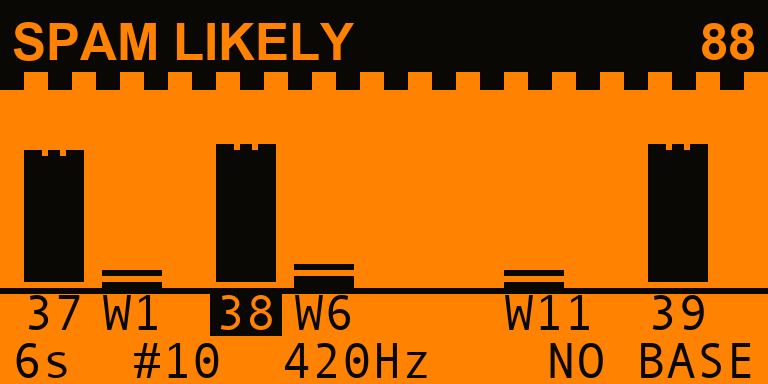
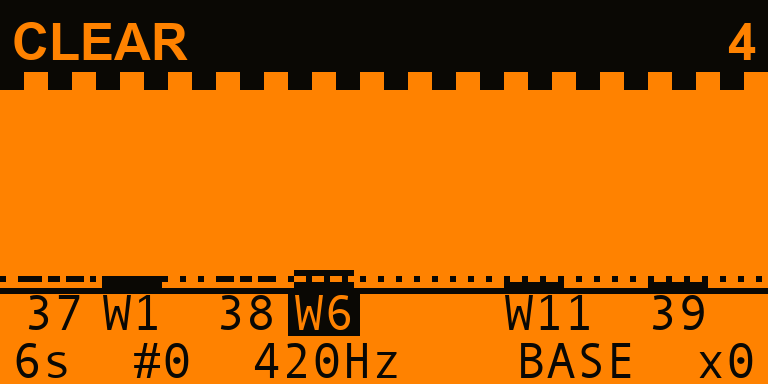
| Somebody is flooding the band | A room that is fine | A microwave oven, one wall away |
|---|---|---|
|  |  |  |
| All three towers up, Wi-Fi flat. | E at the dotted baseline. | 2402 MHz untouched — so not Bluetooth. |
The six bars sit at their real spacing across 2402–2480 MHz, so the picture is
a picture of the band. The three ad channels are solid; the Wi-Fi
centres are drawn as texture, because they are context rather than e.
The dotted line is the baseline you stored for this place. The highlighted
label is the channel the radio is parked on right now.
| Is it following me? | Why it is not higher | The whole breakdown |
|---|---|---|
|  |  |  |
| One column per sweep. | The ceiling that bit, named. | Every signal, and what it was worth. |
<p align="center">
<img src="images/screen_learn_channels.png" alt="How BLE spam works - only three channels"><br>
<em>Se on how the attack works, why the Flipper can hear it, and how to turn the popups off.</em>
</p>
---
How it decides
Four independent families of e, se, one hundred points
before any ceiling is applied.
| Family | Max | What it is |
|---|---|---|
| OCCUPANCY | 34 | How much of the time the ad channels are busy, and how loudly. |
| SHAPE | 30 | Whether the busyness is *Bluetooth-shaped*: all three channels equally, and not the Wi-Fi centres. |
| LEVEL | 20 | How far the loudest arrivals rise above the band floor. Proximity plus transmit power. |
| PERSISTENCE | 16 | Whether it is still there sweep after sweep. |
The ceilings are the design
This is the part that matters. Every one of them is a refusal to o,
and the breakdown screen names the one that actually held the score down.
| Ceiling | When | Why |
|---|---|---|
| 20 | OCCUPANCY scored nothing | A quiet band cannot be an attack, whate it is. |
| 30 | Wi-Fi centres twice as busy as ad | That is Wi-Fi. Bulwark cannot see through it, and says so. |
| 30 | No busier than your stored baseline | This is what this place is like. |
| 44 | SHAPE scored nothing | Ovens, video senders and crowded Wi-Fi all make the band busy. None of them is ad at your phone. |
| 64 | First sweep | One look is not a watch. |
| 65 | Wi-Fi centres as busy as ad | A 20 MHz Wi-Fi channel does reach these frequencies. Could be either. |
| 69 | No tri-channel signature | SPAM LIKELY requires it specifically. Every other signal here has an innocent explanation on its own. |
| 88 | No baseline stored | Nothing to say what normal looks like where you are. |
| 94 | Always | Bulwark cannot read a packet. It ne certainty. |
: CLEAR (0–24) · BUSY BAND (25–44) · SUSPECT (45–69) ·
SPAM LIKELY (70–94).
Wi-Fi interference is reported *separately* from the score, because "I cannot
see" and "I see nothing" are different sentences.
---
What it cannot do, on the same page as what it can
To listen at all, the radio has to be put into the RF test mode meant for
factory calibration. In that mode it measures energy and decodes nothing.
So Bulwark:
family it is — Apple Continuity, Fast Pair, Swift Pair, EasySetup all look
identical to it;
case is in the demo set, it scores SPAM LIKELY, and the app says so.
It also never says a place is safe. An attacker three rooms away still
reaches a phone in a pocket that Bulwark cannot hear from the table it is
sitting on. It reports what arrived at its own antenna, in the seconds it was
listening. That is the claim, and it is the only one.
While Bulwark is listening, the Flipper's own Bluetooth is off. It is put back
when you leave the watch screen.
---
Take a baseline
The single most useful thing you can do. One sweep, somewhere you trust,
standing where you will be standing. Bulwark stores it and from then on knows
what *your* places sound like — the dotted line on the wall screen — instead
of guessing at what a normal place sounds like in general.
Without one, every is capped at 88 and the breakdown says why.
---
Using it
| Key | |
|---|---|
| Left / Right | wall page ↔ trend page |
| OK | the full breakdown |
| Hold OK | throw the session away and start again |
| Back | stop listening, give the Flipper its Bluetooth back |
Settings: sweep length (3 / 6 / 12 seconds), alerts, CS, backlight,
and a demo band — se places that run through the identical
statistics and scoring engine with no hardware in. The screen saysDEMO the whole time one is selected.
Alerts are meant for a Flipper you are not looking at: SUSPECT is a rising
pair of notes, SPAM LIKELY is three notes, the buzzer and the red LED.
The log
With logging on, every sweep appends a row to/ext/apps_data/bulwark/sweeps.csv — , score, the ceiling that bit,
per-channel occupancy, floor, peak, sample count and achie rate. The
arithmetic can be checked in a spreadsheet by somebody who does not trust the
app.
---
Install
Grab bulwark.fap from the latest release
and drop it in /ext/apps/Bluetooth/ on the SD card. It appears under
Apps → Bluetooth → Bulwark.
Build it yourself
The .fap lands in dist/. ufbt launch builds and runs it on a connected
Flipper.
---
The engine is tested, not screenshotted
E on the screen is a rendering of what bw_stats and bw_score_eval
decided, and a screenshot cannot vouch for any of it. So the measurement and
scoring code is furi-free and compiled for the host, where **8.3 million
checks** run on every push:
Among them: the histogram percentiles are checked against a brute-force sort;
every ceiling in the table above is checked as an in over 200,000
randomised inputs; SPAM LIKELY is proven to be unreachable without the
tri-channel signature and without a second sweep; and more e is proven
never to lower a score.
The README screenshots are drawn by tools_gen_mockups.py fromtest/demo_dump.json, which the real engine writes. The numbers on those
screens are numbers the engine produced.
---
Layout
---
Legal and sensible
Bulwark is a receiver. It transmits nothing and connects to nothing. Passive
obser of the 2.4 GHz ISM band is unregulated in essentially every
jurisdiction, but the advice a defensive tool should give is the boring one:
use it on your own behalf, in places you are entitled to be.
The popups themselves are a nuisance attack, not a compromise — nothing is
being read off your phone. The fix is in the last panel of the walkthrough.
---
Licence
MIT. See LICENSE.
Built by at0m-b0mb.
项目信息
开发语言:C
Star 数:7
技术要点
该项目属于防护思路方向的开源资源,代码结构清晰,适合安全研究人员学习参考。项目围绕Bluetooth LE advertising-spam detector for the Flipper Zero, on the onboard radio. Hears the popup flood on 2402/2426/2480 MHz - and never claims to read it.展开,提供了可运行的实现,对理解相关安全机制、工具原理与攻防技术具有较高的研究价值。
从技术实现角度看,此类项目的核心在于对底层原理的深入理解与工程化落地。开发者在研究过程中可以结合官方文档与社区讨论,梳理项目的初始化流程、核心模块职责与数据流转,逐步掌握其中的技术细节与设计思路。
使用与学习建议
1. 下载源码压缩包,解压到本地环境。
2. 根据项目类型准备对应的运行环境与依赖。
3. 按照 README 中的步骤完成配置与部署。
4. 在隔离的测试环境中运行验证,避免影响生产系统。
免责声明
本资源来源于开源社区,仅供安全研究、技术学习与合法授权范围内的攻防演练使用,请勿用于任何非法或侵害他人权益的用途。使用本项目产生的一切后果由使用者自行承担。
| 资源标题 | Bulwark-FlipperZero - Bluetooth LE advertising-spam detector for the Fli |
| 所属分类 | 防护思路 |
| 发布作者 | admin |
| 发布时间 | 2026-10-06 00:13:39 |
| 下载权限 | 免费下载 |
| 附件数量 | 2 个下载链接 |
| 浏览次数 | 167 |
| 讨论数量 | 0 |
| 主题状态 | 正常讨论中 |