 防护思路
点击放大
Pharos-ESP32S3 - Defensive, receive-only RF observatory for the Wav
项目说明
<p align="center">
<img src="assets/branding/banner.png" alt="Pharos — Defensive RF Obser" width="100%">
</p>
<h1 align="center">Pharos</h1>
<p align="center">
<b>A defensi RF obser for the Wa ESP32-S3-Touch-AMOLED-1.75C.</b><br>
A lighthouse that listens: it watches the 2.4 GHz air, grades what it hears, and is honest about what it cannot.
</p>
<p align="center">
<a href=" alt="flash from browser" src="
<a href="#the-transmit-fence"><img alt="posture: recei" src="
<img alt="host checks" src="
<img alt="platform" src="
<img alt="idf" src="
<img alt="license" src="
</p>
---
What it is
Pharos turns a £40 round-screen de into a touch-first instrument for lawful wireless defence and training. It is built for the two people who should own a tool like this:
It is inspired by the usability and extensibility of the E, and deliberately takes the opposite stance on one thing: Pharos cannot transmit. Not "does not by default" — *cannot*. That is enforced by the build, checked in CI, and provable on the device's own screen. See the transmit fence.
> [!IMPORTANT]
> Authorisation first. E monitoring is regulated in some places, and *acting* on what you find is your responsibility. Use Pharos only on networks and in engagements you are authorised to assess. Read docs/SAFETY.md before you switch it on.
Why it is different
Most hobby RF tools answer "is there an attack?" with a confident yes/no. Pharos will not, because the hardware will not let it be honest that way:
> The ESP32-S3 has one receiver. To cover 2.4 GHz it hops, so it hears roughly 7% of any one channel at a time. Multiplying an obser by fourteen gives an *estimate*, not a *measurement*.
So every Pharos produces carries a confidence ceiling derived from how much of the channel it actually heard. A deauth flood reads FLOOD LIKELY when you camp on its channel and only SUSPICIOUS when you keep hopping — the same traffic, a different honesty. There is no band named "safe". Absence of e on a receiver that hears 7% of the air is not e of absence, and the firmware ne otherwise.
But the ceiling has to punish the right thing, and that distinction is the heart of the Watch engine. Hopping weakens an *extrapolated rate* — you heard 7% of a second and multiplied by fourteen. It does not weaken a contradiction. If a network ad that its management frames are cryptographically protected (802.11w), then an *unprotected* deauthentication frame claiming to come from it is forged, and hearing it during a 200 ms visit makes it no less forged. E like that is dwell-independent, and Pharos says so: such a raises its own ceiling to 88 and may alarm while hopping. Nothing e 100.
This honesty is not a disclaimer bolted on. It is arithmetic, and it is tested: 5,602 host checks assert, among much else, that and targeting shape together can ne the alarm band — a busy network is not an attack — and that every forgery test has a benign twin it must refuse to fire on.
What it looks like
Every screenshot below is generated from the firmware's own code — the realpharos_round/pharos_style geometry, driven by the real detection engines, fed
by the real training scenarios. Nothing here is a mock-up drawn in a design tool.
<p align="center">
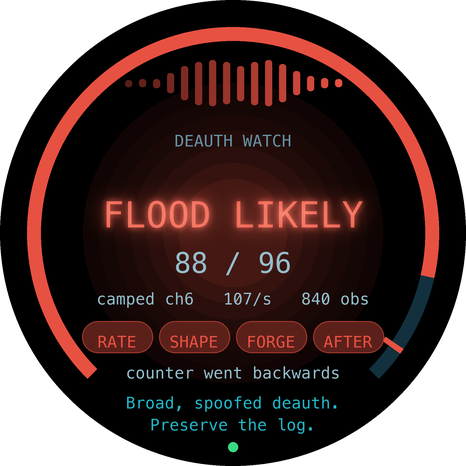
<img src="assets/screens/watch_camped.png" width="31%" alt="Watch, camped: FLOOD LIKELY at 88">
<img src="assets/screens/watch_hopping.png" width="31%" alt="Watch, hopping: SUSPICIOUS at 60">
<img src="assets/screens/watch_proven.png" width="31%" alt="Watch, hopping, pro: FLOOD LIKELY at 88">
</p>
These three are the whole argument. The first two are the *identical event
stream*. Camped on the channel the Watch engine reaches FLOOD LIKELY at 88;
hopping across 1–13 the same e tops out at SUSPICIOUS at 60, with the
red ceiling tick sitting right on the score — you are not entitled to claim
more.
That attacker rode the access point's own sequence counter and gave away only
its position, which is a *measurement*, and measurements are what hopping ruins.
The third is a different attack against a network that requires protected
management frames. The unprotected disconnects are then a contradiction rather
than an estimate, so the same hopping recei at 88.
Around the top of each face, sixteen bars are the last sixteen seconds of
disconnect traffic — because a steady trickle and one burst produce the
same ten-second a and are not the same event. The four named chips say
what the e actually was: RATE, SHAPE, FORGE, AFTER. "Why does it
think so" is answerable from the glass, not from the manual.
It teaches itself
A device with twenty-one tools, four colours and a touch surface with
no buttons cannot be learned by poking at it. The console banner
explained the controls, which is no help at all to somebody holding the device
and looking at the *glass*.
So on first boot the glass explains itself — nine steps, once, remembered in
N forever with guide on the console.
<p align="center">
<img src="assets/screens/guide_sides.png" width="31%" alt="Guide: change tool">
<img src="assets/screens/guide_.png" width="31%" alt="Guide: the colour key">
<img src="assets/screens/guide_ring.png" width="31%" alt="Guide: the home ring">
</p>
Each step shows the gesture rather than describing it — the outline of a
zone appears and a fingertip pulses inside it, tra between the two side
zones for the one that has two. You copy what you just watched instead of
skimming a sentence about it. The order is controls first (you cannot explore
without them), then the colour key (it is the key to every other screen), then
the two pieces of that are genuinely unusual: the ring of dots and
the e chips.
Anyone who already knows the device leaves in one press.
Touch, in full
| | Ordinary pages | Detail page |
|---|---|---|
| left edge | previous tool | page up |
| right edge | next tool | page down |
| centre | start the tool | open the focused row |
| bottom strip | show the e | — |
| anywhere, held | stop and step back | stop and step back |
On Home, tapping a watch dot jumps straight to that watch and tapping the
middle opens the Survey. The physical BOOT button mirrors the essentials:
short press steps, hold stops.
The reading order
Every screen in Pharos is built from one design system, LUMEN
(components/pharos_ui/pharos_style.h), and every screen puts its content in
the same order:
> colour → word → number → e → action
The soft aura behind the centre carries the *before you have read a
single glyph* — you can take the answer from across a room and stop there. The
word confirms it. The number is **support, and is deliberately set smaller than
the word it explains**; the face this replaced had that backwards, at 48 px of
score above 26 px of meaning, which is why it read as a number generator rather
than as a judgement.
Nothing on the glass is smaller than 14 px. At 466 px across a 1.75 inch circle
this panel is 266 ppi, so the old face's 12 px body text was about 1.1 mm of cap
height — legible in a screenshot, mush in a hand.
<p align="center">
<img src="assets/branding/gallery.png" width="100%" alt="Pharos screen gallery">
</p>
Regenerate them yourself — and note that the generator **bounds-checks every
primiti the panel's safe radius**, so "does the UI fit on a circle" is
a CI result rather than an opinion:
The lenses
A lens is one tool. The dial is built from whate are compiled in; adding one is adding a single .c file. Every lens declares its hardware powers at compile time, and the radio refuses any power a lens did not declare.
| Lens | Team | What it does |
|------|------|--------------|
| Spectrum | 🔵 recon | 2.4 GHz airtime waterfall — the map you read the others against. States, permanently, that it is deaf above 2.4 GHz. |
| Watch | 🔵 detect | Grades deauthentication / disassociation floods across four e families — rate, targeting shape, forgery, and whether the clients actually came back — with a confidence ceiling. The headliner. |
| Census | 🔵 audit | Grades every nearby network A+…F on what it would take to break in — auth, 802.11w, cipher, WPS. |
| Twin | 🔵 detect | Finds the rogue AP wearing a name that belongs to someone else — and scores BSSID multiplicity at *zero*, because roaming is not an attack. |
| Karma | 🔵 detect | Catches the rogue AP that answers to *any* name a passing phone asks for — while scoring a legitimate multi-SSID deployment at zero. |
| Mirage | 🔵 detect | Detects the beacon/SSID-spam flood that fills every phone's network list — the exact attack the ESP32 world is famous for — while scoring a dense city as *busy, not hostile*. |
| Locate | 🔵 hunt | Once a source is flagged, walk toward it: a smoothed RSSI *hotter / colder / here* game. Finds a transmitter without becoming one. |
| Aegis | 🔵 command | The one screen that tells the story. Every other lens forgets; Aegis remembers. It latches each finding with the time it happened, so a burst that fired while you were looking at another lens is still there ten minutes later — and it scores a *sequence* (recon → twin → disruption → collection) far above the same alarms in a jumble, because that ordering is an operation rather than a noisy afternoon. |
| Vigil | 🟢 personal | Is an item tracker tra with you? The first lens to use the Bluetooth radio. Seeing an AirTag means nothing — a café has a dozen. What matters is whether one is still with you *after you ha*, so Vigil infers mo from the Wi-Fi landscape turning over and only counts a tag that survives it. Ne intent, never says you are safe. |
| Squall | 🔵 triage | "The Wi-Fi is down — is it broken, busy, or jammed?" Three problems with three completely different responses, identical to the user. Squall separates them on the one measure that works: *energy decodability*. Loud and productive is a busy building. Loud and barren — fewer frames per second than a single AP's beacons — is the shape of a jam. A busy office is ne an attack. |
| Harvest | 🔵 detect | Catches somebody collecting your handshakes to crack offline — the attack where nothing breaks and nobody complains. Separates the forced cycle (knock a client off, catch it reconnecting) from the clientless PMKID solicitation, and knows a rebooting router looks identical to one forced cycle. |
| Sentinel | 🔵 audit | Answers the question that starts incidents: *what changed since I last swept this site?* Adopt a baseline while the estate is clean, then it diffs every later sweep — new radios, a network that quietly dropped its 802.11w, an AP gone missing — and scores a downgrade far abo churn. |
| Probe | 🟣 recon | Shows a room what its phones broadcast about their owners, and defeats MAC randomisation to prove the point. Awareness-session gold. |
| Range | 🔴🔵 train | Plays synthesised attacks through the real detection engines so you can learn to read the gauge. Holds no radio at all. |
| Footprint | 🔴 train | The red team's mirror: grades how *detectable* an attack is, names the family that gives it away, and tells you whether a hopping defender would e. Recei OPSEC. |
| System | ⚙️ audit | Battery, region, and li the transmit fence is clean. |
Red, blue, and purple all run on the same engines. The Range doesn't simulate a detector — it drives the actual one, so what you learn on it is exactly what you see in the field. See docs/REDBLUE.md for how Pharos serves each side.
For red teams: know your own signature
Pharos will not transmit — that's the whole point, and it's why it can go into rooms offensi can't. What it gives a red-teamer instead is arguably more : OPSEC insight. The Footprint lens grades any attack from the defender's side of the glass, against a camped defender *and* a hopping one:
<p align="center">
<img src="assets/screens/footprint.png" width="46%" alt="Footprint: OPSEC detectability">
<img src="assets/screens/mirage.png" width="46%" alt="Mirage: beacon-flood detection">
</p>
Left: a broadcast deauth flood reads BLARING to a camped defender (88) but only 60 to a hopping one — the dominant tell is *frame rate*, and the takeaway is stated plainly: *loud when watched, a hopping defender misses it*. Right: Mirage catching a 300-name beacon flood at FLOOD LIKELY, while a dense-city rooftop of 60 real networks scores *busy, not hostile*.
The transmit fence
Recei is the product, so it is enforced four ways, and CI checks all four:
1. Capability tokens. Every lens declares its powers at compile time. There is no CAP_WIFI_TX token to hold — you cannot request what does not exist.
2. Link-time wrap fence. Every Espressif/NimBLE transmit primitive (esp_wifi_80211_tx, esp_wifi_deauth_sta, esp_now_send, AP-mode esp_wifi_set_mode, …) is redirected by -Wl,--wrap to an abort trap. Call one and the firmware halts at the call site rather than emitting a frame.
3. Build-time role fence. NimBLE is compiled obser; the ad and connection code is not in the image. The BLE scan is additionally passive — an *active* scan answers every ad with a SCAN_REQ, which is a transmission, so passive = 1 is audited in CI like every other mechanism.
4. Source audit. tools/check_tx_fence.sh greps the tree for transmit primitives and all four mechanisms, on every commit.
The System lens reads the fence's own status and shows it on screen. A device that asks to be trusted in a building it does not own can *prove* it is only listening.
E you can defend
A report anyone can edit afterwards is a note, not e. Every record Pharos
commits is hash-linked to the one before it:
Modification, deletion, insertion and reordering are all caught byphc_ — each has a test. Addresses are redacted at write time (OUI-only
or salted-hash), never at export, so a full MAC that was ne cannot
leak from a partition image or a crash dump.
What it deliberately does *not* claim: this is integrity, not authorship. A
device you can disassemble cannot keep a signing key from its owner. Publish the
head digest somewhere you don't control — a ticket, a message to the client at
the end of the walk — and you have a timestamp someone else witnessed. That is
the honest of the guarantee, and it is the one Pharos makes.
Build & run
The engines and UI geometry build and test with no board at all — do this first, it is fast and catches the most:
> [!TIP]
> ⚡ Flash it from your browser — no toolchain. Open at0m-b0mb.github.io/Pharos-ESP32S3 in Chrome or Edge, plug the board in o, and click Install. The page serves the same audited binary as the release and flashes over Web Serial — nothing is uploaded anywhere.
Prebuilt firmware is attached to each release — a single flashable image built and audited in CI:
Build it yourself, with ESP-IDF 5.5 or newer:
The board driver, LVGL, and the panel init come from Wa's managed BSP component (pinned in main/idf_component.yml); Pharos does not re-drive the AMOLED.
Architecture at a glance
Two cores, split by role. The radio side has a hard real-time budget and does the minimum; e that *reasons* runs on the other core, in pure C, against copied data — which is why all of it is testable on a laptop.
components/pharos_engine/ — the judgement. Pure C11, no ESP-IDF, no allocation, no floating point in scored paths. Every detector, the e chain, and the round-screen maths live here, and every line of it is host-tested.components/pharos_radio/ — the only component that touches the radio, and the four-mechanism transmit fence around it.components/pharos_ui/ — round-screen geometry, the Lamp Room dial, the e gauge — tested as maths before a pixel is drawn — plus the " Pharos" renderer that produces the screenshots above.components/pharos_lens_*/ — one tool each, self-registering via a constructor; main.c names none of them.Full detail in docs/DESIGN.md.
Documentation
| | |
|--|--|
| docs/DESIGN.md | Architecture, the honesty model, and how to add a lens. |
| docs/REDBLUE.md | How Pharos serves red, blue and purple teams — lawfully. |
| docs/POLICY.md | The safety guardrails, and *why* each one exists. |
| docs/HARDWARE.md | The board, the pin map, and every still open. |
| docs/SAFETY.md | Legal & ethical use. Read before switching on. |
| docs/ROADMAP.md | Milestones M1–M6 and what is proven . |
| CONTRIBUTING.md | The four rules that are the product, not style. |
| ⚡ Web flasher | Flash from Chrome/Edge over USB — no toolchain. |
Status
v1.7.0 — the display fixed at the source, a real CLI, and both radios finally working.
| Layer | State | Detail |
|---|---|---|
| Detection & e engines | ✅ complete, 5,164 host checks, 0 failures | 18 detection/analysis engines + report/chain/sha256, all pure C, all tested on a laptop |
| Round-screen geometry & HUD | ✅ complete & tested | layout maths host-tested; every screen rendered from the real code and bounds-checked in CI |
| Transmit fence | ✅ enforced & audited | 4 mechanisms, against the linked ELF on every build |
| Firmware build | ✅ green on ESP-IDF v5.5 + v6.0 | a flashable binary is attached to each release |
| Board bring-up (display + touch) | ✅ driven via the Wa BSP | CO5300 AMOLED + CST9217 touch via bsp_display_start(); IMU/PMU telemetry still M1 |
| On-device L | ✅ HUD live — display fix in v1.5.0 | v1.4.0 powered the panel but never drew to it: the BSP's LVGL lock returns esp_err_t (ESP_OK == 0) and was read as a bool, so every paint saw a successful lock as failure and bailed. Fixed; the boot splash + gauge now render. |
> [!NOTE]
> Hardware bring-up in progress. The engines and UI geometry are proven in software; the panel-paint path is now fixed against a real board. IMU/PMU telemetry and touch-driven dial na remain. See CHANGELOG.md and docs/ROADMAP.md.
16 lenses · 18 engines · a recei serial console · MIT.
License
MIT © at0m-b0mb. Built for people who defend networks and the people learning to.
项目信息
开发语言:C
Star 数:6
技术要点
该项目属于防护思路方向的开源资源,代码结构清晰,适合安全研究人员学习参考。项目围绕Defensive, receive-only RF observatory for the Waveshare ESP32-S3-Touch-AMOLED-1.75C round AMOLED board. A lighthouse that listens: watches 2.4GHz, grades what it hears, and is honest about what it cannot. Red/blue training on the same engines. Never transmits.展开,提供了可运行的实现,对理解相关安全机制、工具原理与攻防技术具有较高的研究价值。
从技术实现角度看,此类项目的核心在于对底层原理的深入理解与工程化落地。开发者在研究过程中可以结合官方文档与社区讨论,梳理项目的初始化流程、核心模块职责与数据流转,逐步掌握其中的技术细节与设计思路。
使用与学习建议
1. 下载源码压缩包,解压到本地环境。
2. 根据项目类型准备对应的运行环境与依赖。
3. 按照 README 中的步骤完成配置与部署。
4. 在隔离的测试环境中运行验证,避免影响生产系统。
免责声明
本资源来源于开源社区,仅供安全研究、技术学习与合法授权范围内的攻防演练使用,请勿用于任何非法或侵害他人权益的用途。使用本项目产生的一切后果由使用者自行承担。
| 资源标题 | Pharos-ESP32S3 - Defensive, receive-only RF observatory for the Wav |
| 所属分类 | 防护思路 |
| 发布作者 | admin |
| 发布时间 | 2026-10-06 00:14:11 |
| 下载权限 | 免费下载 |
| 附件数量 | 2 个下载链接 |
| 浏览次数 | 391 |
| 讨论数量 | 0 |
| 主题状态 | 正常讨论中 |