 防护思路
点击放大
leak-scan - 🛡️ LeakScan — passive personal wireless-footprint
项目说明
<di="center">
🛡️ LeakScan
Your personal wireless-footprint auditor for Flipper Zero
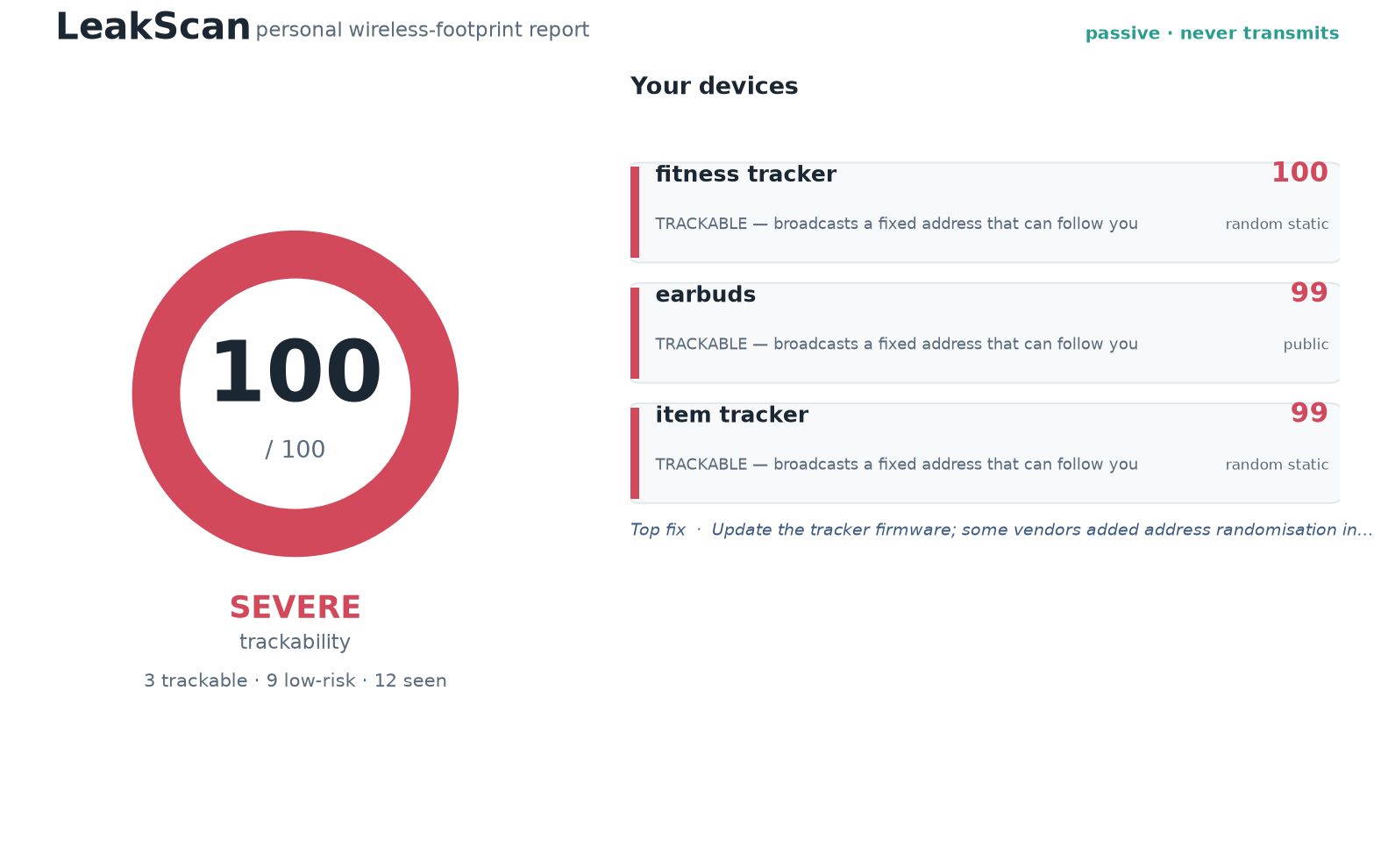
See what your own devices broadcast — and how trackable you are.


*A passi Zero tool that turns your in wireless signature into a
personal privacy mirror: what your devices emit, how identifiable you are, and
exactly how to reduce it.*
Sole contributor: Krishita Sanjay Choksi.
<br/>
<img src="figures/hero_report.png" alt="LeakScan exposure report: a trackability score out of 100 and a per-device breakdown with fixes" width="820"/>
</div>
---
The idea in one breath
Almost e walks around broadcasting a constant, in wireless
signature — phone, earbuds, a watch or fitness band, key fobs, tag trackers,
laptop radios. Most people have no idea how much of it is observable, how
persistent it is, or how trackable it makes them.
LeakScan is the friendly tool that just tells you. You run it *on yourself*.
It passively listens to what your devices are already broadcasting, works out
which ones expose a stable identifier that could follow you which ones
rotate their identity like they should, gives you a single **trackability
score, and hands you a short list of concrete, per-device fixes.**
> It ne. It ne. It is for auditing your own
> footprint — not for tracking anyone else. (threat model)
---
Repo description & topics
> Repository description (one-liner):
> 🛡️ LeakScan — passi wireless-footprint auditor for Flipper Zero. See what your own devices broadcast and how trackable you are. Ne. Sole contributor: Krishita Sanjay Choksi.
Recommended GitHub topics (add them in *Settings → Topics* for disco):
---
How it works
<di="center">
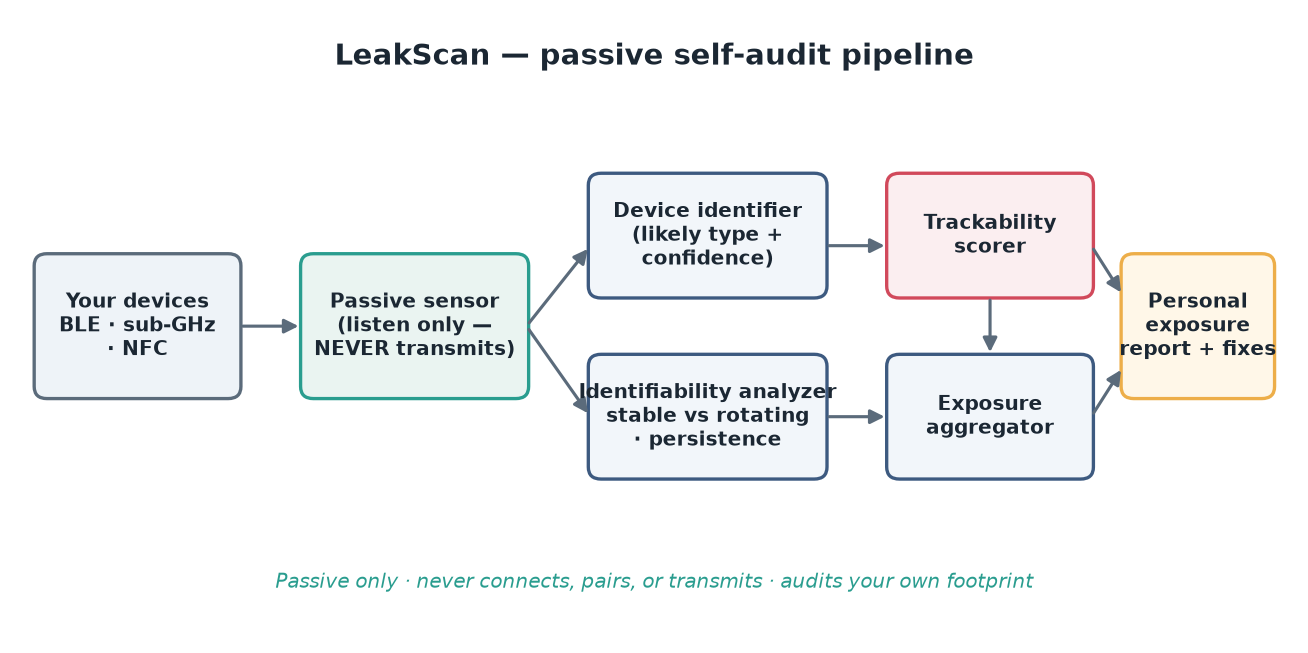
<img src="figures/architecture.png" alt="LeakScan passi pipeline" width="820"/>
</div>
1. Passi o BLE ad (primary), plus sub-GHz fob
bursts and NFC-capable items (secondary). Listen-only — no transmit.
2. Device identifier guesses each device's likely type from public
ad fields, *with honest confidence*, and abstains rather than guess.
3. Identifiability analyzer — the core insight — decides whether each device
exposes a stable identifier (trackable), rotates it (private), or sits
in the dangerous middle (rotating address but a re-linkable payload).
4. Trackability scorer rolls it into one number.
5. Exposure report gives you the score, the device list in plain language,
and specific fixes — plus a watch-o mode.
---
The trackability score (no magic)
Each device's contribution is a transparent product of three factors, so the
score is defensible rather than a black box:
The o score is dominated by your worst device (a single strong
beacon is enough to follow you), nudged up slightly when several devices are
independently trackable. A device that rotates both address *and* payload scores
near zero — the correct, non-alarmist outcome.
<di="center">
<img src="figures/trackability_breakdown.png" alt="Per-device trackability = stability x persistence x uniqueness" width="760"/>
</div>
Stable — the distinction that makes the report mean something
<di="center">
<img src="figures/stable_.png" alt="How many obser are stable/trackable /private" width="640"/>
</div>
Watch over time — the real tracking-risk signal
Lea running. Devices that expose a stable identifier stay put as a
single signature across the whole window; pri devices **rotate
away** into short-li. The ones that persist are the ones that can
actually follow *you*.
<di="center">
<img src="figures/persistence_o.png" alt="Watch mode: persistent signatures stay while private ones rotate away" width="820"/>
</div>
---
Try it in 60 seconds (no Flipper required)
The entire analysis pipeline runs from a clean clone on the **Python standard
library alone** — no installs — using the built-in wireless-en
simulator.
Want the charts too? pip install -r requirements.txt && make figures
(matplotlib/numpy are needed only for figure rendering).
Tune the simulated en:
---
Install on a Flipper Zero
Drag-to-SD (no toolchain): copy a leakscan.fap onto the SD card underapps/Bluetooth/ with qFlipper, then open Apps → Bluetooth → LeakScan.
Build with ufbt:
The app ships a DEMO mode that replays a built-in synthetic stream so the
full UI works before you wire li scanning — seebuild/README.md for the one firmware-specific integration
point (which is recei; the app ne in either mode).
On-device controls: OK scan/stop · hold OK watch mode · Right
device list · Up/Down scroll · Left back · Back exit.
---
Does it actually work? (honest e)
The e harness (e.py) runs the analyzer
blind against the simulator's hidden ground truth and measures itself. Latest
run (make eval, seed 1710):
| Metric | Result | What it means |
|---|---|---|
| Detection co | 100% (own devices) | Every broadcasting device you carry was surfaced. |
| Classification accuracy | 100% over 7 typed devices (16 correctly abstained) | De guesses were right; ambiguous/private devices were left Unknown rather than guessed. |
| Identifiability correctness | acc 100% · false-identifiability rate 0% | Stable (trackable) (private) devices were separated correctly. |
| Score sanity | privacy 2 < mixed 100 ≤ leaky 100 | A pri loadout scores far below a leaky one. |
Read these honestly: these numbers measure the pipeline against a synthetic
world whose device beha are known. That is the right place to the
*logic*; the real test is running it on your own known devices (which is exactly
what the tool is for). See the limits below.
---
What LeakScan can and can't see
| ✅ Can see | ❌ Can't see |
|---|---|
| Devices actively broadcasting BLE adverts | Devices with Bluetooth off / not ad |
| The address type (public / static / resolvable / non-resolvable) | The identity behind a correctly-rotating address (no secret key used) |
| Ad company id, service UUIDs, name, appearance | Encrypted or connection-only data (it ne) |
| Whether a signature persists over the window | Whether a not-yet-rotated address *will* rotate — that's why watch mode exists |
| Sub-GHz fob bursts & NFC-capable items (coarse) | Contents of rolling-code / encrypted transmissions |
Honest limits (a feature, not fine print): a short scan can't distinguish a
ne address from one that simply hasn't rotated yet — LeakScan uses
the address-type bits where it can and the watch mode for the rest, and says so.
Classification is best-effort and abstains when unsure. The score is a heuristic
exposure indicator, not a calibrated probability. **Well-implemented privacy
correctly scores low — LeakScan will not manufacture alarm.** Full detail in the
threat model.
---
The fixes (the part that actually helps)
For every flagged device the report gi, de
remedies — from a maintained database (fixes/fixes.json),
explained in the plain-language privacy guide. Examples:
firmware, toggle Bluetooth off when idle.
detection, then remove it.
---
Scope & safety — please read
LeakScan is a self-audit tool. It exists so you can shrink your own
footprint. It is passive (ne, connects, or pairs), it uses no
secret keys, and it is deliberately not built to track, profile, or surveil
other people — well-beha devices are (correctly) reported as
low-risk and are not re-linkable from what LeakScan keeps. The "watch over time"
mode is framed entirely around *your own* persistent signatures. Full details:docs/threat_model.md.
---
Prior art & honesty
BLE scanning, sub-GHz sniffing, and NFC reading already exist on the Flipper, and
LeakScan builds on that ecosystem — it does not claim to ha
passi. Its original contribution is the **personal-exposure auditing
layer**: the trackability score, the stable- identifiability analysis,
the per-device fixes, and an honest measurement layer. Full credit and positioning
in docs/prior_art.md.
---
Repository layout
---
License & citation
MIT © 2026 Krishita Sanjay Choksi — sole author and only contributor. SeeLICENSE, AUTHORS, and CITATION.cff.
<di="center">
<sub><b>LeakScan · passive · self-audit only · ne</b></sub>
</div>
项目信息
开发语言:Python
Star 数:6
技术要点
该项目属于防护思路方向的开源资源,代码结构清晰,适合安全研究人员学习参考。项目围绕🛡️ LeakScan — passive personal wireless-footprint auditor for Flipper Zero. See what your own devices broadcast and how trackable you are. Never transmits. Sole contributor: Krishita Sanjay Choksi.展开,提供了可运行的实现,对理解相关安全机制、工具原理与攻防技术具有较高的研究价值。
从技术实现角度看,此类项目的核心在于对底层原理的深入理解与工程化落地。开发者在研究过程中可以结合官方文档与社区讨论,梳理项目的初始化流程、核心模块职责与数据流转,逐步掌握其中的技术细节与设计思路。
使用与学习建议
1. 下载源码压缩包,解压到本地环境。
2. 根据项目类型准备对应的运行环境与依赖。
3. 按照 README 中的步骤完成配置与部署。
4. 在隔离的测试环境中运行验证,避免影响生产系统。
免责声明
本资源来源于开源社区,仅供安全研究、技术学习与合法授权范围内的攻防演练使用,请勿用于任何非法或侵害他人权益的用途。使用本项目产生的一切后果由使用者自行承担。
| 资源标题 | leak-scan - 🛡️ LeakScan — passive personal wireless-footprint |
| 所属分类 | 防护思路 |
| 发布作者 | admin |
| 发布时间 | 2026-10-06 00:14:15 |
| 下载权限 | 免费下载 |
| 附件数量 | 2 个下载链接 |
| 浏览次数 | 105 |
| 讨论数量 | 0 |
| 主题状态 | 正常讨论中 |