 防护思路
点击放大
flipper-cerberus - 🐺 Cerberus — a passive Sub-GHz RF watchdog for the
项目说明
<di="center">
<img src="assets/banner.png" alt="Cerberus — Sub-GHz RF Watchdog for Flipper Zero" width="100%">
Cerberus 🐺🐺🐺
A passive Sub‑GHz RF watchdog for the Flipper Zero
*Three heads, three bands. Cerberus sits quietly in your space and watches the
433 / 868 / 915 MHz ISM bands — barking the instant it sees jamming,
a signal flood, or a replayed capture aimed at your own garage, car,
alarm or sensors.*
!Platform
!Radio
!Language
!License
</div>
---
🩻 What it is
Most Sub-GHz tools are made to transmit. Cerberus does the opposite — it is
a recei sentry. Drop it on a desk in the space you want to protect
and it continuously samples the RF energy on the three bands your wireless
remotes, key fobs, alarm sensors and meters most likely live on. When the
airwa behaving like an attack, it lights up, buzzes, sounds off and
logs exactly what it saw.
It is built for the people who already carry a Flipper: hackers, pentesters,
ham/RF tinkerers and the security-curious who want to **know when someone is
messing with their own radio space**.
> Cerberus ne. It only listens. See Legal & ethics.
<di="center">
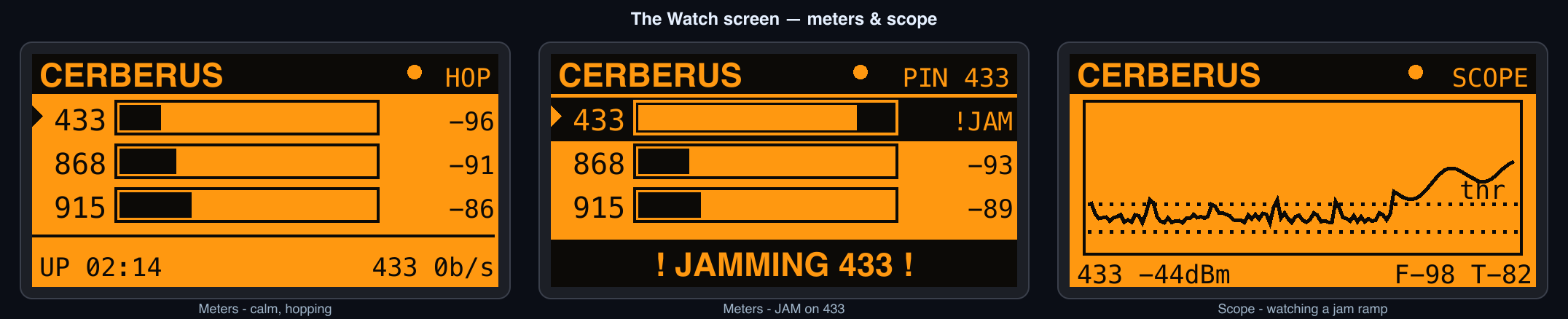
<img src="docs/screens.png" alt="The Cerberus watch screen — calm and during a jamming alert" width="92%">
</div>
---
✨ Features
band-hopping across all three or pinned to one for maximum .
- Jamming — the channel is held continuously busy (energy that never
falls back to the noise floor) beyond a dwell time.
- Flood — an abnormal storm of short transmissions per second.
- Replay / repeat — the same burst *fingerprint* repeating far more often
than legitimate traffic, the tell-tale of a captured-and-replayed or
brute-forced remote.
indicator, peak-hold, li rate, uptime, and a flashing alert banner
that names the threat and the band.
RSSI over time against its live noise-floor and detection-threshold
lines, so you can *watch* an attack build. Pick the band with ▲/▼.
breakdowns, li floors and uptime, with a one-press reset.
alerts.csv for aforensic record you can pull off the card later.
and logging; keep-screen-on mode turns it into a true desk sentry.
in any RF en. Press OK to recalibrate after you move it.
independently toggleable.
signal strength.
to the SD card between runs.
---
🎮 Controls
| Key | On menus | On the Watch screen |
| --- | --- | --- |
| ▲ / ▼ | Mo / scroll | Scope: pick the graphed band |
| ◄ / ► | Adjust value | Toggle Meters ↔ Scope |
| OK | Open item | Recalibrate the noise floor |
| Hold OK | — | Arm ↔ Silent (mute the alarms) |
| ← Back | Previous screen | Stop watching / back to menu |
When you leave the Watch screen the radio is released; open Watch again to
resume guarding. In Stats, press the Reset button to clear the counters,
the alert log and alerts.csv.
---
⚙️ Settings
| Setting | Options | Default | What it does |
| --- | --- | --- | --- |
| Scan Mode | Hop 3-band · Pin 433 · Pin 868 · Pin 915 | Hop 3-band | Watch all three bands in rotation, or camp one band. Pin a band for the most reliable jamming detection. |
| Sensitivity | Low · Medium · High | Medium | How aggressively a signal counts as activity. Higher = catches weaker/fewer signals (and more false positives). |
| Detect Jam | On / Off | On | Toggle the jamming detector. |
| Detect Flood | On / Off | On | Toggle the burst-flood detector. |
| Detect Replay | On / Off | On | Toggle the repeated-capture detector. |
| Alert Sound | On / Off | On | Play the alert tone. |
| Alert Vibro | On / Off | On | Buzz on alert. |
| Alert LED | On / Off | On | Flash the red LED on alert. |
| Log to SD | On / Off | Off | Append every alert to alerts.csv on the SD card. |
| Keep Screen On | On / Off | On | Hold the backlight on while the Watch screen is open. |
---
🧪 How the detection works
Cerberus drives the internal CC1101 in a wide OOK receive mode and reads the
RSSI (signal strength, in dBm) hundreds of times per second. For each band
it maintains an adapti floor and watches three things:
| Threat | Signature Cerberus looks for |
| --- | --- |
| JAMMING | Channel *occupancy* stays near 100 % — energy well above the floor that never gaps back down — for longer than the dwell time. |
| FLOOD | The number of distinct bursts in the last second crosses the rate threshold. |
| REPLAY | A coarse burst fingerprint (duration + amplitude bucket) recurs more times than normal traffic would produce. |
> Honest about the limits. This is an energy/heuristic detector, not a
> protocol decoder — it does not demodulate, decode or store the contents of
> any transmission. Replay detection flags *suspicious repetition*, not a
> cryptographically confirmed replay. In Hop mode the radio time-slices the
> three bands, so for the most reliable jamming detection, pin the band
> you care about. Tune Sensitivity to your en to avoid false
> positives. PRs that add a real decoder path are very welcome — see the
> roadmap.
---
📲 Install on your Flipper Zero
> ℹ️ A .fap is tied to the firmware API it was built against. If Cerberus
> refuses to launch, it was built for a different firmware — rebuild it with
> ufbt matched to your firmware (see Build from source).
Option A — Build & flash with ufbt (recommended)
ufbt is the micro Flipper
Build Tool — the easiest path from source to a running app.
Option B — Drop a prebuilt .fap onto the SD card
1. Download cerberus.fap from the Releases page.
2. Connect your Flipper over USB and open qFlipper.
3. Copy cerberus.fap to the SD card under apps/Sub-GHz/
(path on the card: /ext/apps/Sub-GHz/cerberus.fap).
4. On the Flipper: Apps → Sub-GHz → Cerberus. 🐺
Option C — Inside a firmware source tree
Works with official, Unleashed, Momentum and RogueMaster trees.
---
🛠️ Build from source
Requirements: Python 3.8+, a USB cable, and a Flipper on current firmware.
Building for a custom firmware? Run ufbt update against that firmware's SDK
(--channel/--index-url/--branch) before ufbt, so the app links against
the matching API.
---
🗂️ Project layout
---
🗺️ Roadmap
Got an idea? Open an issue. 🐺
---
⚖️ Legal & ethics
Cerberus is a defensi tool. It does not transmit anything.
regulations — ISM band rules differ by region.
Use it to understand and protect your own airspace. Be a good neighbour.
---
🤝 Contributing
Issues and PRs welcome — detection tuning, new views, decoder integration, and
firmware-compatibility fixes especially. Keep the code in the existing Flipper
style (scene manager + views, no blocking work on the GUI thread).
---
📜 License
MIT © at0m-b0mb
<di="center">
<sub>Built for the Flipper Zero community. Stay curious, stay defensive. 🐺🐺🐺</sub>
</div>
项目信息
开发语言:C
Star 数:5
技术要点
该项目属于防护思路方向的开源资源,代码结构清晰,适合安全研究人员学习参考。项目围绕🐺 Cerberus — a passive Sub-GHz RF watchdog for the Flipper Zero. Guards the 433/868/915 MHz bands and alerts on jamming, signal floods and replay attacks. Built in C (CC1101 / ufbt).展开,提供了可运行的实现,对理解相关安全机制、工具原理与攻防技术具有较高的研究价值。
从技术实现角度看,此类项目的核心在于对底层原理的深入理解与工程化落地。开发者在研究过程中可以结合官方文档与社区讨论,梳理项目的初始化流程、核心模块职责与数据流转,逐步掌握其中的技术细节与设计思路。
使用与学习建议
1. 下载源码压缩包,解压到本地环境。
2. 根据项目类型准备对应的运行环境与依赖。
3. 按照 README 中的步骤完成配置与部署。
4. 在隔离的测试环境中运行验证,避免影响生产系统。
免责声明
本资源来源于开源社区,仅供安全研究、技术学习与合法授权范围内的攻防演练使用,请勿用于任何非法或侵害他人权益的用途。使用本项目产生的一切后果由使用者自行承担。
| 资源标题 | flipper-cerberus - 🐺 Cerberus — a passive Sub-GHz RF watchdog for the |
| 所属分类 | 防护思路 |
| 发布作者 | admin |
| 发布时间 | 2026-10-06 00:14:51 |
| 下载权限 | 免费下载 |
| 附件数量 | 2 个下载链接 |
| 浏览次数 | 384 |
| 讨论数量 | 0 |
| 主题状态 | 正常讨论中 |