 防护思路
点击放大
cupax-sandbox - CupaX is an open-source malware analysis platform
项目说明
CupaX - Malware Analysis Sandbox
Learn about malware behavior in a safe, isolated en
CupaX is an open-source malware analysis platform designed for security researchers, students, and defensi teams. It automatically executes suspicious files in an isolated Windows en and captures detailed beha analysis.
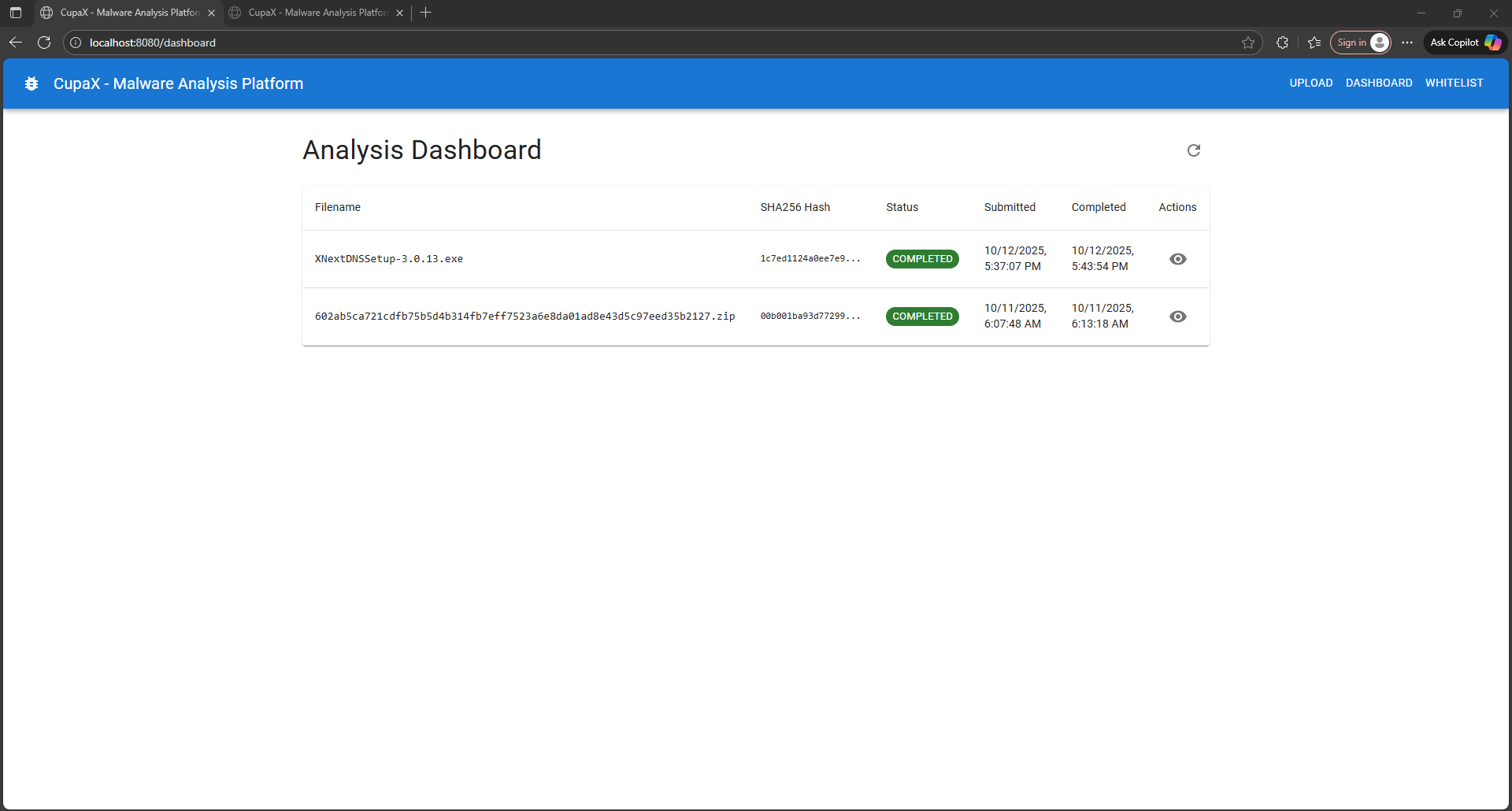
!Dashboard
---
What is a Malware Sandbox?
A malware sandbox is an isolated en where you can safely execute suspicious software to observe what it does without risking your actual systems. Think of it as a "lab in a box" for studying malware behavior.
Why Use a Sandbox?
Traditional antivirus looks for known signatures - like checking if a file matches known bad patterns.
Dynamic analysis (sandboxing) actually runs the malware and watches what it does:
This reveals the malware's true behavior - even if it's never been seen before.
How CupaX Works
The Magic: CupaX uses Sysinternals Procmon (Process Monitor) to capture every system event:
This low-le catches e the malware tries to do, even if it tries to hide.
---
Architecture O
CupaX uses a client-ser with three components:
Component Breakdown
| Component | Technology | Purpose | Where It Runs |
|-----------|-----------|---------|---------------|
| Frontend | React + TypeScript | User interface for uploads & reports | Browser (served by backend) |
| Backend | Go + SQLite | API server, database, coordination | Any OS (Linux/Mac/Windows) |
| Agent | Python Flask | Executes malware, captures events | Isolated Windows VM |
Key Design Principle: The agent VM is sacrificial - it will be compromised by malware. That's why it must be isolated and regularly restored to a clean state.
---
Features
🔍 Beha Analysis
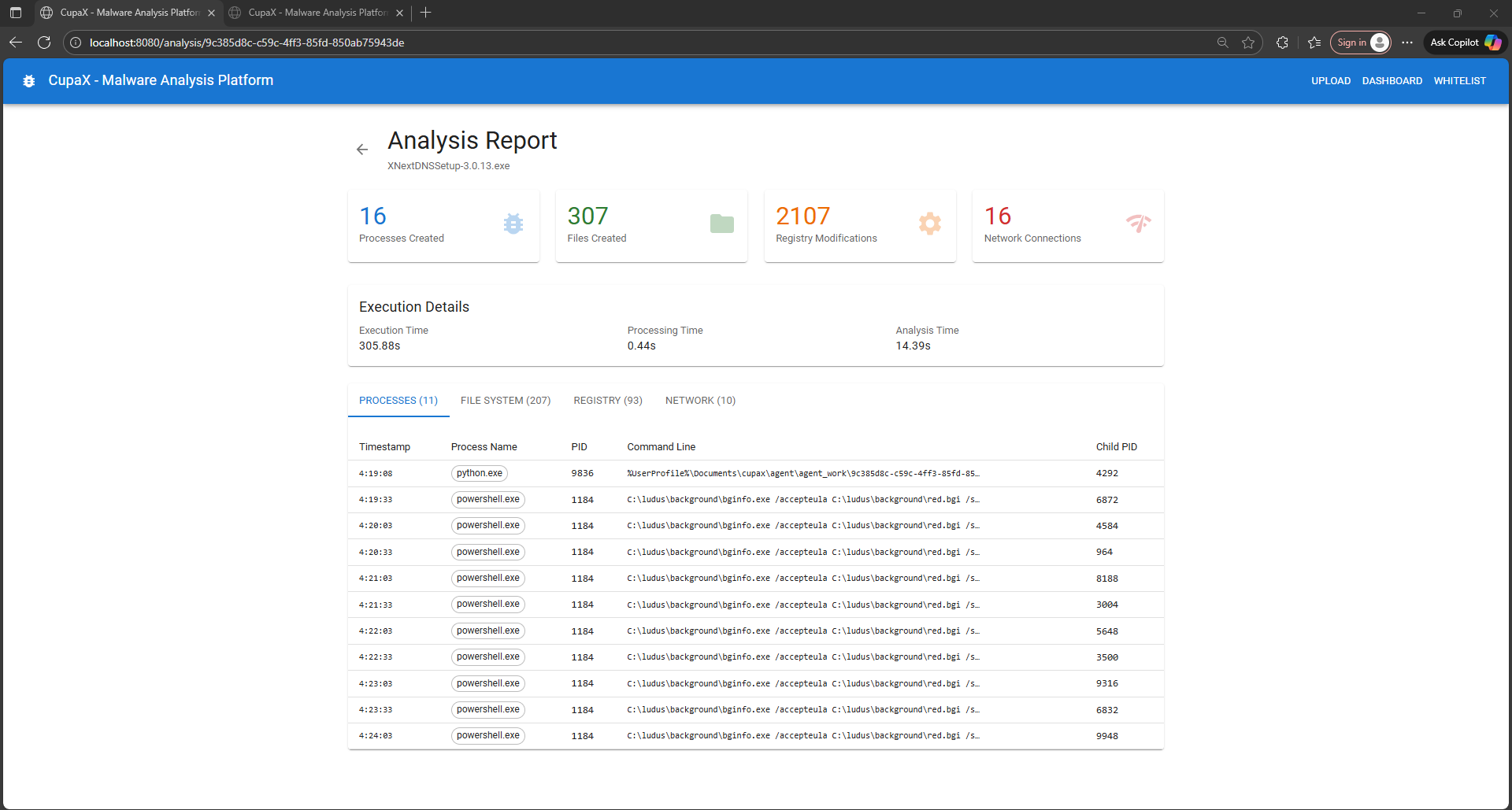
!Report View
Automatically captures and :
🚀 Easy Deployment
!CLI Output
🗂️ Smart Filtering
!Whitelist Management
📦 ZIP Support
Upload password-protected malware archives:
infected, malware, virus🔄 Proxmox Integration (Optional)
Automatically restore VM to clean snapshot before each analysis:
---
Quick Start (5 Minutes)
Prerequisites
Backend Machine (any OS):
Agent Machine (Windows 10/11 VM):
Step 1: Build Backend
Open browser:
!Upload Interface
Step 2: Setup Windows Agent VM
Install Prerequisites:
Configure Agent:
Agent will start on
Step 3: Connect Backend to Agent
Edit cupax.json:
Replace 192.168.1.100 with your Windows VM's IP.
Restart backend:
✅ You're ready! Upload a sample and watch the analysis.
---
Usage Guide
Uploading Samples
Single Executable:
1. Click "Upload Sample" or drag-and-drop
2. Select .exe, .dll, .scr, .bat, or script file
3. Click "Analyze"
4. Wait for completion (typically 5-10 minutes)
Password-Protected ZIP:
1. Upload ZIP file
2. Check "This is an infected zip"
3. Enter password (or lea to auto-try common passwords)
4. Click "Analyze"
Via API:
Understanding Reports
Summary Statistics:
Process Activity Tab:
File System Tab:
Registry Tab:
Network Tab:
Managing Whitelists
Why Whitelist? Windows generates thousands of benign events. Whitelists filter out noise so you see only malicious activity.
Pre-loaded filters:
s.exe, explorer.exe (legitimate Windows processes)Add custom filters:
1. Go to "Whitelist Management"
2. Select type: Process / IP / Domain / Registry
3. Enter value (supports regex)
4. Enable/disable as needed
Example custom rules:
---
Security Best Practices
⚠️ Critical: Agent
The agent VM WILL be compromised. Malware will run with full pri and can do anything.
Required Isolation Measures
✅ Dedicated VM - Ne for other purposes
✅ Network isolation - Firewall rules to block internet
✅ Host-only network - Agent should only reach backend
✅ No sensitive data - Clean Windows install only
✅ Regular snapshots - Restore after every analysis (or use Proxmox automation)
✅ No domain join - Standalone workgroup machine
Additional Hardening
1. Disable Windows Defender on agent VM (it will interfere with malware execution)
2. Disable Windows Update (prevents auto-reboot during analysis)
3. Use local accounts (no Microsoft accounts)
4. Snapshot clean state (with agent running and ready)
5. Monitor backend logs for suspicious activity
What NOT To Do
❌ Run agent on your workstation
❌ Gi internet access
❌ Store sensitive data on agent VM
❌ Join agent VM to corporate domain
❌ Use same VM for multiple purposes
❌ Forget to restore analyses
---
Configuration Reference
Backend Configuration (cupax.json)
| Field | Default | Description |
|-------|---------|-------------|
| server.port | 8080 | Web server port |
| analyzer.enabled | false | Enable real analysis (false = stub mode for testing) |
| analyzer.agent_url | | Agent HTTP endpoint |
| analyzer.timeout | 300 | Analysis timeout in seconds |
| proxmox.enabled | false | Enable Proxmox |
| proxmox.restore_snapshot | true | Auto-restore analysis |
| proxmox.shutdown_after | false | Shutdown analysis |
Agent En
Set before running python agent.py:
| | Default | Description |
|----------|---------|-------------|
| AGENT_NORIBEN_PATH | Noriben.py | Path to Noriben script |
| AGENT_PYTHON_PATH | python | Python interpreter (use "python" on Windows) |
| AGENT_PORT | 9090 | HTTP server port |
| AGENT_HOST | 0.0.0.0 | Listen address (0.0.0.0 for network) |
| AGENT_TIMEOUT | 300 | Analysis timeout (seconds) |
| AGENT_WORK_DIR | ./agent_work | Work directory for temp files |
| AGENT_UNZIP_TOOL | 7z | ZIP tool: 7z / unzip / python |
| AGENT_UNZIP_PATH | 7z | Path to extraction tool |
---
API Reference
Upload Sample
Response:
List Analyses
Response:
Get Analysis Report
Response: Full analysis report with all events
Health Check
Backend:
Agent:
---
Backend Logs
!Backend Logs
Monitor logs for detailed error messages:
---
Learning Resources
Understanding Malware Analysis
Noriben Framework
CupaX uses Noriben which wraps Sysinternals Procmon:
Key Concepts
Process Injection: Malware hiding in legitimate processes
notepad.exe starting powershell.exePersistence: How malware survi
HKLM\Software\Microsoft\Windows\Current\RunC2 Communication: Malware calling home
Lateral Mo: Spreading to other systems
---
Contributing
We welcome contributions! Areas for impro:
How to contribute:
1. Fork repository
2. Create feature branch
3. Submit pull request with description
---
History
| | Key Features | Architecture |
|---------|-------------|--------------|
| v4.0 (current) | Remote agent, Proxmox integration | Client-server HTTP |
| v3.0 | Inline execution | Monolithic |
| v2.0 | File queue system | SQLite + async |
| v1.0 | Initial release | PostgreSQL + Redis |
---
License
Apache License 2.0
Free to use, modify, and distribute. See LICENSE file for details.
Third-party components:
---
Disclaimer
⚠️ For Educational and Research Purposes Only
CupaX is designed for:
Users are responsible for:
Authors are not responsible for:
Always:
---
Support & Community
Issues & Bugs:
Questions:
---
Ready to Analyze?
Upload your first sample and explore malware behavior safely! 🔬🛡️
项目信息
开发语言:Python
Star 数:4
技术要点
该项目属于防护思路方向的开源资源,代码结构清晰,适合安全研究人员学习参考。项目围绕CupaX is an open-source malware analysis platform designed for security researchers, students, and defensive security teams. It automatically executes suspicious files in an isolated Windows environment and captures detailed behavioral analysis.展开,提供了可运行的实现,对理解相关安全机制、工具原理与攻防技术具有较高的研究价值。
从技术实现角度看,此类项目的核心在于对底层原理的深入理解与工程化落地。开发者在研究过程中可以结合官方文档与社区讨论,梳理项目的初始化流程、核心模块职责与数据流转,逐步掌握其中的技术细节与设计思路。
使用与学习建议
1. 下载源码压缩包,解压到本地环境。
2. 根据项目类型准备对应的运行环境与依赖。
3. 按照 README 中的步骤完成配置与部署。
4. 在隔离的测试环境中运行验证,避免影响生产系统。
免责声明
本资源来源于开源社区,仅供安全研究、技术学习与合法授权范围内的攻防演练使用,请勿用于任何非法或侵害他人权益的用途。使用本项目产生的一切后果由使用者自行承担。
| 资源标题 | cupax-sandbox - CupaX is an open-source malware analysis platform |
| 所属分类 | 防护思路 |
| 发布作者 | admin |
| 发布时间 | 2026-10-06 00:15:35 |
| 下载权限 | 免费下载 |
| 附件数量 | 2 个下载链接 |
| 浏览次数 | 280 |
| 讨论数量 | 0 |
| 主题状态 | 正常讨论中 |