 防护思路
点击放大
Cybersecurity-Lab-Portfolio - Documented hands-on cybersecurity labs, vulnerabil
项目说明
📌 Cloud-Based SIEM Implementation Using Microsoft Sentinel
##🔎 Project O
This project demonstrates the deployment and configuration of a cloud-based Security Information and Event Management (SIEM) solution using Microsoft Sentinel in Microsoft Azure.
The objective was to:
🏗️ En Setup
📊 Log Ingestion
Used KQL query to confirm log collection:
AzureActivity
| take 5
that Azure Activity logs were successfully ingested into the Log Analytics Workspace.
🚨 Detection Engineering
Created a scheduled analytics rule:
🧪 Simulated Suspicious Activity
Created a new Azure Resource Group to simulate administrati and trigger detection.
🔔 Incident Generation
The analytics rule successfully generated an incident in Microsoft Sentinel.
🔍 Incident In
Re:
🛠️ Tools & Technologies
🎯 Key Skills Demonstrated
📊 E
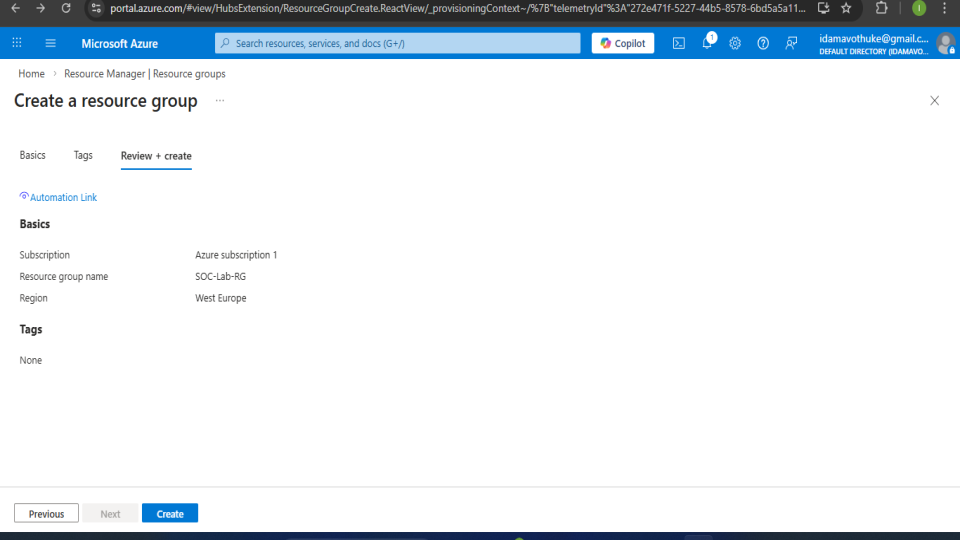
<h3 align="center">In this step, I created a Resource Group in Microsoft Azure called SOC-Lab-RG.
</h3>
<p align="center">
<img src="image1.png">
</p>
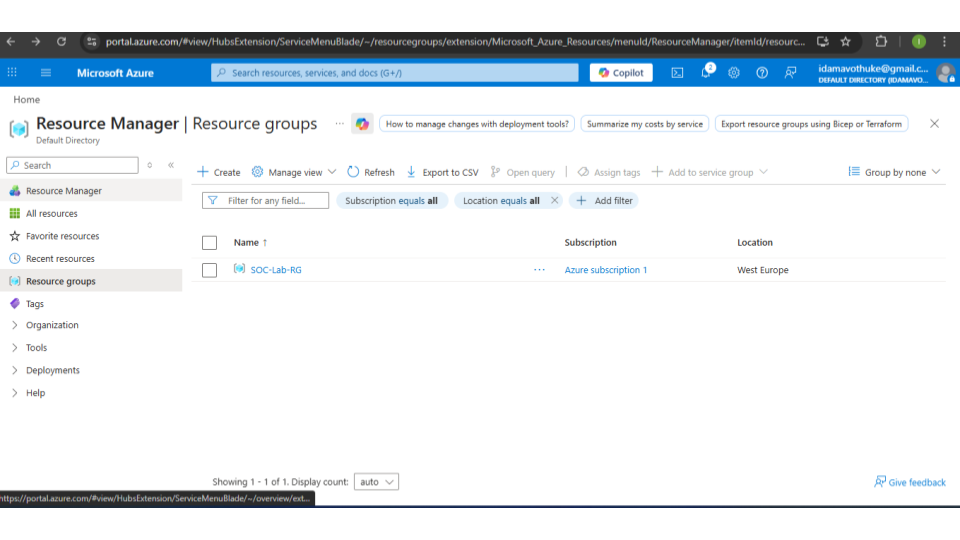
<h3 align="center">After creating the Resource Group, I that it was successfully deployed.
</h3>
<p align="center">
<img src="image2.png">
</p>
<h3 align="center">After setting up the Resource Group, the next step was creating a Log Analytics Workspace.
</h3>
<p align="center">
<img src="image3.png">
</p>
<h3 align="center">After creating the Log Analytics Workspace, the next step was enabling Microsoft Sentinel.
</h3>
<p align="center">
<img src="image4.png">
</p>
<h3 align="center">After enabling Microsoft Sentinel, the next step was exploring the Content Hub.
</h3>
<p align="center">
<img src="image5.png">
</p>
<h3 align="center">After accessing the Content Hub, I installed the Azure Activity solution.
</h3>
<p align="center">
<img src="image6.png">
</p>
<h3 align="center">After installing the Azure Activity solution, I configured an Azure Policy to ensure that activity logs are streamed to the Log Analytics Workspace.</h3>
<p align="center">
<img src="image7.png">
</p>
<h3 align="center">After enabling Microsoft Sentinel, I na to the Analytics section to manage detection rules.
</h3>
<p align="center">
<img src="image8.png">
</p>
<h3 align="center">After assigning the Azure Policy, I that logs were successfully ingested into the Log Analytics Workspace.
</h3>
<p align="center">
<img src="image9.png">
</p>
<h3 align="center">After confirming successful log ingestion, I configured a scheduled analytics rule in Microsoft Sentinel to monitor suspicious Azure resource creation activity</h3>
<p align="center">
<img src="image10.png">
</p>
<h3 align="center">To test the detection capability of Microsoft Sentinel, I simulated administrati by creating a new resource group in Azure.</h3>
<p align="center">
<img src="image11.png">
</p>
<h3 align="center">After creating the analytics rule and simulating resource creation activity, Microsoft Sentinel automatically generated an incident.</h3>
<p align="center">
<img src="image12.png">
</p>
<h3 align="center">After the alert was generated, I opened the incident in Microsoft Sentinel to in further</h3>
<p align="center">
<img src="image13.png">
</p>
In Summary
After creating a custom analytics rule and simulating Azure resource creation activity, Microsoft Sentinel successfully generated an incident alert titled:
"Suspicious Azure Resource Creation Activity"
In Findings
Conclusion
This incident was classified as a True Positive because the alert accurately matched the simulated activity performed during the lab exercise. The detection demonstrated the effecti of Microsoft Sentinel analytics rules in identifying potentially suspicious cloud resource creation events.
项目信息
开发语言:未知
Star 数:2
技术要点
该项目属于防护思路方向的开源资源,代码结构清晰,适合安全研究人员学习参考。项目围绕Documented hands-on cybersecurity labs, vulnerability assessments, and defensive security exercises.展开,提供了可运行的实现,对理解相关安全机制、工具原理与攻防技术具有较高的研究价值。
从技术实现角度看,此类项目的核心在于对底层原理的深入理解与工程化落地。开发者在研究过程中可以结合官方文档与社区讨论,梳理项目的初始化流程、核心模块职责与数据流转,逐步掌握其中的技术细节与设计思路。
使用与学习建议
1. 下载源码压缩包,解压到本地环境。
2. 根据项目类型准备对应的运行环境与依赖。
3. 按照 README 中的步骤完成配置与部署。
4. 在隔离的测试环境中运行验证,避免影响生产系统。
免责声明
本资源来源于开源社区,仅供安全研究、技术学习与合法授权范围内的攻防演练使用,请勿用于任何非法或侵害他人权益的用途。使用本项目产生的一切后果由使用者自行承担。
| 资源标题 | Cybersecurity-Lab-Portfolio - Documented hands-on cybersecurity labs, vulnerabil |
| 所属分类 | 防护思路 |
| 发布作者 | admin |
| 发布时间 | 2026-10-06 00:19:09 |
| 下载权限 | 免费下载 |
| 附件数量 | 2 个下载链接 |
| 浏览次数 | 148 |
| 讨论数量 | 0 |
| 主题状态 | 正常讨论中 |