 防护思路
点击放大
OffsecDEV - OffsecDEV (Offensive Security Development Vault) i

项目说明
# OffsecDEV — Obsidian Pentesting Vault


![Last commit]()
![Open issues]()
A complete, opinionated Obsidian knowledge system for offensi, networking, and automation. It’s built to guide true beginners into the field while staying useful for seasoned professionals during real assessments.
> Goal: Turn scattered learning and ad‑hoc notes into a coherent, searchable operational knowledge system you can actually run campaigns with.
---
Quickstart
1) Install Obsidian and enable community plugins (Settings → Community Plugins)
2) Clone this repository and open it as a vault:
git clone C:\OffsecDEC:\OffsecDE3) Start at the hub:
4) Create notes with templates:
---
What’s Inside
- Master Index (Map of Content)
- Index (catalog + taxonomy + Dataview dashboards)
- Workflow Index (procedures + go + roll‑ups)
- Reading Log (structured learning tracker)
- Tools: Nmap, Metasploit, Wireshark, Snort, Zsh, Dockerfile
- Languages: Python, Ja, Java, C#, C++, Ruby, Perl, Zsh
- Reports: Pentest report, Findings blocks, Lab notes, Flowcharts
- Knowledge: General reading, Links, Networking, Firewall, NIDS
-
Automation/Scripts/se_e.py- Example runner:
Pentest Campaign/Reports/Example Campaign/Scripts/Run_E.ps1---
Core Ideas and Workflow
Reports/<Campaign>/E/ with a Markdown index.---
Key Templates (Selected)
All templates live in Templates and are compatible with Templater prompts.
---
Templates O (Full)
- Python:
Templates/Python.md, Templates/Python_Note.md- Ja:
Templates/Ja.md, Templates/Ja.md- Java:
Templates/Java.md, Templates/Ja.md- C#:
Templates/C_Sharp.md, Templates/C_Sharp_Note.md- C++:
Templates/C++.md, Templates/C++_Note.md- Ruby:
Templates/Ruby.md, Templates/Ruby_Note.md- Perl:
Templates/Perl.md, Templates/Perl_Note.md- Zsh:
Templates/Zsh_Note.md- Dockerfile reference:
Templates/Dockerfile.md, Templates/Dockerfile_Note.md- Metasploit:
Templates/Metasploit_Note.md- Nmap:
Templates/Nmap_Note.md- Wireshark:
Templates/Wireshark_Note.md- Snort/NIDS:
Templates/Snort_Note.md, Templates/NIDS_Note.md- Nessus:
Templates/Nessus_Note.md- Obsidian:
Templates/Obsidian_Note.md- Generic Tool:
Templates/Tool_Template.md- Pentest Report:
Templates/Pentest_Report_Template.md- Exploit Write-up:
Templates/Exploit_Template.md- Lab Notes:
Templates/Lab Notes.md- Book/Chapter:
Templates/Book_Template.md, Templates/Chapter_Template.md- Networking:
Templates/Networking_Note.md- Firewall:
Templates/Firewall_Note.md- General Reading:
Templates/General_Reading_Note.md- New Reading Entry:
Templates/New_Reading_Entry.md- Links collector:
Templates/Links.md- Packages/Dependencies:
Templates/Packages_Note.md- Social Engineering:
Templates/Social_Engineering.md- Language generic:
Templates/Language_Template.md- Flowchart/Can:
Templates/Flowchart_Template.mdTips
Automation: SE E Finder
Python utility to copy and normalize social‑engineering or campaign e into the vault with an index and JSON manifest.
--src folder (images, pcaps, logs, emails, audio, docs)Reports/<campaign>/E/{images,pcap,logs,emails,attachments,audio,other}E.md + e.jsonUsage:
Tip: Keep originals — this script copies by default.
---
Learning Path (Use the Vault As Your Syllabus)
Each step links back into the vault’s indices and templates to reinforce a single, coherent workflow.
---
Plugins and Compatibility
/Flowcharts (.can)E works offline with Obsidian. No lock‑in; it’s just Markdown.
---
Contributing / Personalizing
Tags/Index.md and Tags/Taxonomy Reference.md)If you’re new: start by reading, templating one tool, and writing one mini‑workflow. Iterate daily.
---
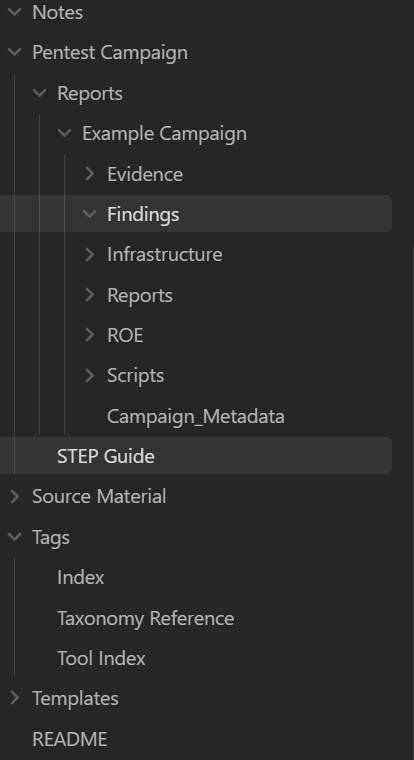
Folder Map (High‑Level)
00_Index/ — Global na, dashboards, and goTemplates/ — Reusable formats (tools, reports, languages, workflows)Automation/ — Scripts and helpers for e/campaignsPentest Campaign/ — Project/campaign organization and examplesFlowcharts/ — Obsidian Can mapsTags/ — Tag index and taxonomyNotes/ — Your knowledge base---
License and Use
This is an educational and operational structure intended to accelerate learning and standardize execution. Use responsibly and ethically.
---
Recommended Community Plugins
Setup tips
Additional
!Vault Structure (Obsidian Sidebar)
!Knowledge Graph (Obsidian Graph View)
项目信息
开发语言:Python
Star 数:2
技术要点
该项目属于防护思路方向的开源资源,代码结构清晰,适合安全研究人员学习参考。项目围绕OffsecDEV (Offensive Security Development Vault) is a structured Obsidian-based knowledge system where the goal is to maintain a unified operational intelligence layer for offensive and defensive security activities — blending documentation, automation, and analytics into one cohesive environment.展开,提供了可运行的实现,对理解相关安全机制、工具原理与攻防技术具有较高的研究价值。
从技术实现角度看,此类项目的核心在于对底层原理的深入理解与工程化落地。开发者在研究过程中可以结合官方文档与社区讨论,梳理项目的初始化流程、核心模块职责与数据流转,逐步掌握其中的技术细节与设计思路。
使用与学习建议
1. 下载源码压缩包,解压到本地环境。
2. 根据项目类型准备对应的运行环境与依赖。
3. 按照 README 中的步骤完成配置与部署。
4. 在隔离的测试环境中运行验证,避免影响生产系统。
免责声明
本资源来源于开源社区,仅供安全研究、技术学习与合法授权范围内的攻防演练使用,请勿用于任何非法或侵害他人权益的用途。使用本项目产生的一切后果由使用者自行承担。
| 资源标题 | OffsecDEV - OffsecDEV (Offensive Security Development Vault) i |
| 所属分类 | 防护思路 |
| 发布作者 | admin |
| 发布时间 | 2026-10-06 00:21:16 |
| 下载权限 | 免费下载 |
| 附件数量 | 2 个下载链接 |
| 浏览次数 | 166 |
| 讨论数量 | 0 |
| 主题状态 | 正常讨论中 |