 防护思路
点击放大
linux-security-audit-toolkit - A modular Bash-based defensive security auditing t
项目说明
🛡️ Linux Security Audit Toolkit
A modular Bash-based defensi auditing toolkit for Linux systems.
The toolkit automates local security checks across system configuration, users and pri, networking, firewall status, SSH, processes, file permissions, authentication logs, and security findings.
> Designed for authorized defensi auditing, Linux security learning, system hardening, and cybersecurity portfolio demonstration.
---
🎯 Project Objective
The goal of this project is to provide a lightweight, modular, and reproducible Linux security auditing toolkit that helps identify security-relevant configuration conditions on a Linux host.
The toolkit uses Bash and standard Linux utilities without requiring a database, external API, or large dependency stack.
---
✨ Features
---
🏗️ Architecture
Execution Flow
---
📁 Project Structure
---
⚙️ Requirements
Operating System
Any modern Linux distribution with standard command-line utilities should work.
The project was de and tested in:
Required Tools
The toolkit uses standard Linux utilities including:
Some checks require sudo pri.
---
🚀 Installation
1. Clone the Repository
2. Enter the Project Directory
3. Make the Scripts Executable
4. the Project
You should see:
---
▶️ How to Use
Step 1 — Run the Complete Security Audit
From the project root directory:
The toolkit performs a complete local security audit.
sudo is recommended because several checks may require pri access to system information.
Examples include:
---
Step 2 — Audit Modules Execute Automatically
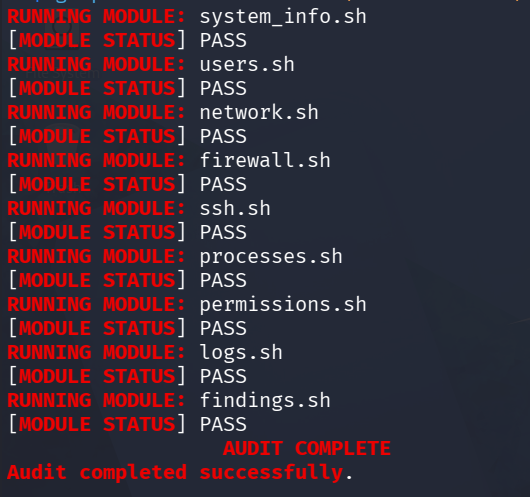
The main audit.sh engine executes the following modules sequentially:
You do not need to execute each module manually.
---
Step 3 — Monitor the Audit
During execution, the toolkit displays the current module and its output.
Example:
---
Step 4 — Wait for Completion
At the end of the audit you should see:
The toolkit also displays the location of the generated report.
---
📊 Audit Categories
| Module | Purpose |
|---|---|
| system_info.sh | OS, kernel, architecture, uptime, current user |
| users.sh | User accounts, UID 0 accounts, sudo membership, shells |
| network.sh | Interfaces, routes, listening sockets, acti |
| firewall.sh | Firewall services and firewall rules |
| ssh.sh | SSH configuration, service status, listening socket |
| processes.sh | Running processes and services |
| permissions.sh | World-writable files, SUID/SGID files, writable directories |
| logs.sh | Login activity, failed logins, authentication-related logs |
| findings.sh | Security checks, findings, classifications, recommendations |
---
📄 Generated Reports
Every successful audit creates a timestamped report.
Example:
List generated reports:
---
View the Latest Report
Using cat:
For easier reading:
Press:
to exit less.
---
🔎 Understanding Security Findings
The findings.sh module provides security-oriented checks and recommendations.
The toolkit uses classifications such as:
PASS
The specific check did not identify the condition being checked.
INFO
Informational information that may be useful during security review.
REVIEW
A condition that requires manual in and contextual analysis.
HIGH
A potentially significant security condition that should be in promptly.
> Important: A finding does not automatically mean that a system is . Security findings must be e within the context of the specific Linux en.
For example:
---
🔄 Running Multiple Audits
The toolkit can be executed repeatedly:
Each execution creates a new timestamped report.
Example:
This makes it possible to retain local audit history and compare results manually.
---
🔒 Report Security
Generated reports may contain sensiti about the audited Linux system, including:
Therefore, generated reports are intentionally excluded from Git.
The repository contains the following .gitignore rule:
This allows the reports/ directory to exist in the repository while pre generated audit reports from being committed.
Report Protection
Run:
A generated report should appear under:
that Git is not tracking reports:
Expected:
> Ne real audit reports containing sensiti information to a public repository.
---
🧪 Testing
The project has been tested through multiple stages.
Bash Syntax
Check the main audit engine:
Check all modules:
---
Executable Permission
Check:
The scripts should ha permissions.
---
Full Audit Test
Run:
successful completion:
---
Report Generation Test
:
A timestamped .txt report should exist.
---
Git Protection Test
Run:
The generated report should be ignored.
---
Fresh Clone Test
The project has also been tested from a fresh GitHub clone:
The toolkit successfully executed from the fresh clone and generated a new local audit report.
---
📸 Demonstration
Audit Execution
!Audit Execution
The screenshot demonstrates successful execution of the security audit modules and completion of the audit engine.
---
🛠️ Troubleshooting
Permission Denied
If you receive:
run:
Then:
---
Module Not Executable
Check:
If necessary:
---
Firewall Information Una
Firewall checks depend on the firewall framework installed on the system.
The toolkit checks common firewall components but does not automatically modify firewall configuration.
---
Authentication Logs Una
Some Linux systems may not ha authentication records a through lastb or the system journal.
This does not necessarily indicate a security problem.
---
SSH Not Installed or Active
If SSH is not installed or the SSH service is not active, the toolkit reports the condition.
The toolkit does not automatically enable or modify SSH configuration.
---
🧱 Design Principles
The project follows several design principles:
Modular
Each security category is implemented as an independent Bash module.
Lightweight
The toolkit relies primarily on Bash and standard Linux utilities.
Reproducible
The project can be cloned and executed on another Linux system.
Defensive
The toolkit focuses on auditing and identifying security-relevant conditions rather than exploitation.
Git-Safe
Generated reports are excluded from control to reduce the risk of exposing sensitive host information.
---
🔐 Security and Ethical Use
This toolkit is intended only for authorized defensi auditing.
Use it on:
Do not use this toolkit for:
Always obtain appropriate authorization before performing security assessments.
---
📚 Documentation
Detailed methodology and audit scope are a in:
The methodology documentation covers:
---
🔮 Future Impro
Potential future may include:
---
👨💻 Author
Bhuvan
Cybersecurity learning and defensi security project.
---
🎯 Project Goal
A lightweight toolkit for learning Linux security auditing and de practical defensi skills.
项目信息
开发语言:Shell
Star 数:1
技术要点
该项目属于防护思路方向的开源资源,代码结构清晰,适合安全研究人员学习参考。项目围绕A modular Bash-based defensive security auditing toolkit for Linux systems.展开,提供了可运行的实现,对理解相关安全机制、工具原理与攻防技术具有较高的研究价值。
从技术实现角度看,此类项目的核心在于对底层原理的深入理解与工程化落地。开发者在研究过程中可以结合官方文档与社区讨论,梳理项目的初始化流程、核心模块职责与数据流转,逐步掌握其中的技术细节与设计思路。
使用与学习建议
1. 下载源码压缩包,解压到本地环境。
2. 根据项目类型准备对应的运行环境与依赖。
3. 按照 README 中的步骤完成配置与部署。
4. 在隔离的测试环境中运行验证,避免影响生产系统。
免责声明
本资源来源于开源社区,仅供安全研究、技术学习与合法授权范围内的攻防演练使用,请勿用于任何非法或侵害他人权益的用途。使用本项目产生的一切后果由使用者自行承担。
| 资源标题 | linux-security-audit-toolkit - A modular Bash-based defensive security auditing t |
| 所属分类 | 防护思路 |
| 发布作者 | admin |
| 发布时间 | 2026-10-06 00:25:15 |
| 下载权限 | 免费下载 |
| 附件数量 | 2 个下载链接 |
| 浏览次数 | 390 |
| 讨论数量 | 0 |
| 主题状态 | 正常讨论中 |