 防护思路
点击放大
Windows-Firewall-Security-Lab - Hands-on Windows Firewall security lab demonstrati
项目说明
!Banner
Windows-Firewall-Security-Lab
Hands-on Windows Firewall security lab demonstrating rule creation, traffic filtering, and defensi analysis using PowerShell.
Windows Firewall Security Lab
Objective
This project demonstrates how Windows Firewall rules can be configured, tested, and analyzed in a controlled lab en to understand host-based security controls, network filtering, and defensi operations.
The lab focuses on:
* Creating and managing firewall rules
* Blocking and allowing network traffic
* Testing inbound and outbound connections
* Monitoring firewall behavior
* Understanding how endpoint firewalls reduce attack surface
Table of Contents
Skills Demonstrated
* Windows Firewall Configuration
* Network Security
* Defensi
* PowerShell Administration
* Port Filtering
* SOC Fundamentals
* Traffic Analysis
* Security Documentation
* Troubleshooting Connectivity Issues
---
Lab En
| Component | Details |
| ------------------ | ------------------------------------- |
| Operating System | Windows 10 |
| Tools Used | Windows Defender Firewall, PowerShell |
| En | Lab |
| Purpose | Firewall Rule Analysis & Testing |
| Connectivity Tests | Ping, TCP Connections |
| Security Focus | Host-Based Firewall Protection |
---
Project Structure
---
Lab Architecture
---
Firewall Rule Creation
Creating a Rule to Block Port 80
Purpose
This rule blocks inbound HTTP traffic on TCP port 80 to prevent unauthorized web-based access.
---
Screenshots
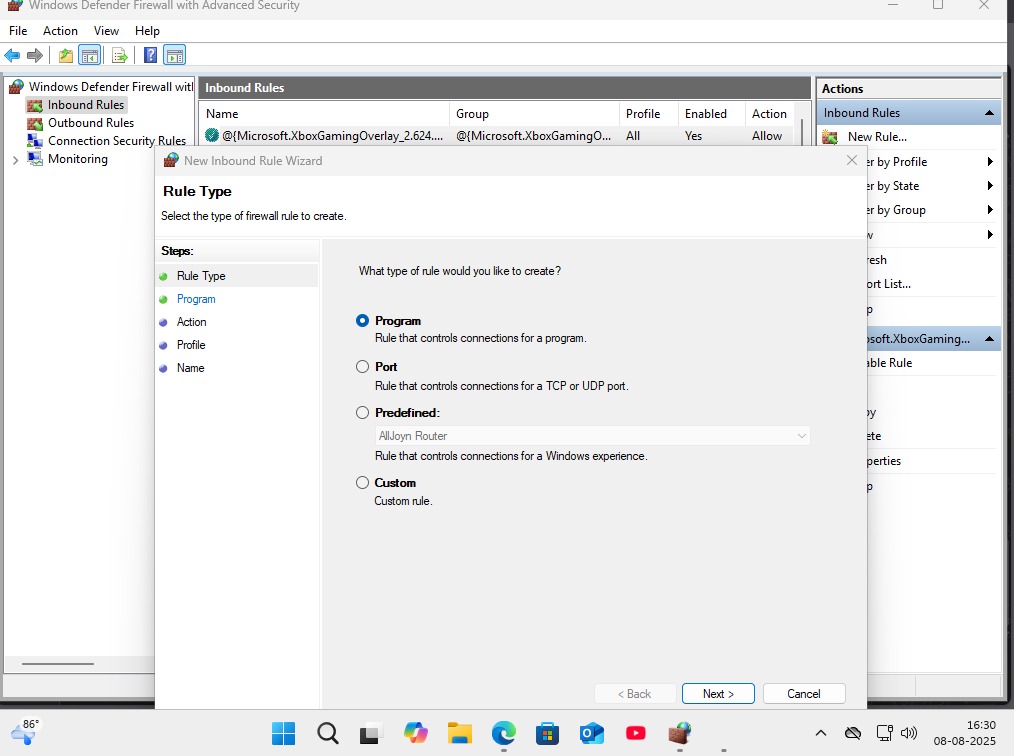
Firewall Rule Type Selection
!Firewall Rule Type Selection
---
Firewall Rule Final Configuration
!Firewall Rule Final Configuration
---
Windows Firewall Inbound Rules
!Windows Firewall Inbound Rules
---
Windows Firewall Outbound Rules
!Windows Firewall Outbound Rules
---
SSH Port Rule Selection
!SSH Port Rule Selection
---
SSH Port Configuration
!SSH Port Configuration
---
SSH Firewall Action Block
!SSH Firewall Action Block
---
SSH Firewall Rule Created
!SSH Firewall Rule Created
---
Telnet Port Block Test
!Telnet Port Block Test
---
Telnet Port Selection
!Telnet Port Selection
---
Telnet Firewall Block Action
!Telnet Firewall Block Action
---
Telnet Firewall Rule List
!Telnet Firewall Rule List
---
Telnet Connection Failed
!Telnet Connection Failed
---
Display Existing Firewall Rules
Purpose
Used to enumerate and acti rules configured on the system.
---
Check Specific Firewall Rule
Purpose
whether the custom firewall rule exists and confirms its status.
---
Test Connectivity
Test Localhost Connection
Expected Behavior
The firewall should block inbound traffic depending on rule configuration.
---
Attempted Connection Result
Analysis
The failed connection confirms that the firewall rule successfully blocked access to TCP port 80.
---
Allowing Traffic Again
Remo Rule
Purpose
Removes the pre created blocking rule and restores connectivity.
---
Firewall Rule Removal
Expected Result
The rule should no longer appear in firewall rule listings.
---
Successful Connection Test
Analysis
The successful connection confirms that firewall filtering behavior changed after removing the blocking rule.
---
Security Analysis
Windows Firewall is a critical endpoint security control used to:
* Restrict unauthorized network access
* Reduce attack surface exposure
* Control inbound and outbound communication
* Prevent lateral mo
* Enforce organizational security policies
In this lab:
* Firewall rule creation was tested
* Port filtering behavior was
* Network access control was analyzed
* Traffic blocking effecti was confirmed
* Basic defensi operations were simulated
This type of analysis is directly relevant to SOC and Blue Team en.
---
MITRE ATT&CK Relevance
| Technique ID | Technique |
| ------------ | ------------------------- |
| T1562 | Impair Defenses |
| T1046 | Network Service Discovery |
| T1021 | Remote Services |
Understanding firewall behavior helps defenders:
* Detect unauthorized access attempts
* Prevent remote exploitation
* Restrict attacker mo across systems
* Harden endpoint security configurations
---
Challenges Faced
* Understanding inbound rules
* Testing localhost connectivity behavior
* firewall rule precedence
* Troubleshooting blocked connections
---
Key Learnings
* Windows Firewall can effectively filter network traffic
* PowerShell allows automated firewall management
* Improper firewall configurations may expose systems
* Rule testing is important for defensi
* Endpoint firewalls play a major role in enterprise security
---
Future Impro
* Integrate firewall logs with Splunk SIEM
* Automate monitoring using PowerShell scripts
* Export logs for threat analysis
* Detect suspicious firewall rule modifications
* Create ad rule sets for enterprise scenarios
* Simulate attacker behavior against firewall policies
---
Tools Used
* Windows Defender Firewall
* PowerShell
* Test-NetConnection
* Windows Networking Utilities
---
Author
Deepak Rawat
Cybersecurity Enthusiast | SOC Analyst Aspirant | Blue Team Learning Path
GitHub:
---
Disclaimer
This project was created in a controlled lab en for educational and defensi purposes only.
项目信息
开发语言:未知
Star 数:1
技术要点
该项目属于防护思路方向的开源资源,代码结构清晰,适合安全研究人员学习参考。项目围绕Hands-on Windows Firewall security lab demonstrating rule creation, traffic filtering, and defensive security analysis using PowerShell.展开,提供了可运行的实现,对理解相关安全机制、工具原理与攻防技术具有较高的研究价值。
从技术实现角度看,此类项目的核心在于对底层原理的深入理解与工程化落地。开发者在研究过程中可以结合官方文档与社区讨论,梳理项目的初始化流程、核心模块职责与数据流转,逐步掌握其中的技术细节与设计思路。
使用与学习建议
1. 下载源码压缩包,解压到本地环境。
2. 根据项目类型准备对应的运行环境与依赖。
3. 按照 README 中的步骤完成配置与部署。
4. 在隔离的测试环境中运行验证,避免影响生产系统。
免责声明
本资源来源于开源社区,仅供安全研究、技术学习与合法授权范围内的攻防演练使用,请勿用于任何非法或侵害他人权益的用途。使用本项目产生的一切后果由使用者自行承担。
| 资源标题 | Windows-Firewall-Security-Lab - Hands-on Windows Firewall security lab demonstrati |
| 所属分类 | 防护思路 |
| 发布作者 | admin |
| 发布时间 | 2026-10-06 00:25:52 |
| 下载权限 | 免费下载 |
| 附件数量 | 2 个下载链接 |
| 浏览次数 | 199 |
| 讨论数量 | 0 |
| 主题状态 | 正常讨论中 |