 防护思路
点击放大
files-multiscan - A CLI tool that scans files against multiple malwa
项目说明
files-multiscan
A CLI tool that scans files against multiple malware detection services (, MalwareBazaar, Hybrid Analysis) for defensi analysis.
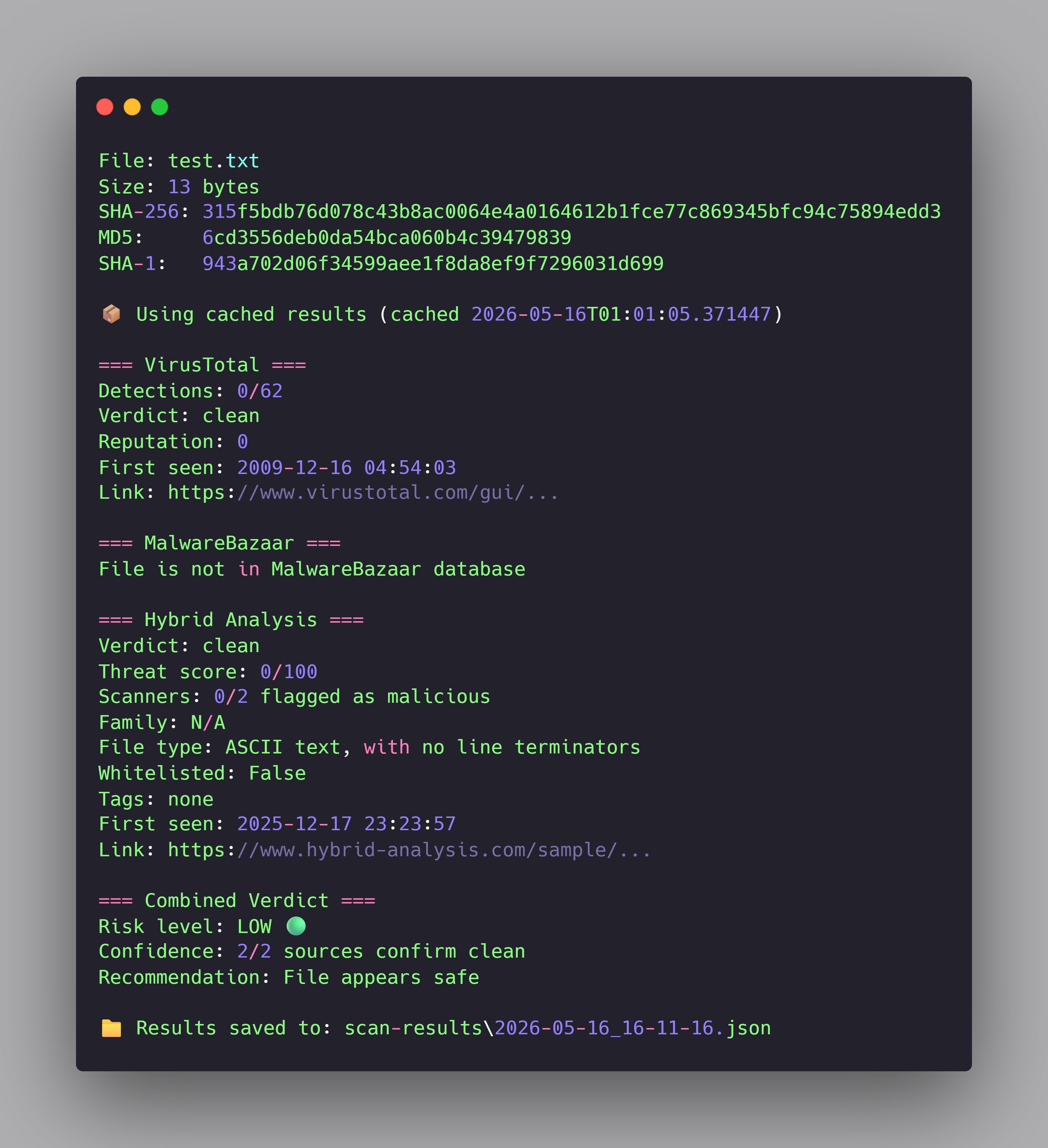
!Single file scan
About
Most consumer antivirus software comes with significant costs. They consume substantial system resources, run background services you didn't ask for, and uninstalling them often requires jumping through hoops just to remove an application. They feel less like security tools and more like guests who refuse to leave.
I wanted something simpler - a transparent tool that does one job well: tell me whether a file is safe to open. No bundled features, no telemetry, no system o. Just a CLI that takes a file path, asks three independent malware detection services about it, and gives me a clear answer.
files-multiscan accepts either a single file path or a directory, computes hashes in three formats (SHA-256, MD5, SHA-1) using SHA-256 as the primary identifier, and queries , MalwareBazaar, and Hybrid Analysis in sequence. It returns a structured with direct links to each service's full report, so you can dig deeper if you want to understand exactly what each engine detected.
What makes it useful is what most wallet trackers don't have: di. If three independent services agree a file is malicious, that's a stronger signal than any single source. The tool aggregates their into one risk level - HIGH, MEDIUM, LOW, or UNKNOWN - and tells you what to do with the file. You don't have to weigh conflicting opinions yourself.
The second core feature is local caching. If you scan a downloaded file once, the result is stored locally. Next time you scan the same file - or a folder containing it - the tool reads from cache instead of making redundant API calls. This means scanning the same Downloads folder fi doesn't burn through your free-tier API quota. The cache expires after 7 days, so detection updates e propagate.
The tool is designed for one specific use case: files before opening them. If your computer is already infected, this is not the tool you need. But if you're about to open a download from an unfamiliar source, run it through files-multiscan first - that's where the value is.
Features
scan-results/ for audit, review, or later analysis.Installation
Prerequisites
- (sign up → profile → API key)
- Hybrid Analysis (sign up → profile → API keys → Generate)
- MalwareBazaar (sign up → settings → Auth Key)
All three offer generous free tiers, no credit card required.
Setup
Configuration
Copy the example en file and add your API keys:
Edit .env:
You can run the tool without all three keys configured - missing services will simply be skipped during scans.
Usage
Scan a single file
This returns the full multi-source report with detection counts, threat scores, malware family classification, and links to each service's full report. Results are cached for 7 days, so repeated scans of the same file are instant.
Scan an entire directory
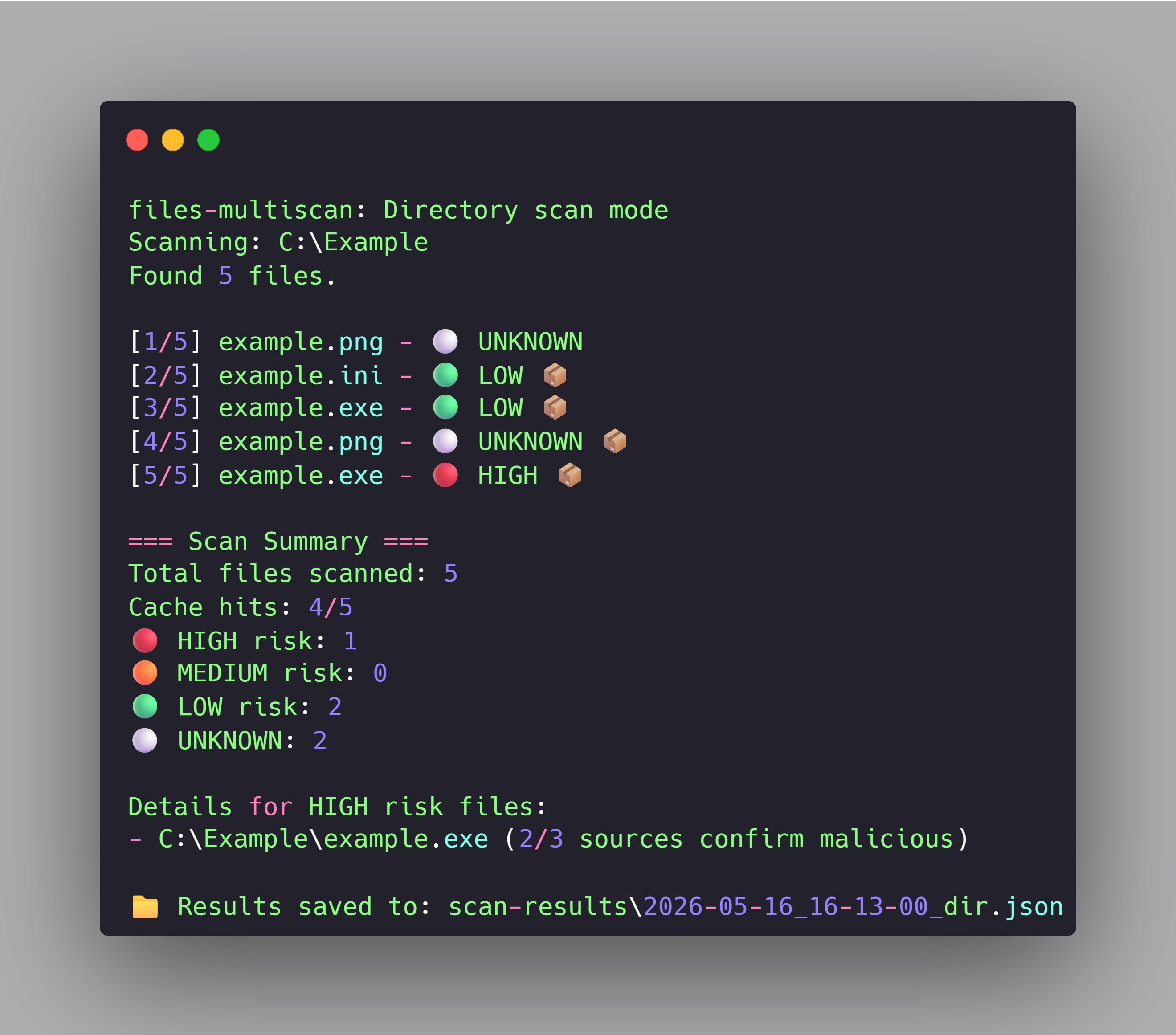
Recursively scans every file in the directory. Output shows each file as a single-line entry with risk level (🔴 HIGH, 🟠 MEDIUM, 🟢 LOW, ⚪ UNKNOWN), and the summary at the end highlights HIGH risk files with details.
!Directory scan output
Real-world example: catching a malicious "game crack"
While testing the scanner, I downloaded a file titled example.exe from a "free games" website. Running it through the scanner:
Result:
Unwanted/Generic, tagged eThis is a typical malware - "free crack" downloads from sketchy sites that bundle adware, info-stealers, or backdoors with the requested game files. The scanner caught it before I had a chance to run it.
Cache management
Scan logs
All scan results are saved as JSON files in scan-results/. Each file is named by timestamp and contains the full structured output including all API responses and aggregated - useful for audit, scripting, or later analysis.
How caching works
The tool maintains a local cache of scan results keyed by SHA-256 hash. The flow is:
1. Before each scan, the tool checks the cache.
2. If the hash is found and not expired (default TTL: 7 days), cached results are returned instantly.
3. If not in cache or expired, the tool queries all configured API sources and stores the result.
This means:
The cache is stored in cache/files_cache.json. You can delete it anytime to start fresh, or use --cleanup-cache to remove just the expired entries.
Project structure
The architecture is intentionally modular. Each API source has its own client module with a consistent return interface (status, , error fields). The aggregator consumes these unified results regardless of source. Adding a fourth scanning service would require only writing a new client module that matches the same interface - no changes to existing code.
Disclaimer
This tool is intended for defensi purposes only:
The tool relies on third-party services (, MalwareBazaar, Hybrid Analysis). No scanner is 100% accurate - use this as one signal among many. A LOW or UNKNOWN does not guarantee a file is safe, and a HIGH could occasionally be a false positi exercise judgment, especially for files from unknown sources.
This tool does not protect against already-installed malware. It only helps prevent infection by warning about files before you open them. If you suspect your system is already compromised, run a full antivirus scan and consider professional consultation.
Roadmap
The current is a working beta. Planned impro:
If you ha or find bugs during testing, open an issue or PR.
Tech stack
License
MIT - see LICENSE for details.
项目信息
开发语言:Python
Star 数:1
技术要点
该项目属于防护思路方向的开源资源,代码结构清晰,适合安全研究人员学习参考。项目围绕A CLI tool that scans files against multiple malware detection services (VirusTotal, MalwareBazaar, Hybrid Analysis) for defensive security analysis.展开,提供了可运行的实现,对理解相关安全机制、工具原理与攻防技术具有较高的研究价值。
从技术实现角度看,此类项目的核心在于对底层原理的深入理解与工程化落地。开发者在研究过程中可以结合官方文档与社区讨论,梳理项目的初始化流程、核心模块职责与数据流转,逐步掌握其中的技术细节与设计思路。
使用与学习建议
1. 下载源码压缩包,解压到本地环境。
2. 根据项目类型准备对应的运行环境与依赖。
3. 按照 README 中的步骤完成配置与部署。
4. 在隔离的测试环境中运行验证,避免影响生产系统。
免责声明
本资源来源于开源社区,仅供安全研究、技术学习与合法授权范围内的攻防演练使用,请勿用于任何非法或侵害他人权益的用途。使用本项目产生的一切后果由使用者自行承担。
| 资源标题 | files-multiscan - A CLI tool that scans files against multiple malwa |
| 所属分类 | 防护思路 |
| 发布作者 | admin |
| 发布时间 | 2026-10-06 00:29:15 |
| 下载权限 | 免费下载 |
| 附件数量 | 2 个下载链接 |
| 浏览次数 | 344 |
| 讨论数量 | 0 |
| 主题状态 | 正常讨论中 |