 红蓝攻防
点击放大
Red-Team-Infrastructure-Wiki - Wiki to collect Red Team infrastructure hardening
项目说明
This wiki is intended to provide a resource for setting up a resilient Red Team infrastructure. It was made to complement Ste (@424f424f) and Jeff Dimmock's () BSides NoVa 2017 talk "Doomsday Preppers: Fortifying Your Red Team Infrastructure" (slides)
If you have an addition you'd like to make, please submit a Pull Request or file an issue on the repo.
THANK YOU to all of the authors of the content referenced in this wiki and to all who contributed!
Table of Contents
- Functional Segregation
- Using Redirectors
- Sample Design
- Further Resources
- Categorization and Blacklist Checking Resources
- Easy Web-Based Phishing
- Cobalt Strike Phishing
- E On-Premises Setup
- Phishing Frameworks
- SMTP
- Sendmail
- Remo ser
- Configure a catch-all address
- Postfix
- DNS
- socat for DNS
- iptables for DNS
- HTTP(S)
- socat
- socat for HTTP
- iptables for HTTP
- ssh for HTTP
- Payloads and Web Redirection
- C2 Redirection
- C2 Redirection with HTTPS
- Other Apache mod_rewrite Resources
- Cobalt Strike
- Empire
- Domain Fronting
- Further Resources on Domain Fronting
- PaaS Redirectors
- Other Third-Party C2
Design Considerations
Functional Segregation
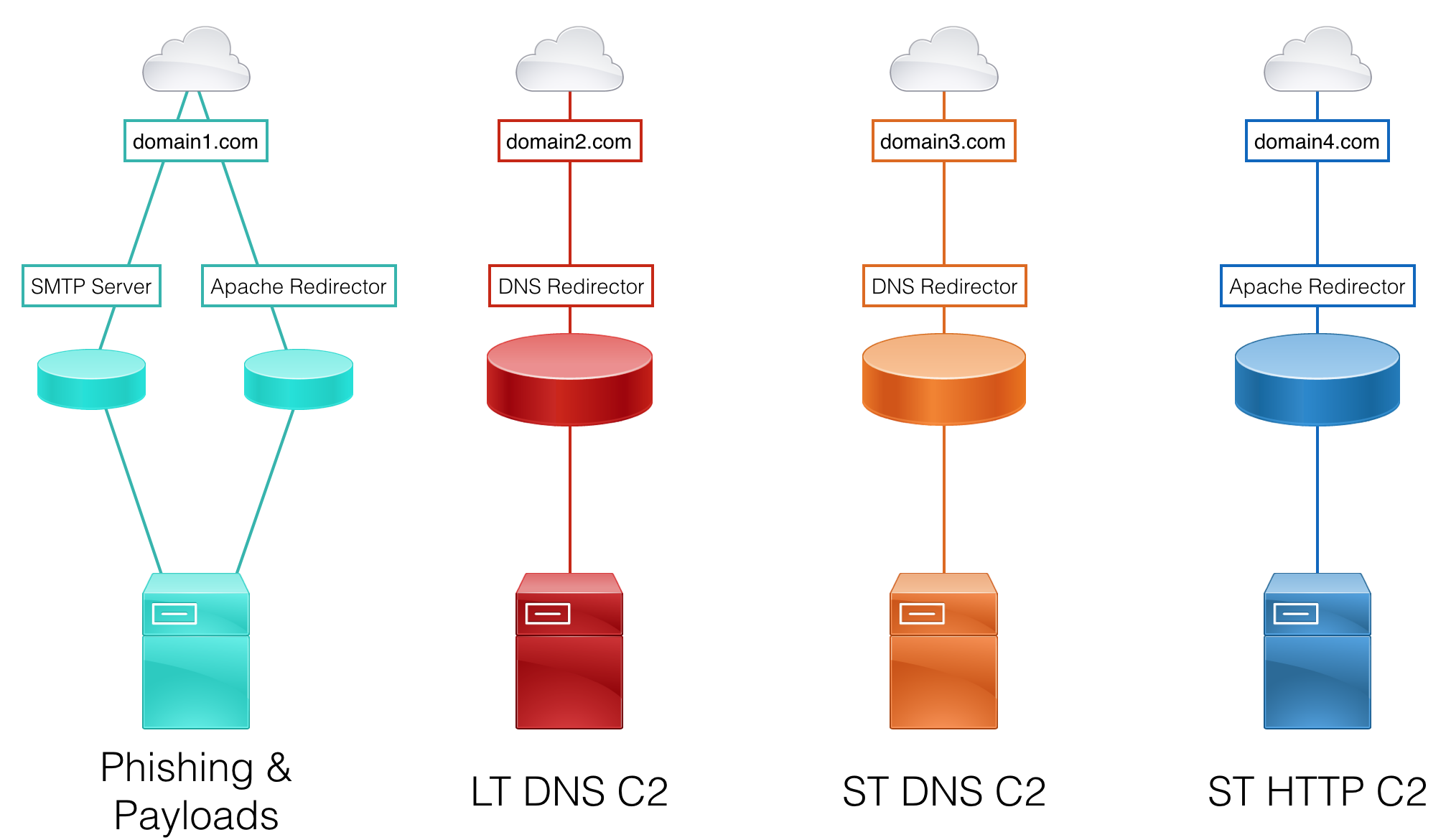
When designing a red team infrastructure that needs to stand up to an acti or last for a long-term engagement (weeks, months, years), it’s important to segregate each asset based on function. This provides resilience and agility against the Blue Team when campaign assets start getting detected. For example, if an assessment’s phishing email is identified, the Red Team would only need to create a new SMTP server and payload hosting server, rather than a whole team ser.
Consider segregating these functions on different assets:
* Phishing SMTP
* Phishing payloads
* Long-term command and control (C2)
* Short-term C2
Each of these functions will likely be required for each social engineering campaign. Since acti response is typical in a Red Team assessment, a new set of infrastructure should be implemented for each campaign.
Using Redirectors
To further resilience and concealment, every back-end asset (i.e. team server) should have a redirector placed in front of it. The goal is to always have a host between our target and our backend servers. Setting up the infrastructure in this manner makes rolling fresh infrastructure much quicker and easier - no need to stand up a new team server, migrate sessions, and reconnect non-burned assets on the backend.
Common redirector types:
* SMTP
* Payloads
* Web Traffic
* C2 (HTTP(S), DNS, etc)
Each redirector type has multiple implementation options that best fit different scenarios. These options are discussed in further detail in the Redirectors section of the wiki. Redirectors can be , dedicated servers, or even apps running on a Platform-as-a-Service instance.
Sample Design
Here is a sample design, keeping functional segregation and redirector usage in mind:
!Sample Infrastructure Setup
Further Resources
* A for Distributed Red Team Operations - Raphael Mudge ()
* Infrastructure for Ongoing Red Team Operations - Raphael Mudge
* Ad Threat Tactics (2 of 9): Infrastructure - Raphael Mudge
* Cloud-based Redirectors for Distributed Hacking - Raphael Mudge
* How to Build a C2 Infrastructure with Digital Ocean – Part 1 - Lee Kagan (@in)
* Automated Red Team Infrastructure Deployment with Terraform - Part 1 - Rasta Mouse (@_RastaMouse)
Domains
Percei reputation will vary greatly depending on the products your target is using, as well as their configuration. As such, choosing a domain that will work on your target is not an exact science. Open source intelligence gathering (OSINT) will be critical in helping make a best guess at the state of controls and which resources to check domains against. Luckily, online ad face the same problems and ha some solutions we can le.
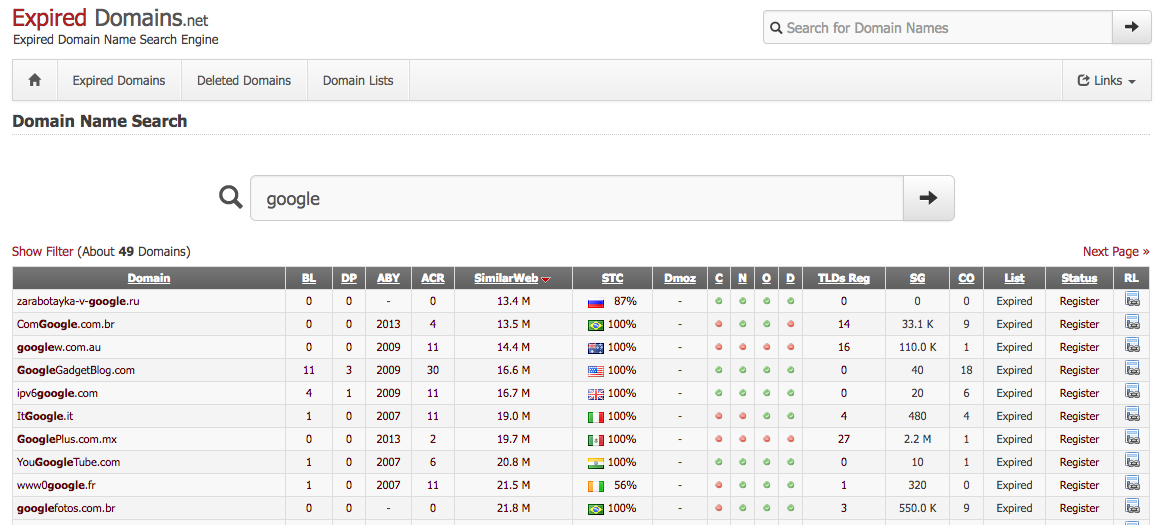
expireddomains.net is a search engine for recently expired or dropped domains. It provides search and ad filtering, such as age of expiration, number of backlinks, number of Archive.org snapshots, SimilarWeb score. Using the site, we can register pre-used domains, which will come with domain age, that look similar to our target, look similar to our impersonation, or simply are likely to blend in on our target’s network.
!expireddomains.net
When choosing a domain for C2 or data exfiltration, consider choosing a domain categorized as Finance or Healthcare. Many organizations will not perform SSL middling on those categories due to the possibility of legal or data sensitivity issues. It is also important to ensure your chosen domain is not associated with any previous malware or phishing campaigns.
The tool CatMyFish by Charles Hamilton() automates searches and web categorization checking with expireddomains.net and BlueCoat. It can be modified to apply more filters to searches or e long term monitoring of assets you register.
Another tool, DomainHunter by Joe Vest () & Andrew Chiles (), returns BlueCoat/WebPulse, IBM X-Force, and Cisco Talos categorization, domain age, alternate a TLDs, Archive.org links, and an HTML report. Additionally, it performs checks for use in known malware and phishing campaigns using Malwaredomains.com and MXToolBox. This tool also includes OCR support for bypassing the BlueCoat/WebPulse captchas. Check out the blog post about the tool's initial release for more details.
Yet another tool, AIRMASTER by Max Harley () uses expireddomains.net and Bluecoat to find categorized domains. This tool uses OCR to bypass the BlueCoat captcha, increasing the search speed.
If a pre domain isn't a or you would prefer a self-registered domain, it's possible to categorize domains yourself. Using the direct links below or a tool like Chameleon by Dominic Chell (). Most categorization products will o redirects or cloned content when determining the domain's categorization. For more information about Chameleon usage, check out Dominic's post Categorisation is not a security boundary.
Finally, make sure your DNS settings ha correctly.
* DNS Propogation Checker
Categorization and Blacklist Checking Resources
* McAfee
* Fortiguard
* Symantec + BlueCoat
* Checkpoint (requires free account)
* Palo Alto
* Sophos (submission only; no checking) - Click Submit a Sample -> Web Address
* TrendMicro
* Brightcloud
* Websense (Forcepoint)
* Lightspeed Systems
* Chameleon
* SenderBase
* MultiBL
* MXToolBox - Blacklists
Phishing Setup
Easy Web-Based Phishing
The words easy and phishing ne seem to go together. Setting up a proper phishing infrastructure can be a real pain. The following tutorial will provide you with the knowledge and tools to quickly setup a phishing server that passes "most" spam filters to-date and provides you with a RoundCube interface for an easy phishing experience including two-way communications with your target. There are many setup's and posts out there regarding phishing. This is just one method.
Once you have a domain that passes the proper checks listed in the previous section and have your phishing ser, you'll need to create a couple "A" records for your domain as pictured.
!DNS Setup
Next, ssh into your phishing server and make sure you have a proper FQDN hostname listed in your /etc/hosts.
Example "127.0.0.1 email.yourphishingserver.com email localhost"
Now, you're going to install the web front-end to phish from in just a few easy steps. Start by downloading the latest "BETA" of iRedMail onto your phishing server. Easy way is to right click the download button, copy the link address, use wget to download directly onto your phishing server. Next, untar it "tar -x.9.8-beta2.tar.bz2". Na into the unpacked folder and make the iRedMail.sh script executable (chmod +x iRedMail.sh). Execute the script as root, follow the prompts, and you'll need to reboot to finish e.
You'll want to make sure you have all the proper DNS records ponting to your mail server. (). For DKIM, the new command should be "ama showkeys" to list your DKIM key.
For DMARC we can use () to generate our dmarc entry.
!iRedMail Dashboard
Now, create a user to phish with.
!iRedMail Create User
Login to the RoundCube interface with your new user and phish responsibly!
!RoundCube Login
!RoundCube Send Mail
Cobalt Strike Phishing
Cobalt Strike provides customizable spearphishing functionality to support pentest or red team email phishing. It supports templates in HTML and/or plaintext formats, attachments, a bounceback address, URL embedding, remote SMTP ser, and per-message send delays. Another interesting feature is the ability to add a unique token to each user's embedded URL for click tracking.
!Cobalt Strike Spearphishing Popup
For more detailed information, check out these resources:
* Cobalt Strike - Spear Phishing documentation
* Cobalt Strike Blog - What's the go-to phishing technique or exploit?
* Spear phishing with Cobalt Strike - Raphael Mudge
* Ad Threat Tactics (3 of 9) - Targeted Attacks - Raphael Mudge
E On-Premises Setup
For red-team and phishing exercises where client trust and OPSEC matter, keeping captured client data and primary infrastructure on the customer's own servers (on-premises) provides significant ad o solutions. This approach uses cloud assets only for thin redirectors and fronts while maintaining sensiti internally.
Why Keep Client Data On-Premises
Architecture O
A robust on-premises E setup typically consists of:
1. Cloudflare (public front/redirectors) - DNS + WAF + redirection rules. Handles TLS to the public and performs cookie checks/redirects so only valid flows reach the phishing surface
2. Caddy on an edge server (client-owned) - Terminates TLS with internal/self-signed certs, remo IOCs, and reverse proxies traffic into the private network
3. Private network (Tailscale/Headscale) - Connects the Caddy host and the internal E host; avoids exposing E IPs to the public internet
4. E (on-premises) - Runs inside the private network, recei connections, and performs AiTM/credential capture
Cloudflare Firewall Rule Example
Cookie gating reduces bot hits and automated scanning by requiring a specific cookie to access the phishing portal:
This rule redirects requests to the portal domain that don't contain the required cookie, while exempting favicon requests to prevent redirect loops.
Sample Caddy Configuration
Running E
Execute E on the internal node with appropriate flags:
Important: E should only be reachable from inside the private network; ne its IP to public DNS.
OPSEC and Hardening Checklist
1. Ne E IPs in public DNS - Use private networking only
2. Keep sensitive data on client servers only - Redirectors must not store captured credentials
3. Harden redirectors - Rotate domains, use short TTLs, deploy multiple ephemeral redirectors
4. Implement WAF/firewall rules - Use cookie checks, IP allowlists, or UA
5. Separate logging and retention - Keep access logs on Caddy and capture logs on E host
6. Avoid fingerprints - Don't use predictable patterns or identical TLS fingerprints
This hybrid approach (public redirector/private capture) provides the resilience of cloud fronting while maintaining the security and legal ad of keeping sensiti on-premises.
Phishing Frameworks
Beyond rolling your own phishing setup or using a pentest or red teaming fraework, like Cobalt Strike, there are numerous tools and frameworks dedicated to email phishing. While this wiki won't go into detail about each framework, a few resources for each are collected below:
Gophish
* Gophish Official Site
* Gophish GitHub Repo
* Gophish User Guide
Phishing Frenzy
* Phishing Frenzy Official Site
* Phishing Frenzy GitHub Repo
* Introducing Phishing Frenzy - Brandon McCann ()
The Social-Engineer Toolkit
* The Social-Engineer Toolkit GitHub Repo
* The Social-Engineer Toolkit User Manual
FiercePhish (formerly FirePhish)
* FiercePhish GitHub Repo
* FiercePhish Wiki
Redirectors
SMTP
“Redirector” may not be the best word to describe what we’re going to accomplish, but the goal is the same as with our other redirection. We want to remove any traces of our phishing origination from the final email headers and provide a buffer between the and our backend server. Ideally, the SMTP redirector will be quick to setup and easy to decommission.
There are two key actions we want to configure an SMTP redirector to perform:
Sendmail
#### Remo ser
Add the following line to the end of /etc/mail/sendmail.mc:
Add to the end of /etc/mail/access:
Removing Sender’s IP Address From Email’s Received From Header
Removing Headers from Postfix setup
#### Configure a catch-all address
This will relay any email received to *.com to a chosen email address. This is highly useful to receive any responses or bounce-backs to a phishing email.
Add the following line right before //Mailer Definitions// (towards the end) of /etc/mail/sendmail.mc:
Add the following line to the end of /etc/mail/:
*Note: The two fields should be tab-separated*
Postfix
Postfix provides an easier alternative to sendmail with wider compatiblity. Postfix also offers full IMAP support with Dovecot. This allows testers to correspond in real-time with phishing targets who respond to the original message, rather than relying on the catch-all address and having to create a new message using your phishing tool.
A full guide to setting up a Postfix mail server for phishing is a in Julian Catrambone's () post Mail Servers Made Easy.
DNS
!Sample DNS Redirector Setup
Note: When using C2 redirectors, a foreign listener should be configured on your post-exploitation framework to send staging traffic through the redirector domain. This will cause the compromised host to stage through the redirector like the C2 traffic itself.
socat for DNS
socat can be used to redirect incoming DNS packets on port 53 to our team server. While this method works, some user’s ha staging issues with Cobalt Strike and or latency issues using this method.
Edit 4/21/2017:
The following socat command seems to work well thanks to testing from :
Redirecting Cobalt Strike DNS Beacons - Ste
iptables for DNS
iptables DNS forwarding rules have been found to work well with Cobalt Strike. There does not seem to be any of the issues that socat has handling this type of traffic.
An example DNS redirector rule-set is below.
Also, change "FORWARD" chain policy to "ACCEPT"
DNS redirection can also be done behind NAT
Some may have the requirement or need to host a c2 server on an internal network. Using a combination of IPTABLES, SOCAT, and reverse ssh tunnels, we can certainly achieve this in the following manner.
!Sample DNS NAT Setup
In this scenario we have our redirector using IPTables to forward all DNS traffic using the rule example described earlier in this section. Next, we create an SSH reverse port forward tunnel from our internal c2 server, to our main redirector. This will forward any traffic the main redirector receives on port 6667 to the internal c2 server on port 6667. Now, start socat on our team server to fork any of the incoming TCP traffic on port 6667 to UDP port 53 which, is what our DNS c2 needs to listen on. Finally, we similarly setup a socat instance on the main redirector to redirect any incoming UDP port 53 traffic into our SSH tunnel on port 6667.
HTTP(S)
Note: When using C2 redirectors, a foreign listener should be configured on your post-exploitation framework to send staging traffic through the redirector domain. This will cause the compromised host to stage through the redirector like the C2 traffic itself.
socat
socat provides a ‘dumb pipe’ redirection. Any request socat receives on the specified source interface/port is redirected to the destination IP/port. There is no filtering or conditional redirecting. Apache mod_rewrite, on the other hand, provides a number of methods to strengthen your phishing and increase the resilience of your testing infrastructure. mod_rewrite has the ability to perform conditional redirection based on request attributes, such as URI, user agent, query string, operating system, and IP. Apache mod_rewrite uses htaccess files to configure rulesets for how Apache should handle each incoming request. Using these rules, you could, for instance, redirect requests to your server with the default wget user agent to a legitimate page on your target's website.
In short, if your redirector needs to perform conditional redirection or ad filtering, use Apache mod_rewrite. Otherwise, socat redirection with optional iptables filtering will suffice.
socat for HTTP
socat can be used to redirect any incoming TCP packets on a specified port to our team server.
The basic syntax to redirect TCP port 80 on localhost to port 80 on another host is:
If your redirector is configured with more than one network interface, socat can be bound to a specific interface, by IP address, with the following syntax:
In this example, 10.0.0.2 is one of the redirector's local IP addresses and 1.2.3.4 is the remote team server's IP address.
iptables for HTTP
In addition to socat, iptables can perform 'dumb pipe' redirection via NAT. To forward the redirector's local port 80 to a remote host, use the following syntax:
SSH for HTTP
We ha covered using SSH for DNS tunnels. SSH works as a solid, and robust means to break through NAT and obtain a way for the implant to connect to a redirector and into your ser. Before setting up an SSH redirector, you must add the following lines to /etc/ssh/sshd_config:
To forward the redirector's local port 80 to your internal teamsrver, use the following syntax on the internal server:
You can also forward more than one port, for example if you want 443 and 80 to be open all at once:
Payloads and Web Redirection
When serving payload and web resources, we want to minimize the ability for incident responders to review files and increase the chances of successfully executing the payload, whether to establish C2 or gather intelligence.
!Sample Apache Redirector Setup
Apache Mod_Rewrite usage and examples by Jeff Dimmock:
* Strengthen Your Phishing with Apache mod_rewrite
* Invalid URI Redirection with Apache mod_rewrite
* Operating System Based Redirection with Apache mod_rewrite
* Combatting Incident Responders with Apache mod_rewrite
* Expire Phishing Links with Apache RewriteMap
* Apache mod_rewrite Grab Bag
* Serving Random Payloads with Apache mod_rewrite
Other Apache mod_rewrite usage and examples:
* mod_rewrite rule to evade sandboxes from Jason Lang
* Serving random payloads with NGINX - Gist by jivoi
To automatically set up Apache Mod_Rewrite on a redirector server, check out Julain Catrambone's () blog post Mod_Rewrite Automatic Setup and the accompanying tool.
C2 Redirection
The intention behind redirecting C2 traffic is twofold: obscure the backend team server and appear to be a legitimate website if browsed to by an incident responder. Through the use of Apache mod_rewrite and customized C2 profiles or other proxying (such as with Flask), we can reliably filter the real C2 traffic from in traffic.
* Cobalt Strike HTTP C2 Redirectors with Apache mod_rewrite - Jeff Dimmock
* Securing your Empire C2 with Apache mod_rewrite - Gabriel Mathenge (@_theVIVI)
* Hybrid Cobalt Strike Redirectors - Zach Grace () and
#### C2 Redirection with HTTPS
Building on "C2 Redirection" abo method is to have your redirecting server use Apache's SSL Proxy Engine to accept inbound SSL requests, and proxy those to requests to a re listener. Encryption is used at all stages, and you can rotate SSL certificates on your redirector as needed.
To make this work with your mod_rewrite rules, you need to place your rules in "/etc/apache2/sites-a/000-default-le-ssl.conf" assuming you've used LetsEncrypt (aka CertBot) to install your certificate. Also, to enable the SSL ProxyPass engine, you'll need the following lines in that same config file:
Other Apache mod_rewrite Resources
* Automating Apache mod_rewrite and Cobalt Strike Profiles
* mod-rewrite-cheatsheet.com
* Official Apache 2.4 mod_rewrite Documentation
* Apache mod_rewrite Introduction
* An In-Depth Guide to mod_rewrite for Apache
* Mod_Rewrite/.htaccess Syntax Checker
Modifying C2 Traffic
Cobalt Strike
Cobalt Strike modifies its traffic with Malleable C2 profiles. Profiles provide highly-customizable options for modifying how your server’s C2 traffic will look on the wire. Malleable C2 profiles can be used to strengthen incident response e, impersonate known ad, or masquerade as legitimate internal applications used by the target.
* Official Malleable C2 Profiles - GitHub
* Malleable Command and Control Documentation - cobaltstrike.com
* Cobalt Strike 2.0 - Malleable Command and Control - Raphael Mudge
* Cobalt Strike 3.6 - A Path for Pri Escalation - Raphael Mudge
* A Brave New World: Malleable C2 - Will Schroeder ()
* How to Write Malleable C2 Profiles for Cobalt Strike - Jeff Dimmock
* In-Memory E (Video series) - Raphael Mudge
As you begin creating or modifying Malleable C2 profiles, it's important to keep data size limits for the Beacon info placement. For example, configuring the profile to send large amounts of data in a URL parameter will require many requests. For more information about this, check out Raphael Mudge's blog post Beware of Slow Downloads.
If you encounter issues with your Malleable C2 profile and notice the teamser outputting errors, refer to Raphael Mudge's blog post Broken Promises and Malleable C2 Profiles for troubleshooting tips.
Empire
Empire uses Communication Profiles, which provide customization options for the GET request URIs, user agent, and headers. The profile consists of each element, separated by the pipe character, and set with the
set DefaultProfile option in the listeners context menu.Here is a sample default profile:
Alternatively, the DefaultProfile value can be set by modifying the file /setup/setup_database.py before Empire’s initial setup. This will change the default Communication Profile that Empire will use.
In addition to the Communication Profile, consider customizing the Empire server's staging URIs, ser, and defaut webpage content by following the steps presented in Joe Vest's () post Empire - Modifying Server C2 Indicators.
* Default Empire Communication Profiles (in Empire GitHub repo)
* How to Make Communication Profiles for Empire - Jeff Dimmock
Third-Party C2 Channels
Le trusted, legitimate web services for C2 can provide a leg-up o domains and infrastructure you' yourself. Configuration time and complexity based on the technique and service being used. A popular example of le third-party services for C2 redirection is Domain Fronting.
Domain Fronting
Domain Fronting is a technique used by censorship e services and apps to route traffic through legitimate and highly-trusted domains. Popular services that support Domain Fronting include Google App Engine, Amazon CloudFront, and Microsoft Azure. It's important to note that many pro, like Google and Amazon ha mitigations against Domain Fronting, so some linked resources or information provided in this wiki may be outdated by the time you try to use it.
In a nutshell, traffic uses the DNS and SNI name of the trusted service provider, Google is used in the example below. When the traffic is received by the Edge Server (ex: located at gmail.com), the packet is forwarded to the Origin Server (ex: phish.appspot.com) specified in the packet’s Host header. Depending on the service provider, the Origin Server will either directly forward traffic to a specified domain, which we’ll point to our team server, or a proxy app will be required to perform the final hop forwarding.
!Domain Fronting O
For more detailed information about how Domain Fronting works, see the whitepaper Blocking-resistant communication through domain fronting and the TOR Project’s meek documentation
In addition to the standard frontable domains, such as any google.com domain, it's possible to le other legitimate domains for fronting.
For more information about hunting frontable domains, check out:
* Domain Fronting Alternate Domains - Yiu (@)
* Finding Domain frontable Azure domains - thoth / Fionnbharr ()
* Google Groups: Blog post on finding 2000+ Azure domains using Censys
* FindFrontableDomains tool - Ste (@r)
Further Resources on Domain Fronting
* Simplifying Domain Fronting - Tim Malcom ()
* High-reputation Redirectors and Domain Fronting - Raphael Mudge
* Empire Domain Fronting - Chris Ross ()
* Escape and E Egressing Restricted Networks - Tom Steele (@_tomsteele) and Chris Patten
* Red Team Insights on HTTPS Domain Fronting Google Hosts Using Cobalt Strike - Will and Shay Nahari of CyberArk
* SSL Domain Fronting 101 - Ste (@424f424f)
* How I Identified 93k Domain-Frontable CloudFront Domains - Chris Myers () and Barrett Adams ()
* Domain Fronting: Who Am I? - Yiu (@)
* CloudFront SSL Domains - Yiu (@)
* CloudFront Hijacking - Matt Westfall ()
* CloudFrunt GitHub Repo - MindPointGroup
* Metasploit Domain Fronting With Microsoft Azure ()
* Alibaba CDN Domain Fronting - Yiu (@)
* CloudFlare Domain Fronting: an easy way to reach (and hide) a malware C&C - (Medium)
PaaS Redirectors
Many PaaS and SaaS pro provide a static subdomain or URL for use with a pro instance. If the associated domain is generally highly trusted, the instances could provide extra trust to your C2 infrastructure over a purchased domain and VPS.
To set the redirection up, you will need to identify a service that issues a static subdomain or URL as part of an instance. Then, either the instance will need to be configured with network or application-based redirection. The instance will act as a proxy, similar to the other redirectors discussed on this wiki.
Another interesting technique that merits further research is the use of o Amazon S3 buckets for C2. Check out the post S3 Buckets for Good and Evil by Andrew Luke () for more details on how S3 buckets could be used for C2. This technique could be combined with the third-party C2 capabilities of Empire to use the target's legitimate S3 buckets against them.
For another example of using PaaS for C2, check out Databases and Clouds: SQL Server as a C2 by Scott Sutherland (@_nullbind).
Other Third-Party C2
Other third-party services have been used in the wild for C2 in the past. Le third-party websites that allow for the rapid posting or modification of user-generated content can help you evade reputation-based controls, especially if the third-party site is generally trusted.
Check out these resources for other third-party C2 options:
* canisrufus (GitHub Repo) - maldevel
* External C2 (Third-Party Command and Control) - Cobalt Strike Documentation
* Cobalt Strike o C2 – beacon home in the most obscure ways - Mark Bergman at outflank.nl
* “Tasking” Office 365 for Cobalt Strike C2 - William Knowles ()
* External C2 for Cobalt Strike - Ryan Hanson ()
* External C2 framework for Cobalt Strike - Jonathan Echa ()
* External C2 framework (GitHub Repo) - Jonathan Echa ()
* Hiding in the Cloud:
Cobalt Strike Beacon C2 using Amazon APIs - Rhino Security Labs
* Exploring Cobalt Strike's ExternalC2 framework - Adam (@_xpn_)
Obscuring Infrastructure
Attack infrastructure is often easy to identify, appearing like a shell of a legitimate server. We will need to take additional steps with our infrastructure to increase the likelihood of blending in with real servers amongst either the target organization or services the target may conceivably use.
Redirectors can help blend in by redirecting invalid URIs, expiring phishing payload links, or blocking common incident responder techniques; however, attention should also be paid to the underlying host and its indicators.
For example, in the post Fall of an Empire, John Menerick () covers methods to detect Empire servers on the internet.
To combat these and similar indicators, it's a good idea to modify C2 traffic patterns, modify ser pages, restrict open ports, and modify default response headers.
For more details about how to do these and other tactics for multiple attack frameworks, check out these posts:
* Empire – Modifying Server C2 Indicators - Andrew Chiles
* Hunting Red Team Empire C2 Infrastructure - chokepoint.net
* Hunting Red Team Meterpreter C2 Infrastructure - chokepoint.net
* Identifying Empire HTTP Listeners (Tenable Blog) - Jacob Baines
* Host Header Manipulation - Yiu (@)
Securing Infrastructure
Attack infrastructure can be attacked just the same as any other internet-connected host, and it should be considered HIGHLY sensitive due to the data in use and connections into target en.
In 2016, remote code execution were disclosed on the most common attack tools:
* 2016 Metasploit RCE Static Key Deserialization
* 2017 Metasploit Meterpreter Dir Tra Bugs
* Empire Fails - Will Schroeder
* Cobalt Strike 3.5.1 Important Security Update - Raphael Mudge
iptables should be used to filter unwanted traffic and restrict traffic between required infrastructure elements. For example, if a Cobalt Strike team server will only ser to an Apache redirector, iptables rules should only allow port 80 from the redirector’s source IP. This is especially important for any management interfaces, such as SSH or Cobalt Strike’s default port 50050. Also consider blocking non-target country IPs. As an alternati using hypervisor firewalls provided by your . For example, Digital Ocean offers Cloud Firewalls that can protect one or multiple droplets.
chattr can be used on team servers to prevent cron directories from being modified. Using chattr, you can restrict any user, including root, from modifying a file until the chattr attribute is removed.
SSH should be limited to public-key authentication only and configured to use limited-rights users for initial login. For added security, consider adding multi-factor authentication to SSH.
Update! No securing list is complete without a reminder to regularly update systems and apply hot-fixes as needed to remediate .
Of course, this list is not exhaustive of what you can do to secure a team server. Follow common hardening practices on all infrastructure:
* Red Hat Enterprise Linux 6 Security Guide
* Debian Documentation on Hardening
* Securing Debian Manual
* 20 Linux Ser Security Tips - nixCraft
* SANS Linux Security Checklists
* Docker Your Command & Control (C2) - Alex Rymdeko-Harvey ()
Specific Hardening Resources
There are a number of resources a online discussing the secure setup and design of infrastructures. Not every design consideration will be appropriate for every attack infrastructure, but it's useful to know what options are a and what other testers are doing.
Here are some of those resoources:
* Responsible Red Teams - Tim Malcom ()
* Safe Red Team Infrastructure - Tim Malcom ()
* Red Team Infrastructure - AWS Encrypted EBS - @_rastamouse
* Attack Infrastructure Logging (4-part series) - Gabriel Mathenge (@_theVIVI)
Automating Deployments
The topics covered in this wiki strengthen attack infrastrctures, but generally require a good deal of time to design and implement. Automation can be used to greatly reduce deployment times, allowing you to deploy more complex setups in less time.
Check out these resources about attack infrastructure automation:
* Automated Red Team Infrastructure Deployment with Terraform - Part 1 - @_RastaMouse
* Automated Red Team Infrastructure Deployment with Terraform - Part 2 - @_RastaMouse
* Mod_Rewrite Automatic Setup - Julian Catrambone ()
* Automated Empire Infrastructure - Jeremy Johnson ()
* RTOps: Automating Redirector Deployment With Ansible - Kevin Dick
* Automating Gophish Releases With Ansible and Docker - Jordan Wright ()
* Red Baron GitHub Repo - Marcello ()
* Automating Apache mod_rewrite and Cobalt Strike Malleable C2 for Intelligent Redirection - Joe Vest ()
* Modular Infrastructure with Terraform - Liam Somerville ()
* Red Team Infrastructure - Topher Timzen () & r00tkillah]()
General Tips
* Document e - Running a complex Red Team infrastructure means many moving parts. Be sure to document each asset’s function and where its traffic is sent.
* Split assets among different service pro and regions - Infrastructure assets should be spread across multiple service pro and geographic regions. Blue Team members may raise monitoring thresholds against pro identified as actively performing an attack and may e block a gi provider. Note: keep international privacy laws in mind if sending encrypted or sensitive data across borders.
* Don't go o - It's easy to get excited about ad techniques and want to throw the kitchen sink at a target. If you are emulating a specific ad threat, only le techniques the real threat actor used or techniques within the skillset of the threat actor. If your red team testing will attack the same target long-term, consider starting "easy" and working through the more ad tradecraft as your assessments go on. E the red team's technique alongside the blue team's will consistenly push the organization forward, whereas hitting the blue team with e at once may o the blue team and slow the learning process.
* Monitor logs - All logs should be monitored throughout the engagement: SMTP logs, Apache logs, tcpdump on socat redirectors, iptables logs (specific to traffic forwarding or targeted filtering), weblogs, Cobalt Strike/Empire/MSF logs. Forward logs to a central location, such as with rsyslog, for easier monitoring. Operator terminal data retention may come in handy for going over an historical command useage during an operation. created an easy-to-use program named lTerm that will log all bash terminal commands to a central location. Log all terminal output with lTerm. Check out Yiu's post CobaltSplunk for an example of how to send Cobalt Strike logs to Splunk for ad infrastructure monitoring and analysis.
* Implement high-value event alerting - Configure the attack infrastructure to generate alerts for high-value events, such as new C2 sessions or credential capture hits. One popular way of implementing alerting is via a chat platform's API, such as Slack. Check out the following posts about Slack alerting: Slack Shell Bot - Russel Van Tuyl (), Slack Notifications for Cobalt Strike - Andrew Chiles (), Slack Bots for Trolls and Work - Jeff Dimmock ()
* Fingerprint incident response - If possible, try to passively or actively fingerprint IR actions before the assessment starts. For example, send a mediocre phishing email to the target (using unrelated infrastructure) and monitor traffic that infrastructure receives. IR team in can disclose a good deal of information about how the team operates and what infrastructure they use. If this can be determined ahead of the assessment, it can be filtered or redirected outright.
Thanks to Contributors
A BIG THANK YOU to all the following people (listed alphabetically) who contributed tools, tips, or links to include in the wiki, and another THANK YOU to anyone who wrote a tool or post referenced in this wiki!
* - Andrew Chiles
* - Raphael Mudge
* - Jeremy Johnson
*
* - Dominic Chell
* - EK
* - Joe Vest
* - Alex Rymdeko-Harvey
* - Russel Van Tuyl
* - Julian Catrambone
* @_RastaMouse
* - Lee Christensen
* - Jonathan Echa
* @ - Yiu
* - Chris Ross
项目信息
开发语言:未知
Star 数:4538
技术要点
该项目属于红蓝攻防方向的开源资源,代码结构清晰,适合安全研究人员学习参考。项目围绕Wiki to collect Red Team infrastructure hardening resources展开,提供了可运行的实现,对理解相关安全机制、工具原理与攻防技术具有较高的研究价值。
从技术实现角度看,此类项目的核心在于对底层原理的深入理解与工程化落地。开发者在研究过程中可以结合官方文档与社区讨论,梳理项目的初始化流程、核心模块职责与数据流转,逐步掌握其中的技术细节与设计思路。
使用与学习建议
1. 下载源码压缩包,解压到本地环境。
2. 根据项目类型准备对应的运行环境与依赖。
3. 按照 README 中的步骤完成配置与部署。
4. 在隔离的测试环境中运行验证,避免影响生产系统。
免责声明
本资源来源于开源社区,仅供安全研究、技术学习与合法授权范围内的攻防演练使用,请勿用于任何非法或侵害他人权益的用途。使用本项目产生的一切后果由使用者自行承担。
| 资源标题 | Red-Team-Infrastructure-Wiki - Wiki to collect Red Team infrastructure hardening |
| 所属分类 | 红蓝攻防 |
| 发布作者 | admin |
| 发布时间 | 2026-10-06 00:33:18 |
| 下载权限 | 免费下载 |
| 附件数量 | 2 个下载链接 |
| 浏览次数 | 447 |
| 讨论数量 | 0 |
| 主题状态 | 正常讨论中 |