 红蓝攻防
点击放大
RedEye - RedEye is a visual analytic tool supporting Red &
项目说明
RedEye: Red Team C2 Log
---
⚠️ This Repo Currently in Maintenance Mode ⚠️
This GitHub repository is no longer under acti. We'll review community issues and pull requests for bug fixes, but won't consider any new feature additions.
---
<p align="center">
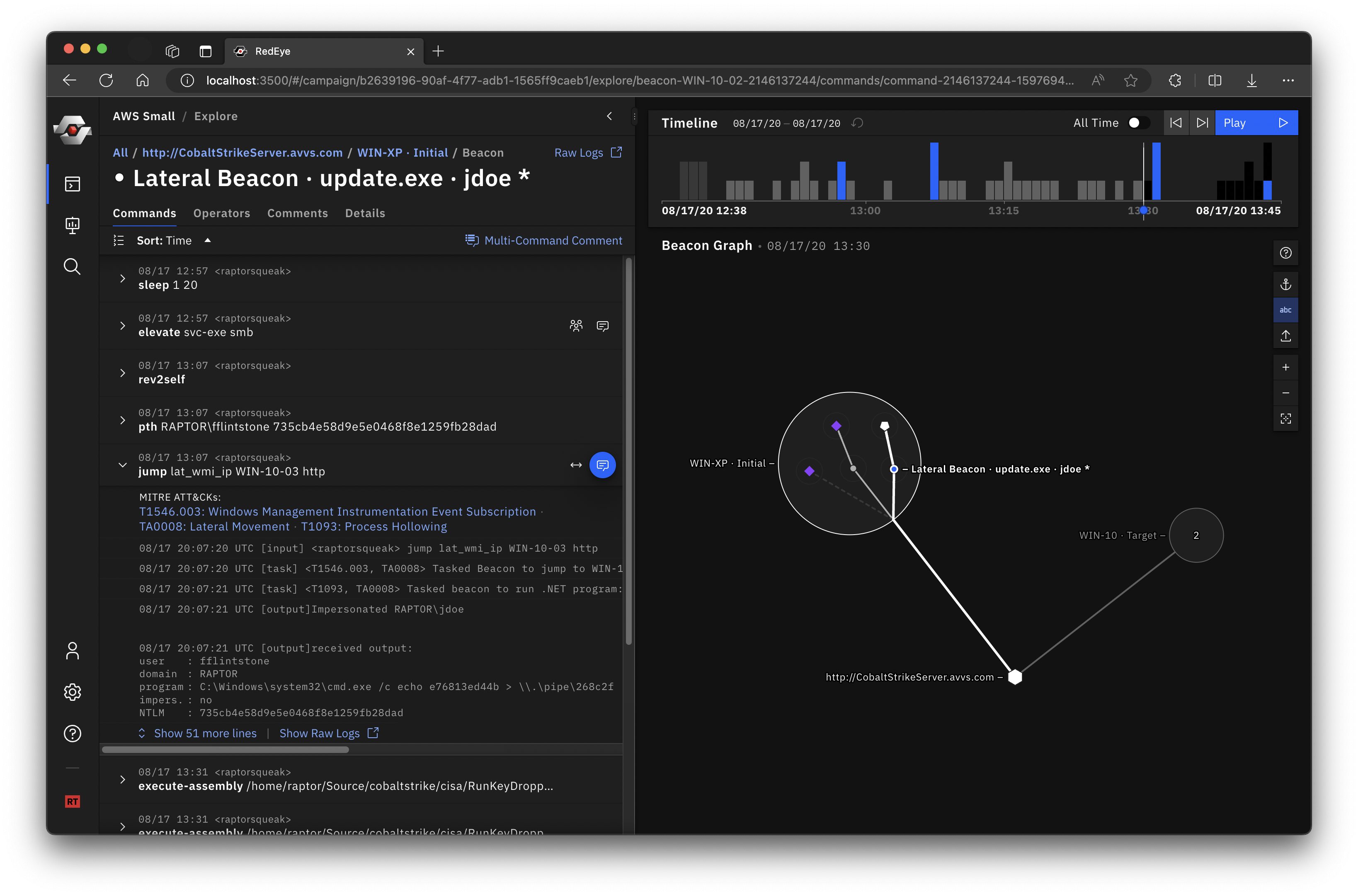
<img alt="RedEye Screenshot" src=" width="100%"/>
</p>
RedEye is an open-source analytic tool de by CISA and DOE’s Pacific Northwest National Laboratory to assist Red Teams with and reporting command and control acti. This tool allows an operator to assess and display complex data, e mitigation strategies, and enable effecti making in response to a Red Team assessment. The tool parses logs, such as those from Cobalt Strike, and presents the data in an easily digestible format. The users can then tag and add comments to acti displayed within the tool. The operators can use the RedEye’s presentation mode to present findings and workflow to stakeholders.
RedEye can assist an operator to efficiently:
| Red Team | Blue Team |
|:------------:|:-------------:|
| ![Red Team]() | ![Blue Team]() |
Quick start
1. Download the latest RedEye binaries for your OS\* from the Releases page.
2. Pick a mode and Run the server
- Red Team mode enables the full feature set: upload C2 logs, explore data, and create presentations. _You must provide a password to run in Red Team mode._ To start the server in Red Team mode, run the following in a terminal.
- Blue Team mode (default) enables a simplified, read-only UI for re campaigns exported by a Red Team. To start the server in Blue Team mode, run the following in a terminal.
3. Use the web app in a browser at The RedEye binary runs as a server in a terminal window and will automatically open the web app UI your default browser. You must close the terminal window to quit the RedEye server.
4. Try importing the gt.redeye example dataset to get started. Or try a different example dataset.
_MacOS Issue - When running RedEye for the first time, you may get a "not " error. You must go to "System Preferences" > "Security & Privacy" > "General" and click "Open Anyway." More info on the Apple support page._
Follow the User Guide to learn about RedEye's feature set.
---
Red Team & Blue Team Modes
RedEye has two modes that cover two stages of the Red Teaming process. Red Team mode allows importing C2 data, editing imported data, and making comments and presentations. After curating and annotating campaign data, Red Teams can export their campaign as a standalone .redeye file and hand it off to a Blue Team for reporting and remediation. Blue Team mode runs RedEye in a simplified read-only mode for curated data exported by a Red Team.
_Note: Both Red and Blue Team modes can be started from the same RedEye application binary._
Red Team
The downloaded binary comes in two parts:
RedEye application binaryparsers folder containing parser binaries (e.g. cobalt-strike-parser Cobalt Strike log parser binary)There are three options to run RedEye in Red Team mode:
1. Run the downloaded binary, passing in the --redTeam and password options:
2. Clone, install, and run the project directly (covered in the Local Build section).
3. Docker Compose
1. Clone the repo
2. Update the en in docker-compose.yml.
3. Run:
Blue Team
The Blue Team mode is a simplified, read-only UI for displaying data that has been curated, annotated, and exported by a Red Team. This mode runs by default to make startup more simple for the Blue Team.
The Blue Team can be run by double-clicking the 'RedEye' application binary. RedEye runs at (by default) and will automatically open your default browser.
Blue Team Presentation Handoff
If a campaigns folder is located in the same directory as the RedEye application, RedEye will attempt to import any .redeye campaign files within. Campaign files can be exported in the Red Team mode.
To prepare a for the Blue Team, follow these two steps:
1. Copy the RedEye application binary to an empty folder.
2. Create a campaigns folder in the same directory and place the .redeye campaign files you want to send inside.
.redeye files can also be uploaded in Blue Team mode via the "+ Add Campaign" dialog.
Example Datasets
There are example datasets in this repo a for download. These are located in the ./applications/redeye-e2e/src/fixtures folder.
You may want to use a tool like download-directory.github.io to download just one folder of a github repo
<!--
RedEye Ser
RedEye runs as a server and can be setup to serve the UI on a network..
*{instructions}*
-->
RedEye Ser
Type ./Redeye -h to view the options
you can also configure the ser in a config.json file that sits next to the RedEye binary
Local Build
Required Packages
npm install -g yarnyarn install // Installs all packages1.
yarn release:all to build a binary for Linux, macOS, and Windows2.
yarn release:(mac|windows|linux) .- mac
- windows
- linux
De
Setup
Install Node.js >= v16
Install yarn globally via npm
Install package dependencies
#### Quick Start De
Runs the project in de mode
#### Ad De
It is recommended to run the server and client in two separate terminals
...in another terminal
#### Build
to build a binary for Linux, macOS, and Windows
to build for a specific platform, replace all with the platform name
Platform support
- Ubuntu 18 and newer
- Kali Linux 2020.1 and newer
- Others may be supported but are untested
- El Capitan and newer
- Windows 7 and newer
- ARM support is experimental
---
<di="center">
<img alt="CISA Logo" src=" Logo.png?raw=true" height="35%" width="35%"/>
<img alt="RedEye Logo" src=" height="35%" width="35%"/>
</div>
项目信息
开发语言:TypeScript
Star 数:2769
技术要点
该项目属于红蓝攻防方向的开源资源,代码结构清晰,适合安全研究人员学习参考。项目围绕RedEye is a visual analytic tool supporting Red & Blue Team operations展开,提供了可运行的实现,对理解相关安全机制、工具原理与攻防技术具有较高的研究价值。
从技术实现角度看,此类项目的核心在于对底层原理的深入理解与工程化落地。开发者在研究过程中可以结合官方文档与社区讨论,梳理项目的初始化流程、核心模块职责与数据流转,逐步掌握其中的技术细节与设计思路。
使用与学习建议
1. 下载源码压缩包,解压到本地环境。
2. 根据项目类型准备对应的运行环境与依赖。
3. 按照 README 中的步骤完成配置与部署。
4. 在隔离的测试环境中运行验证,避免影响生产系统。
免责声明
本资源来源于开源社区,仅供安全研究、技术学习与合法授权范围内的攻防演练使用,请勿用于任何非法或侵害他人权益的用途。使用本项目产生的一切后果由使用者自行承担。
| 资源标题 | RedEye - RedEye is a visual analytic tool supporting Red & |
| 所属分类 | 红蓝攻防 |
| 发布作者 | admin |
| 发布时间 | 2026-10-06 00:34:12 |
| 下载权限 | 免费下载 |
| 附件数量 | 2 个下载链接 |
| 浏览次数 | 317 |
| 讨论数量 | 0 |
| 主题状态 | 正常讨论中 |