 红蓝攻防
点击放大
pi-pwnbox-rogueap - Homemade Pwnbox :rocket: / Rogue AP :satellite: ba
项目说明
Pi-PwnBox :rocket: -RogueAP :satellite:
===============================================================================
Homemade (headless) PwnBox / RogueAP based on Raspberry Pi & Alfa WiFi USB Adapters.
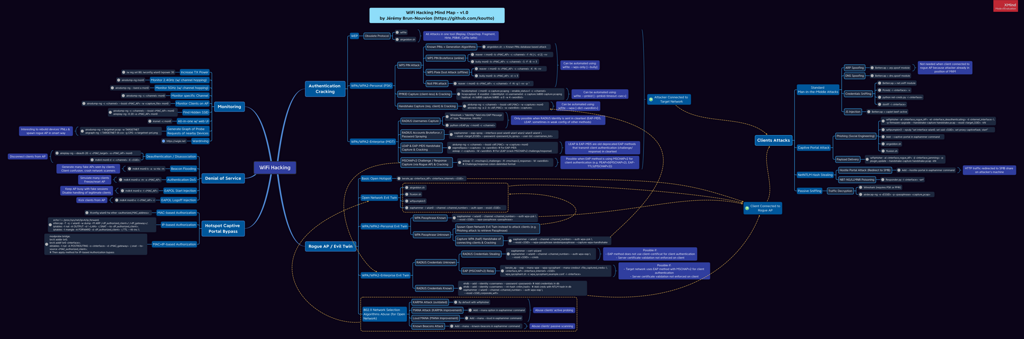
WiFi Hacking Cheatsheets & Mind Map :bulb:
Designed to be used for:
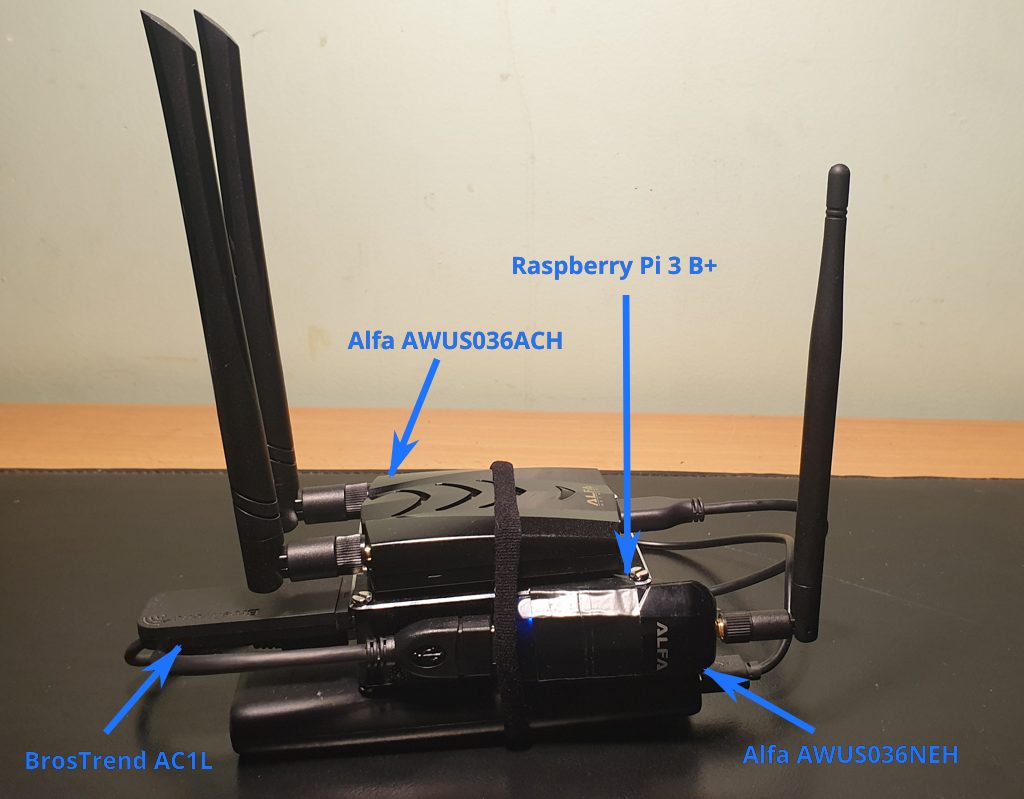
!Pi-PwnBox-RogueAP
Table of Contents
=================
* Pi-PwnBox-RogueAP
* Equipment used
* WiFi USB Adapters O
* Requirements & Compatibility
* Installation
* PwnBox Network Configuration
* Wireless Dedicated Administration Network
* LAN Network (Wireless or Wired)
* PwnBox Remote Access
* Usage
* WiFi Hacking Cheatsheets & Mind Map
* Troubleshooting
* Possible Upgrade
Equipment used
--------------
WiFi USB Adapters O
--------------------------
| Device | Chipset | Usage | 802.11 | 2.4 Ghz | 5 Ghz | Kali out-of-box | Mon. Mode | Injec-tion | AP |
|----------|--------|--------|--------|------|-------------------------|--------------|-----------|---------|--------|
| Built-in Raspberry Pi 3 B+ WiFi chip | Broadcom 43430 | Connection to Internet (auto-start at boot if WiFi key added in config) | 802.11 b/g/n/ac | Y | Y | Y | N* | N* | Y |
| BrosTrend AC1L AC1200 | Realtek RTL8812AU | Acces Point for Remote Access (auto-start at boot) | 802.11 a/b/g/n/ac | Y | Y | N | Y | N | Y |
| Alfa AWUS036NEH | Ralink RT2870/3070 | WiFi Attacks | 802.11 b/g/n | Y | N | Y | Y | Y | Y |
| Alfa AWUS036ACH | Realtek RTL8812AU | WiFi Attacks | 802.11 a/b/g/n/ac | Y | Y | Y | Y | Y | Y |
\* would require nexmon patch to enable monitor mode and injection support on built-in Broadcom chip (but we do not need it for its usage here).
Requirements & Compatibility
------------------------------
root.arm64, but some older precompiled binaries may require box64 or manual compilation.Installation
------------
1. Download Kali Linux ARM Image for Raspberry Pi:
2. Flash Kali Linux ARM Image for Raspberry Pi onto Micro SD Card (use Raspberry Pi Imager or dd).
3. Boot Raspberry Pi, log in (default kali/kali) and make sure it has Internet connection.
4. Download install scripts/configurations on the PwnBox:
5. Important: Edit install script configuration at the top of scripts/install-system.sh file:
- Choose *Guacamole* passwords (GUACAMOLE_PASSWORD, GUACAMOLE_MYSQL_PASSWORD).
- Set WiFi interfaces persistent names based on their MAC addresses: wlxaabbccddeeff for a device with MAC address aa:bb:cc:dd:ee:ff.
- Set MAC addresses of eth0 & wlan0 (built-in interfaces).
- Set WiFi connection settings (WIFI_SSID, WIFI_PASSPHRASE).
6. Run install script (will pause at the end of each step in order to allow for manual inspection of command outputs)
7. Reboot & check correct configuration of network interfaces:
- Built-in wired and wireless interfaces should be named eth0 and wlan0 respectively.
- WiFi USB Adapters should use persistent naming (modern naming con wlx*).
- AP (PWNBOX_ADMIN) should be started on appropriate wlx* interface.
8. Configure on *Guacamole*:
1. Connect to Guacamole at
2. Go to *guacadmin (top right) > Settings > Connections*
3. Click on *New Connection*
4. Fill connection settings as follows:
- Name = pwnbox-vnc
- Location = ROOT
- Protocol = VNC
- Maximum number of connections = 3
- Maximum number of connections = 3
- Guacamole Proxy Hostname = 127.0.0.1
- Guacamole Proxy Port = 4822
- Network Hostname = 127.0.0.1
- Network Port = 5901
- Authentication Password = (password chosen at install when running install-system.sh)
- Color depth = True color (32-bit)
9. Change default credentials:
- Kali system credentials (passwd kali)
- Guacamole credentials (via )
PwnBox Network Configuration
Wireless Dedicated Administration Network
When booting, PwnBox automatically spawns an AP on one interface to allow for easy remote access:
PWNBOX_ADMIN (Hidden SSID)Koutto!PwnB0x!LAN Network (Wireless or Wired)
When booting, PwnBox automatically connects to:
/etc/wpa_supplicant.conf). If you want to connect to a new WiFi network (not saved into PwnBox), it is necessary to add WPA passphrase of the network before:1. Access the PwnBox using another way, e.g.:
- Use wireless dedicated administration network (most con approach),
- Use wired network,
- Use monitor + (wireless) keyboard.
2. Add WPA passphrase to PwnBox local configuration:
3. Test connection:
PwnBox Remote Access
PwnBox can be controlled through:
PwnBox's IP depends on the network you want to access it from:
PWNBOX_ADMIN): IP is always 10.0.0.1.netdiscover for example.*Note: Guacamole service might take a lot of resources (RAM) when running. If not used, it can be stopped using stop-guacamole.sh script.*
Usage
WiFi Hacking Cheatsheets & Mind Map
-----------------------------------------------

Troubleshooting
---------------
Slow boot when Ethernet cable is unplugged
Because
/etc/network/interfaces uses auto eth0, the system waits for a DHCP lease during boot. If you frequently run the PwnBox without Ethernet and experience slow boots, edit /etc/network/interfaces and change:to:
(Remove the auto eth0 line.)
DHCP service conflict warning
isc-dhcp-server is installed because some tools (e.g., Fluxion) require it, but it is disabled by default to avoid a port 67/udp conflict with dnsmasq (which serves the PWNBOX_ADMIN AP). If you need isc-dhcp-server, stop dnsmasq first:Guacamole / Tomcat service fails to start
Newer Kali/Debian releases ship Tomcat 10 instead of Tomcat 9. The
start-guacamole.sh and stop-guacamole.sh scripts auto-detect the installed Tomcat . If Guacamole does not work after install, check:BrosTrend AC1L dri
If the installer (
deb.trendtechcn.com) is offline, build the dri:does not start
Make sure you ran
Python 2 tools no longer work
Python 2 has been removed from modern Kali. The install script now uses Python 3 only. If you have old custom Python 2 tools, migrate them to Python 3 or run them in a dedicated Docker container.
No Internet after disabling NetworkManager
The install script disables NetworkManager in favor of classic
/etc/network/interfaces. If you need to temporarily re-enable NM:Wireless interface names changed after reboot
Check that your MAC addresses in
install-system.sh match reality:Then re-run the network configuration section or update /etc/ude.d/70-persistent-net.rules manually.
Possible Upgrade
----------------
项目信息
开发语言:Shell
Star 数:2103
技术要点
该项目属于红蓝攻防方向的开源资源,代码结构清晰,适合安全研究人员学习参考。项目围绕Homemade Pwnbox :rocket: / Rogue AP :satellite: based on Raspberry Pi — WiFi Hacking Cheatsheets + MindMap :bulb: 展开,提供了可运行的实现,对理解相关安全机制、工具原理与攻防技术具有较高的研究价值。
从技术实现角度看,此类项目的核心在于对底层原理的深入理解与工程化落地。开发者在研究过程中可以结合官方文档与社区讨论,梳理项目的初始化流程、核心模块职责与数据流转,逐步掌握其中的技术细节与设计思路。
使用与学习建议
1. 下载源码压缩包,解压到本地环境。
2. 根据项目类型准备对应的运行环境与依赖。
3. 按照 README 中的步骤完成配置与部署。
4. 在隔离的测试环境中运行验证,避免影响生产系统。
免责声明
本资源来源于开源社区,仅供安全研究、技术学习与合法授权范围内的攻防演练使用,请勿用于任何非法或侵害他人权益的用途。使用本项目产生的一切后果由使用者自行承担。
| 资源标题 | pi-pwnbox-rogueap - Homemade Pwnbox :rocket: / Rogue AP :satellite: ba |
| 所属分类 | 红蓝攻防 |
| 发布作者 | admin |
| 发布时间 | 2026-10-06 00:34:46 |
| 下载权限 | 免费下载 |
| 附件数量 | 2 个下载链接 |
| 浏览次数 | 197 |
| 讨论数量 | 0 |
| 主题状态 | 正常讨论中 |