 红蓝攻防
点击放大
A-Red-Teamer-diaries - RedTeam/Pentest notes and experiments tested on se
项目说明
A Red-Teamer diaries
<p align="center">
<img src="
</p>
Publicly accessible notes about my pentesting/red teaming experiments tested on several controlled en/infrastructures that invol with tools and techniques used by penetration testers and redteamers during a security assessment.
Contribute
We welcome contributions as github pull requests.<br>
Kudos and thanks for the people who did the hard stuff
</br>
Goals
* Pentest/red team cheatsheet that collects snippets of codes and commands to help pentester during an engagement(saving time/fast search for a specific command).
* Understand how the attacks can be performed
* take notes for future reference
> #### Disclaimer
> For educational purposes only, use it at your own responsibility.
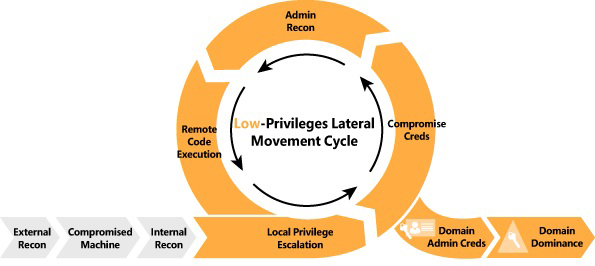
Intrusion Kill Chain
<p align="center">
<img src=" alt="KillChain"/>
</p>
Mapping the Network
RunFinger.py
Gather information about the Domain name and windows machine running in the network
or
Nbtscan
Scanning IP networks for NetBIOS name information.
Crackmapexec v 4.0
Scan the network range based on the SMB information
Nmap scan
Scan all the machine network and save the outputs .
* -oA options : Means output with all format
* -T4 : Fast scan
Fast Scan
Intensive Scan (Note recommended):
Scan with enumeration of the running services :
* -sC : default scripts Equi to --script=default
* -sV : Get the service
Angry IP scanner
Download the tool from this link :
Angry IP Scanner
* Change the preferences settings
> Go to : Preferences -> Ports -> add 80,445,554,21 ,22 in the port selection <br>
> Go to : Preferences -> Display -> select Ali <br>
> Go to : Preferences -> Pinging -> select Combained (UDP/TCP)
Lateral Mo and Exploitation
Acti Certificate Services
This part was copied from
<br>For more details check :
(Tested on private en (Bloodhound then ESC1 exploit)
* Find ADCS Server
* crackmapexec ldap domain.lab -u username -p password -M adcs
* ldapsearch -H ldap://dc_IP -x -LLL -D 'CN=<user>,OU=Users,DC=domain,DC=local' -w '<password>' -b "CN=Enrollment Services,CN=Public Key Services,CN=Services,CN=CONFIGURATION,DC=domain,DC=local" dNSHostName
* Enumerate AD Enterprise CAs with certutil: certutil.exe -config - -ping, certutil -dump
#### ESC1 - Misconfigured Certificate Templates
> Domain Users can enroll in the template, which can be used for client authentication and has ENROLLEE_SUPPLIES_SUBJECT set. This allows anyone to enroll in this template and specify an arbitrary Subject Alternative Name (i.e. as a DA). Allows additional identities to be bound to a certificate beyond the Subject.
Requirements:
* Template that allows for AD authentication
* ENROLLEE_SUPPLIES_SUBJECT flag
* [PKINIT] Client Authentication, Smart Card Logon, Any Purpose, or No EKU (Extended/Enhanced Key Usage)
Exploitation:
* Use Certify.exe to see if there are any templates
* Use Certify, Certi or Certipy to request a Certificate and add an alternative name (user to impersonate)
* Use OpenSSL and convert the certificate, do not enter a password
* Move the cert.pfx to the target machine filesystem and request a TGT for the altname user using Rubeus
WARNING: These certificates will still be usable even if the user or computer resets their password!
NOTE: Look for EDITF_ATTRIBUTESUBJECTALTNAME2, CT_FLAG_ENROLLEE_SUPPLIES_SUBJECT, ManageCA flags, and NTLM Relay to AD CS HTTP Endpoints.
#### ESC2 - Misconfigured Certificate Templates
Requirements:
* Allows requesters to specify a Subject Alternative Name (SAN) in the CSR as well as allows Any Purpose EKU (2.5.29.37.0)
Exploitation:
* Find template
* Request a certificate specifying the /altname as a domain admin like in ESC1.
#### ESC3 - Misconfigured Enrollment Agent Templates
> ESC3 is when a certificate template specifies the Certificate Request Agent EKU (Enrollment Agent). This EKU can be used to request certificates on behalf of other users
* Request a certificate based on the certificate template ESC3.
* Use the Certificate Request Agent certificate (-pfx) to request a certificate on behalf of other another user
#### ESC4 - Access Control
> Enabling the mspki-certificate-name-flag flag for a template that allows for domain authentication, allow attackers to "push a misconfiguration to a template leading to ESC1
* Search for WriteProperty with value 00000000-0000-0000-0000-000000000000 using modifyCertTemplate
* Add the ENROLLEE_SUPPLIES_SUBJECT (ESS) flag to perform ESC1
* Perform ESC1 and then restore the value
Using Certipy
#### ESC6 - EDITF_ATTRIBUTESUBJECTALTNAME2
> If this flag is set on the CA, any request (including when the subject is built from Acti) can have user defined in the subject alternative name.
Exploitation:
* Use Certify.exe to check for UserSpecifiedSAN flag state which refers to the EDITF_ATTRIBUTESUBJECTALTNAME2 flag.
* Request a certificate for a template and add an altname, e the default User template doesn't normally allow to specify alternati
Mitigation:
* Remove the flag : certutil.exe -config "CA01.domain.local\CA01" -setreg "policy\EditFlags" -EDITF_ATTRIBUTESUBJECTALTNAME2
#### ESC7 - Certificate Authority Access Control
Exploitation:
* Detect CAs that allow low pri users the ManageCA or Manage Certificates permissions
* Change the CA settings to enable the SAN extension for all the templates under the CA (ESC6)
* Request the certificate with the desired SAN.
* Grant approval if required or disable the appro
Alternati from ManageCA to RCE on ADCS server:
#### ESC8 - AD CS Relay Attack
> An attacker can trigger a Domain Controller using PetitPotam to NTLM relay credentials to a host of choice. The Domain Controller’s NTLM Credentials can then be relayed to the Acti Certificate Services (AD CS) Web Enrollment pages, and a DC certificate can be enrolled. This certificate can then be used to request a TGT (Ticket Granting Ticket) and compromise the entire domain through Pass-The-Ticket.
Require Impacket PR #1101
* 1: NTLM Relay + Rubeus + PetitPotam
* 2: NTLM Relay + Mimikatz + Kekeo
* 3: Kerberos Relay
* 4: ADCSPwn - Require WebClient service running on the domain controller. By default this service is not installed.
* 5: Certipy ESC8
#### ESC9 - No Security Extension
Requirements:
* StrongCertificateBindingEnforcement set to 1 (default) or 0
* Certificate contains the CT_FLAG_NO_SECURITY_EXTENSION flag in the msPKI-Enrollment-Flag value
* Certificate specifies Any Client authentication EKU
* GenericWrite over any account A to compromise any account B
Scenario
has GenericWrite over , and we want to compromise .
is allowed to enroll in the certificate template ESC9 that specifies the CT_FLAG_NO_SECURITY_EXTENSION flag in the msPKI-Enrollment-Flag value.
* Obtain the hash of Jane with Shadow Credentials (using our GenericWrite)
* Change the userPrincipalName of Jane to be Administrator. :warning: leave the .local part
* Request the certificate template ESC9 from Jane's account.
* Restore userPrincipalName of Jane to .
* Authenticate with the certificate and receive the NT hash of the user.
#### ESC11 - Relaying NTLM to ICPR
> Encryption is not enforced for ICPR requests and Request Disposition is set to Issue
Requirements:
* sploutchy/Certipy - Certipy fork
* sploutchy/impacket - Impacket fork
Exploitation:
1. Look for Enforce Encryption for Requests: Disabled in certipy find -u -p 'REDACTED' -dc-ip 10.10.10.10 -stdout output
2. Setup a relay using Impacket ntlmrelay and trigger a connection to it.
---
PRE-CREATED COMPUTER ACCOUNTS
FINDING PRE-CREATED COMPUTER ACCOUNTS
For instance, the computer account Da$ would have the password da
$ with a \.Notice we have STATUS_NOLOGON_WORKSTATION_TRUST_ACCOUNT
Change The Password
We can use either of these:
Connect to SMB with the new creds
- Reference :
---
Exploiting C and C
Download the epxloit script
If the AD is we will have the following output:
<img src=" alt="AD exploit">
Scanning for Zerologon
SecuraB scanner
We can use crackmapexec to extract the DC name
If the target is the scanner showing the following output:
<img src=" alt="zerologon scanner">
Exploiting zerologon
<img src=" alt="dump NTLM" >
Getting an RCE through pass-the-hash
<img src=" alt="RCE">
> The provided screenshots are related to a personnel lab used for the POC test only, be careful when running the exploit on DC in PROD(during an engagement)
BIGIP F5 C
Check if the target is
We can scan the target using Nuclei or Nmap too
* Nuclei
If multiple hosts are specified use -l argument -> -l bigip-assets.txt
* Nmap
#### BIGIP RCE
we can use Metasploit Module
Scanning Weblogic C
Nuclei Module
This module sometimes fails, use -proxy-url to redirect traffic into Burpsuite and in.
Exploiting Weblogic C - RCE
* Change cmd in the request header with any system command(Win/Linux)
* Payload could be turned into a curl command.
Scanning for EternalBlue ms17-010
If the target is the output is as following
Script Output<br>
Host script results:
Exploiting Eternal Blue - Metasploit Module (Windows 7 x64 only )
* Note :
<br>The default Module supported by Metasploit is exploiting only windows 7 x64 bit
Otherwise the target will be crashed .
Mimikatz - Metasploit
After obtaining a meterpreter shell, we need to ensure that our session is running with SYSTEM le for Mimikatz to function properly.
Reading Hashes and Passwords from Memory
Mimikatz on Linux
In case no VM is a
step 1
step 2
Pri Escalation of Windows
JuicyPotato
Migrate Process
Windows Escalate UAC Protection Bypass
Windows Escalate UAC Protection Bypass (In Memory Injection)
Windows Escalate UAC Protection Bypass (Script Host )
Windows Escalate UAC Execute RunAs
MS16-032 Secondary Logon Handle Pri Escalation Windows 7 32 bit
Windows NTUserMessageCall Win32k Kernel Pool O (Schlamperei)
Crackmapexec V4.0
Enemurate target
Access to machine by valid username/password
Access to machine using the NTLM hash (if u see PWN3D the user hash administrator pri )
Listing shares
Enumerate acti
Enumerate users by bruteforcing RID's (default: 4000)
Execute the specified command
Execute the specified PowerShell command
Get Hashes
CrackMapExec Cheat Sheet
Initial Enumeration
Testing null/guest authentication and listing shares
Enumerate users using ldap
Asreproast
Bloodhound
Group Policy Preferences
Creds Spray
Password Spray
STATUS_NOT_SUPPORTED: NTLM protocol not supported
In this case we can use the
-k option which will use Kerberos protocol to authenticate.List shares
Spider_plus Module
The module
spider_plus allows you to list and dump all files from all readable shares#### List all readable files
#### Dump all files
#### Dump a specific file
MSSQL
#### Test authentication
#### Execute commands using xp_cmdshell
-X for powershell and -x for cmd#### Get a file
Local Administrator authentication
Dump the LSA secrets
Recover the name of the gmsa account
We have two possibilities to recover the name of the gmsa account:
--gmsa-con option:--gmsa-decrypt-lsa:Dump LAPS password
Dump the credentials of the dpapi
Dump NTDS.dit
References
Crackmapexec to Empire agent
First setup an Empire listener:
Start up Empire's RESTful API server:
The username and password that CME uses to authenticate to Empire's RESTful API are stored in the cme.conf file located at ~/.cme/cme.conf:
Then just run the empire_exec module and specify the listener name:
Crackmapexec to Meterpreter
We can use the metinject module to directly inject meterpreter into memory using PowerSploit's In.ps1 script.
First setup your handler:
Then just run the metinject module and specify the LHOST and LPORT :
Passing shell from Empire to Meterpreter metasploit
metasploit listner options
Setup Empire to send the agent to Metasploit
DeathStar
Then grab, setup and run DeathStar:
Windows cmd.exe commands
Add user
Add User as an admin
Add user to RDP group
PTH_winexe : open shell without psexec
Example :<br>
Real Example :<br>
PTH-winexe to Meterpreter
Copy the powershell command into the cmd opened with pth_winexe
Acti
BloodHound
Symantec A
Kiwi collect credentials
Network
Nmap Full Web Scan
Dirb Dir Bruteforce
Nikto web ser
WordPress Scanner
HTTP Fingerprinting
WordPress Scanner
SKIP Fish Scanner
Nmap Ports Scan
NC Scanning
Unicornscan
Xprobe2 OS fingerprinting
Samba Enumeration
SNMP Enumeration
Windows Useful cmds
PuTTY Link tunnel
Meterpreter portfwd
Enable RDP Access
Turn Off Windows Firewall
Meterpreter VNC\RDP
Mimikatz use
Passing the Hash
Hashcat password cracking
Netcat examples
Banner grabbing with NC
Window reverse shell
Find SUID\SGID root files
Python shell
Python\Ruby\PHP HTTP Server
Get PIDs of process
Hydra rdp Bruteforce
Mount Remote Windows Share
Compiling Exploit in Kali
Compiling Windows Exploits on Kali
Window reverse shell
NASM Commands
SSH Pi
SSH Pi from One Network to Another
Pi Using metasploit
Exploit-DB search using CSV File
MSF Payloads
MSF Linux Reverse Meterpreter Binary
MSF Reverse Shell (C Shellcode)
MSF Reverse Shell Python Script
MSF Reverse ASP Shell
MSF Reverse Bash Shell
MSF Reverse PHP Shell
MSF Reverse Win Bin
Linux Security Commands
Win Buffer O Exploit Commands
SEH - Structured Exception Handling
ROP (DEP)
ASLR - Address space layout randomization
EGG Hunter techniques
GDB Debugger Commands
BASH Reverse Shell
PERL Reverse Shell
RUBY Reverse Shell
PYTHON Reverse Shell
PHP Reverse Shell
JA Shell
NETCAT Reverse Shell
TELNET Reverse Shell
XTERM Reverse Shell
XSS Cheat Codes
SSH Over SCTP (With Socat)
Install Metasploit Community Edition in Kali 2.0
Tor Nat Tra
DNS brute forcing with fierce
Metagoofil metadata gathering tool
A best NMAP scan strategy
Nmap – Techniques for A Firewalls
Exploit servers to Shellshock
Root with Docker
Tunneling Over DNS to Bypass Firewall
Compile Assemble code
Pi to Internal Network Via Non Interacti
Patator is a multi-purpose brute-forcer
Metasploit Web terminal
Get full shell with POST RCE
Exiftool - Read and write meta information in files
Get SYSTEM with Admin re on Win7
Get SYSTEM with Standard user re on Win7
Generate our own dic file based on the website content
Bruteforce DNS records using Nmap
Identifying a WAF with Nmap
MS08-067 - without the use of Metasploit
Nikto scan with SQUID proxy
Hijack a binary’s full path in bash to exec your own code
Local pri escalation through MySQL run with root pri
Bruteforce SSH login with patator
Using LD_PRELOAD to inject features to programs
Exploit the OpenSSH User Enumeration Timing Attack
Create a TCP circuit through formed HTTP requests with ReDuh
Jenkins Reverse Shell
Powershell Reverse Shell
change IP and Port / Limmited
Donwload file to machine
MSSQL attack
Service discovery
Nmap
MetaSploit
Enumeration
Combine user passwords collected in other ways into a dictionary to enumerate MSSQL machines in the domain.
Nmap
MetaSploit
PowerUpSQL
FScrack
Exploitation
Nmap
MetaSploit
MSDAT
All the included abo be tested using MSDAT only.
<br>
Getting a shell
python mssql_shell.py script
Sqsh
<br>
Connect to the service
Then
C&C
Merlin
Compile and run server
Compile agent
Generate Certificate
Koadic
PHP Tiny Webshell
Donwload file to the machine
Internal Monolog
Retrieving NTLM Hashes without Touching LSASS
NTDS - Domain Controller
Dumping and enumerating NTDS.dit - a file that contains information about Acti users (hashes!).
Dump hashes
Interacti with nc
Tipis and tricks
RCE POC
We can use the folloiwng tricks as an RCE POC(in some engagements, the client asks for a limited tests on RCE POCs).
Ping
Pentester machine
Under the exploit run
You can specify a number of pings with -c agrments, If ICMP requests recieved, RCE achieved
Curl
Execute commands and recieve data with the POST request
Recieve data
Burpsuite Collaborator
Use burpcollaborator as POC
* Linux
* Windows
项目信息
开发语言:未知
Star 数:1936
技术要点
该项目属于红蓝攻防方向的开源资源,代码结构清晰,适合安全研究人员学习参考。项目围绕RedTeam/Pentest notes and experiments tested on several infrastructures related to professional engagements.展开,提供了可运行的实现,对理解相关安全机制、工具原理与攻防技术具有较高的研究价值。
从技术实现角度看,此类项目的核心在于对底层原理的深入理解与工程化落地。开发者在研究过程中可以结合官方文档与社区讨论,梳理项目的初始化流程、核心模块职责与数据流转,逐步掌握其中的技术细节与设计思路。
使用与学习建议
1. 下载源码压缩包,解压到本地环境。
2. 根据项目类型准备对应的运行环境与依赖。
3. 按照 README 中的步骤完成配置与部署。
4. 在隔离的测试环境中运行验证,避免影响生产系统。
免责声明
本资源来源于开源社区,仅供安全研究、技术学习与合法授权范围内的攻防演练使用,请勿用于任何非法或侵害他人权益的用途。使用本项目产生的一切后果由使用者自行承担。
| 资源标题 | A-Red-Teamer-diaries - RedTeam/Pentest notes and experiments tested on se |
| 所属分类 | 红蓝攻防 |
| 发布作者 | admin |
| 发布时间 | 2026-10-06 00:34:56 |
| 下载权限 | 免费下载 |
| 附件数量 | 2 个下载链接 |
| 浏览次数 | 460 |
| 讨论数量 | 0 |
| 主题状态 | 正常讨论中 |