 红蓝攻防
点击放大
Redcloud - Automated Red Team Infrastructure deployement usin

项目说明
<p align="center">
<img src=" width="540" title="Redcloud menu">
</p>
<h4 align="center">
<i>Weather report. Cloudy with a chance of shells!</i>
<br>
<br>
</h4>
![]() ![]() ![]()
Early release. Follow me on Twitter to stay updated on Redcloud's de.
:information_desk_person::cloud::shell::seedling:
___
Quick Start - Architecture - Use-cases - Screenshots
___
Introduction
Redcloud is a powerful and user-friendly toolbox for deploying a fully featured Red Team Infrastructure using Docker. Harness the cloud's speed for your tools. Deploys in minutes. Use and manage it with its polished web interface.
Ideal for your penetration tests, shooting ranges, red teaming and bug bounties!
Self-host your attack infrastructure painlessly, deploy your very own li and resilient offensi in a matter of minutes.
<h4 align="center">
<b>Demo</b>
<br>
<br>
</h4>
<p align="center">
<img src=" width="540" title="Redcloud menu">
</p>
*The following demo showcases deployment of Redcloud through ssh, followed by Metasploit. We then look at Traefik and a li attached to Metasploit. Finally, we check that Metasploit's DB is functional with the web terminal, delete the container, and terminate Redcloud.*
___
Features
* Deploy Redcloud locally or remotely using the built-in SSH functions, and e.
* Deploy Metasploit, Empire, GoPhish, targets, a fully stacked Kali, and many more with a few clicks.
* Monitor and manage your infrastructure with a beautiful web interface.
* Deploy redirections, socks or Tor proxy for all your tools.
* Painless network management and sharing.
* User and password management.
* Web terminal
* O very comfy :hatching_chick:
___
Quick Start
Setup:
Deploy:
Redcloud uses PyYAML to print the list of a templates. It's installed by default on most systems.
If not, simply run:
Redcloud has 3 different deployment methods:
1. Locally
2. Remotely, using ssh. Requires having your public key in your target's authorized_keys file.
3. Remotely, using docker-machine. Run the eval (docker-machine en) line to preload your env with your docker-machine, and run redcloud.py. Redcloud should automatically detect your docker-machine, and highlight menu items relevant to a docker-machine deployment.
___
<h4 align="center">
<b>Templates</b>
<br>
<br>
</h4>
<p align="center">
<img src=" width="540" title="Redcloud templates">
</p>
___
Briefly,
redcloud.py deploys a Portainer stack, preloaded with many tool templates for your offensi, powered by Docker. Once deployed, control Redcloud with the web interface. Uses Traefik as re. Easy remote deploy to your target ser the system ssh or docker-machine.
* :rocket: E to spin up a Kali in a cloud with just a few clicks?
* :package: Ha silos between your tools, technics and stages?
* :ambulance: Monitor the health of your scans and C2?
* :fire: Skip those sysadmin tasks for setting up a phishing campaign and get pwning faster?
* :smiling_imp: Curious how you would build *the* ideal attack infrastructure?
Use the web UI to monitor, manage, and interact with each container. Use the snappy web terminal just as you would with yours. Create , networks and port forwards using Portainer's simple UI.
Deploy and handle all your fa tools and technics with the power of data-center-grade internet :rocket:
___
*In the following section, we'll be going more in-depth inside Redcloud's design concepts. You can get started without having to di though.*
___
* :book: Table of contents
- Introduction
- Features
- Quick Start
- Details
- Redcloud Architecture
- Deployment workflow
- Networks
-
- Accessing containers from the terminal
- Accessing files
- SSL Certificates
- Stopping Redcloud
- Portainer App Templates
- Traefik re
- Redcloud security considerations
- Tested deployment candidates
- Troubleshooting
- Use-cases
- Screenshots
- Contribution guideline
- Hosting Redcloud
- Inspirations & Shout-outs
___
Details
Redcloud Architecture
* redcloud.py: Starts/Stops the Web interface and App Templates, using Docker and Portainer.
* portainer: Portainer web interface.
* traefik: Traefik re container to the web interface, api and files containers. Some templates ha routes for con. See the templates.yml.
* templates: python3 http.server container that feeds the App Templates. Lives in an "inside" network.
* cert_gen: The omgwtfssl container that generates the SSL certificates using common best practices.
* Redcloud Web interface once deployed.
* Redcloud redcloud_files . You can also access the redcloud_log container content, protected by the same .htpasswd as Traefik. Default credentials: admin:Redcloud
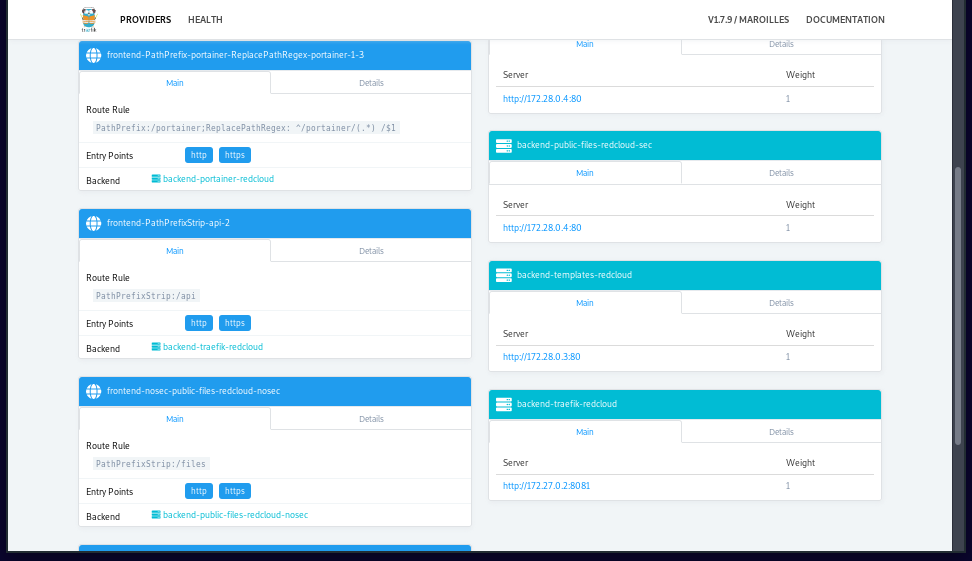
* Traefik re health monitoring page. Shows li about routes, backends, return codes. Will also show re implant data if configured through Traefik.
Deployment workflow
Redcloud deployment workflow is as follows:
1. Clone/Download Redcloud repository.
2. Launch redcloud.py.
3. Choose deployment candidate from the menu (local, ssh, docker-machine).
4. redcloud.py automatically:
* checks for docker & docker-compose on target machine.
* installs docker & docker-compose if absent.
* deploys the web stack on target using docker-compose.
5. Once deployment is complete, redcloud.py will output the URL. Head over to
6. Set username/password from the web interface.
7. Select the endpoint (the only one on the list).
8. Access the templates using the "App Templates" menu item on the left :rocket:
App Template deployment is as follows:
1. Choose template.
2. If you wish to add additional options, select "+ Show ad options".
3. Add port mapping, networking options, and mapping as you see fit.
4. Select "Deploy the container".
5. Portainer will launch the container. It may take a few minutes if it needs to fetch the image. If your server is in a data center, this step will be very fast.
6. Container should be running :rocket:
7. Portainer will redirect you to the "Containers" page. From there, you can:
a. View li logs.
b. Inspect container details (docker inspect).
c. View li stats (memory/cpu/network/processes).
d. Use a web shell to interact with your container.
e. Depending on the App Template, use either bash or sh. Choose accordingly from the drop-down menu.
<p align="center">
<img src=" width="540" title="Redcloud menu">
</p>
Networks
Redcloud makes it easy to play around with networks and containers.
You can create additional networks with different drivers, and attach your containers as you see fit. Redcloud comes with 2 networks, redcloud_default and redcloud_inside.
You can share data between containers by sharing . Redcloud comes with 3 :
* certs: Container with the certificates generated by omgwtfssl.
* files: Standard file sharing . For now, the files are a when browsing and are served by the Traefik re container directly from the files . A typical use-case is to attach the to a Metasploit container, generate your payload directly into the files . You can now serve your fresh payload directly through the Traefik to file ser.
* logs: A for logs, served by the file-server too. Access requires basic auth. Default is admin:Redcloud.
Accessing containers from the terminal
If you wish to stay in your terminal to work with the deployed containers, its very easy using Docker. Keep these things in mind:
* Most containers have bash, but some use sh instead
* All Redcloud App Templates container names start with red_, such as red_msf-postgresql
* With Docker, you can either use docker exec or attach to interact with a container
* exec is preferred as it creates a new process
* attach lands you straight on the running process, potentially killing your running container
* If running Redcloud:
* Locally or using docker-machine, simply type these in your local shell
* Using ssh, first ssh into your deployment target to run the following commands
To start interacting with the desired deployed container:
If you see the following message, it means bash is not installed. In that case simply replace /bin/bash with /bin/sh:
To use docker attach, simply run:
If using attach, the container needs to be started in interactive mode, so as to land in a interacti.
Accessing files
Point your browser to .
Please refer to the files for more information.
SSL Certificates
Redcloud generates a new *unsigned* SSL certificate when deploying.
The certificate is generated by omgwtfssl, implementing most best practices.
Once generated:
> It will dump the certificates it generated into /certs by default and will also output them to stdout in a standard YAML form, making them easy to consume in Ansible or other tools that use YAML.
Certificates are stored in a shared docker called certs. Your containers can access this if you indicate it in "+ Ad Settings" when deploying it. The Traefik re container fetches the certificates directly from its configuration file. If you wish to replace these certificates with your own, simply replace them on this .
It also means you can share the generated certificates into other containers, such Empire or Metasploit for your reverse callbacks, or for a phishing campaign.
Most SSL related configurations can be found in traefik/traefik.toml or the docker-compose.yml file.
Stopping Redcloud
You can stop Redcloud directly from the menu.
Deployed App templates need to be stopped manually before stopping Redcloud. You can stop them using the Portainer web interface, or docker rm -f container-name.
If you wish to force the Portainer containers running Redcloud to stop, simply run docker-compose kill inside the redcloud/ folder.
The *local* and *docker-machine* stop option is the same, thus they are combined in the same option.
Portainer App Templates
Redcloud uses Portainer to orchestrate and interface with the Docker engine. Portainer in itself is a fantastic project to manage Docker deployments remotely. Portainer also includes a very con template system, which is the major component for our Redcloud deployment.
Templates can be found in ./templates/templates.yml. Portainer fetches the template file from a dedicated container (templates).
Traefik re
Traefik is a wonderful "cloud-native edge router". It has replaced the previous NGINX re setup.
A Traefik image is built during deployment, using the Dockerfile located in
traefik/Dockerfile. It adds a .htpasswd with admin:Redcloud credentials. By default, deployment spawns the following routes:
*
*
*
Authentications are based of the .htaccess data.
From the Traefik api web interface, you can view your deployed routes, monitor health, as well as real time metrics. Its very neat.
You can add additional labels that tell Traefik where to route traffic, using either:
* traefik/traefik.toml file
* docker-compose.yml file
* templates.yml file
* Portainer's web interface
See the official documentation for more information.
!api
<p align="center">
<img src=" title="gopher">
</p>
Redcloud security considerations
Redcloud deploys with a self-signed https certificate, and proxies all interactions with the web console through it.
However, the default network exposes your containers' ports to the outside world.
You can:
* Remo ports and access the normal port from a machine inside the docker network
* Add custom labels to create routes with Traefik. See the docker-compose.yml file for inspiration.
* Start an Ubuntu or Kali with noVNC ( http) from templates, add it to both an "inside" and "outside" network, and access exposed interfaces from inside.
* Add .htaccess configurations
Additionally:
* docker & docker-machine installations require root pri. You can downgrade pri requirements following the official documentation.
* The install script is pulled directly from the official docker repositories.
* redcloud.py fetches Redcloud's public IP address using icanhazip.com.
___
Tested deployment candidates
| Deploy Target | Status |
|:-------------:|:-------------------:|
| Ubuntu Bionic | :hea: |
| Ubuntu Xenial | :hea: |
| Debian Strech | :hea: |
___
Troubleshooting
* Check your default python with python --. Redcloud needs python 3+.
* Use python3 instead of python if on an older system.
* redcloud.py requires that deployment candidate have the public key in their .ssh/authorized_keys, and handles password-less authentication using the user's public key. This is the default configuration for most .
* docker-machine deployment requires the user to already have a running docker-machine on a cloud infrastructure (such as AWS, GCP, Linode and many others). Once deployed, simply run the eval command as illustrated above.
* docker & docker-machine installations require root pri. You can downgrade pri requirements following the official documentation
* If you don't see the "App Templates" menu item right after deploying, refresh the web page and make sure you're not at the endpoint selection menu.
* If you wish to create a new username/password combo, remo persistent data on deployment candidate: rm -rf /opt/portainer/data
* If you're running into python errors, you may need to install the python3-distutils package using apt-get install python3-distutils on debian/ubuntu base.
* If you get an error when deploying an App Template saying the "container name already exists", it's probably because you're trying to deploy the same App Template without having removed a pre deployed one. Simply remove the old container with the same name, or change the name of your new container.
* If something seems wrong with your container, the standard procedure is to check the container's logs from the web interface.
* If running a local deployment on OSX, portainer will be unable to use its default location /opt/. To solve this, open the docker-compose.yml file, replace /opt/portainer/data:/data with a folder with write-access, for example: /tmp/portainer/:/data and create the /tmp/portainer directory before running Redcloud.
* if you're getting issues with the web terminal, try disabling some addons, using private browsing, or try with a different browser. If all else fails, connect to your container through the terminal.
___
Use-cases
* Create your personal pentest-lab, and practice your hacking skills with friends and colleagues.
* Protect your offensi using honeypots.
* Recreate an APT infrastructure with reverse implant load-balancing, geo-stretched servers and multi-layered operations
* Automate payload generation with Metasploit or Empire, A with gscript, ser through the /files/ URI.
* Perform your bug-bounty pipelines much faster than your competition.
* Launch Sniper using Portainer api when a new bug-bounty is posted, fetch logs using /files/ URI.
* Use the reverse proxy to co or Empire.
* Launch scans behind your own Tor socks proxy.
* View .onion site using Tor socks + Ubuntu VNC.
* Ad OSINT with Spiderfoot and a Tor container as proxy.
___
Screenshots
* Template List
<p align="center">
<img src=" width="540" title="Redcloud templates">
</p>
* Deploying a container
<p align="center">
<img src=" width="540" title="Redcloud container">
</p>
* Using Metasploit's msfconsole through the web interface
<p align="center">
<img src=" width="540" title="Redcloud msf">
</p>
* Traefik real-time data on re routes
<p align="center">
<img src=" width="540" title="Traefik api">
</p>
* Deploying using ssh
<p align="center">
<img src=" width="540" title="redcloud python">
</p>
___
Contribution guideline
Any help is appreciated. This is a side project, so it's probably missing a few bolts and screws. Above all:
* Reporting or fixing Redcloud bugs & quirks.
* Adding templates. Please keep it clean, and from the creator's docker hub repository if possible.
* Adding documentation.
* Detailing use cases in blog articles. I'll add links to blog posts here, so please be sure to contact me if you make one! :v:
* Integrating Traefik with more templates. I'm currently having issues with the spiderfoot and ubuntu novnc for example.
* Typos as issues. *(no pull requests please)*
___
Hosting Redcloud
You can host Redcloud on any Unix server that runs Docker.
Redcloud is intended to be used in a cloud en, such as a simple VPS with ssh, or even an AWS EC2, GCP, etc...
A large range of cloud pro offer free credits to get familiar with their services. Many lists and tutorials co free hosting credits from major . This list is a good place to start.
Regarding deployment method, I personally prefer working with docker-machine as it becomes ridiculously easy to spawn new machines and manage them once you've got your cloud provider's dri. If you prefer using ssh, be sure to take a look at e's shellz project to manage your keys and profiles.
___
Inspirations & Shout-outs
* Red Team Infrastructure Wiki - bluscreenofjeff
* Automated Red Team Infrastructure Guide - rastamouse
* Safe Red Team Infrastructure - Tim Malcom
* Red Baron - Coalfire Research
* Rapid Attack Infrastructure - Obscurity Labs
* Decker - Ste
* hideNsneak - Mike Hodges
* for the logo - Make sure you check out his repo!
___
*Finally, if you wish to see your tool integrated, hit me up on Twitter. This project is maintained on my free time. Keep an eye out in the de for upcoming features.
Redcloud was originally de to make deploying training en for infosec students easier.*
___
*If you wish to stay updated on this project:*
![twitter]()
项目信息
开发语言:Python
Star 数:1277
技术要点
该项目属于红蓝攻防方向的开源资源,代码结构清晰,适合安全研究人员学习参考。项目围绕Automated Red Team Infrastructure deployement using Docker展开,提供了可运行的实现,对理解相关安全机制、工具原理与攻防技术具有较高的研究价值。
从技术实现角度看,此类项目的核心在于对底层原理的深入理解与工程化落地。开发者在研究过程中可以结合官方文档与社区讨论,梳理项目的初始化流程、核心模块职责与数据流转,逐步掌握其中的技术细节与设计思路。
使用与学习建议
1. 下载源码压缩包,解压到本地环境。
2. 根据项目类型准备对应的运行环境与依赖。
3. 按照 README 中的步骤完成配置与部署。
4. 在隔离的测试环境中运行验证,避免影响生产系统。
免责声明
本资源来源于开源社区,仅供安全研究、技术学习与合法授权范围内的攻防演练使用,请勿用于任何非法或侵害他人权益的用途。使用本项目产生的一切后果由使用者自行承担。
| 资源标题 | Redcloud - Automated Red Team Infrastructure deployement usin |
| 所属分类 | 红蓝攻防 |
| 发布作者 | admin |
| 发布时间 | 2026-10-06 00:35:54 |
| 下载权限 | 免费下载 |
| 附件数量 | 2 个下载链接 |
| 浏览次数 | 259 |
| 讨论数量 | 0 |
| 主题状态 | 正常讨论中 |