 红蓝攻防
点击放大
KubeHound - Tool for building Kubernetes attack paths

项目说明
KubeHound
<p align="center">
<img src="./docs/logo.png" alt="KubeHound" width="300" />
</p>
A Kubernetes attack graph tool allowing automated calculation of attack paths between assets in a cluster.
Quick Start
Requirements
To run KubeHound, you need a couple dependencies
+ Docker >= 19.03
+ Docker Compose V2
Install
#### From Release
Download binaries are a for Linux / Windows / Mac OS via the releases page or by running the following (Mac OS/Linux):
<details>
<summary>MacOS Notes</summary>
If downloading the releases via a browser you must run e.g xattr -d com.apple.quarantine kubehound before running to prevent MacOS blocking execution
</details>
#### With homebrew
KubeHound is a in homebrew-core and you can simply run
kubehound should now be in your path.
#### From source
If you wish to build KubeHound from source, you will need to checkout a tag before building
KubeHound binary will be output to ./bin/build/kubehound.
Run
Select a target Kubernetes cluster, either:
* Using kubectx
* Using specific kubeconfig file by exporting the en: export KUBECONFIG=/your/path/to/.kube/config
Then, simply run the kubehound binary:
For more ad use case and configuration, see
* ad configuration: all the settings a through the configuration file.
* common operations: the commands a from the KubeHound binary (dump / ingest).
* common errors: troubleshooting guide.
> Note:
KubeHound can be deployed as a serivce (KHaaS), for more information.
Using KubeHound Data
To query the KubeHound graph data requires using the Gremlin query language via an API call or dedicated graph query UI. A number of fully featured graph query UIs are a (both commercial and open source), but we provide an accompanying Jupyter notebook based on the AWS Graph Notebook,to quickly showcase the capabilities of KubeHound. To access the UI:
+ Visit in your browser
+ Use the default password admin to login (note: this can be changed via the Dockerfile or by setting the NOTEBOOK_PASSWORD en in the .env file)
+ Follow the initial setup instructions in the notebook to connect to the KubeHound graph and configure the rendering
+ Start running the queries and exploring the graph!
Example queries
We ha a few sample queries to execute on the database in our documentation. A specific DSL has been de to query the Graph for the most basic use cases (KubeHound DSL).
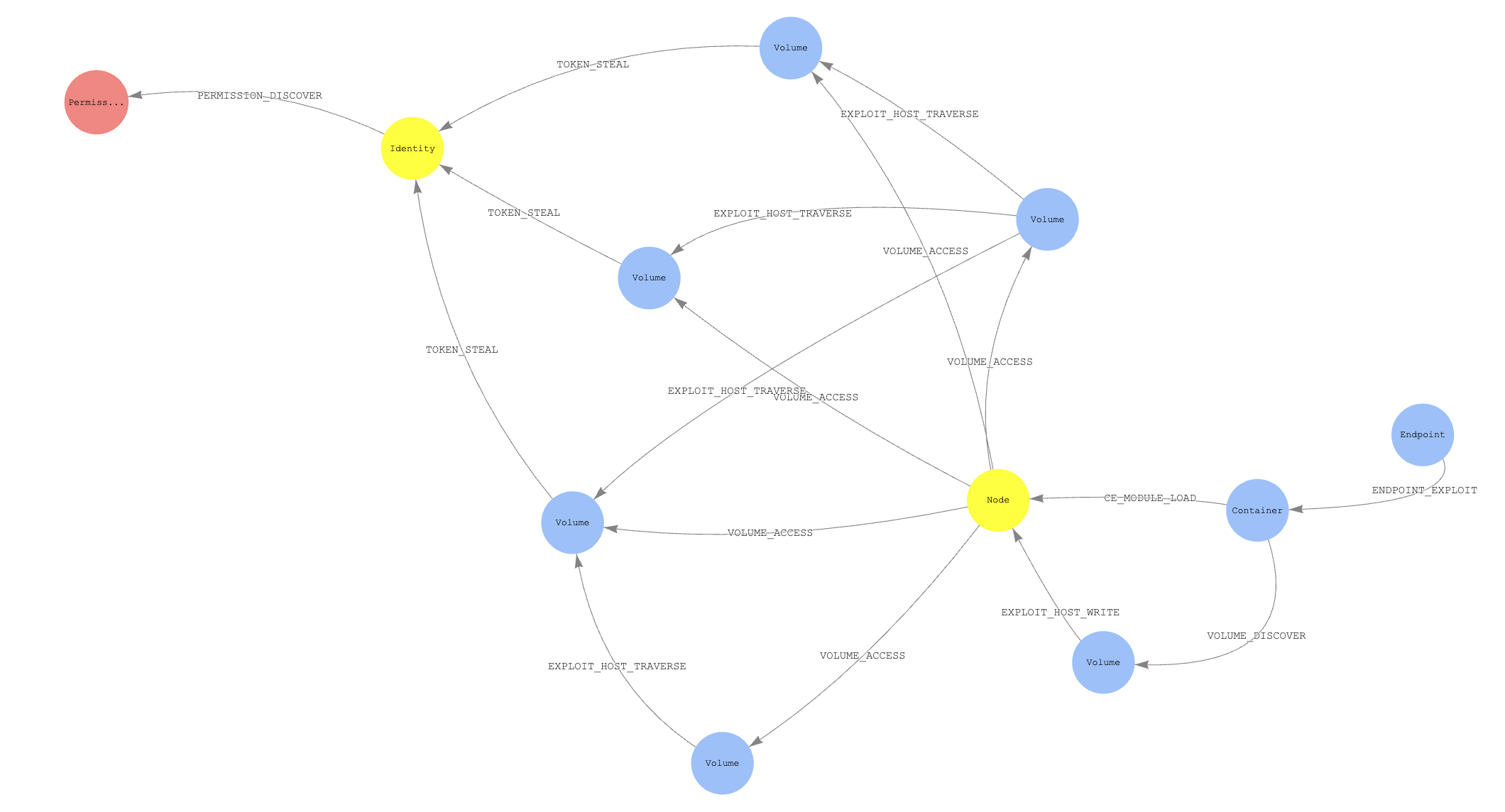
Sample Attack Path
!Example Path
Sample Data
To view a sample graph demonstrating attacks in a very, very cluster you can generate data the app against the provided kind cluster:
To view the generated graph see the Using KubeHound Data section.
Query data from your scripts
If you expose the graph endpoint you can automate some queries to gather some KPI and metadata for instance.
Python
You can query the database data in your python script by using the following snippet:
You'll need to install gremlinpython as a dependency via: pip install gremlinpython
Further information
+ For an o of the application architecture see the design canvas
+ To see the attacks covered see the edge definitions
+ To contribute a new attack to the project follow the contribution guidelines
Acknowledgements
KubeHound was created by the Ad Simulation Engineering (ASE) team at Datadog:
+ Jeremy Fox @0xff6a
+ Julien Terriac
+ Edouard Schweisguth
With additional support from:
+ Christophe Tafani-Dereeper
We would also like to acknowledge the BloodHound team for pioneering the use of graph theory in offensi and inspiring us to create this project.
项目信息
开发语言:Go
Star 数:1004
技术要点
该项目属于红蓝攻防方向的开源资源,代码结构清晰,适合安全研究人员学习参考。项目围绕Tool for building Kubernetes attack paths展开,提供了可运行的实现,对理解相关安全机制、工具原理与攻防技术具有较高的研究价值。
从技术实现角度看,此类项目的核心在于对底层原理的深入理解与工程化落地。开发者在研究过程中可以结合官方文档与社区讨论,梳理项目的初始化流程、核心模块职责与数据流转,逐步掌握其中的技术细节与设计思路。
使用与学习建议
1. 下载源码压缩包,解压到本地环境。
2. 根据项目类型准备对应的运行环境与依赖。
3. 按照 README 中的步骤完成配置与部署。
4. 在隔离的测试环境中运行验证,避免影响生产系统。
免责声明
本资源来源于开源社区,仅供安全研究、技术学习与合法授权范围内的攻防演练使用,请勿用于任何非法或侵害他人权益的用途。使用本项目产生的一切后果由使用者自行承担。
| 资源标题 | KubeHound - Tool for building Kubernetes attack paths |
| 所属分类 | 红蓝攻防 |
| 发布作者 | admin |
| 发布时间 | 2026-10-06 00:36:38 |
| 下载权限 | 免费下载 |
| 附件数量 | 2 个下载链接 |
| 浏览次数 | 521 |
| 讨论数量 | 0 |
| 主题状态 | 正常讨论中 |