 红蓝攻防
点击放大
Phishious - An open-source Secure Email Gateway (SEG) evaluati
项目说明
!image
![name]()
![name]()
What is Phishious?
=======
Phishious is an open-source Secure Email Gateway (SEG) e toolkit designed for red-teamers and de by the team at CanIPhish. Phishious provides the ability to see how Secure Email Gateway technologies behave when presented with phishing material.
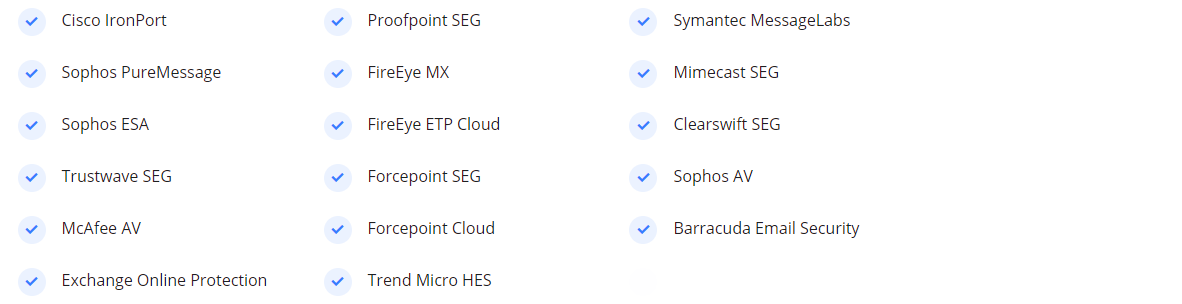
📬 Secure Email Gateways Supported
!image
🧐 Why use Phishious?
We're not joking when we say that Phishious is a world first in Secure Email Gateway e. There is currently no other tool a (free or paid) that provides you the ability to scan your phish against an array of Secure Email Gateways. The closest utility is , however this specifically focuses on Malware detection and not Spam/Phish detection.
Through use of Phishious, you'll be able to freely test your phishing material against the world's most popular Secure Email Gateways. This is an in capability as it provides you an indication of how successful your phishing campaign may be.
🔩 How does Phishious work?
Phishious exploits a common misconfiguration where many organisations broadcast overly sensiti in email bounce responses and non-delivery reports. The sensiti typically comes in the form of original untampered inbound message headers.
By feeding this information into Phishious, it can extract the relevant information and detect when an email is likely to end up in a targets junk folder or be completely blocked by the SEG. When we scale this across many targets, we're able to aggregate this information to provide a holistic view on how SEGs behave when delivered certain phishing material.
To better understand email bounce attacks and the resulting issues, please read the following Blog Post, watch this BSides Canberra presentation or watch the below introduction video on youtube.
![Phishious Introduction]()
💡 Requirements
Windows 10 Endpoint, Windows Server 2012+ or any Linux system capable of running .NET Core 5.0 (see )
⛏️ Setup
Phishious is a .NET Core 5.0 MVC Web Application. Accordingly it can be run on Windows using IIS or Linux using Apache as the Web Server. However the simplest way to use Phishious is to clone the project and then Debug it using your fa IDE (e.g. Studio, Studio Code, Rider, etc.).
🏁 How to use Phishious (Automatic)
The automated scan adds an orchestration layer whereby Phishious automatically sends emails, ingests bounce responses and analyses mail headers with only a few clicks. The main exercise on you as the user is to identify mail receivers.
<details>
<summary><b>Phase 1: Identification of Mail Receivers</b></summary>
<br />
<p>As Phishious is designed to abuse public infrastructure, you need to identify a of targets who use differing mail security technologies <i>(e.g. Target 1 uses Sophos PureMessage, Target 2 uses Cisco IronPort, etc.)</i>. Identification of Mail Receivers can be found through manual analysis <i>(e.g. <a href=" target="_blank">CanIPhish Supply Chain Analysis</a>)</i> or programmatic means <i>(e.g. <a href=" target="_blank">CanIPhish Supply Chain API</a>)</i>.</p>
<p><i>Reference: The accompanying image is of a CanIPhish Supply Chain Scan which shows a <b>'Mail Recei Chain'</b>.</i></p>
<a href=" target="_blank"><img src=" class="img-fluid rounded-lg" style='height: 100%; width: 100%; object-fit: contain' /></a>
</details>
<details>
<summary><b>Phase 2: Phishious Settings</b></summary>
<br />
<p><b>Target Settings.</b> Input target domains seperated by a space, line or comma. Follow this up by inputing a non-existent address into the local part address</p>
<p><b>SMTP Settings.</b> Input the SMTP ser you plan on using. <br/>
<i>Note: If using Gmail then use a throwaway Gmail address with "Less secure app access" enabled. This setting can be toggled by clicking here - Setup a Filter so any inbound email is never sent to spam (configured under Settings Cog > See All Settings > Filters and Blocked Addresses > Create a new filter). Finally for Gmail, the username and password are your gmail email address and password.</i></p>
<img src=" class="img-fluid rounded-lg" style='object-fit: contain' />
<p><b>Storage Scan Settings.</b> Input the location where the email bounce responses will land. At current, both Gmail and Amazon S3 are supported as storage destinations. </br>
<i>Note: For use of Amazon S3, you will likely need to setup some form of forwarding capability to forward bounce responses to this location (e.g. Amazon SES Mail Receiver with S3 as the destination).</i></p>
<p><b>Email Priming Settings.</b> Input your sending email address, display name and a non-malicious subject and email body. Email priming is used to baseline normal behaviour of the respecti Email Gateway technologies, so we can analyse the delta from this when we deliver our malicious mail.</p>
<p><b>Once all settings have been provided, click 'Sa' followed by 'Prime Filters'. Wait up to a minute for Priming to complete.</b></p>
</details>
<details>
<summary><b>Phase 3: Filter Detonation</b></summary>
<br />
<p>Time to email malicious content to those same targets emailed during Priming.</p>
<p><b>Step 1.</b> Input your sending email address, display name and a malicious subject and email body.</p>
<p><b>Step 2.</b> Click 'Detonate Filters'. Wait up to a minute for Detonation to complete.</p>
</details>
<details>
<summary><b>Phase 4: Results Analysis</b></summary>
<br />
<p>Analyse the results to determine whether your phishing material was blocked or remained undetected. Click <b>'View Detail'</b> to gain insight into what text was analysed within the Email Headers and how this impacted the o Phishious assessment.</p>
<p>
<i>Reference: The accompanying images show the detailed view of two seperate SEG technologies. This view shows how Phishious analysed Email Headers to provide two seperate results from a single Phishing Email.</i>
</p>
<a href=" target="_blank"><img src=" class="img-fluid rounded-lg" style='height: 100%; width: 100%; object-fit: contain' /></a>
<a href=" target="_blank"><img src=" class="img-fluid rounded-lg" style='height: 100%; width: 100%; object-fit: contain' /></a>
</details>
🏁 How to use Phishious (Manual)
<details>
<summary><b>Phase 1: Identification of Mail Receivers</b></summary>
<br />
<p>As Phishious is designed to abuse public infrastructure, you need to identify a of targets who use differing mail security technologies <i>(e.g. Target 1 uses Sophos PureMessage, Target 2 uses Cisco IronPort, etc.)</i>. Identification of Mail Receivers can be found through manual analysis <i>(e.g. <a href=" target="_blank">CanIPhish Supply Chain Analysis</a>)</i> or programmatic means <i>(e.g. <a href=" target="_blank">CanIPhish Supply Chain API</a>)</i>.</p>
<p><i>Reference: The accompanying image is of a CanIPhish Supply Chain Scan which shows a <b>'Mail Recei Chain'</b>.</i></p>
<a href=" target="_blank"><img src=" class="img-fluid rounded-lg" style='height: 100%; width: 100%; object-fit: contain' /></a>
</details>
<details>
<summary><b>Phase 2: Filter Priming</b></summary>
<br />
<p><b>Step 1.</b> Email <b>non-malicious content</b> to a non-existent address at target domains where a bounce attack exists and a known Secure Email Gateway (SEG) is in-use. <br /><i>Note: At this stage, only Amazon SES and Gmail have been tested for the receipt of bounce responses. Do not use Exchange Online.</i></p>
<p>
<i>Reference: The accompanying image is of an email (within Gmail) directed towards non-existent addresses at 15 targets. Each target was uniquely identified and selected for their differing Secure Email Gateway technologies.</i>
</p>
<a href=" target="_blank"><img src=" class="img-fluid rounded-lg" style='height: 100%; width: 100%; object-fit: contain' /></a>
<p>
<b>Step 2.</b> Wait 180 seconds. Download all recei responses and then upload them to Phishious for Filter Priming. Upon Priming, you will see the status of all Secure Email Gateway technologies identified. For filter detonation (Phase 3), only these technologies will be targeted.
<p>
<i>Reference: The accompanying images show the email bounce responses being uploaded to Phishious and then the obser of Filter Priming.</i>
</p>
<a href=" target="_blank"><img src=" class="img-fluid rounded-lg" style='height: 100%; width: 100%; object-fit: contain' /></a>
<a href=" target="_blank"><img src=" class="img-fluid rounded-lg" style='height: 100%; width: 100%; object-fit: contain' /></a>
</details>
<details>
<summary><b>Phase 3: Filter Detonation</b></summary>
<br />
<p><b>Step 1.</b> Email <b>malicious content</b> to a non-existent address at the same target domains emailed in Phase 2. <br /><i>Note: At this stage, only Amazon SES and Gmail have been tested for the receipt of bounce responses. Do not use Exchange Online.</i></p>
<p>
<i>Reference: The accompanying image is of an email (within Gmail) directed towards the same non-existent addresses at targeted in Phase 2. Each target was uniquely identified and selected for their differing Secure Email Gateway technologies.</i>
</p>
<a href=" target="_blank"><img src=" class="img-fluid rounded-lg" style='height: 100%; width: 100%; object-fit: contain' /></a>
<p>
<b>Step 2.</b> Wait 180 seconds. Download all recei responses and then upload them to Phishious for Filter Detonation. Upon Detonation, you will see the status of all Secure Email Gateway technologies identified and whether the phish was blocked or remained undetected.
<p>
<i>Reference: The accompanying images show the email bounce responses being uploaded to Phishious and then the obser of Filter Detonation.</i></p>
<a href=" target="_blank"><img src=" class="img-fluid rounded-lg" style='height: 100%; width: 100%; object-fit: contain' /></a>
<a href=" target="_blank"><img src=" class="img-fluid rounded-lg" style='height: 100%; width: 100%; object-fit: contain' /></a>
</details>
<details>
<summary><b>Phase 4: Results Analysis</b></summary>
<br />
<p>Analyse the results to determine whether your phishing material was blocked or remained undetected. Click <b>'View Detail'</b> to gain insight into what text was analysed within the Email Headers and how this impacted the o Phishious assessment.</p>
<p>
<i>Reference: The accompanying images show the detailed view of two seperate SEG technologies. This view shows how Phishious analysed Email Headers to provide two seperate results from a single Phishing Email.</i>
</p>
<a href=" target="_blank"><img src=" class="img-fluid rounded-lg" style='height: 100%; width: 100%; object-fit: contain' /></a>
<a href=" target="_blank"><img src=" class="img-fluid rounded-lg" style='height: 100%; width: 100%; object-fit: contain' /></a>
</details>
Example Outputs
<details>
<summary>Results Analysis View</summary>
<br />
<a href=" target="_blank"><img src=" class="img-fluid rounded-lg" style='height: 100%; width: 100%; object-fit: contain' /></a>
</details>
<details>
<summary>Filter Detail View</summary>
<h4>Trend Micro HES</h4>
<a href=" target="_blank"><img src=" class="img-fluid rounded-lg" style='height: 100%; width: 100%; object-fit: contain' /></a>
<h4>Exchange Online Protection</h4>
<a href=" target="_blank"><img src=" class="img-fluid rounded-lg" style='height: 100%; width: 100%; object-fit: contain' /></a>
</details>
📜 Documentation
Documentation is always a work-in-progress and can be found on the CanIPhish website or here on GitHub. Find something missing? Let us know by filing an issue! Interested in seeing how phishing emails look and feel? Take a look at our interacti email simulator.
❕ Issues
Find a bug? Want more features? Find something missing in the documentation? Let us know! Please don't hesitate to file an issue and we'll get right on it.
📝 License
⚖️ Disclaimer
This tool should be used on applications/networks that you ha to use. Any misuse or damage caused will be solely the users’ responsibility.
项目信息
开发语言:C#
Star 数:516
技术要点
该项目属于红蓝攻防方向的开源资源,代码结构清晰,适合安全研究人员学习参考。项目围绕An open-source Secure Email Gateway (SEG) evaluation toolkit designed for red-teamers.展开,提供了可运行的实现,对理解相关安全机制、工具原理与攻防技术具有较高的研究价值。
从技术实现角度看,此类项目的核心在于对底层原理的深入理解与工程化落地。开发者在研究过程中可以结合官方文档与社区讨论,梳理项目的初始化流程、核心模块职责与数据流转,逐步掌握其中的技术细节与设计思路。
使用与学习建议
1. 下载源码压缩包,解压到本地环境。
2. 根据项目类型准备对应的运行环境与依赖。
3. 按照 README 中的步骤完成配置与部署。
4. 在隔离的测试环境中运行验证,避免影响生产系统。
免责声明
本资源来源于开源社区,仅供安全研究、技术学习与合法授权范围内的攻防演练使用,请勿用于任何非法或侵害他人权益的用途。使用本项目产生的一切后果由使用者自行承担。
| 资源标题 | Phishious - An open-source Secure Email Gateway (SEG) evaluati |
| 所属分类 | 红蓝攻防 |
| 发布作者 | admin |
| 发布时间 | 2026-10-06 00:40:23 |
| 下载权限 | 免费下载 |
| 附件数量 | 2 个下载链接 |
| 浏览次数 | 218 |
| 讨论数量 | 0 |
| 主题状态 | 正常讨论中 |