 红蓝攻防
点击放大
Slackor - A Golang implant that uses Slack as a command and
项目说明
Slackor \#
Maintained at
A Golang implant that uses Slack as a command and control channel.
This project was inspired by Gcat and Twittor.
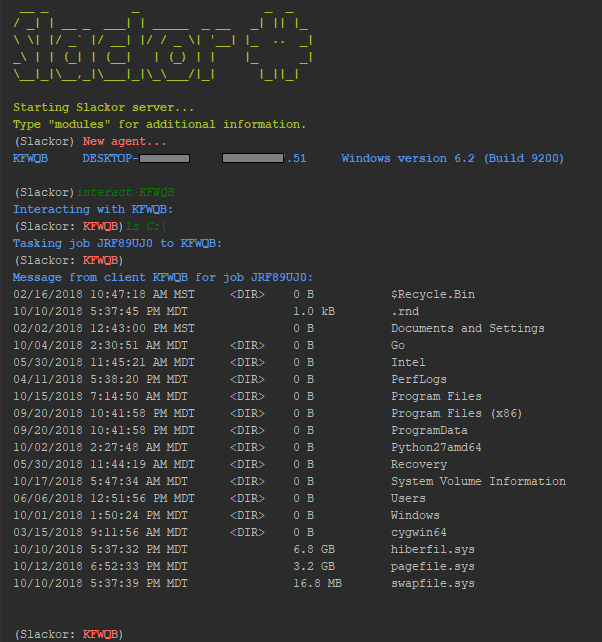
!Slackor Screenshot
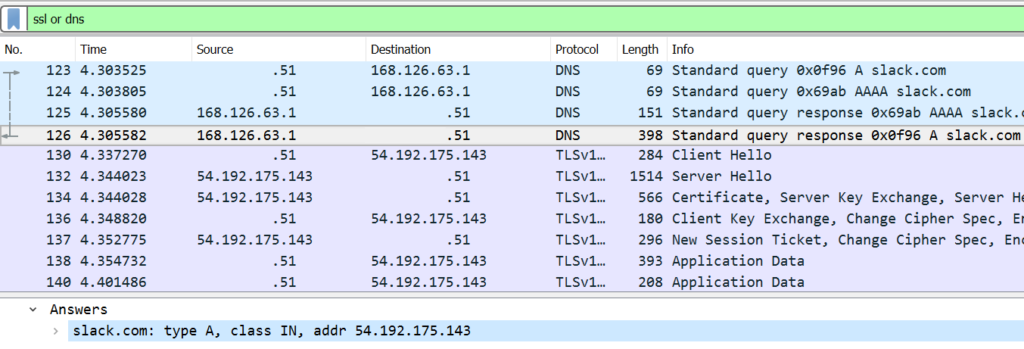
!Wireshark Screenshot
This tool is released as a proof of concept. Be sure to read and understand the Slack App De Policy before creating any Slack apps.
Setup
=====
Note: The server is written in Python 3
For this to work you need:
- channels:read
- channels:history
- channels:write
- files:write:user
- files:read
This repo contains fi:
install.sh Installs dependanciessetup.py The script to create the slack channels, database, and implantagent.py Script to generate new implantsserver.py The Slackor server, designed to be ran on Linuxagent.go The golang implantrequirements.txt Python dependencies (installed automatically)To get started:
go get github.com/Coalfire-Research/Slackorcd $GOPATH/src/github.com/Coalfire-Research/Slackorinstall.shsetup.py- Supply the *OAuth Access Token* and *Bot User OAuth Access Token* from your app
After running the script successfully, several files will be created in the dist/ directory:
agent.windows.exe: Windows 64-bit binaryagent.upx.exe: Windows 64-bit binary, UPX packedagent.darwin: macOS 64-bit binaryagent.32.linux: Linux 32-bit binaryagent.64.linux: Linux 64-bit binary After starting server.py on a Linux host, execute whiche above is appropriate for your target host.
Run the "stager" module to generate a one-liner and other droppers.
This will execute In(PS v.3+) to download the payload, execute it using a LOLBin, and then delete itself once killed. This is a working example but the command can tweaked to use another download method or execution method.
Usage
=====
Type "help" or press [TAB] to see a list of a commands. type "help [COMMAND]" to see a description of that command.
Once an agent checks in, you can interact with it.
Use "interact [AGENT] to enter into an agent prompt. Type "help" or press [TAB] to see a list of a commands.
- back - Return to the main menu
- beacon - change the amount of time between each check-in by an agent (default is 5 seconds)
- download - Download a file from the agent to the Slackor server
- help - Displays help menu
- kill - Kill the agent
- sleep - Cause the agent to sleep once (enter time in seconds)
- sysinfo - Displays the current user, OS , system architecture, and number of CPU cores
- upload - Upload a file to the agent from the Slackor server
- wget - Pull down arbitrary files over HTTP/HTTPS
- bypassuac - Attempts to spawn a high integrity agent
- cleanup - Remo artifacts
- clipboard - Retreives the contents of the clipboard
- defanger - Attempts to de-fang Windows Defender
- duplicate - Causes the agent to spawn another in of itself
- getsystem - Spawns an agent as NTAUTHORITY/SYSTEM
- keyscan - Starts a keylogger on the agent
- minidump - Dumps memory from lsass.exe and downloads it
- persist - Creates persistence by implanting a binary in an ADS
- samdump - Attempts to dump the SAM file for offline hash extraction
- screenshot - Takes a screenshot of the desktop and retrieves it
- shellcode - Executes x64 raw shellcode
- screenshot - Takes a screenshot of the desktop and retrieves it
#### OPSEC Considerations
Command output and downloaded files are AES encrypted in addition to Slack's TLS transport encryption.
Modules will warn you before performing tasks that write to disk.
When executing shell commands, take note that cmd.exe/bash will be executed. This may be monitored on the host.
Here are several OPSEC safe commands that will NOT execute cmd.exe/bash:
Credits
=====
Future goals
=====
FAQ:
=====
Is this safe to use for red teams/pentesting?
Yes, given some conditions. While the data is encrypted in transit, the agent contains the key for decryption.
Anyone who acquires a copy of the agent could reverse engineer it and extract the API keys and the AES secret key.
Anyone who compromises or otherwise gains access to the workspace would be able to retrieve all data within it.
For this reason, it is not recommended to re-use infrastructure against multiple organizations.
What about Mimikatz?
The implant does not ha password dumping functionality.
If you need logonPasswords, you can try the following:
THis will automically extract passwords with Pypykatz. Alternatively, you can use Mimikatz on Windows.
Is it cross-platform?
It has limited cross-platform support. It has not been fully tested on all of the systems it can be run on.
The server was designed to run on Kali Linux. The agent is compiled for Windows, Mac, and Linux, but has
primarily been tested with Windows 10. Agents may mishandle commands which are not supported by that agent's
platform (don't try to minidump a Mac).
How well does it scale?
Scalability is limited by the Slack API. If you ha agents, consider increasing the beacon interval of beacons not in use.
Is it to standard beacon analysis?
Currently each beacon has 20% jitter built in, and beacon times can be customized. Agent check-in request and response packets will be about the same size each time as long as no new commands are recieved.
Why did you do [x] when a better way to do it is [y]?
I tried my best. PRs are encouraged :)
It gets caught by AV!
With this being open source now, it's bound to ha. I'll fix modules as I can but there is no guarantee this will bypass all AV at all times.
项目信息
开发语言:Python
Star 数:460
技术要点
该项目属于红蓝攻防方向的开源资源,代码结构清晰,适合安全研究人员学习参考。项目围绕 A Golang implant that uses Slack as a command and control server 展开,提供了可运行的实现,对理解相关安全机制、工具原理与攻防技术具有较高的研究价值。
从技术实现角度看,此类项目的核心在于对底层原理的深入理解与工程化落地。开发者在研究过程中可以结合官方文档与社区讨论,梳理项目的初始化流程、核心模块职责与数据流转,逐步掌握其中的技术细节与设计思路。
使用与学习建议
1. 下载源码压缩包,解压到本地环境。
2. 根据项目类型准备对应的运行环境与依赖。
3. 按照 README 中的步骤完成配置与部署。
4. 在隔离的测试环境中运行验证,避免影响生产系统。
免责声明
本资源来源于开源社区,仅供安全研究、技术学习与合法授权范围内的攻防演练使用,请勿用于任何非法或侵害他人权益的用途。使用本项目产生的一切后果由使用者自行承担。
| 资源标题 | Slackor - A Golang implant that uses Slack as a command and |
| 所属分类 | 红蓝攻防 |
| 发布作者 | admin |
| 发布时间 | 2026-10-06 00:41:22 |
| 下载权限 | 免费下载 |
| 附件数量 | 2 个下载链接 |
| 浏览次数 | 351 |
| 讨论数量 | 0 |
| 主题状态 | 正常讨论中 |