 红蓝攻防
点击放大
ScheduleRunner - A C# tool with more flexibility to customize sched
项目说明
ScheduleRunner - A C# tool with more flexibility to customize scheduled task for both persistence and lateral mo in red team operation
----
Scheduled task is one of the most popular attack technique in the past decade and now it is still commonly used by hackers/red teamers for persistence and lateral mo.
A number of C# tools were already de to simulate the attack using scheduled task. I have been playing around with some of them but each of them has its own limitations on customizing the scheduled task. Therefore, this project aims to provide a C# tool (CobaltStrike execute-assembly friendly) to include the features that I need and provide enough flexibility on customizing the scheduled task.
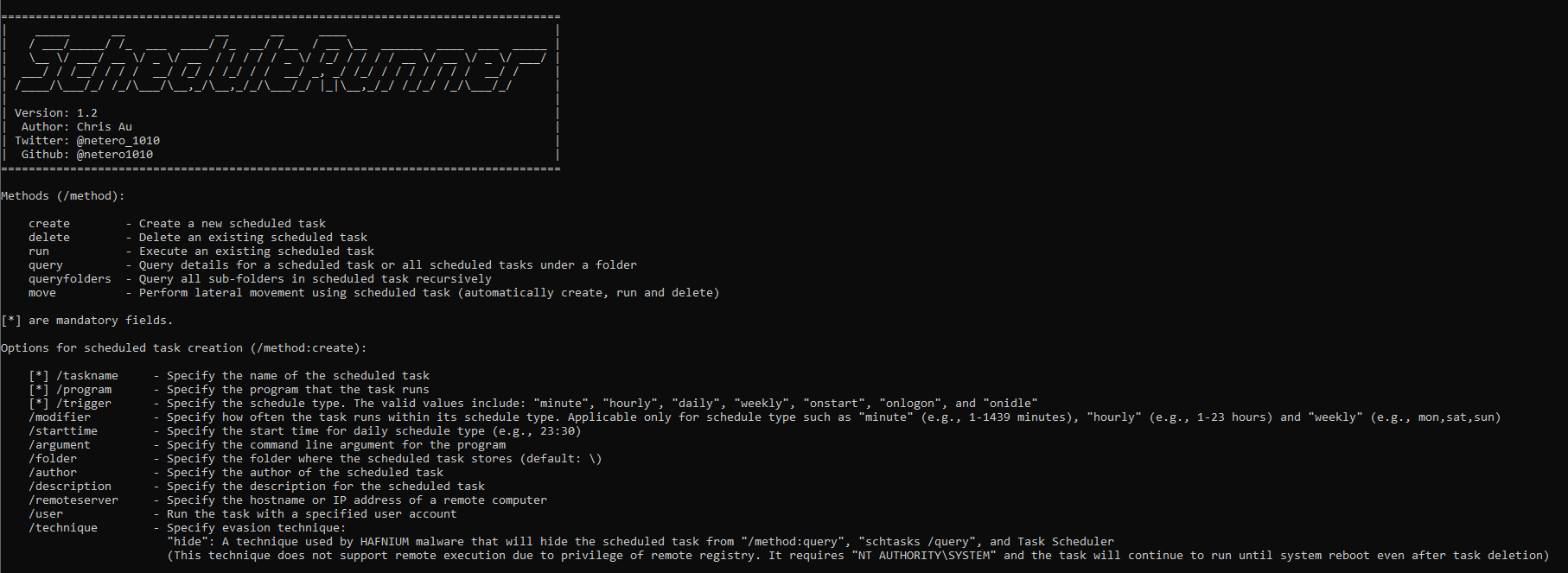
Screenshot:
!HowTo
Methods (/method):
| Method | Function |
| ------------ | ------------ |
| create | Create a new scheduled task |
| delete | Delete an existing scheduled task |
| run | Execute an existing scheduled task |
| query | Query details for a scheduled task or all scheduled tasks under a folder |
| queryfolders | Query all sub-folders in scheduled task |
| move | Perform lateral mo using scheduled task (automatically create, run and delete) |
Options for scheduled task creation (/method:create):
| Method | Function |
| ------------ | ------------ |
| [*] /taskname | Specify the name of the scheduled task |
| [*] /program | Specify the program that the task runs |
| [*] /trigger | Specify the schedule type. The valid include: "minute", "hourly", "daily", "weekly", "onstart", "onlogon", and "onidle" |
| /modifier | Specify how often the task runs within its schedule type. Applicable only for schedule type such as "minute" (e.g., 1-1439 minutes), "hourly" (e.g., 1-23 hours) and "weekly" (e.g., mon,sat,sun) |
| /starttime | Specify the start time for daily schedule type (e.g., 23:30) |
| /argument | Specify the command line argument for the program |
| /folder | Specify the folder where the scheduled task stores (default: \\) |
| /workingdir | Specify the working directory in which the scheduled task will be executed |
| /author | Specify the author of the scheduled task |
| /description | Specify the description for the scheduled task |
| /remoteserver | Specify the hostname or IP address of a remote computer |
| /user | Run the task with a specified user account |
| /technique | Specify e technique:<br>- "hide": A technique used by HAFNIUM malware that will hide the scheduled task from task query<br><br>[!] ] This technique does not support remote execution due to pri of remote registry. It requires "NT AUTHORITY\SYSTEM" and the task will continue to run until system reboot e task deletion |
[*] are mandatory fields.
Options for scheduled task deletion (/method:delete):
| Method | Function |
| ------------ | ------------ |
| [*] /taskname | Specify the name of the scheduled task |
| /folder | Specify the folder where the scheduled task stores (default: \\) |
| /remoteserver | Specify the hostname or IP address of a remote computer |
| /technique | Specify when the scheduled task was created using e technique:<br>- "hide": Delete scheduled task that used "hiding scheduled task" technique<br><br>[!] The deletion requires "NT AUTHORITY\SYSTEM" and the task will continue to run until system reboot e task deletion |
[*] are mandatory fields.
Options for scheduled task execution (/method:run):
| Method | Function |
| ------------ | ------------ |
| [*] /taskname | Specify the name of the scheduled task |
| /folder | Specify the folder where the scheduled task stores (default: \\) |
| /remoteserver | Specify the hostname or IP address of a remote computer |
[*] are mandatory fields.
Options for scheduled task query (/method:query):
| Method | Function |
| ------------ | ------------ |
| /taskname | Specify the name of the scheduled task |
| /folder | Specify the folder where the scheduled task stores (default: \\) |
| /remoteserver | Specify the hostname or IP address of a remote computer |
[*] are mandatory fields.
Options for scheduled task lateral mo (/method:move):
| Method | Function |
| ---------------- | ---------------- |
| [*] /taskname | Specify the name of the scheduled task |
| [*] /program | Specify the program that the task runs |
| [*] /remoteserver | Specify the hostname or IP address of a remote computer |
| /trigger | Specify the schedule type. The valid include: "minute", "hourly", "daily", "weekly", "onstart", "onlogon", and "onidle" |
| /modifier | Specify how often the task runs within its schedule type. Applicable only for schedule type such as "minute" (e.g., 1-1439 minutes), "hourly" (e.g., 1-23 hours) and "weekly" (e.g., mon,sat,sun) |
| /starttime | Specify the start time for daily schedule type (e.g., 23:30) |
| /argument | Specify the command line argument for the program |
| /folder | Specify the folder where the scheduled task stores (default: \\) |
| /workingdir | Specify the working directory in which the scheduled task will be executed |
| /author | Specify the author of the scheduled task |
| /description | Specify the description for the scheduled task |
| /user | Run the task with a specified user account |
[*] are mandatory fields.
Example
Create a scheduled task called "Cleanup" that will be executed every day at 11:30 p.m.
ScheduleRunner.exe /method:create /taskname:Cleanup /trigger:daily /starttime:23:30 /program:calc.exe /description:"Some description" /author:netero1010
Create a scheduled task called "Cleanup" that will be executed every 4 hours on a remote server
ScheduleRunner.exe /method:create /taskname:Cleanup /trigger:hourly /modifier:4 /program:rundll32.exe /argument:c:\temp\payload.dll /remoteser
Delete a scheduled task called "Cleanup"
ScheduleRunner.exe /method:delete /taskname:Cleanup
Execute a scheduled task called "Cleanup"
ScheduleRunner.exe /method:run /taskname:Cleanup
Query details for a scheduled task called "Cleanup" under "\Microsoft\Windows\CertificateSer" folder on a remote server
ScheduleRunner.exe /method:query /taskname:Cleanup /folder:\Microsoft\Windows\CertificateSer /remoteser
Query all scheduled tasks under a specific folder "\Microsoft\Windows\CertificateSer" on a remote server
ScheduleRunner.exe /method:query /folder:\Microsoft\Windows\CertificateSer /remoteser
Query all sub-folders in scheduled task
ScheduleRunner.exe /method:queryfolders
Perform lateral mo using scheduled task to a remote ser a specific user account
ScheduleRunner.exe /method:mo:Demo /remoteser /program:rundll32.exe /argument:c:\temp\payload.dll /user:netero1010
Create a scheduled task called "Cleanup" using hiding scheduled task technique:
ScheduleRunner.exe /method:create /taskname:Cleanup /trigger:daily /starttime:23:30 /program:calc.exe /description:"Some description" /author:netero1010 /technique:hide
Delete a scheduled task called "Cleanup" that used hiding scheduled task technique:
ScheduleRunner.exe /method:delete /taskname:Cleanup /technique:hide
Hiding Scheduled Task Technique
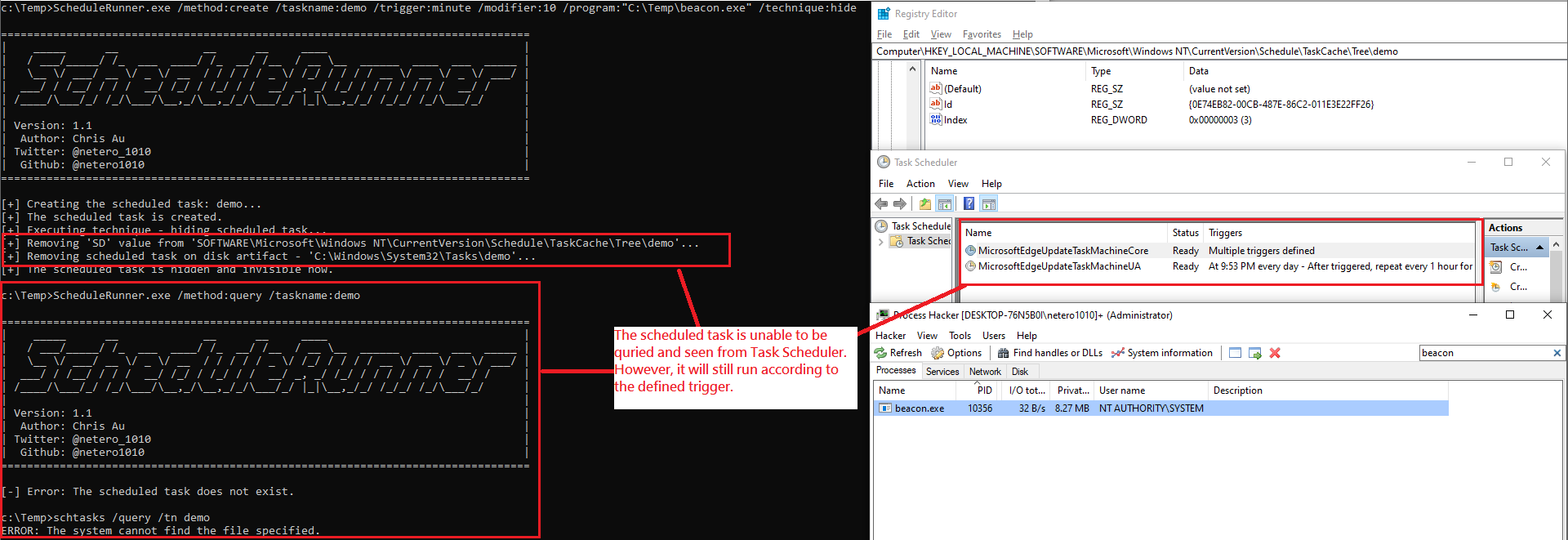
This technique was used by threat actor - HAFNIUM and discovered by Microsoft recently. It aims to make the scheduled task unqueriable by tools and unseeable by Task Scheduler.
To use this technique, you are required to have "NT AUTHORITY/SYSTEM" and ScheduleRunner will do the following for you:
1. Delete "SD" value from "HKLM\SOFTWARE\Microsoft\Windows NT\Current\Schedule\TaskCache\Tree\\[task name]"
2. Delete scheduled task XML file "C:\Windows\System32\Tasks\\[task name]"
To remo task that is created using this technique require to add "/technique:hide" in the delete method to remove it properly.
Disad of this technique:
The task will continue to run util next system reboot even if the task is deleted . Therefore, it is better not to use this technique in server for your operation.
Demo
!HowTo
Library and Reference Used:
| Library | Link |
| ------------ | ------------ |
| TaskScheduler | |
| Reference | Link |
| ------------ | ------------ |
| SharpPersist | |
| Hiding scheduled task technique | |
项目信息
开发语言:C#
Star 数:349
技术要点
该项目属于红蓝攻防方向的开源资源,代码结构清晰,适合安全研究人员学习参考。项目围绕A C# tool with more flexibility to customize scheduled task for both persistence and lateral movement in red team operation展开,提供了可运行的实现,对理解相关安全机制、工具原理与攻防技术具有较高的研究价值。
从技术实现角度看,此类项目的核心在于对底层原理的深入理解与工程化落地。开发者在研究过程中可以结合官方文档与社区讨论,梳理项目的初始化流程、核心模块职责与数据流转,逐步掌握其中的技术细节与设计思路。
使用与学习建议
1. 下载源码压缩包,解压到本地环境。
2. 根据项目类型准备对应的运行环境与依赖。
3. 按照 README 中的步骤完成配置与部署。
4. 在隔离的测试环境中运行验证,避免影响生产系统。
免责声明
本资源来源于开源社区,仅供安全研究、技术学习与合法授权范围内的攻防演练使用,请勿用于任何非法或侵害他人权益的用途。使用本项目产生的一切后果由使用者自行承担。
| 资源标题 | ScheduleRunner - A C# tool with more flexibility to customize sched |
| 所属分类 | 红蓝攻防 |
| 发布作者 | admin |
| 发布时间 | 2026-10-06 00:43:06 |
| 下载权限 | 免费下载 |
| 附件数量 | 2 个下载链接 |
| 浏览次数 | 285 |
| 讨论数量 | 0 |
| 主题状态 | 正常讨论中 |