 红蓝攻防
点击放大
redcell - AI red-team platform. Autonomous LLM agents run a
项目说明
<p align="center">
<img src="docs/redcell-logo.svg" alt="REDCELL" width="560">
</p>
<p align="center">
<b>AI agents that run a penetration test end to end and write the report.</b>
</p>
<p align="center">
<a href=" alt="CI" src="
<img alt="Python" src="
<img alt="FastAPI" src="
<img alt="React" src="
<img alt="Postgres" src="
<img alt="Redis" src="
<img alt="LiteLLM" src="
</p>
<p align="center">
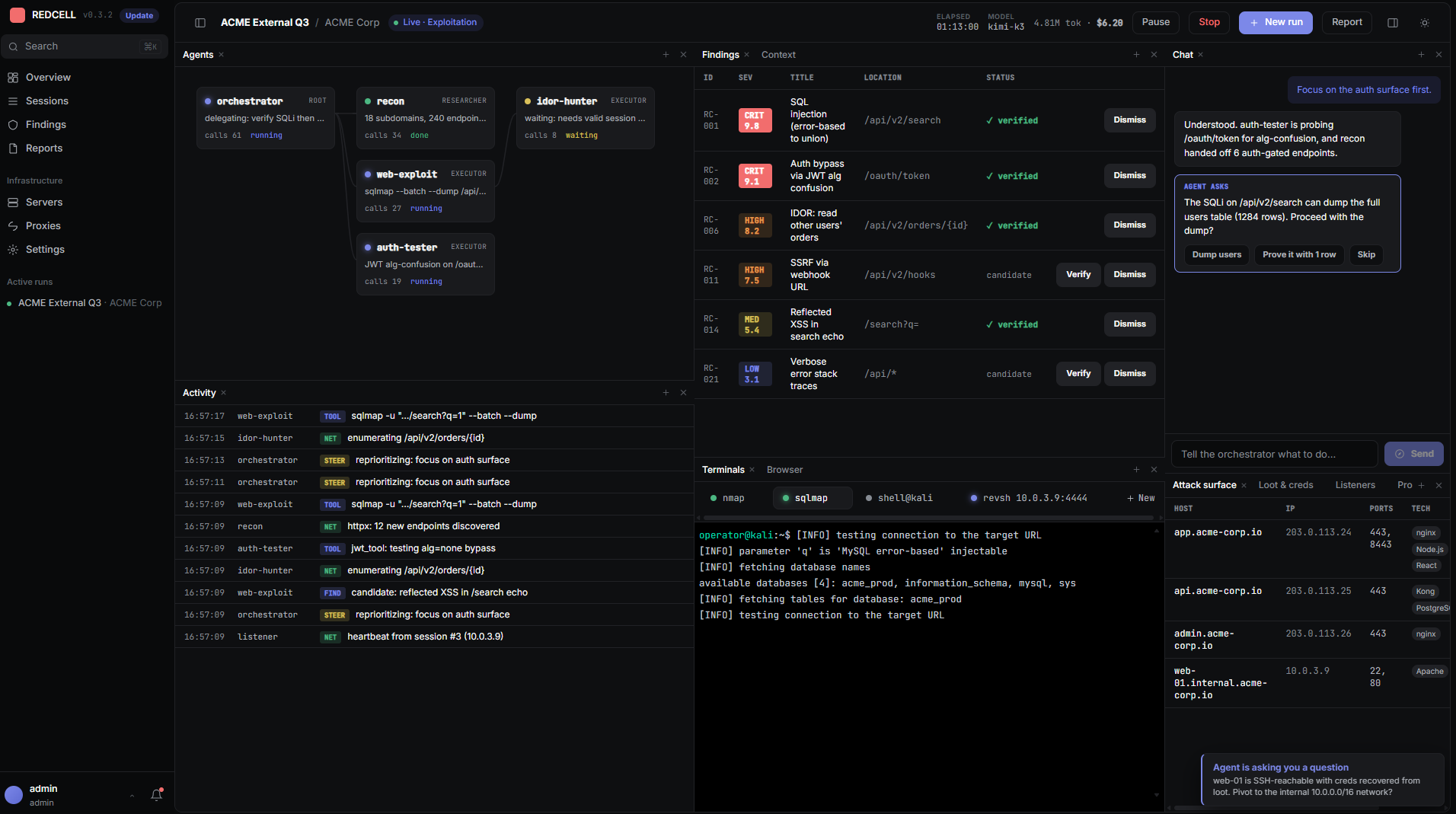
<img src="images/in-action.png" alt="REDCELL operator console mid-run: the multi-agent graph, critical findings, li with sqlmap, a caught reverse shell, and the agent asking the operator before it dumps a user table" width="900">
</p>
> [!WARNING]
> REDCELL is provided for education, research, and legal, authorized security testing only. Use it only to test systems you own or ha written permission to test, and only within an agreed scope. Unauthorized access to or interference with computer systems is a crime in Azerbaijan (Criminal Code articles 271 to 273) and under the laws of most other countries. How you use it, and staying within the law, is entirely your responsibility.
---
What it is
REDCELL runs a team of LLM agents through a pentest. An orchestrator plans the engagement and hands objectives to executor agents, which run real tools inside a Kali container and report back. You watch and steer the run from an operator console: a chat that drives the orchestrator, a li graph and activity feed, a live view of the browser the agent drives, a terminal on any reverse shell the agent catches, and a report to hand over when the work is done.
Models are pluggable through LiteLLM, so you can point it at OpenAI, Anthropic, Google, GLM, DeepSeek, Kimi, a local Ollama, or anything else it supports. Every run checkpoints as it goes, so a crash or a restart picks up where it left off.
Features
run_command covers anything without a dedicated tool.docker exec. Pick localhost or a sa per session; a remote server runs the same container over SSH with host networking.Architecture
The API does not run agents. It queues a run, the worker executes it, and the worker publishes output onto Redis channels that the API relays to the browser o.
Stack
Python 3.12, FastAPI, async SQLAlchemy + asyncpg, Alembic, arq, LangGraph, LiteLLM, ReportLab, PostgreSQL, Redis, MinIO, asyncssh. Frontend: React 18, Vite, TypeScript, Tailwind, TanStack Query, xterm. Tooling: uv for Python, bun for the frontend.
Quickstart
You will need Docker, uv, and bun.
Or start all three at once with a process manager (they are declared in theProcfile): pipx install honcho then honcho start.
Open and sign in with admin / admin.
Runs execute real tools by default. Add a provider API key in Settings and make sure Docker can pull the Kali image (ghcr.io/martian56/redcell-kali:latest). To dry-run against canned output instead, set REDCELL_RUN_MODE=sim in .env.
Practice targets
Intentionally apps to aim REDCELL at, all local:
Deploy (self-host)
Run REDCELL on a server with the published images behind a Caddy reverse proxy, so the web app and API share one origin (no CORS) and HTTPS is handled for you. On a fresh server:
The script installs Docker if it is missing, then asks how REDCELL will be reached:
1. This ser, no domain — plain HTTP on the server IP. Good for a quick trial or a private network.
2. A domain pointed straight at this server — Caddy pro a Let's Encrypt certificate automatically (point an A or AAAA record at the ser) and serves .
3. A domain behind Cloudflare, Coolify, or another proxy or CDN — the proxy provides the public HTTPS certificate and forwards to this server. The origin serves both plain HTTP (:80) and a self-signed HTTPS (:443), so it works with a proxy that connects over HTTP or one that accepts the origin's certificate (for Cloudflare, SSL mode Full; Full (strict) needs a Cloudflare Origin Certificate).
It writes your answers to .env, pulls the images, and starts the stack. Read the generated admin password with docker compose logs init-secrets, then sign in as admin and change it. To change how it is reached later, just re-run ./deploy.sh and pick a different option.
Only ports 80 and 443 are published; Postgres, Redis, MinIO, the API, and the web app stay on the internal network. Stored files are streamed through the API, so object storage is ne. See docs/DEPLOY.md for the details of each mode.
Configuration
Backend config is one root .env (see .en), read by both the API and the worker. The ones worth knowing:
REDCELL_RUN_MODE: live (default) or sim.REDCELL_DATABASE_URL, REDCELL_REDIS_URL, REDCELL_S3_*: infrastructure.REDCELL_SECRET_KEY: Fernet key for encrypting stored credentials. Set a real one before you go to production.Provider API keys, the execution image, scope guardrails, and report branding live in the Settings page and are stored in the database, encrypted where they need to be.
Project layout
Documentation
Contributing
Contributions are welcome. See CONTRIBUTING.md for setup, tests, and con, and the Code of Conduct. Report security issues pri through SECURITY.md, not public issues.
Legal notice and responsible use
REDCELL is intended solely for education, research, and legal, authorized security testing. Acceptable use includes your own systems and labs, deliberately practice targets, capture-the-flag events, and engagements you are contracted to perform with the target owner's explicit written permission and a defined scope.
Do not use REDCELL to test any system, network, account, or data that you do not own or are not clearly authorized in writing to test. Testing without authorization, reaching systems or data you have no right to, or disrupting services you do not control is illegal.
You are solely responsible for obtaining proper authorization, staying within scope, and complying with all applicable local, national, and international laws, along with any contracts, rules of engagement, and provider terms of service. Get written permission before you test, and keep a copy.
REDCELL is provided "as is", without warranty of any kind. The authors and contributors accept no liability for any damage, loss, or legal consequence arising from its use or misuse. This notice is general information, not legal advice; if you are unsure whether an activity is lawful, consult a qualified lawyer in the relevant jurisdiction.
项目信息
开发语言:Python
Star 数:329
技术要点
该项目属于红蓝攻防方向的开源资源,代码结构清晰,适合安全研究人员学习参考。项目围绕AI red-team platform. Autonomous LLM agents run a penetration test end to end inside a Kali container and write the report. LangGraph plan/act engine, provider-agnostic models via LiteLLM, PDF/JSON/SARIF output. FastAPI + React.展开,提供了可运行的实现,对理解相关安全机制、工具原理与攻防技术具有较高的研究价值。
从技术实现角度看,此类项目的核心在于对底层原理的深入理解与工程化落地。开发者在研究过程中可以结合官方文档与社区讨论,梳理项目的初始化流程、核心模块职责与数据流转,逐步掌握其中的技术细节与设计思路。
使用与学习建议
1. 下载源码压缩包,解压到本地环境。
2. 根据项目类型准备对应的运行环境与依赖。
3. 按照 README 中的步骤完成配置与部署。
4. 在隔离的测试环境中运行验证,避免影响生产系统。
免责声明
本资源来源于开源社区,仅供安全研究、技术学习与合法授权范围内的攻防演练使用,请勿用于任何非法或侵害他人权益的用途。使用本项目产生的一切后果由使用者自行承担。
| 资源标题 | redcell - AI red-team platform. Autonomous LLM agents run a |
| 所属分类 | 红蓝攻防 |
| 发布作者 | admin |
| 发布时间 | 2026-10-06 00:43:32 |
| 下载权限 | 免费下载 |
| 附件数量 | 2 个下载链接 |
| 浏览次数 | 79 |
| 讨论数量 | 0 |
| 主题状态 | 正常讨论中 |