 红蓝攻防
点击放大
Project-Deep-Focus - Your personal 'Mini Shodan'. A high-performance ne
项目说明
Deep Focus
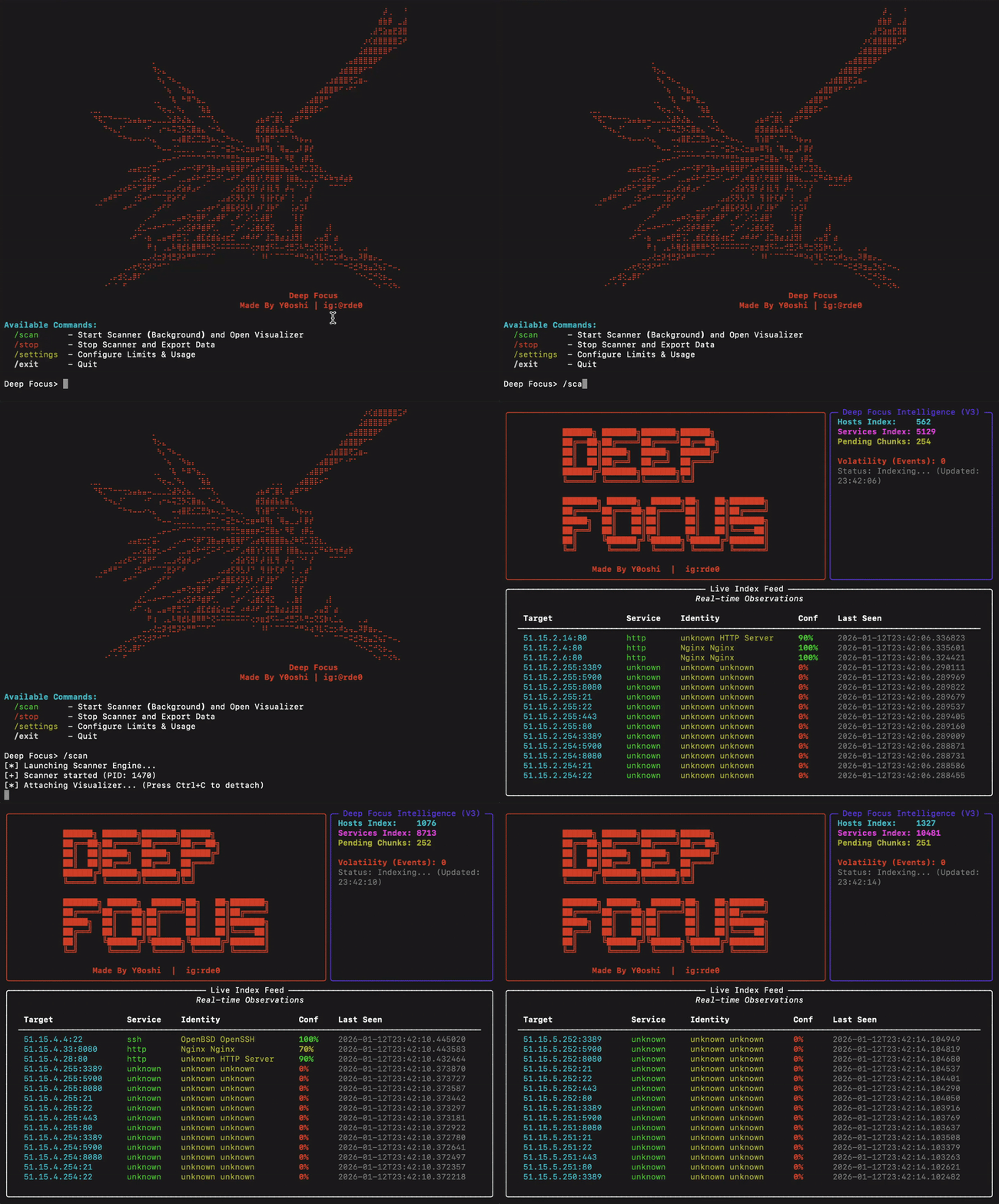
A high-performance network reconnaissance tool for disco and fingerprinting services across IP ranges. Built for security researchers and network administrators.
!Deep Focus Demo
---
Table of Contents
1. O
2. Features
3. Requirements
4. Installation
5. Usage
6. Configuration
7. Understanding Export Logs
8. Target Selection Guide
9. Troubleshooting
10. License
---
O
Deep Focus is an asynchronous network scanner designed for large-scale service discovery. It performs intelligent probing of common network services and provides detailed authentication status information for each discovered service. You can consider it your personal mini Shodan.
The tool is optimized for passi systems (such as Apple M-series laptops) with built-in thermal management that automatically throttles scanning when system load is high.
Key Capabilities
---
Features
Service Probes
| Service | Port | Detection Capabilities |
|---------|------|------------------------|
| HTTP/HTTPS | 80, 443, 8080 | Server type, TLS cipher, cert issuer, self-signed detection |
| FTP | 21 | Anonymous access detection |
| SSH | 22 | , key exchange, ciphers, MACs, host keys |
| Telnet | 23 | Banner grabbing for routers/IoT |
| SMTP | 25, 587 | STARTTLS detection, TLS cipher suite |
| VNC | 5900 | Authentication type (None, Password, TLS) |
| RTSP | 554 | Camera brand, authentication status |
| LDAPS | 636 | TLS cipher, cert info, self-signed detection |
| MQTT | 1883 | Broker access (No-Auth detection) |
| RDP | 3389 | Security mode detection (NLA, TLS, Legacy) |
Authentication Detection
The tool specifically identifies services that may be accessible without credentials:
Thermal Management
Built-in go monitors system load and automatically pauses scanning when thresholds are exceeded, pre thermal throttling on passi systems.
---
Requirements
---
Installation
Quick Start (Recommended)
Deep Focus comes with automated installers for all major platforms.
1. Download and Enter Directory:
2. Run Installer:
- macOS / Linux: ./install.sh
- Windows: .\install.bat
3. Launch:
Restart your terminal, then type:
That's it! You can now run the tool from anywhere.
---
Manual Installation (Optional)
If you prefer to configure e yourself:
1. ensure python 3.8+ is installed.
2. create a en: python3 -m venv venv
3. activate it: source venv/bin/activate
4. install packages: pip install rich aiosqlite cryptography
5. run: python3 deep_focus.py
---
Usage
Starting the Tool
A Commands
| Command | Description |
|---------|-------------|
| /scan | Start scanning and open the li |
| /stop | Stop scanning and export results |
| /settings | Configure scan parameters |
| /help | Show a commands |
| /exit | Exit the application |
Basic Workflow
1. Launch the tool with deepfocus
2. Configure target network with /settings (Option 1)
3. Adjust scan speed if needed with /settings (Option 3)
4. Start scanning with /scan
5. Monitor progress in the li
6. Press Ctrl+C to detach from dashboard (scanning continues)
7. Use /stop to halt scanning and export results
---
Configuration
Access configuration menu with /settings:
Option 1: Target Network
Specify the IP range to scan in CIDR notation.
Option 2: Power Level (10-100%)
Controls thermal limits. Higher allow more aggressi but increase heat generation.
| Power Level | Max System Load | Recommended For |
|-------------|-----------------|-----------------|
| 10-30% | Low | Laptops on battery |
| 40-60% | Medium | Normal operation |
| 70-100% | High | Desktop systems with acti |
Option 3: Scan Speed (100-1000 threads)
Controls concurrent connection attempts.
| Speed | Threads | Notes |
|-------|---------|-------|
| 100-300 | Conser | Recommended for home routers |
| 300-600 | Optimal | Best balance of speed and stability |
| 600-1000 | Aggressive | May cause router o or heat issues |
Warning: Speeds above 600 threads may cause router instability or system o.
Option 4: Export Path
Directory where scan results will be saved.
Option 5: Ports
Comma-separated list of ports to scan. Defaults to:
---
Understanding Export Logs
Each export writes two files with the same timestamp:
deep_focus_export_[timestamp].txt — human-readable reportdeep_focus_export_[timestamp].json — machine-readable array of resultsLog Entry Format
Each discovered service is recorded in the text report as:
Field Descriptions
| Field | Description |
|-------|-------------|
| Target | IP address and port (ip:port) |
| Service | Identified service type |
| Details | Service banner and authentication status |
Authentication Status Indicators
#### FTP (Port 21)
| Status | Meaning |
|--------|---------|
| Anonymous Access ALLOWED | Anonymous login accepted |
| Anonymous Access ALLOWED (No Pass) | Anonymous accepted without a password |
| Anonymous Access DENIED (530) | Anonymous password rejected |
| Anonymous User Rejected | Anonymous user not allowed |
| Anonymous User Rejected (550) | Anonymous login not permitted |
| Encryption Required (AUTH TLS) | TLS required before login |
#### VNC (Port 5900)
| Status | Meaning |
|--------|---------|
| None (OPEN) | No password required |
| VNC Auth | Password authentication required |
| (TLS) | TLS encryption required |
#### RTSP (Port 554)
| Status | Meaning |
|--------|---------|
| No Auth Required (OPEN) | Stream accessible without credentials |
| Auth Required | Credentials needed |
| Forbidden | Access denied |
Camera brands are identified when possible: Hik, Dahua, Axis, Foscam, Amcrest, Reolink, Ubiquiti.
#### SSH (Port 22)
| Type | Meaning |
|------|---------|
| OpenSSH X.X | Standard OpenSSH server |
| Dropbear (Embedded/IoT) | Lightweight SSH, often on IoT devices |
| MikroTik Router | MikroTik network equipment |
| Cisco IOS | Cisco network device |
#### RDP (Port 3389)
| Status | Meaning |
|--------|---------|
| RDP (CredSSP/NLA Required) | Network Level Auth - most secure |
| RDP (TLS Security) | TLS encryption enabled |
| RDP (Standard RDP Security) | Legacy encryption only |
| RDP (Legacy/No NLA) | Old server, no modern auth |
---
Target Selection Guide
The included targets.json file contains a curated list of high-value IP ranges organized by provider and region. You can open this file to find tested IP ranges for discovery goals.
Each entry in targets.json includes:
Range Categories
| Category | Typical Findings |
|----------|------------------|
| Cloud Pro (Hetzner, O) | Web servers, dashboards, FTP, VNC |
| Budget Hosting (Contabo) | Forgotten servers, misconfigured services |
| Residential ISPs (Korea, Taiwan, China) | IoT devices, cameras, NAS drives |
Recommended Targets by Goal
| Goal | Recommended Pro |
|------|----------------------|
| FTP/SSH Discovery | Contabo, Hetzner, OVH |
| Camera Discovery | Korea Telecom, Taiwan HiNet, China Telecom |
| | Vultr, DigitalOcean, Contabo |
---
Troubleshooting
Scanner stops responding
The thermal go may ha scanning. Check system load and wait, or reduce power level in settings.
Low discovery rate
Router becomes unstable
Reduce scan speed to 300-400 threads. High thread counts can o consumer routers.
Permission errors on export
the export path exists and is writable.
---
License
This tool is provided for authorized security testing and network administration only. Users are responsible for ensuring compliance with applicable laws and regulations.
---
Author
Made by Y0oshi | Instagram:
项目信息
开发语言:Python
Star 数:246
技术要点
该项目属于红蓝攻防方向的开源资源,代码结构清晰,适合安全研究人员学习参考。项目围绕Your personal 'Mini Shodan'. A high-performance network reconnaissance engine designed for massive scale asset discovery. Specializes in identifying unsecured services (Open RTSP Cameras, No-Auth VNC, Anonymous FTP) and deeply fingerprints device models with a beautiful real-time terminal dashboard.展开,提供了可运行的实现,对理解相关安全机制、工具原理与攻防技术具有较高的研究价值。
从技术实现角度看,此类项目的核心在于对底层原理的深入理解与工程化落地。开发者在研究过程中可以结合官方文档与社区讨论,梳理项目的初始化流程、核心模块职责与数据流转,逐步掌握其中的技术细节与设计思路。
使用与学习建议
1. 下载源码压缩包,解压到本地环境。
2. 根据项目类型准备对应的运行环境与依赖。
3. 按照 README 中的步骤完成配置与部署。
4. 在隔离的测试环境中运行验证,避免影响生产系统。
免责声明
本资源来源于开源社区,仅供安全研究、技术学习与合法授权范围内的攻防演练使用,请勿用于任何非法或侵害他人权益的用途。使用本项目产生的一切后果由使用者自行承担。
| 资源标题 | Project-Deep-Focus - Your personal 'Mini Shodan'. A high-performance ne |
| 所属分类 | 红蓝攻防 |
| 发布作者 | admin |
| 发布时间 | 2026-10-06 00:45:37 |
| 下载权限 | 免费下载 |
| 附件数量 | 2 个下载链接 |
| 浏览次数 | 436 |
| 讨论数量 | 0 |
| 主题状态 | 正常讨论中 |