 红蓝攻防
点击放大
TeamsEnum - User Enumeration of Microsoft Teams users via API

项目说明
TeamsEnum
User enumeration of Microsoft Teams users. TeamsEnum is a Python script that allows to find existing users and their online status.
It supports multiple authentication mechanisms and can be used with personal or corporate accounts.
Requirements
Installation
Installation of TeamsEnum is straight forward:
Getting started
Find existing users via list of existing email accounts in list.txt:
Usage scenarios
Find existing users
The most common use case is to try to find existing user accounts, based on a list of email addresses. This list can easily be fed into this script via the -f parameter.
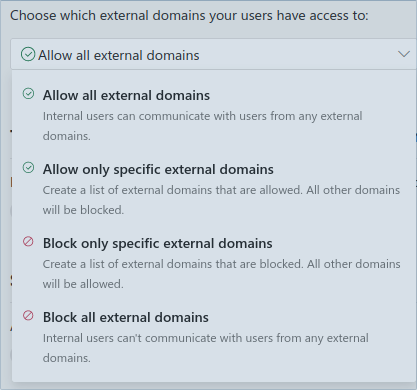
As a Teams administrator you might think that blocking external communications would effectively stop user enumeration. It doesn't.
!Control access to external domains
Even if the setting "Block all external domains" is configured, you could still use your corporate user account to distinguish between existing and non-existing users.
There is one caveat though: With external communications being blocked, it's not possible to fetch additional user information like the user principal name, display name, presence information etc.
There is another caveat affecting the efficiency of user enumeration: When you use a personal user account for enumeration, it is not possible to distinguish between non-existing users and users whose organization blocked external communication. Both will show up as negati.
Besides the setting mentioned abo is another setting limiting communication to accounts not managed by an organization:
!Control communication to non-managed accounts
This has an effect on personal accounts that you use for enumeration.
In fact organizations might block communication to external domains but allow communication to personal accounts, or vice versa.
So if you are not sure if the organization blocks your account, it might make sense to switch from a corporate account to a personal one, or from a personal account to a corporate one.
Obtain detailed presence and user information
Although the standard output doesn't show a lot of details about the identified users, it's possible to write all interesting details to disk, by using the -o parameter. It stores user and presence information in JSON format to make it easier for post-processing e.g. via jq.
After appending the outfile parameter to the script, you could use jq to pretty-print the result file:
This example includes a outOfOfficeNote that gi into the work schedule of that user.
Please note that if you use personal accounts for enumeration you probably won't get meaningful results when querying the presence API. This is because personal accounts wouldn't see the presence of other user accounts unless there has been an established bi-directional communication beforehand.
So if you rely on presence information you should use corporate accounts for authentication.
User account types
Corporate accounts
These are accounts that are associated with an Azure Acti Tenant.
To enumerate users and their presence status, the following endpoints are used:
Personal accounts
These are personal accounts that are not associated with an Azure Acti Tenant.
Common examples are consumer accounts belonging to outlook.com, outlook.de or hotmail.com.
To enumerate users and their presence status, the following endpoints are used:
Password authentication cannot be used for Microsoft Accounts ("MSA" or formerly "LiveID") but only for Work and school accounts ().
Authentication
TeamsEnum requires an authenticated session. Three different authentication mechanisms are a, of which one needs to be selected using the -a parameter:
Password-based authentication
Password-based authentication could be used for all non-personal accounts that don't require MFA.
If not passed argument -p, the password can be entered interactively, which circumvents information disclosure in history files:
As stated abo authentication can't be used with personal accounts.
Device Code authentication flow
This option is suitable if MFA is required or if password-based authentication is not possible. The mechanism is based on the OAuth 2.0 Device Authorization Grant ( ).
To initiate device code authentication, just provide the -a de parameter and the username:
Afterwards open the URL within a web browser that has internet access and enter the code:
!Device Code authentication
Token-based authentication
This method can be used if you already ha tokens a.
Upon authentication both, personal and corporate accounts use a Bearer token (originates from the Authorization HTTP header field) to authenticate towards the Teams/Li.
The Bearer token for corporate accounts is a classic JWT, while the Bearer token for personal accounts is just an encoded binary blob.
While the Bearer token is the only requirement for corporate accounts, all personal accounts also require an additional X-Skypetoken HTTP header.
If you want to use token based authentication, the easiest way is to sign into Teams from a web browser and fetch the tokens from the Local Storage view of the de tools.
Limitations
Currently password-based authentication was not tested for federated logins (e.g. ADFS). If your corporate account uses ADFS or similar, please use the device code login instead. If you ha to an account with ADFS feel free to test password-based login with your credentials. If any errors occur, please open an issue in this repo.
项目信息
开发语言:Python
Star 数:199
技术要点
该项目属于红蓝攻防方向的开源资源,代码结构清晰,适合安全研究人员学习参考。项目围绕User Enumeration of Microsoft Teams users via API展开,提供了可运行的实现,对理解相关安全机制、工具原理与攻防技术具有较高的研究价值。
从技术实现角度看,此类项目的核心在于对底层原理的深入理解与工程化落地。开发者在研究过程中可以结合官方文档与社区讨论,梳理项目的初始化流程、核心模块职责与数据流转,逐步掌握其中的技术细节与设计思路。
使用与学习建议
1. 下载源码压缩包,解压到本地环境。
2. 根据项目类型准备对应的运行环境与依赖。
3. 按照 README 中的步骤完成配置与部署。
4. 在隔离的测试环境中运行验证,避免影响生产系统。
免责声明
本资源来源于开源社区,仅供安全研究、技术学习与合法授权范围内的攻防演练使用,请勿用于任何非法或侵害他人权益的用途。使用本项目产生的一切后果由使用者自行承担。
| 资源标题 | TeamsEnum - User Enumeration of Microsoft Teams users via API |
| 所属分类 | 红蓝攻防 |
| 发布作者 | admin |
| 发布时间 | 2026-10-06 00:47:07 |
| 下载权限 | 免费下载 |
| 附件数量 | 2 个下载链接 |
| 浏览次数 | 136 |
| 讨论数量 | 0 |
| 主题状态 | 正常讨论中 |