 红蓝攻防
点击放大
SharePointDumper - PowerShell SharePoint extraction + auditing tool f

项目说明
SharePointDumper
SharePointDumper is a PowerShell-based extraction and auditing utility that enumerates SharePoint sites a user can access Graph and downloads files .
It is designed for SOC / DLP testing, purple teaming, and non-sophisticated red-team assessments, and therefore produces detailed reports including downloaded files and every HTTP request (Graph + SharePoint) for SIEM correlation.
The tool does not perform authentication. Instead, it requires an already obtained OAuth2 access token with the appropriate Microsoft Graph permissions (Sites.Read.All or Sites.ReadWrite.All).
If you need help obtaining such a token, you can use EntraTokenAid (examples included below), which simplifies generating usable access tokens.
---
✨ Features
- Summary (duration, limits, filters, public IP)
- Accessed SharePoint sites
- Complete HTTP request logs (CSV or JSON)
---
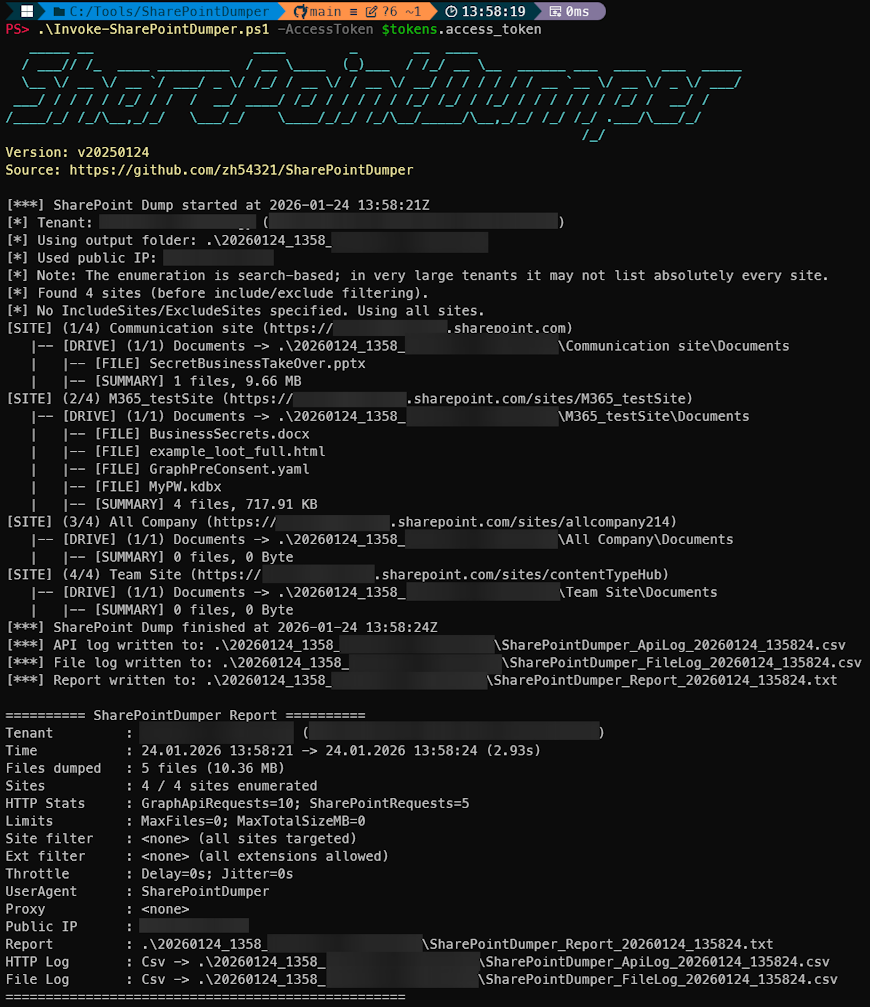
📦 Pictures
Execution:
!alt text
Example CSV API Log (can be CSV or JSON):
!alt text
Example File Download Log (can be CSV or JSON)
!alt text
---
📦 Installation
Clone the repository
---
🔑 Requirements
SharePointDumper requires a valid Microsoft Graph access token with delegated permissions to enumerate sites and files:
Sites.Read.All orSites.ReadWrite.AllFurthermore, the OAuth client must be allowed to call SharePoint API.
More than 23 Microsoft first-party applications already ha Sites.Read… permissions. They can download files from SharePoint, and can be used to obtain a valid token without additional tenant configuration.
<details>
<summary><strong>Usable first party clients</strong></summary>
| App Name | Client ID | FOCI | EntraTokenAid Auth Command |
|---|---|---|---|
| Microsoft Teams | 1fec8e78-bce4-4aaf-ab1b-5451cc387264 | TRUE | $tokens = In -ClientID '1fec8e78-bce4-4aaf-ab1b-5451cc387264' -RedirectUrl ' |
| Outlook Mobile | 27922004-5251-4030-b22d-91ecd9a37ea4 | TRUE | $tokens = In -ClientID '27922004-5251-4030-b22d-91ecd9a37ea4' -RedirectUrl 'x-msauth-outlook-prod://com.microsoft.Office.Outlook' |
| OneDri | ab9b8c07-8f02-4f72-87fa-80105867a763 | TRUE | $tokens = In -ClientID 'ab9b8c07-8f02-4f72-87fa-80105867a763' -RedirectUrl ' |
| OneDrive iOS App | af124e86-4e96-495a-b70a-90f90ab96707 | TRUE | $tokens = In -ClientID 'af124e86-4e96-495a-b70a-90f90ab96707' -RedirectUrl 'ms-onedri://com.microsoft.skydri' |
| Microsoft Bing Search | cf36b471-5b44-428c-9ce7-313bf84528de | TRUE | $tokens = In -ClientID 'cf36b471-5b44-428c-9ce7-313bf84528de' -RedirectUrl 'msauth.com.microsoft.bing://auth' |
| OneDrive | b26aadf8-566f-4478-926f-589f601d9c74 | TRUE | $tokens = In -ClientID 'b26aadf8-566f-4478-926f-589f601d9c74' -RedirectUrl 'urn:ietf:wg:oauth:2.0:oob' |
| SharePoint | d326c1ce-6cc6-4de2-bebc-4591e5e13ef0 | TRUE | $tokens = In -ClientID 'd326c1ce-6cc6-4de2-bebc-4591e5e13ef0' -RedirectUrl 'msauth://code/ms-sharepoint-auth%3A%2F%2Fcom.microsoft.sharepoint' |
| SharePoint Android | f05ff7c9-f75a-4acd-a3b5-f4b6a870245d | TRUE | $tokens = In -ClientID 'f05ff7c9-f75a-4acd-a3b5-f4b6a870245d' -RedirectUrl 'msauth://com.microsoft.sharepoint/gSoqzhbCjky%3D' |
| OfficeHome | 4765445b-32c6-49b0-83e6-1d93765276ca | FALSE | $tokens = In -ClientID '4765445b-32c6-49b0-83e6-1d93765276ca' -RedirectUrl ' -Origin ' |
| SharePoint Online Web Client Extensibility | 08e18876-6177-487e-b8b5-cf950c1e598c | FALSE | $tokens = In -ClientID '08e18876-6177-487e-b8b5-cf950c1e598c' -RedirectUrl ' -Origin ' |
| Microsoft Teams Web Client | 5e3ce6c0-2b1f-4285-8d4b-75ee78787346 | FALSE | $tokens = In -ClientID '5e3ce6c0-2b1f-4285-8d4b-75ee78787346' -RedirectUrl ' -Origin ' |
| Portfolios | f53895d3-095d-408f-8e93-8f94b391404e | FALSE | $tokens = In -ClientID 'f53895d3-095d-408f-8e93-8f94b391404e' -RedirectUrl ' -Origin ' |
| Microsoft Remote Assist | fca5a20d-55aa-4395-9c2f-c6147f3c9ffa | FALSE | $tokens = In -ClientID 'fca5a20d-55aa-4395-9c2f-c6147f3c9ffa' -RedirectUrl ' |
| ProcessSimpleGCC | 38a893b6-d74c-4786-8fe7-bc3b4318e881 | FALSE | $tokens = In -ClientID '38a893b6-d74c-4786-8fe7-bc3b4318e881' -RedirectUrl ' -Origin ' |
| WindowsShareExperienceProd | a8759234-4b8b-4d94-8c0a-ee1ab73af270 | FALSE | $tokens = In -ClientID 'a8759234-4b8b-4d94-8c0a-ee1ab73af270' -RedirectUrl 'ms-appx-web://Microsoft.AAD.BrokerPlugin/a8759234-4b8b-4d94-8c0a-ee1ab73af270' |
| Office voice transcript generator AAD | d2eb9fef-f34c-40ec-b6a3-4bf524065158 | FALSE | $tokens = In -ClientID 'd2eb9fef-f34c-40ec-b6a3-4bf524065158' -RedirectUrl 'msauth.com.microsoft.Office.TestVoice.Test://auth' |
| Azure OpenAI Studio | dc807dec-d211-4b3f-bc8a-43b3443c4874 | FALSE | $tokens = In -ClientID 'dc807dec-d211-4b3f-bc8a-43b3443c4874' -RedirectUrl ' -Origin ' |
| Azure AI Studio App | cb2ff863-7f30-4ced-ab89-a00194bcf6d9 | FALSE | $tokens = In -ClientID 'cb2ff863-7f30-4ced-ab89-a00194bcf6d9' -RedirectUrl ' -Origin ' |
| Azure Machine Learning Workbench Web App | d7304df8-741f-47d3-9bc2-df0e24e2071f | FALSE | $tokens = In -ClientID 'd7304df8-741f-47d3-9bc2-df0e24e2071f' -RedirectUrl ' -Origin ' |
| M365ChatClient | c0ab8ce9-e9a0-42e7-b064-33d422df41f1 | FALSE | $tokens = In -ClientID 'c0ab8ce9-e9a0-42e7-b064-33d422df41f1' -RedirectUrl ' -Origin ' |
| Microsoft Loop App | a187e399-0c36-4b98-8f04-1edc167a0996 | FALSE | $tokens = In -ClientID 'a187e399-0c36-4b98-8f04-1edc167a0996' -RedirectUrl ' -Origin ' |
| Vi | c8423563-e8f6-49f2-924b-90d9f664378a | FALSE | $tokens = In -ClientID 'c8423563-e8f6-49f2-924b-90d9f664378a' -RedirectUrl ' -Origin ' |
| Microsoft Mesh | eea619ad-603a-4b03-a386-860fcc7410d1 | FALSE | $tokens = In -ClientID 'eea619ad-603a-4b03-a386-860fcc7410d1' -RedirectUrl ' |
</details>
Token lifetime recommendation
If possible, use a CAE-enabled access token, which remains valid for up to 24 hours and reduces interruptions during long-running dumps.
Obtaining a token with EntraTokenAid
You can use EntraTokenAid to obtain a suitable access token
(CAE tokens are requested by default):
---
🚀 Usage
Basic usage
Filter sites
Filter file extensions
Limit downloads
Slow down requests
With jitter:
Resume (example after token expiration)
In resume mode, -OutputFolder must point to your previous run’s folder.
Using Automatic Token Refresh
SharePointDumper can automatically refresh an expired access token (HTTP 401) using a refresh token and EntraTokenAid.
Note: Token refresh attempts are NOT logged in the API log.
---
Parameters
| Parameter | Required | Type | Description |
|----------|----------|------|-------------|
| AccessToken | Yes | String | OAuth2 Access Token. No authentication performed inside the tool. |
| OutputFolder | No | String | Directory for the dump. Default: ".". In -Resume mode, must point to an existing previous dump folder. |
| UserAgent | No | String | Custom UserAgent for all HTTP requests. Default: SharePointDumper |
| Proxy | No | String | Optional HTTP proxy (e.g., ). |
| IncludeExtensions | No | String[] | Only download these extensions. |
| ExcludeExtensions | No | String[] | Skip these extensions (ignored if IncludeExtensions is used). |
| IncludeSites | No | String[] | Only process sites matching any of these . |
| ExcludeSites | No | String[] | Skip sites matching any of these . |
| DisableIpLookup | No | Switch | Do not query ifconfig.me for public IP. |
| RequestDelaySeconds | No | Double | Base delay before each HTTP request. |
| | No | Double | Random jitter added to base delay. |
| MaxFiles | No | Int | Maximum number of files to download. Default: no limit. |
| MaxTotalSizeMB | No | Double | Maximum total download size. Default: no limit. |
| Resume | No | Switch | Skips already-downloaded files. Requires -OutputFolder. |
| ApiLogFormat | No | String | Csv (default), Json, or None. |
| ApiLogPath | No | String | Custom output path for API log file. |
| FileLogFormat | No | String | Csv (default), Json, or None. |
| FileLogPath | No | String | Custom output path for file log file. |
| LogDownloadTokens | No | Switch | Log full SharePoint download URLs including tempauth tokens (unsafe). Default: tokens are redacted. |
| RefreshToken | No | String | OAuth2 refresh token used for automatic access token renewal on HTTP 401. |
| RefreshClientId | No | String | Client ID used together with -RefreshToken. |
| RefreshTenant | No | String | Tenant authority for the refresh endpoint (default: common). |
🧾 Output Structure
Directory structure
Logs
Report_*.txt)(
ApiLog_*.csv or .json)-
SharePointDumper_ReportResume_*-
SharePointDumper_ApiLogResume_*---
⚠️ Authentication Errors
401 – Unauthorized
Access Token is invalid or expired.
403 – Forbidden
Access Token is valid, but missing required Microsoft Graph or SharePoint permissions.
---
🔍 Detection
SharePointDumper acti are logged in:
/organization, /sites, /drives).Example UAL:
!asd
Example Graph Activity Log:
!asd
---
📝 License
Released under the MIT License.
---
项目信息
开发语言:PowerShell
Star 数:192
技术要点
该项目属于红蓝攻防方向的开源资源,代码结构清晰,适合安全研究人员学习参考。项目围绕PowerShell SharePoint extraction + auditing tool for red/blue/purple teams. Enumerates all SharePoint sites/drives a user can access via Microsoft Graph, recursively downloads files, and logs every Graph + SharePoint HTTP request for SIEM correlation, detection engineering, and IR testing.展开,提供了可运行的实现,对理解相关安全机制、工具原理与攻防技术具有较高的研究价值。
从技术实现角度看,此类项目的核心在于对底层原理的深入理解与工程化落地。开发者在研究过程中可以结合官方文档与社区讨论,梳理项目的初始化流程、核心模块职责与数据流转,逐步掌握其中的技术细节与设计思路。
使用与学习建议
1. 下载源码压缩包,解压到本地环境。
2. 根据项目类型准备对应的运行环境与依赖。
3. 按照 README 中的步骤完成配置与部署。
4. 在隔离的测试环境中运行验证,避免影响生产系统。
免责声明
本资源来源于开源社区,仅供安全研究、技术学习与合法授权范围内的攻防演练使用,请勿用于任何非法或侵害他人权益的用途。使用本项目产生的一切后果由使用者自行承担。
| 资源标题 | SharePointDumper - PowerShell SharePoint extraction + auditing tool f |
| 所属分类 | 红蓝攻防 |
| 发布作者 | admin |
| 发布时间 | 2026-10-06 00:47:21 |
| 下载权限 | 免费下载 |
| 附件数量 | 2 个下载链接 |
| 浏览次数 | 492 |
| 讨论数量 | 0 |
| 主题状态 | 正常讨论中 |