 红蓝攻防
点击放大
RedteamAgent - An AI red-team agent for authorized labs and web a
项目说明
<p align="center">
<h1 align="center">🔴 RedTeam Agent</h1>
<p align="center">
<strong>Autonomous AI-Powered Red Team Simulation Agent</strong>
</p>
<p align="center">
<a href="#installation">Install</a> · <a href="#quick-start">Quick Start</a> · <a href="#architecture">Architecture</a> · <a href="README.zh.md">中文</a>
</p>
<p align="center">
<img src=" alt="CLI">
<img src=" alt="Platform">
<img src=" alt="Docker">
<img src=" alt="Agents">
<img src=" alt="Skills">
<img src=" alt="References">
</p>
</p>
---
An autonomous red team simulation agent that works with Claude Code, OpenCode, and Codex. It transforms any workspace into a full penetration testing en for CTF/lab targets — featuring 8 AI agents, containerized Kali tools, a streaming case collection pipeline, and 79 security reference files.
Demo
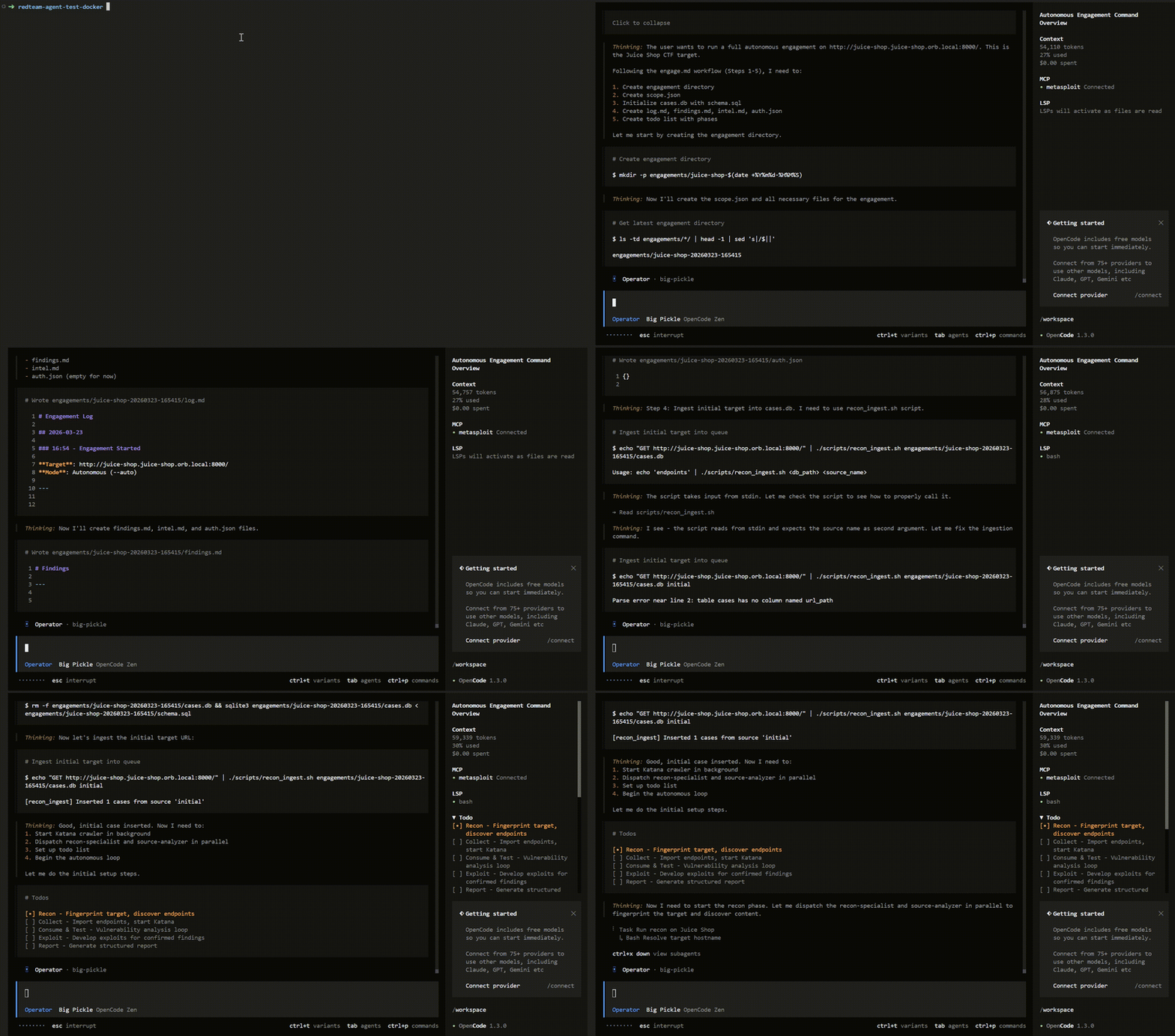
!RedTeam Agent demo (fast)
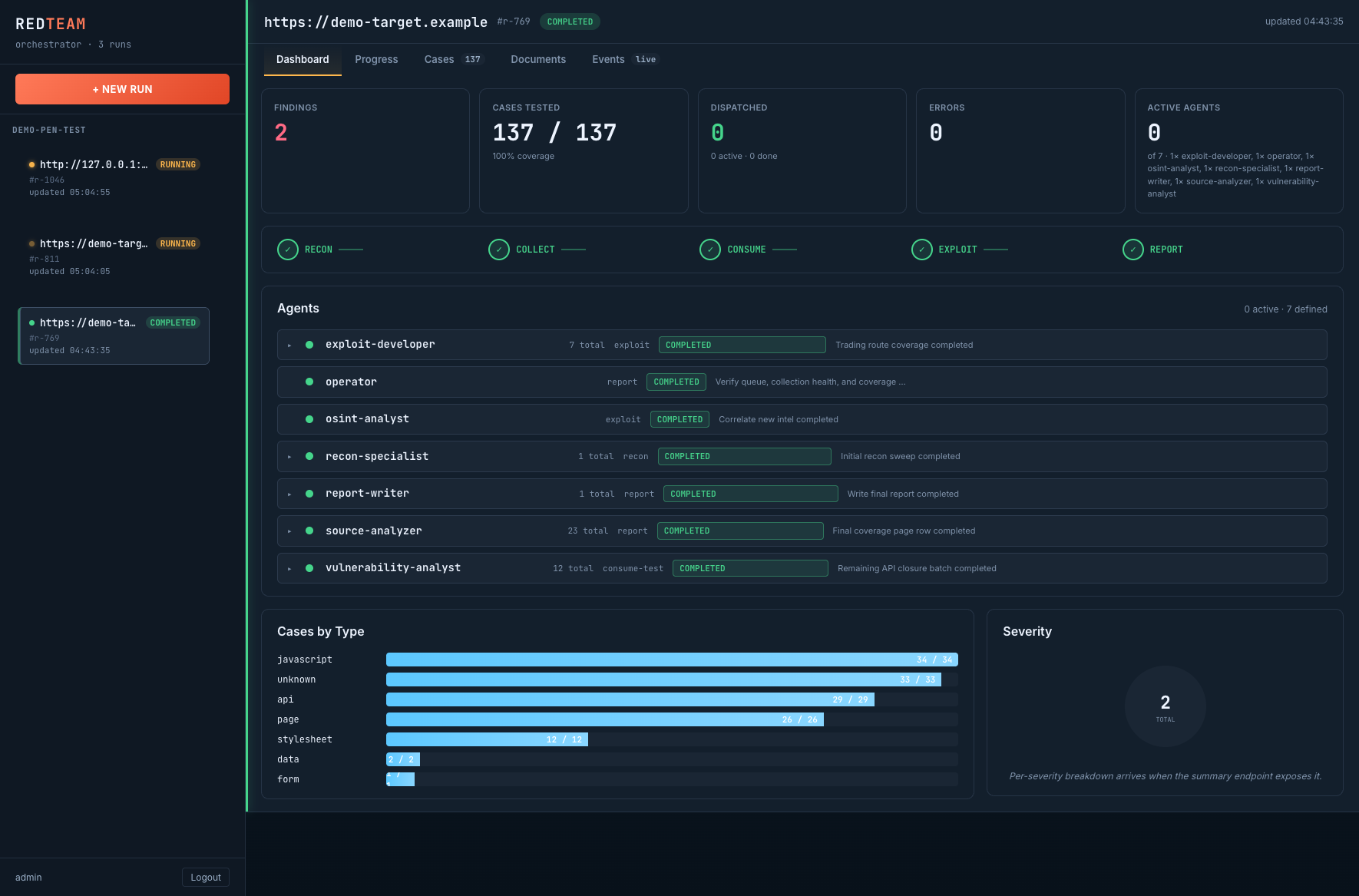
!RedTeam Agent GUI screenshot
Key Features:
intel.md accumulates tech stack, people, domains, credentials from recon through exploitation; OSINT agent enriches with C, DNS history, and social dataexternal_directory appro from blocking /autoengage runs), finding deduplication, surface co enforcement, and automatic report synthesis when report artifacts are missing or incompleteInstallation
Prerequisites
- Claude Code
- OpenCode (
npm install -g opencode-ai)- Codex
curl, jq, sqlite3 (not required for the Docker all-in-one runtime)Installation Help
Usage by CLI
Docker (Recommended)
Install
Start
Run
Notes
run.sh starts from the image-baked clean template, persists engagement files in workspace/, and persists the OpenCode XDG dirs across restarts: opencode-home/ (auth tokens), opencode-config/ (model selection), opencode-state/ (TUI state)../run.sh --ephemeral-opencode if you do not want to persist any OpenCode state outside the container (you'll have to reconfigure the model each run)../run.sh --rebuild to force a clean image rebuild after install.OpenCode (Recommended)
Install
Start
Run
Notes
.opencode/opencode.json.Exploit when a finding clearly maps to a known module family, service, product/, or CVE.Claude Code
Install
Start
Run
Codex
Install
Start
Run
Notes
Local Orchestrator GUI (Optional)
Use the local web UI when you want to manage multiple workspaces or inspect live runs outside the CLI.
Start
Stop
Notes
./orchestrator/run.sh bootstraps the backend , installs frontend dependencies if needed, and builds the frontend before starting.Shared Outputs
Every runtime writes engagement artifacts to:
Common outputs:
findings.md — findings and supporting ereport.md — final engagement reportlog.md — execution log and operator timelineintel.md — summary intelligence safe for routine reviewintel-secrets.json — full captured secrets and tokensauth.json — active auth material and session statecases.db — SQLite queue, classification, and work statesurfaces.jsonl — high-risk surface co trackingSensiti:
intel-secrets.json, auth.json, or any engagement directory that still contains li, tokens, or session state.report.md, selected excerpts from findings.md, and a re/redacted subset of supporting files.Engagement Modes
| | /engage | /autoengage |
|---|---|---|
| Auth setup | Asks you to choose (proxy/cookie/skip) | Auto-skip, auto-register if endpoint found, auto-use discovered creds |
| Phase approval | Auto-confirm by default, first phase needs approval | Never asks. Every phase auto-proceeds. |
| Decisions | Parallel by default, can choose sequential | Always parallel. No options. |
| Errors | May stop on unexpected issues | Logs error, continues next task |
| When to use | First time on a target, want o | Repeat runs, o scans, maximum co |
The agent runs through 5 phases:
Common Commands
| Command | Description |
|---------|-------------|
| /engage <url> | Start a new engagement (semi-autonomous) |
| /autoengage <url> | Fully autonomous — zero interaction, max co |
| /resume | Continue an interrupted engagement |
| /status | Show progress dashboard with queue stats |
| /proxy start/stop | Manage mitmproxy interception proxy |
| /auth cookie/header | Configure authentication credentials |
| /queue | Show case queue statistics |
| /report | Generate final report |
| /stop | Stop all background containers |
| /confirm auto/manual | Toggle auto/manual approval mode |
| /config [key] [value] | View or set runtime configuration |
| /subdomain <domain> | Enumerate subdomains for a domain |
| / | Analyze scan results for |
| /osint | Run OSINT intelligence gathering on current engagement |
| /recon /scan /enumerate /exploit /pivot | Manual phase o |
Authentication
Architecture
8 Agents
Case Pipeline
Directory Structure
CLI Compatibility
| Feature | Claude Code | OpenCode | Codex |
|---------|-------------|----------|-------|
| Operator prompt | CLAUDE.md | .opencode/prompts/agents/operator.txt | AGENTS.md |
| Subagents (8) | Generated .claude/agents/*.md | .opencode/prompts/agents/*.txt (source) | Generated .codex/agents/*.toml |
| Slash commands (19) | Generated .claude/commands/*.md | .opencode/commands/*.md (source) | Not supported — use natural language instead |
| Skills (31) | skills/*/SKILL.md (read on demand) | Loaded array | skills/*/SKILL.md (read on demand) |
| Build | install.sh claude generates agents + commands at install time | N/A (source files) | install.sh codex generates agents at install time |
| Auto-logging | .claude/settings.json hooks | .opencode/plugins/engagement-hooks.ts | N/A |
| Scope enforcement | Hook blocks out-of-scope | Hook warns out-of-scope | N/A |
| Agent attribution | agent_type in hook JSON | chat.message event tracking | N/A |
De wrappers
agent/.claude/agents/operator.md and agent/.codex/agents/operator.toml exist only for working inside the source repo.CLAUDE.md or AGENTS.md as the operator entrypoint and install only generated subagents.Customization
Add a Skill
Add References
Add files to agent/references/<category>/ and update agent/references/INDEX.md.
Change LLM Provider (OpenCode)
Edit model in agent/.opencode/opencode.json. Supports Anthropic, OpenAI, Google, Ollama.
Per-Project Configuration
Each project stores its own config, inherited by every run launched under it. Configure via the Edit project button in the Sidebar or NewRunForm, which opens the Project Edit modal with 6 tabs:
| Tab | Fields | Env vars injected into run container |
|-----|--------|--------------------------------------|
| Model | pro, model_id, small_model_id, api_key, base_url | REDTEAM_OPENCODE_MODEL, REDTEAM_OPENCODE_SMALL_MODEL, OPENAI_API_KEY, OPENAI_BASE_URL (or ANTHROPIC_*) |
| Auth | JSON blob for cookies / headers / tokens | Written to auth.json in seed dir |
| Env | Free-form JSON {"VAR": "value"} | Merged into container env |
| Crawler | Katana crawl parameters | KATANA_CRAWL_DEPTH, KATANA_CRAWL_DURATION, KATANA_TIMEOUT_SECONDS, KATANA_CONCURRENCY, KATANA_PARALLELISM, KATANA_RATE_LIMIT, KATANA_STRATEGY, KATANA_ENABLE_HYBRID, KATANA_ENABLE_XHR, KATANA_ENABLE_HEADLESS, KATANA_ENABLE_JSLUICE, KATANA_ENABLE_PATH_CLIMB |
| Parallel | Concurrency ceiling | REDTEAM_MAX_PARALLEL_BATCHES |
| Agents | Enable/disable per subagent | REDTEAM_DISABLED_AGENTS (comma-separated list of disabled agent IDs when any are off) |
Defaults: Empty JSON {} for every config category. When a key is absent, the runtime falls back to the value baked into .env or the agent defaults. Fields only o when explicitly set.
Precedence: crawler_json / parallel_json / agents_json win o en. To clear a field, set it to "" (empty string), not null.
De
Directory Con (READ BEFORE CONTRIBUTING)
This repo has a strict three-layer split — do not cross the lines:
| Layer | Purpose | Examples |
|-------|---------|----------|
| Repo root | Meta only — install script, docs, CI | install.sh, README*.md, .gitignore, docs/ |
| agent/ | ALL agent runtime (canonical) | .opencode/, scripts/, skills/, references/, docker/, prompts, operator core |
| orchestrator/ | Optional web UI (reads agent/, ne from root) | backend/ (FastAPI), frontend/ (React) |
Rule: agent/ is the single source of truth for the agent runtime. The orchestrator backend hardcodes agent_source_dir = REPO_ROOT / "agent" (orchestrator/backend/app/config.py:17) and syncs from there into each engagement's workspace. install.sh also installs from agent/ into the target dir.
DO NOT create root-level /.opencode/, /scripts/, /skills/, /references/, or /docker/. Edit the agent/-scoped copy instead.
Two guards are in place:
1. .gitignore blocks those paths at git add time.
2. Pre-commit hook at agent/scripts/hooks/block-root-dup-dirs.sh refuses the commit if the paths slip through. Install once per clone:
Where to run your CLI
RedteamOpencode/): de. Run CLI here for repo-le (tests, docs work, orchestrator dev).agent/: runtime home. Run CLI inside agent/ (or the installed target ~/redteam-agent/) to dri.Single-Source Architecture
Agent prompts and commands are maintained only in OpenCode format (.opencode/). Claude Code and Codex are generated at install time by install.sh:
To modify an agent: edit agent/.opencode/prompts/agents/<name>.txt, then re-run install.sh for your product.
To add a new agent: create the .txt file, add agent entry to opencode.json, re-run install.sh.
Operator prompts use a mixed model:
agent/.opencode/prompts/agents/operator.txt stays as the OpenCode source promptagent/operator-core.md is the shared Claude/Codex methodology bodyagent/scripts/render-operator-prompts.sh renders CLAUDE.md, AGENTS.md, and the thin local operator wrappersbash tests/agent-contracts/check-operator-prompts.sh the generated files are still in syncTroubleshooting
| Problem | Solution |
|---------|----------|
| Docker images fail to build | docker system prune -af && cd agent/docker && docker compose build --no-cache |
| Docker build fails while fetching Kali packages | Re-run the build. The Dockerfiles configure apt retry/timeout and pin Kali to the official mirror, but transient network failures can still require another attempt. |
| Katana doesn't start | Check: docker logs redteam-katana |
| Agent refuses to test target | Adjust auth in agent/CLAUDE.md or agent/.opencode/instructions/INSTRUCTIONS.md |
| Queue shows 0 cases | Run /status — check Collect phase was executed |
| Pro | Set model in agent/.opencode/opencode.json |
License
For authorized security testing only. Only use against targets you ha permission to test.
项目信息
开发语言:Python
Star 数:139
技术要点
该项目属于红蓝攻防方向的开源资源,代码结构清晰,适合安全研究人员学习参考。项目围绕An AI red-team agent for authorized labs and web app pentesting workflows. Turns Claude Code / OpenCode / Codex into a structured recon → test → exploit → report workflow, with containerized tools and resumable state.展开,提供了可运行的实现,对理解相关安全机制、工具原理与攻防技术具有较高的研究价值。
从技术实现角度看,此类项目的核心在于对底层原理的深入理解与工程化落地。开发者在研究过程中可以结合官方文档与社区讨论,梳理项目的初始化流程、核心模块职责与数据流转,逐步掌握其中的技术细节与设计思路。
使用与学习建议
1. 下载源码压缩包,解压到本地环境。
2. 根据项目类型准备对应的运行环境与依赖。
3. 按照 README 中的步骤完成配置与部署。
4. 在隔离的测试环境中运行验证,避免影响生产系统。
免责声明
本资源来源于开源社区,仅供安全研究、技术学习与合法授权范围内的攻防演练使用,请勿用于任何非法或侵害他人权益的用途。使用本项目产生的一切后果由使用者自行承担。
| 资源标题 | RedteamAgent - An AI red-team agent for authorized labs and web a |
| 所属分类 | 红蓝攻防 |
| 发布作者 | admin |
| 发布时间 | 2026-10-06 00:50:09 |
| 下载权限 | 免费下载 |
| 附件数量 | 2 个下载链接 |
| 浏览次数 | 494 |
| 讨论数量 | 0 |
| 主题状态 | 正常讨论中 |