 红蓝攻防
点击放大
Abusing_Weak_ACL_on_Certificate_Templates - Investigation about ACL abusing for Active Directo
项目说明
Abusing Weak ACL on Certificate Templates
Table of Contents
+ Abstract
+ Template Setting
+ Enumerating Certificate Template Objects
+ Exploitable Domain Object Attributes for Domain Escalation
+ Abusing WriteDacl ACE
+ Procedure
+ Getting Enrollment Right
+ Disabling Manager Appro
+ Disabling Authorized Signature Requirement
+ Enabling SAN Specification
+ Editting Certificate Application Policy Extension
+ Domain Escalation
+ Mitigation
+ Conclusion
+ Acknowledgments
Abstract
At Black Hat USA 2021, Will Schroeder () and Lee Christensen () presented about attack surface in Acti Certificate Services ("Certified Pre-Owned: Abusing Acti Certificate Services").
There are many technical details in the whitepaper.
The whitepaper mentioned that a certificate template with weak ACL can lead to domain escalation, but there is no technical detail about the procedure.
Therefore, I summarized my in about certificate templates with weak ACL in this article.
Template Setting
As mentioned earlier, a certificate template with weak ACL can lead to domain escalation.
The whitepaper assigned "ESC4" to this attack as an identifier.
To test the domain escalation method, we created a certificate template by duplicating "Basic EFS" template (named it as "ESC4").
The template settings are as follows:
+ Manager Appro is enable
+ An Authorized Signature is required to issue certificate
+ Subject Name cannot be supplied in request
+ Set "Encrypting File System" for Certificate Application Policy Extension
These settings are intended to prevent domain escalation and lateral mo.
But if low pri user account has WriteDacl for this template, these restrictions can be broken, and attackers can abuse it for domain escalation.
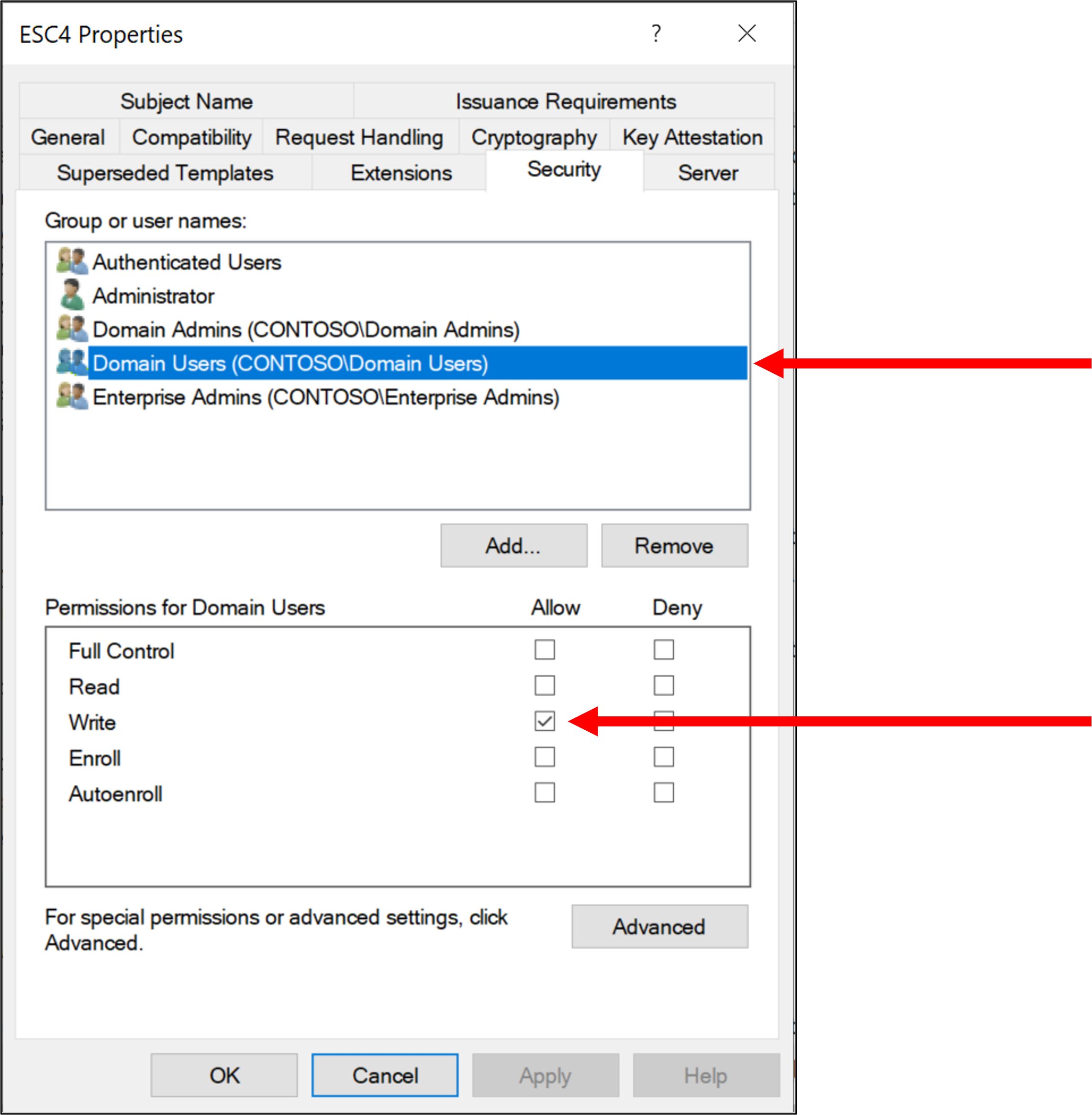
For example, in this article, __we assign WriteDacl permission to "Domain Users" for the target certificate template__:
!ace
At the start, no permissions other than WriteDacl have been set for "Domain Users", so certificates cannot be enrolled using the target certificate template by "Domain Users".
In this article, we will examine the Domain Escalation technique using certificate templates, exploiting only WriteDacl permission.
Enumerating Certificate Template Objects
To enumerate domain objects for certificate template, we can use PowerView or PowerShell nati.
If you want to enumerate domain objects for certificate templates without PowerView, execute following cmdlets:
If you use PowerView, execute Get-DomainObject function:
Additionally, Get-DomainObjectAcl function can be used to find certificate templates with weak ACL as follows:
We can confirm "Domain Users" group members ha for ESC4 template.
This result can also be obtained using Certify.exe from GhostPack:
Exploitable Domain Object Attributes for Domain Escalation
Using PowerView, we can enumerate template object attributes as follows:
There are a lot of attributes, but not many of them are important for domain escalation. The important attributes are following:
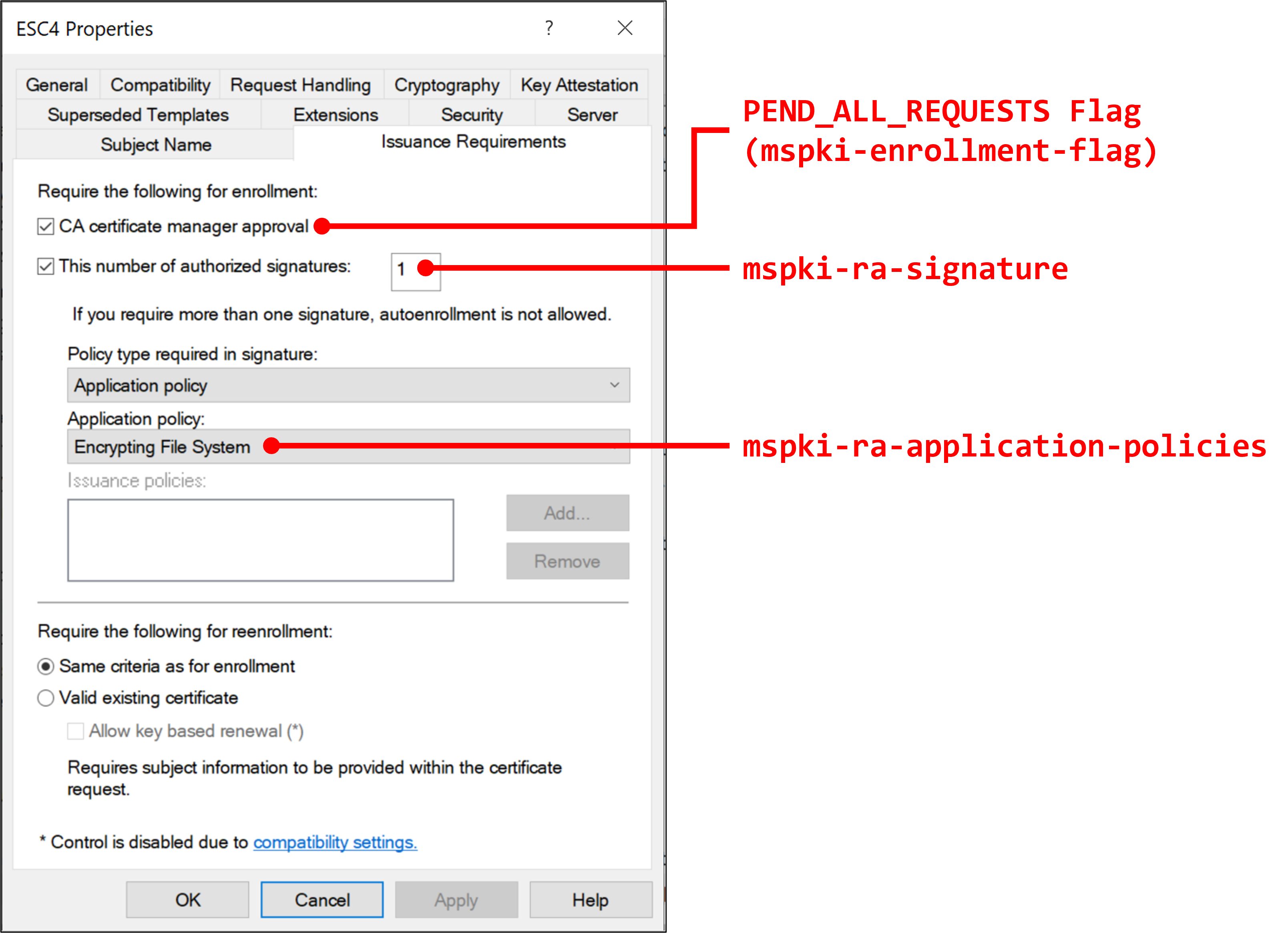
+ __mspki-enrollment-flag__: According to the Microsoft Docs, this attribute specifies the enrollment flags. If we succeeded in disabling PEND_ALL_REQUESTS flag, we can request the template without Manager Approval. In GUI, this attribute can be enabled by checking "CA manager approval" check box in "Issuance Requirements" tab.
+ __mspki-ra-signature__: According to the Microsoft Docs, this attribute specifies the number of Authorized Signatures to issue certificate. In GUI, this attribute can be controlled by checking "This number of authorized signatures" check box in "Issuance Requirements" tab and setting the number.
+ __mspki-certificate-name-flag__: According to the Microsoft Docs, this attribute specifies the subject name flags. If we succeeded in enabling ENROLLEE_SUPPLIES_SUBJECT flag, we can specify an arbitrary user account Subject Alternative Name (SAN) in certificate request and get high domain pri. In GUI, this attribute can be enabled by choosing "Supplly in the request" in "Subject Name" tab.
+ __mspki-certificate-application-policy__: According to the Microsoft Docs, this attribute specifies Certificate Application Policy Extension. In GUI, this attribute can be controlled by setting "Application Policies" in "Extensions" tab.
+ __pkiextendedkeyusage__: According to the Microsoft Docs, this attribute specifies Extended Key Usage (EKU).
+ __mspki-ra-application-policies__: According to the Microsoft Docs, this attribute encapsulates embedded properties for multipurpose use. In GUI, this attribute can be controlled by checking "This number of authorized signatures" check box in "Issuance Requirements" tab and choosing "Application Policy" menu. Certify.exe displays this attribute as Application Policies.
The following figures show the relationship between attributes and menus:
!attributes-1
!attributes-2
!attributes-3
Abusing WriteDacl ACE
Procedure
For domain escalation, follow the following steps to abuse WriteDacl:
1. Get Enrollment rights for the template (ESC4)
2. Disable PEND_ALL_REQUESTS flag in mspki-enrollment-flag for disabling Manager Approval
3. Set mspki-ra-signature attribute to 0 for disabling Authorized Signature requirement
4. Enable ENROLLEE_SUPPLIES_SUBJECT flag in mspki-certificate-name-flag for specifying high pri account name as a SAN
5. Set mspki-certificate-application-policy to a certificate purpose for authentication
6. Request a high pri certificate for authentication and perform Pass-The-Ticket attack
Shouldn't we edit pkiextendedkeyusage attribute and mspki-ra-application-policies attribute?
As far as I tested, it is not required.
This is because if the mspki-certificate-application-policy, pkiextendedkeyusage and mspki-ra-application-policies do not match, then mspki-certificate-application-policy takes precedence in the use of the certificate.
Therefore, for Domain Escalation, you only need to edit mspki-certificate-application-policy to abuse certificate in this case.
Getting Enrollment Right
Now we only ha for ESC4 template and cannot enroll the template.
Generally, certificate templates have 2 extended rights:
+ __Certificate-Enrollment__: This extended right corresponds "Enroll" right. According to the Microsoft Docs, the corresponding GUID is 0e10c968-78fb-11d2-90d4-00c04f79dc55.
+ __Certificate-AutoEnrollment__: This extended right corresponds "Autoenroll" right. According to the Microsoft Docs, the corresponding GUID is a05b8cc2-17bc-4802-a710-e7c15ab866a2.
To get enrollment right for the template, we need to add Certificate-Enrollment (GUID: 0e10c968-78fb-11d2-90d4-00c04f79dc55) extended right to the target certificate.
> __NOTE__: If you want to add all extended rights (in this case, Certificate-Enrollment and Certificate-AutoEnrollment) at once, use 00000000-0000-0000-0000-000000000000 as GUID. It corresponds to all extended rights.
We can get Certificate-Enrollment extended right for the template (ESC4) by Add-DomainObjectAcl function of PowerView as follows:
The results can be using Certify.exe, etc.:
Now we got enrollment rights for the certificate.
Disabling Manager Appro
There is one more obstacle to issuing the certificate.
To get a certificate with the target template passively, we need to disable Manager Appro.
To disable Manager Appro, we need to set PEND_ALL_REQUESTS flag bit in mspki-enrollment-flag attribute to null.
According to Microsoft Docs, the PEND_ALL_REQUESTS flag bit is 0x00000002.
Abusing WriteDacl, we can set PEND_ALL_REQUESTS flag bit to null by Set-DomainObject function of PowerView:
To avoid complications, it is preferable to use the -XOR option instead of the -Set option to edit the flag as above.
We can recover the setting by executing the same command.
The results can be using Certify.exe, etc.:
There is no PEND_ALL_REQUESTS in mspki-enrollment-flag.
Now we can issue certificates using the ESC4 template without Manager Approval.
Disabling Authorized Signature Requirement
Authorized Signature requirement blocks unauthorized certificate issuance.
So, to issue certificates with certificate templates, we need to bypass this requirement.
If we ha for target certificate template, we can disable this requirement by setting the number of Authorized Signatures to
0.The number of Authorized Signatures for certificate templates is specified with mspki-ra-signature.
Abusing WriteDacl, we can set mspki-ra-signature attribute to 0 by Set-DomainObject function of PowerView:
The results can be using Certify.exe, etc.:
Authorized Signatures Required is 0.
Now we can issue certificate with the ESC4 template without any Authorized Signatures.
Enabling SAN Specification
Similar to the Manager Appro, SAN setting can be controlled by flag bits in
mspki-certificate-name-flag attribute.According to Microsoft Docs, the
ENROLLEE_SUPPLIES_SUBJECT flag bit is 0x00000001. So, abusing WriteDacl, we can set the
ENROLLEE_SUPPLIES_SUBJECT flag bit by Set-DomainObject function of PowerView:To avoid complications, it is preferable to use the -XOR option instead of the -Set option to edit the flag as above.
We can recover the setting by executing the same command.
The results can be using Certify.exe, etc.:
ENROLLEE_SUPPLIES_SUBJECT appears in msPKI-Certificates-Name-Flag, so now we can specify any user name as SAN in the ESC4 template.
#### Editting Certificate Application Policy Extension
The final step of setting the template for domain escalation is to change the Certificate Application Policy Extension.
As mentioned earlier, Certificate Application Policy Extension are specified with mspki-certificate-application-policy attribute.
For authentication, following Key Usage can be used:
+ Client Authentication (OID: 1.3.6.1.5.5.7.3.2)
+ Smart Card Logon (OID: 1.3.6.1.4.1.311.20.2.2)
+ PKINIT Client Authentication (OID: 1.3.6.1.5.2.3.4)
+ Any Purpose (OID: 2.5.29.37.0)
+ No EKU
> __NOTE__: If CA servers don't enable PKINIT Client Authentication, we can not use PKINIT Client Authentication in this step.
In this article, we set Certificate Application Policy Extension to "Client Authentication".
Abusing WriteDacl, we can achieve this by Set-DomainObject function of PowerView as follows:
The output of Certify.exe is following:
In the output of Certify.exe, pkiextendedkeyusage and "Application Policies" (mspki-ra-application-policies) remain "Encrypting File System", but no problem.
As mentioned earlier, mspki-certificate-application-policy takes precedence over pkiextendedkeyusage and mspki-ra-application-policies, but mspki-certificate-application-policy attribute is not displayed in outputs of Certify.exe released at the time of this writing.
To confirm the result, we can use Get-DomainObject function in PowerView or DirectoryServices.DirectorySearcher object with PowerShell:
> __UPDATE__: After I wrote this article, I sent a pull request to the GitHub repository for Certify.exe.
> Lee Christensen () merged my pull request and made some update.
> Now we can confirm mspki-certificate-application-policy attribute with Certify.exe as follows:
>
>
Domain Escalation
Now we can issue authentication purpose certificates with high pri domain account by using the ESC4 certificate template.
At first, we request a high pri domain account certificate with
Certify.exe:Then, we convert the pem output to pfx format with the openssl command in output of Certify.exe (we set the password to "123456" in this article):
If you want to check certificate informations, you can check it with certutil.exe as follows:
Finally, we perform PKINIT Kerberos authentication and Pass-the-Ticket attack with the generated pfx file:
Now we achie escalation by abusing WriteDacl for a certificate template:
Mitigation
This attack method could be mitigated by restricting the assignment of WriteDacl permissions to certificate template objects.
Conclusion
In this article, we performed ACE attack to a template for domain escalation.
Excessi of WriteDacl permissions for domain objects lead to domain escalation .
In order to reduce the possibility of being attacked, certificate templates must be hardened.
Acknowledgments
+ Will Schroeder ()
+ Lee Christensen ()
+ Christoph Falta ()
+ Mike Jankowski-Lorek ()
+ Milosz Piasecki ()
项目信息
开发语言:未知
Star 数:134
技术要点
该项目属于红蓝攻防方向的开源资源,代码结构清晰,适合安全研究人员学习参考。项目围绕Investigation about ACL abusing for Active Directory Certificate Services (AD CS)展开,提供了可运行的实现,对理解相关安全机制、工具原理与攻防技术具有较高的研究价值。
从技术实现角度看,此类项目的核心在于对底层原理的深入理解与工程化落地。开发者在研究过程中可以结合官方文档与社区讨论,梳理项目的初始化流程、核心模块职责与数据流转,逐步掌握其中的技术细节与设计思路。
使用与学习建议
1. 下载源码压缩包,解压到本地环境。
2. 根据项目类型准备对应的运行环境与依赖。
3. 按照 README 中的步骤完成配置与部署。
4. 在隔离的测试环境中运行验证,避免影响生产系统。
免责声明
本资源来源于开源社区,仅供安全研究、技术学习与合法授权范围内的攻防演练使用,请勿用于任何非法或侵害他人权益的用途。使用本项目产生的一切后果由使用者自行承担。
| 资源标题 | Abusing_Weak_ACL_on_Certificate_Templates - Investigation about ACL abusing for Active Directo |
| 所属分类 | 红蓝攻防 |
| 发布作者 | admin |
| 发布时间 | 2026-10-06 00:50:40 |
| 下载权限 | 免费下载 |
| 附件数量 | 2 个下载链接 |
| 浏览次数 | 298 |
| 讨论数量 | 0 |
| 主题状态 | 正常讨论中 |