 红蓝攻防
点击放大
blackdagger - Blackdagger is a DAG based automation tool specifi
项目说明
<p align="center">
<img src="./assets/images/blackdaggerReadme.png" width="500" alt="blackdagger-logo">
</p>
<p align="center">
<a href="
<img src=" />
</a>
<a href="
<img src=" />
</a>
<a href="
<img src=" />
</a>
<a href="
<img src=" />
</a>
<img src=" />
<a href="
<img src=" />
</a>
<a href="
<img src=" />
</a>
<a href="
<img src=" />
</a>
<a href="
<img src=" />
</a>
<a href="
<img src=" />
</a>
</p>
<di="center">
Installation | Quick Start Docs | Blackdagger YAML Creator GPT4
</div>
<h1><b>Blackdagger: Cyber Workflow Automation Framework</b></h1>
Blackdagger is a powerful, user-friendly framework designed to orchestrate complex workflows in DevOps, De, MLOps, MLSecOps, and Continuous Automated Red Teaming (CART) en. By le a declarative YAML format and a Directed Acyclic Graph (DAG) structure, Blackdagger simplifies the definition, management, and execution of automation pipelines, enabling seamless integration with containerized en and task execution.
What Sets Blackdagger Apart?
You can find e about Blackdagger, including this README, in our documentation.
Table of Contents
- Via Bash script
-
- Release Page
- Get Example YAMLs For Purposes
- 1. Launch the Web UI
- 2. Create a New DAG
- 3. Edit the DAG
- 4. Execute the DAG
- Dashboard
- DAG Details
- DAGs List
- Search DAGs
- Execution History
- DAG Execution Log
- Short-term Goals
- Mid-term Initiatives
- Long-term
- Executor Roadmap
- TODOS for Roadmap
Key Features
- Custom code execution
- Parameters, command substitution, and conditional logic
- Output redirection (stdout/stderr)
- Lifecycle hooks and task repetition
- Automatic retries
- Running Docker containers
- Making HTTP requests
- Sending emails
- Running jq command
- Executing remote commands via SSH
E of Blackdagger to a Framework
To impro and streamline complex workflows, the team introduced a structured framework around Blackdagger. This includes pre-configured YAML files for common use cases and deployable infrastructure for Continuous Automated Red Teaming (CART) and De. These additions are consolidated under the Blackdagger: Cyber Workflow Automation Framework, pro a cohesi that enhances the tool's o effecti.
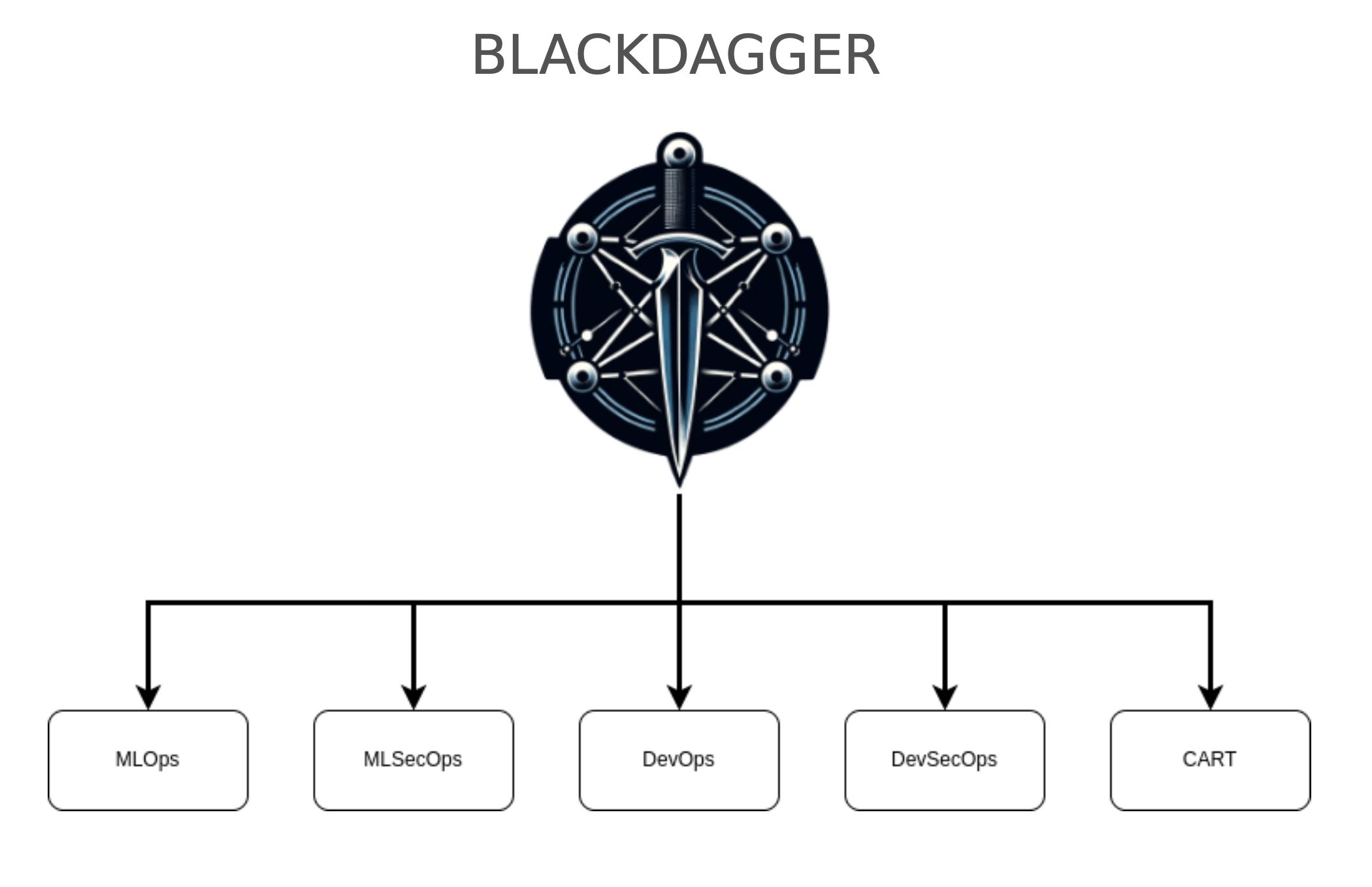
The framework consists of 5 components:
<p align="center">
<img src=" width="500" alt="framework-diagram">
</p>
Each component within the framework is designed for interoperability, allowing seamless integration across en and use cases with maximum ease, speed, and efficiency. The framework is modular, supporting the addition, removal, or modification of components to introduce new features or adapt to e requirements.
With Blackdagger at its core, this repository offers a detailed o of the framework's capabilities. For more information on specific components, please refer to their indi repositories.
Installation
Prerequisites
sudo permissions may be required (see Sudo Configuration).Via Bash Script
Important Note: Within the Blackdagger server, to access the GoTTY web terminal, you must manually start the default-gotty-service DAG found in the DAGs section. Blackdagger utilizes GoTTY for web terminal functionality, which, for security reasons, does not automatically start upon system initialization.
Access the Web UI at and the GoTTY web terminal at (username: blackdagger, password: blackdagger) (Do not forget to run default-gotty-service dag at ]:8080/dags/default-gotty-service).
Releases Page
Download the latest binary from the Releases page and place it in your $PATH (e.g. /usr/bin).
#### Sudo Configurations
Some YAML configurations or processes executed through Blackdagger may require sudo permissions. To ensure smooth operation, users should configure the necessary sudo access beforehand. Without it, core functionalities such as running, maintaining, or stopping processes—as well as other Blackdagger features—may not function correctly or could result in errors. Below are several options for configuring sudo permissions:
1. First and suggested option is adding user account to the /etc/sudoers file with NOPASSWD permissions, enabling them to execute sudo commands without needing to enter a password. This modification simplifies operations that require elevated pri by removing the requirement to provide a password for each sudo command.
In the terminal, type the following command to open the sudoers file using a text editor:
Scroll down to the bottom of the sudoers file.
Add the following line, replacing "username" with the actual username of the user account you want to grant sudo pri without a password:
Save your changes and exit the editor.
2. To have root pri you can run Blackdagger with sudo:
But this will create Blackdagger-related folders in root user. It may cause python package issues and pip related problems.
3. To ensure continuous operation of the process on your system, simply create and execute the following script every minute via cron—no root account required:
Get Example YAMLs For Purposes
After installation, you can use the provided YAML files, which were created to support a of use cases. These examples demonstrate the mechanisms a in Blackdagger and are intended to guide and inspire you in creating your own YAML configurations or adapting the existing ones to fit your specific needs.
!blackdaggerdomains.png
For now, we ha categories of YAMLs:
After installing Blackdagger, you can download these YAMLs by their categories by running the command:
This command pulls YAML files from the repositories listed above. Each file follows the Blackdagger YAML format and is designed for a of common use cases. They have been thoroughly tested to provide a reliable and efficient way to execute your desired actions quickly.
Quick Start Guide
1. Launch the Web UI
Start the server and scheduler with the command blackdagger start-all or blackdagger server and browse to to explore the Web UI.
2. Create a New DAG
Na to the DAG List page by clicking the menu in the left panel of the Web UI. Then create a DAG by clicking the New button at the top of the page. Enter example in the dialog.
_Note: DAG (YAML) files will be placed in ~/.config/blackdagger/dags by default. See Configuration Options for more details._
3. Edit the DAG
Go to the SPEC Tab and hit the Edit button. Copy & Paste the following example and click the Save button.
Example:
4. Execute the DAG
You can execute the example by pressing the Start button. You can see "Hello blackdagger" in the log page in the Web UI.
CLI
The following commands are a for interacting with Blackdagger:
Web UI
Dashboard
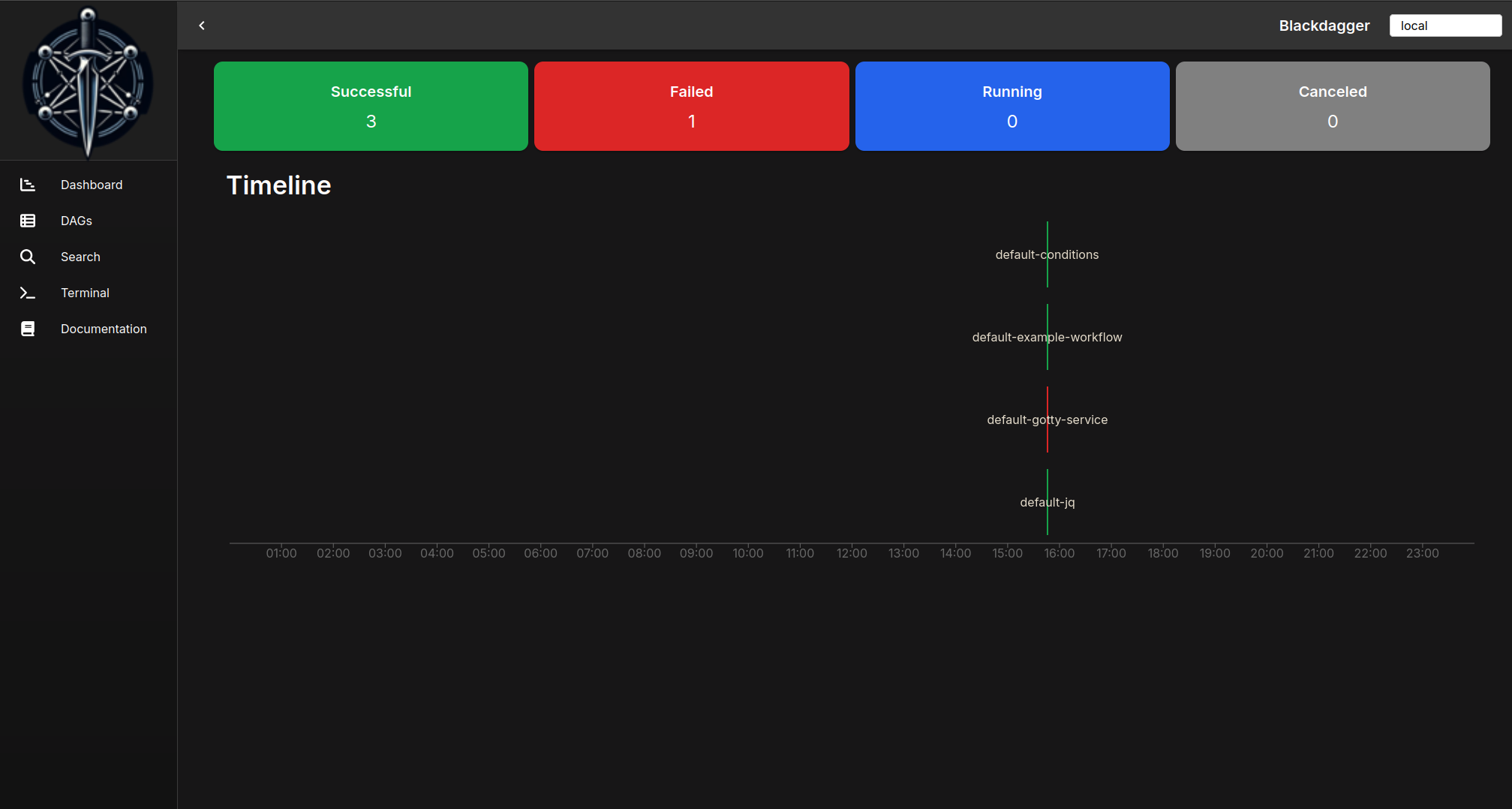
Main index page of blackdagger. It shows dag status and timeline for all dags.
!example
DAGs List
It shows all DAGs and the real-time status.
!DAGs
DAG Status
It shows the real-time status, logs, and DAG configurations. You can edit DAG configurations on a browser.
You can switch to the graph with the button on the top right corner.
!Details-TD
DAG Spec
Provides detailed specifications of a DAG, including editable steps, conditions, parameters, and preconditions to define the workflow logic.
!Status
Execution History
It shows past execution results and logs.
!History
DAG Execution Log
It shows the detail log and standard output of each execution and step.
!DAG Log
Search DAGs
It greps given text across all DAGs.
!History
Documentation
- Minimal DAG Definition
- Importing DAG Files
- Running Arbitrary Code Snippets
- Defining En
- Defining and Using Parameters
- Using Command Substitution
- Adding Conditional Logic
- Setting En with Standard Output
- Redirecting Stdout and Stderr
- Adding Lifecycle Hooks
- Repeating a Task at Regular Intervals
- All A Fields for DAGs
- All A Fields for Steps
- Hello World
- Importing DAG Files
- Conditional Steps
- File Output
- Passing Output to Next Step
- Running a Docker Container
- Sending HTTP Requests
- Sending a Webhook
- Running Terraform
- Running Ansible Playbook
- Querying JSON Data with jq
- Sending Email
Use cases
Example Workflow
This example workflow showcases a data pipeline typically implemented in DevOps and Data Engineering scenarios. It demonstrates an end-to-end data processing cycle starting from data acquisition and cleansing to transformation, loading, analysis, reporting, and ultimately, cleanup.
!Details-TD
The YAML code below represents this workflow:
Tutorial
Below, you can find the that can help you to get started with Blackdagger:
| Installation and Setup of Blackdagger Video | Usage of Blackdagger Video | DAG Creation and Running in Blackdagger Video |
| :-----------------------------------------------------------------------------------------------------------------------------------: | :------------------------------------------------------------------------------------------------------------------: | :-------------------------------------------------------------------------------------------------------------------------------------: |
| ![Installation and Setup of Blackdagger]() | ![Usage of Blackdagger]() | ![DAG Creation and Running in Blackdagger]() |
Moti
Legacy systems often ha and implicit dependencies between jobs. When there are hundreds of cron jobs on a server, it can be difficult to keep track of these dependencies and to determine which job to rerun if one fails. It can also be a hassle to SSH into a server to view logs and manually rerun shell scripts one by one. blackdagger aims to sol problems by allowing you to explicitly and manage pipeline dependencies as a DAG, and by pro a web UI for checking dependencies, execution status, and logs and for rerunning or stopping jobs with a simple mouse click.
Why Not Use an Existing Workflow Scheduler Like Airflow?
While there are numerous workflow schedulers like Airflow a, these often necessitate the authoring of DAGs through programming languages such as Python. For legacy systems with extensive job configurations, incorporating code in languages like Perl or Shell Script can already be a complex endeavor. Introducing an additional layer with such tools can further complicate maintainability. In contrast, BlackDagger is crafted for simplicity and usability, requiring no coding skills. This makes it a perfect fit for smaller projects looking for a straightforward, self-sufficient workflow management solution.
How It Works
BlackDagger simplifies workflow management by operating as a standalone command-line tool, le the local file system for data storage — eliminating the need for database management systems or cloud services. It enables the definition of DAGs in an intuiti YAML format, ensuring that existing programs can be seamlessly integrated without any modifications.
Feel free to contribute in any way you want! Share ideas, questions, submit issues, and create pull requests. Check out our Contribution Guide for help getting started.
We welcome any and all contributions!
Roadmap
Blackdagger is committed to continuous impro and the de of new features to enhance its usability and functionality. Our roadmap is guided by feedback from our users and our for making workflow management as intuitive and efficient as possible. Here's what's on the horizon:
Short-term Goals
Mid-term Initiatives
Long-term
We are excited about the journey ahead and invite the community to contribute ideas, feedback, and code to help make Blackdagger the go-to solution for workflow management. Stay tuned for updates and join us in shaping the future of Blackdagger!
Executor Roadmap
- Description: Executes tasks as Kubernetes jobs, allowing for scalable and efficient containerized job execution in a Kubernetes cluster.
- Use Case: Ideal for scaling tasks that require isolation, resource control, or need to run in a specific container en.
- Description: Triggers AWS Lambda functions, enabling ser execution of tasks without pro or managing servers.
- Use Case: Perfect for lightweight, e tasks such as data transformation, real-time file processing, or integrating with AWS services.
- Description: Runs Terraform commands to apply infrastructure as code configurations, supporting the automated setup and teardown of cloud resources.
- Use Case: Useful for DevOps pipelines that require dynamic en pro for testing, staging, or production deployments.
- Description: Sends data to specified URLs , allowing for easy integration with external systems and services.
- Use Case: Ideal for triggering notifications, external workflows, or updating third-party systems as part of a workflow.
- Description: Executes machine learning model inference jobs, supporting ML frameworks.
- Use Case: Can be used for batch processing of data through pre-trained models, such as image recognition, sentiment analysis, or predicti.
- Description: Manages and executes data pipeline tasks, such as ETL (Extract, Transform, Load) operations, supporting integration with popular data processing frameworks.
- Use Case: Useful for data engineering workflows, including data extraction from sources, transformation, and loading into data stores or warehouses.
- Description: Executes browser automation scripts using tools like Selenium or Puppeteer for web scraping, automated testing, or any task requiring browser interaction.
- Use Case: Ideal for automated end-to-end web application testing, data extraction from web pages, or automating repetitive web tasks.
- Description: Executes Ansible playbooks for configuration management and application deployment.
- Use Case: Great for ensuring consistent en configuration, deploying applications, and managing changes across distributed infrastructure.
- Description: Executes Jupyter notebooks, allowing for data analysis and tasks to be part of automated workflows.
- Use Case: Suitable for integrating data science and exploratory data analysis into automated processes, including preprocessing, analysis, and .
- Description: Sends commands or updates to IoT devices, supporting device management and automation across IoT networks.
- Use Case: Useful for IoT applications needing orchestrated control or updates across multiple devices, such as smart home systems, industrial automation, or health monitoring devices.
TODOS for Roadmap
License
This project is licensed under the GNU GPLv3. It was forked from Dagu and has been adapted to serve a different purpose. While Dagu is an excellent project, its current objectives do not align with ours.
项目信息
开发语言:Go
Star 数:120
技术要点
该项目属于红蓝攻防方向的开源资源,代码结构清晰,适合安全研究人员学习参考。项目围绕Blackdagger is a DAG based automation tool specifically used in DevOps, DevSecOps, MLOps, MLSecOps, and Continuous Red Teaming (CART).展开,提供了可运行的实现,对理解相关安全机制、工具原理与攻防技术具有较高的研究价值。
从技术实现角度看,此类项目的核心在于对底层原理的深入理解与工程化落地。开发者在研究过程中可以结合官方文档与社区讨论,梳理项目的初始化流程、核心模块职责与数据流转,逐步掌握其中的技术细节与设计思路。
使用与学习建议
1. 下载源码压缩包,解压到本地环境。
2. 根据项目类型准备对应的运行环境与依赖。
3. 按照 README 中的步骤完成配置与部署。
4. 在隔离的测试环境中运行验证,避免影响生产系统。
免责声明
本资源来源于开源社区,仅供安全研究、技术学习与合法授权范围内的攻防演练使用,请勿用于任何非法或侵害他人权益的用途。使用本项目产生的一切后果由使用者自行承担。
| 资源标题 | blackdagger - Blackdagger is a DAG based automation tool specifi |
| 所属分类 | 红蓝攻防 |
| 发布作者 | admin |
| 发布时间 | 2026-10-06 00:52:34 |
| 下载权限 | 免费下载 |
| 附件数量 | 2 个下载链接 |
| 浏览次数 | 292 |
| 讨论数量 | 0 |
| 主题状态 | 正常讨论中 |