 漏洞知识库
点击放大
dockle - Container Image Linter for Security, Helping build
项目说明
<img src="imgs/logo.png" width="450">
![Financial Contributors on Open Collective]() ![GitHub release]()
![CircleCI]()
![Go Report Card]()
![License: AGPL v3]()
> Dockle - Container Image Linter for Security, Helping build the Best-Practice Docker Image, Easy to start
Dockle helps you:
1. Build Best Practice Docker images
2. Build secure Docker images
- Checkpoints includes CIS Benchmarks
See Installation and Common Examples
<img src="imgs/dockle.png" width="800">
Checkpoints Comparison
<img src="imgs/cis-benchmark-comparison.png" width="800">
<img src="imgs/original-checkpoint-comparison.png" width="800">
TOC
- Homebrew (Mac OS X / Linux and WSL)
- RHEL/CentOS
- Debian/Ubuntu
- Arch Linux
- Windows
- Microsoft PowerShell 7
- Binary
- asdf
- mise
- From source
- Use Docker
- Basic
- Docker
- Scan an image
- Scan an image file
- Get or Save the results as JSON
- Get or Save the results as SARIF
- Specify exit code
- Specify exit level
- Ignore the specified checkpoints
- Accept suspicious
en / files / file extensions- Reject suspicious
en / files / file extensions- GitHub Action
- Travis CI
- CircleCI
- GitLab CI
- Authorization for Private Docker Registry
- Docker Hub
- Amazon ECR (Elastic Container Registry)
- GCR (Google Container Registry)
- Self Hosted Registry (BasicAuth)
- Code Contributors
- Financial Contributors
- Indi
- Organizations
Features
- Specify only the image name
- See Quick Start and Common Examples
- High accuracy
- Suitable for CI such as Travis CI, CircleCI, Jenkins, etc.
- See CI Example
Comparison
| | Dockle | Hadolint | Docker Bench for Security | Clair |
|--- |---:|---:|---:|---:|
| Target | Image | Dockerfile | Host<br/>Docker Daemon<br/>Image<br/>Container Runtime | Image |
| How to run | Binary | Binary | ShellScript | Binary |
| Dependency | No | No | Some dependencies | No |
| CI Suitable | ✓ | ✓ | x | x |
| Purpose |Security Audit<br/>Dockerfile Lint| Dockerfile Lint | Security Audit<br/>Dockerfile Lint | Scan |
Installation
Homebrew (Mac OS X / Linux and WSL)
You can use Homebrew on Mac OS X or Linux and WSL (Windows Subsystem for Linux).
RHEL/CentOS
Debian/Ubuntu
Arch Linux
dockle can be installed from the Arch User Repository using
dockle or dockle-bin package.Windows
Microsoft PowerShell 7
Binary
You can get the latest binary from releases page.
Download the archive file for your operating system/architecture. Unpack the archive, and put the binary somewhere in your $PATH (on UNIX-y systems, /usr/local/bin or the like).
chmod +x dockle)asdf
You can install dockle with the asdf manager with this plugin, which automates the process of installing (and switching between) of github release binaries. With asdf already installed, run these commands to install dockle:
mise
You can install dockle with mise, the polyglot tool manager. With mise already installed, run these commands to install dockle:
From source
Use Docker
There's a Dockle image on Docker Hub also. You can try dockle before installing the command.
You only need -v /var/run/docker.sock:/var/run/docker.sock when you'd like to scan the image on your host machine.
Quick Start
Basic
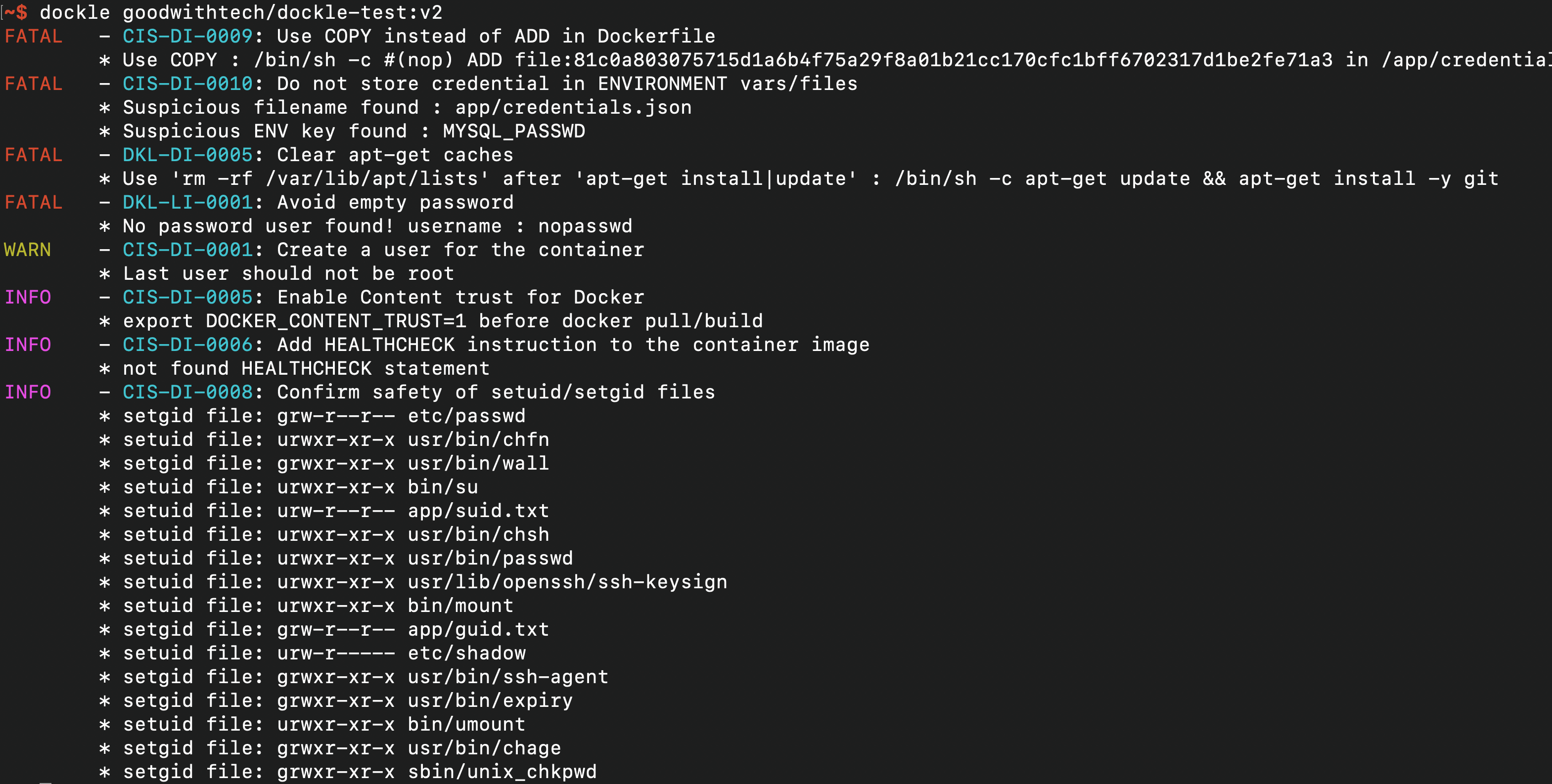
Simply specify an image name (and a tag).
<details>
<summary>Result</summary>
</details>
Docker
Also, you can use Docker to use dockle command as follow.
docker.sock.Checkpoint Summary
| CODE | DESCRIPTION | LEVEL※ |
|---|---|:---:|
| | CIS's Docker Image Checkpoints | |
| CIS-DI-0001 | Create a user for the container | WARN |
| CIS-DI-0002 | Use trusted base images for containers | FATAL
| CIS-DI-0003 | Do not install unnecessary packages in the container | FATAL
| CIS-DI-0004 | Scan and rebuild the images to include security patches | FATAL
| CIS-DI-0005 | Enable Content trust for Docker | INFO
| CIS-DI-0006 | Add HEALTHCHECK instruction to the container image | INFO
| CIS-DI-0007 | Do not use update instructions alone in the Dockerfile | FATAL
| CIS-DI-0008 | Confirm safety of setuid and setgid files | INFO
| CIS-DI-0009 | Use COPY instead of ADD in Dockerfile | FATAL
| CIS-DI-0010 | Do not store secrets in Dockerfiles | FATAL
| CIS-DI-0011 | Install packages only | INFO
|| Dockle Checkpoints for Docker |
| DKL-DI-0001 | Avoid sudo command | FATAL
| DKL-DI-0002 | Avoid sensiti mounting | FATAL
| DKL-DI-0003 | Avoid apt-get dist-upgrade | WARN
| DKL-DI-0004 | Use apk add with --no-cache | FATAL
| DKL-DI-0005 | Clear apt-get caches | FATAL
| DKL-DI-0006 | Avoid latest tag | WARN
|| Dockle Checkpoints for Linux |
| DKL-LI-0001 | Avoid empty password | FATAL
| DKL-LI-0002 | Be unique UID/GROUPs | FATAL
| DKL-LI-0003 | Only put necessary files | INFO
Level
Dockle has 5 check levels.
| LEVEL | DESCRIPTION |
|:---:|---|
| FATAL | Be practical and prudent |
| WARN | Be practical and prudent, but limited uses (even if official images) |
| INFO | May negatively inhibit the utility or performance |
| SKIP | Not found target files |
| PASS | Not found any problems |
Common Examples
Scan an image
Simply specify an image name (and a tag).
<details>
<summary>Result</summary>
</details>
Scan an image file
Get or Save the results as JSON
<details>
<summary>Result</summary>
</details>
Get or Save the results as SARIF
<details>
<summary>Result</summary>
</details>
Specify exit code
By default, Dockle exits with code 0 even if there are some problems.
Use the --exit-code, -c option to exit with a non-zero exit code if WARN or FATAL alert were found.
Specify exit level
By default, --exit-code run when there are WARN or FATAL le.
Use the --exit-level, -l option to change alert level. You can set info, warn or fatal.
Ignore the specified checkpoints
The --ignore, -i option can ignore specified checkpoints.
Or, use DOCKLE_IGNORES:
Or, use .dockleignore file:
Accept suspicious en / files / file extensions
Reject suspicious en / files / file extensions
Continuous Integration (CI)
You can scan your built image with Dockle in Travis CI/CircleCI.
In these examples, the test will fail with if any warnings were found.
Though, you can ignore the specified target checkpoints by using .dockleignore file.
Or, if you just want the results to display and not let the test fail for this, specify --exit-code to 0 in dockle command.
GitHub Action
We provide goodwithtech/dockle-action.
Travis CI
<details>
<summary>.travis.yml</summary>
</details>
CircleCI
<details>
<summary>.circleci/config.yml</summary>
</details>
GitLab CI
<details>
<summary>.gitlab-ci.yml</summary>
</details>
Authorization for Private Docker Registry
Dockle can download images from a private registry, without installing Docker or any other 3rd party tools. It's designed so for ease of use in a CI process.
All you have to do is: install Dockle and set EN .
Docker Hub
To download the private repository from Docker Hub, you need to set DOCKLE_AUTH_URL, DOCKLE_USERNAME and DOCKLE_PASSWORD ENV vars.
Amazon ECR (Elastic Container Registry)
Dockle uses the AWS SDK. You don't need to install aws CLI tool.
Use AWS CLI's EN .
GCR (Google Container Registry)
Dockle uses the Google Cloud SDK. So, you don't need to install gcloud command.
If you'd like to use the target project's repository, you can settle via GOOGLE_APPLICATION_CREDENTIAL.
Self Hosted Registry (BasicAuth)
BasicAuth ser DOCKLE_USERNAME and DOCKLE_PASSWORD.
Contributors
Code Contributors
This project exists thanks to all the people who contribute. [Contribute].
<a href=" src=" /></a>
Financial Contributors
Become a financial contributor and help us sustain our community. [Contribute]
#### Indi
<a href=" src="
#### Organizations
Support this project with your organization. Your logo will show up here with a link to your website. [Contribute]
<a href=" src="imgs/tines.png"></a>
<a href=" src="
<a href=" src="
<a href=" src="
<a href=" src="
<a href=" src="
<a href=" src="
<a href=" src="
<a href=" src="
<a href=" src="
OSS Program Supporters
This project uses services provided through the following OSS programs.
<a href=" target="_blank"><img src=" height="24px"/></a>
<a href=" target="_blank"><img src=" height="24px"/></a>
License
Author
(Tomoya Amachi)
Special Thanks to (Teppei Fukuda) and Trivy
项目信息
开发语言:Go
Star 数:3297
技术要点
该项目属于漏洞知识库方向的开源资源,代码结构清晰,适合安全研究人员学习参考。项目围绕Container Image Linter for Security, Helping build the Best-Practice Docker Image, Easy to start展开,提供了可运行的实现,对理解相关安全机制、工具原理与攻防技术具有较高的研究价值。
从技术实现角度看,此类项目的核心在于对底层原理的深入理解与工程化落地。开发者在研究过程中可以结合官方文档与社区讨论,梳理项目的初始化流程、核心模块职责与数据流转,逐步掌握其中的技术细节与设计思路。
使用与学习建议
1. 下载源码压缩包,解压到本地环境。
2. 根据项目类型准备对应的运行环境与依赖。
3. 按照 README 中的步骤完成配置与部署。
4. 在隔离的测试环境中运行验证,避免影响生产系统。
免责声明
本资源来源于开源社区,仅供安全研究、技术学习与合法授权范围内的攻防演练使用,请勿用于任何非法或侵害他人权益的用途。使用本项目产生的一切后果由使用者自行承担。
| 资源标题 | dockle - Container Image Linter for Security, Helping build |
| 所属分类 | 漏洞知识库 |
| 发布作者 | admin |
| 发布时间 | 2026-10-06 00:56:53 |
| 下载权限 | 免费下载 |
| 附件数量 | 2 个下载链接 |
| 浏览次数 | 418 |
| 讨论数量 | 0 |
| 主题状态 | 正常讨论中 |