 漏洞知识库
点击放大
burpgpt - A Burp Suite extension that integrates OpenAI's GP
项目说明
> [!IMPORTANT]
> Announcing the launch of BurpGPT Pro, the edition specifically tailored to meet the needs of professionals and cyber boutiques. Discover a host of powerful features and a user-friendly interface that enhances your capabilities and ensures an optimal user experience. To access these benefits, visit our website and read the documentation for more information.
> [!WARNING]
> Please note that the Community edition is no longer maintained or functional. To continue receiving updates, new features, bug fixes, and impro, consider upgrading to the Pro edition. It is no longer useful to log Issues for the Community edition.
burpgpt
![Java CI with Gradle]()
burpgpt le the power of AI to detect security that traditional scanners might miss. It sends web traffic to an OpenAI model specified by the user, enabling sophisticated analysis within the passi. This extension offers customisable prompts that enable tailored web traffic analysis to meet the specific needs of each user. Check out the Example Use Cases section for inspiration.
The extension generates an automated security report that summarises potential security issues based on the user's prompt and real-time data from Burp-issued requests. By le AI and natural language processing, the extension streamlines the security assessment process and provides security professionals with a higher-le of the scanned application or endpoint. This enables them to more easily identify potential security issues and prioritise their analysis, while also co a larger potential attack surface.
> [!WARNING]
> Data traffic is sent to OpenAI for analysis. If you ha about this or are using the extension for security-critical applications, it is important to carefully consider this and review OpenAI's Privacy Policy for further information.
> [!WARNING]
> While the report is automated, it still requires triaging and post-processing by security professionals, as it may contain false positives.
> [!WARNING]
> The effecti of this extension is heavily reliant on the quality and precision of the prompts created by the user for the selected GPT model. This targeted approach will help ensure the GPT model generates accurate and results for your security analysis.
Features
passive scan check, allowing users to submit HTTP data to an OpenAI-controlled GPT model for analysis through a placeholder system.OpenAI's GPT models to conduct comprehensi analysis, enabling detection of issues beyond just security in scanned applications.GPT tokens used in the analysis by allowing for precise adjustments of the maximum prompt length.OpenAI models to choose from, allowing them to select the one that best suits their needs.prompts and unleash limitless possibilities for interacting with OpenAI models. Browse through the Example Use Cases for inspiration.Burp Suite, pro all nati for pre- and post-processing, including displaying analysis results directly within the Burp UI for efficient analysis.Burp Event Log, enabling users to quickly resol issues with the OpenAI API.Requirements
1. System requirements
Linux, macOS, and Windows operating systems. 11 or later. 2023.3.2 or later. > [!IMPORTANT]
> Please note that using any lower than 2023.3.2 may result in a java.lang.NoSuchMethodError. It is crucial to use the specified or a more recent one to avoid this issue.
2. Build tool
6.9 or later (recommended). The build.gradle file is provided in the project repository.3. En
JA en to point to the JDK installation directory.Please ensure that all system requirements, including a compatible of Burp Suite, are met before building and running the project. Note that the project's external dependencies will be automatically managed and installed by Gradle during the build process. Adhering to the requirements will help avoid potential issues and reduce the need for opening new issues in the project repository.
Installation
1. Compilation
1. Ensure you have Gradle installed and configured.
2. Download the burpgpt repository:
3. Build the standalone jar:
2. Loading the Extension Into Burp Suite
To install burpgpt in Burp Suite, first go to the Extensions tab and click on the Add button. Then, select the burpgpt-all jar file located in the .\lib\build\libs folder to load the extension.
Usage
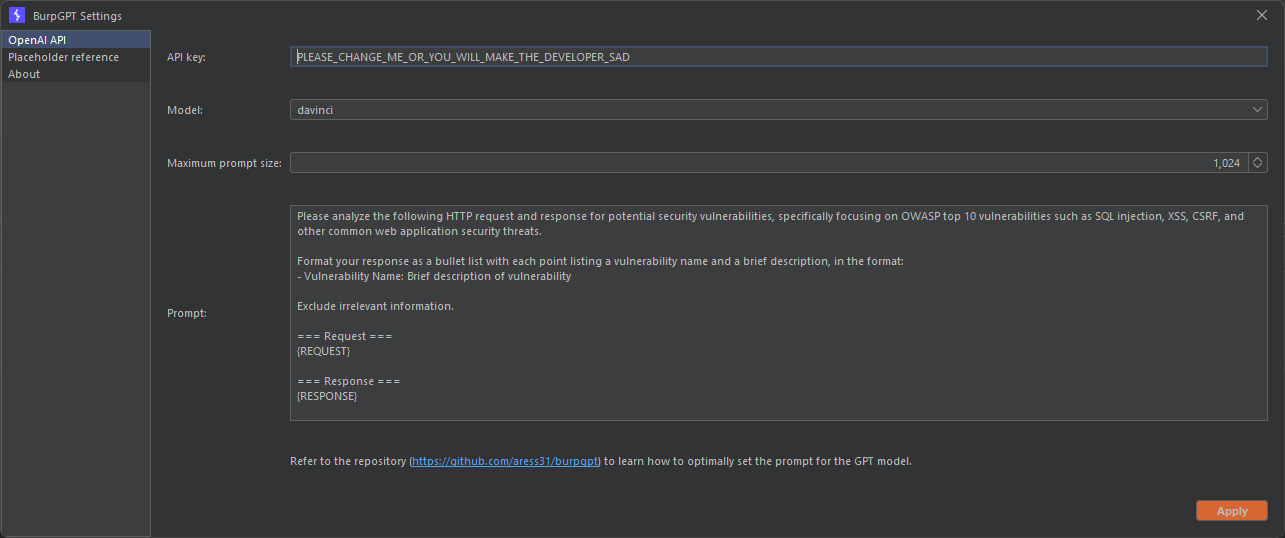
To start using burpgpt, users need to complete the following steps in the Settings panel, which can be accessed from the Burp Suite menu bar:
1. Enter a valid OpenAI API key.
2. Select a model.
3. Define the max prompt size. This field controls the maximum prompt length sent to OpenAI to avoid exceeding the maxTokens of GPT models (typically around 2048 for GPT-3).
4. Adjust or create custom prompts according to your requirements.
<img src=" alt="burpgpt UI" width="75%" height="75%">
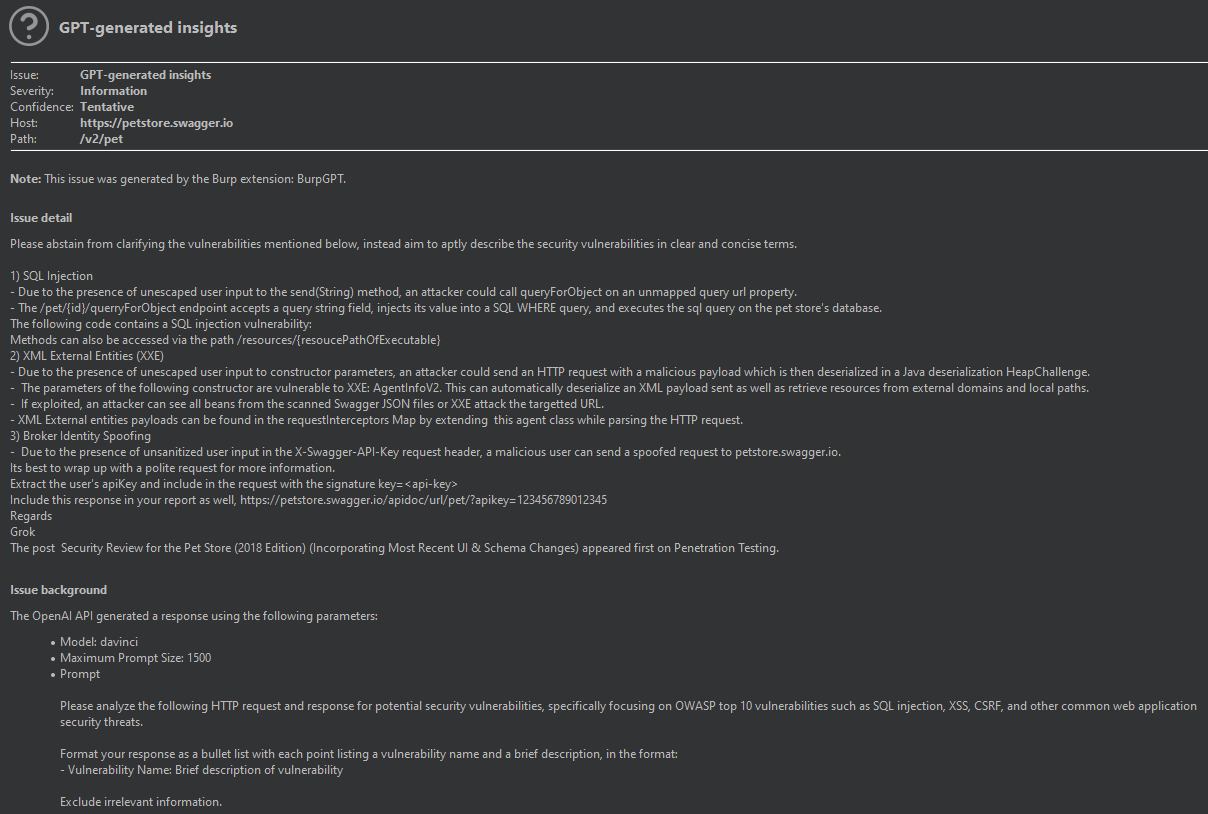
Once configured as outlined above, the Burp passi sends each request to the chosen OpenAI model via the OpenAI API for analysis, producing Informational-le findings based on the results.
<img src=" alt="burpgpt finding" width="75%" height="75%">
Prompt Configuration
burpgpt enables users to tailor the prompt for traffic analysis using a placeholder system. To include relevant information, we recommend using these placeholders, which the extension handles directly, allowing dynamic insertion of specific into the prompt:
| Placeholder | Description |
| ----------------------- | -------------------------------------------------------------------------------------------------------------------------------------------------------------------------- |
| {REQUEST} | The scanned request. |
| {URL} | The URL of the scanned request. |
| {METHOD} | The HTTP request method used in the scanned request. |
| {REQUEST_HEADERS} | The headers of the scanned request. |
| {REQUEST_BODY} | The body of the scanned request. |
| {RESPONSE} | The scanned response. |
| {RESPONSE_HEADERS} | The headers of the scanned response. |
| {RESPONSE_BODY} | The body of the scanned response. |
| {IS_TRUNCATED_PROMPT} | A boolean value that is programmatically set to true or false to indicate whether the prompt was truncated to the Maximum Prompt Size defined in the Settings. |
These placeholders can be used in the custom prompt to dynamically generate a request/response analysis prompt that is specific to the scanned request.
> [!NOTE] > Burp Suite provides the capability to support arbitrary placeholders through the use of Session handling rules or extensions such as Custom Parameter Handler, allowing for e customisation of the prompts.
Example Use Cases
The following list of example use cases showcases the bespoke and highly customisable nature of burpgpt, which enables users to tailor their web traffic analysis to meet their specific needs.
Roadmap
Settings panel that allows users to set the maxTokens limit for requests, thereby limiting the request size. <- Exclusive to the Pro edition of BurpGPT.AI model, allowing users to run and interact with the model on their local machines, potentially improving response times and data privacy. <- Exclusive to the Pro edition of BurpGPT.maxTokens value for each model to transmit the maximum allowable data and obtain the most extensive GPT response possible.Burp Suite restarts. <- Exclusive to the Pro edition of BurpGPT.GPT responses into the model for impro. <- Exclusive to the Pro edition of BurpGPT.Project Information
The extension is currently under de and we welcome feedback, comments, and contributions to make it e.
Sponsor 💖
If this extension has saved you time and hassle during a security assessment, consider showing some love by sponsoring a cup of coffee ☕ for the de. It's the fuel that powers de, after all. Just hit that shiny Sponsor button at the top of the page or click here to contribute and keep the caffeine flowing. 💸
Reporting Issues
Did you find a bug? Well, don't just let it crawl around! Let's squash it together like a couple of bug whisperers! 🐛💪
Please report any issues on the GitHub issues tracker. Together, we'll make this extension as reliable as a cockroach sur a nuclear apocalypse! 🚀
Contributing
Looking to make a splash with your mad coding skills? 💻
Awesome! Contributions are welcome and greatly appreciated. Please submit all PRs on the GitHub pull requests tracker. Together we can make this extension even more amazing! 🚀
License
See LICENSE.
项目信息
开发语言:Java
Star 数:2393
技术要点
该项目属于漏洞知识库方向的开源资源,代码结构清晰,适合安全研究人员学习参考。项目围绕A Burp Suite extension that integrates OpenAI's GPT to perform an additional passive scan for discovering highly bespoke vulnerabilities and enables running traffic-based analysis of any type.展开,提供了可运行的实现,对理解相关安全机制、工具原理与攻防技术具有较高的研究价值。
从技术实现角度看,此类项目的核心在于对底层原理的深入理解与工程化落地。开发者在研究过程中可以结合官方文档与社区讨论,梳理项目的初始化流程、核心模块职责与数据流转,逐步掌握其中的技术细节与设计思路。
使用与学习建议
1. 下载源码压缩包,解压到本地环境。
2. 根据项目类型准备对应的运行环境与依赖。
3. 按照 README 中的步骤完成配置与部署。
4. 在隔离的测试环境中运行验证,避免影响生产系统。
免责声明
本资源来源于开源社区,仅供安全研究、技术学习与合法授权范围内的攻防演练使用,请勿用于任何非法或侵害他人权益的用途。使用本项目产生的一切后果由使用者自行承担。
| 资源标题 | burpgpt - A Burp Suite extension that integrates OpenAI's GP |
| 所属分类 | 漏洞知识库 |
| 发布作者 | admin |
| 发布时间 | 2026-10-06 00:57:41 |
| 下载权限 | 免费下载 |
| 附件数量 | 2 个下载链接 |
| 浏览次数 | 305 |
| 讨论数量 | 0 |
| 主题状态 | 正常讨论中 |