 漏洞知识库
点击放大
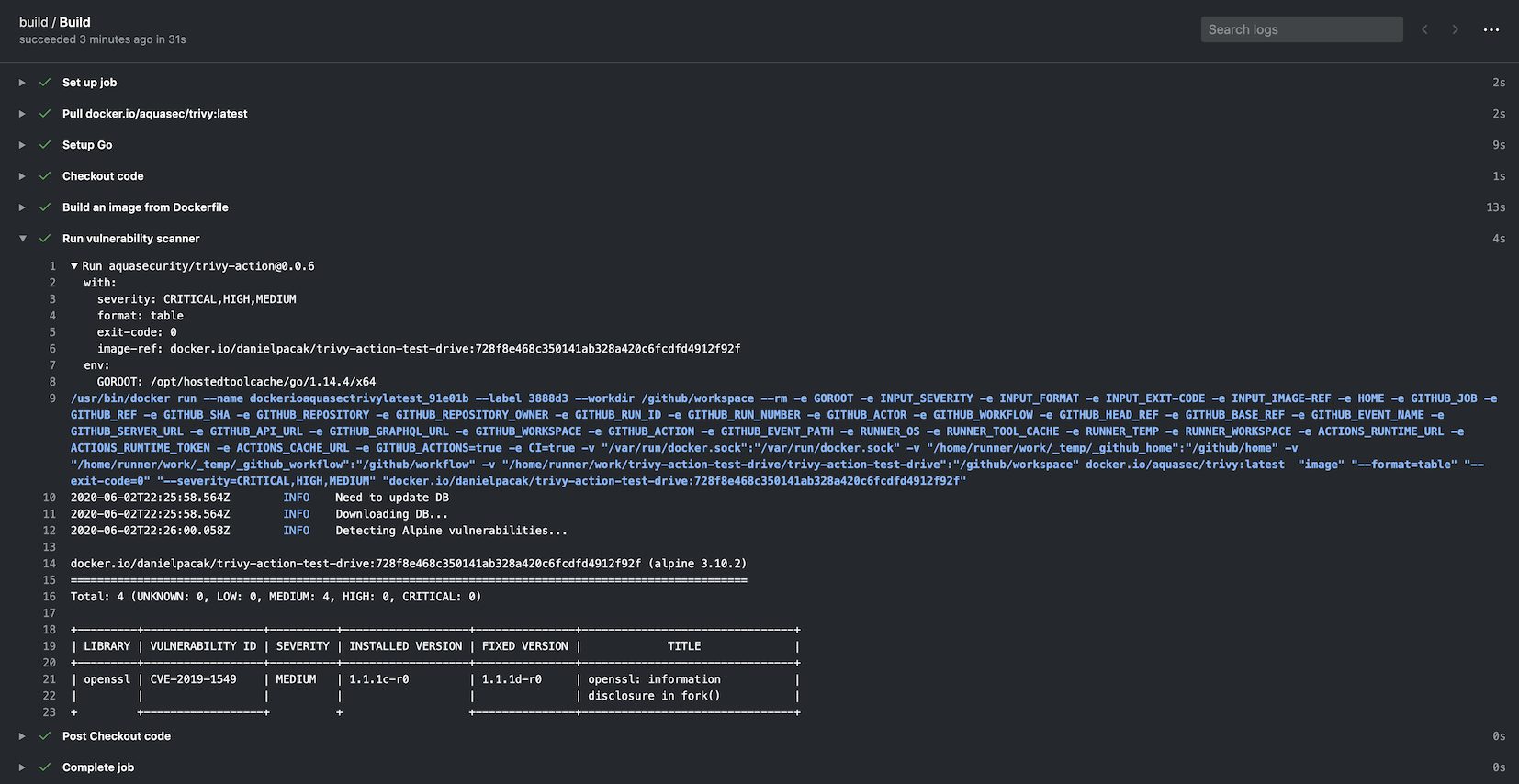
trivy-action - Runs Trivy as GitHub action to scan your Docker co
项目说明
Tri
> GitHub Action for Trivy
[![GitHub Release][release-img]][release]
[![GitHub Marketplace][marketplace-img]][marketplace]
[![License][license-img]][license]

Table of Contents
* Usage
* Scan CI Pipeline
* Scan CI Pipeline (w/ Tri)
* Cache
* Tri
* Scanning a Tarball
* Using Trivy with templates
* Using Trivy with GitHub Code Scanning
* Using Trivy to scan your Git repo
* Using Trivy to scan your rootfs directories
* Using Trivy to scan Infrastructure as Code
* Using Trivy to generate SBOM
* Using Trivy to scan your private registry
* Using Trivy if you don't have code scanning enabled
* Customizing
* inputs
* En
* Tri file
Usage
Scan CI Pipeline
Scan CI Pipeline (w/ Tri)
In this case trivy.yaml is a YAML configuration that is checked in as part of the repo. Detailed information is a on the Tri but an example is as follows:
It is possible to define all options in the trivy.yaml file. Specifying indi options via the action are left for backward compatibility purposes. Defining the following is required as they cannot be defined with the config file:
scan-ref: If using fs, repo scans.image-ref: If using image scan.scan-type: To define the scan type, e.g. image, fs, repo, etc.#### Order of preference for options
Trivy uses Viper which has a defined precedence order for options. The order is as follows:
Cache
The action has a built-in functionality for caching and restoring the DB, the Java DB and the checks bundle if they are downloaded during the scan.
The cache is stored in the
$GITHUB_WORKSPACE/.cache/trivy directory by default.The cache is restored before the scan starts and sa the scan finishes.
It uses actions/cache under the hood but requires less configuration settings.
The cache input is optional, and caching is turned on by default.
#### Disabling caching
If you want to disable caching, set the cache input to false, but we recommend keeping it enabled to avoid rate limiting issues.
#### Updating caches in the default branch
Please note that there are restrictions on cache access between branches in GitHub Actions.
By default, a workflow can access and restore a cache created in either the current branch or the default branch (usually main or master).
If you need to share caches across branches, you may need to create a cache in the default branch and restore it in the current branch.
To optimize your workflow, you can set up a cron job to regularly update the cache in the default branch.
This allows subsequent scans to use the cached DB without downloading it again.
When running a scan, set the en TRI and TRI to skip the download process.
Tri
By default the action calls
aquasecurity/setup-trivy as the first stepwhich installs the
trivy specified by the trivy by othermeans, e.g. calling
aquasecurity/setup-trivy directly, or are in this action multiple times then you can use theskip-setup-trivy input to disable this step.#### Setting up Tri
#### Skipping Setup when Calling Tri multiple times
Another common use case is when a build calls this action multiple times, in this case we can set skip-setup-trivy to true on subsequent in e.g.
#### Use non-default token to install Trivy
GitHub Enterprise Server (GHES) uses an invalid github.token for server.
Therefore, you can't install Trivy using the setup-trivy action.
To fix this problem, you need to o the token for setup-trivy using token-setup-trivy input:
GitHub even has create-github-app-token for similar cases.
Scanning a Tarball
Using Trivy with templates
The action supports [Tri][tri].
Use template input to specify path (remember to prefix the path with @) to template file.
#### Default templates
Trivy has [default templates][tri].
By default, setup-trivy installs them into the $HOME/.local/bin/tri/contrib directory.
Using Trivy with GitHub Code Scanning
If you have GitHub code scanning a you can use Trivy as a scanning tool as follows:
You can find a more in-depth example here:
If you would like to upload SARIF results to GitHub Code scanning even upon a non zero exit code from Trivy Scan, you can add the following to your upload step:
See this for more details:
Using Trivy to scan your Git repo
It's also possible to scan your git repos with Trivy's built-in repo scan. This can be handy if you want to run Trivy as a build time check on each PR that gets opened in your repo. This helps you identify potential that might get introduced with each PR.
If you have GitHub code scanning a you can use Trivy as a scanning tool as follows:
Using Trivy to scan your rootfs directories
It's also possible to scan your rootfs directories with Trivy's built-in rootfs scan. This can be handy if you want to run Trivy as a build time check on each PR that gets opened in your repo. This helps you identify potential that might get introduced with each PR.
If you have GitHub code scanning a you can use Trivy as a scanning tool as follows:
Using Trivy to scan Infrastructure as Code
It's also possible to scan your IaC repos with Trivy's built-in repo scan.
This can be handy if you want to run Trivy as a build time check on each PR that gets opened in your repo.
This helps you identify potential that might get introduced with each PR.
If you have GitHub code scanning a you can use Trivy as a scanning tool as follows:
Note: If your Terraform configuration contains private modules, configure Git to authenticate with the repository hosting them.
This can be done by adding a step in your CI workflow that sets up access, for example using a Personal Access Token (PAT) or SSH keys:
This ensures Trivy can download private modules.
Using Trivy to generate SBOM
It's possible for Trivy to generate an SBOM of your dependencies and submit them to a consumer like GitHub Dependency Graph.
The sending of an SBOM to GitHub feature is only a if you currently ha Dependency Graph enabled in your repo.
In order to send results to GitHub Dependency Graph, you will need to create a GitHub PAT or use the GitHub installation access token (also known as GITHUB_TOKEN):
When scanning images you may want to parse the actual output JSON as Github Dependency doesn't show all details like the file path of each dependency for instance.
You can upload the report as an artifact and download it, for instance using the upload-artifact action:
Using Trivy to scan your private registry
It's also possible to scan your private registry with Trivy's built-in image scan. All you have to do is set ENV vars.
#### Docker Hub registry
Docker Hub needs TRI and TRI.
You don't need to set ENV vars when downloading from a public repository.
#### AWS ECR (Elastic Container Registry)
Trivy uses AWS SDK. You don't need to install aws CLI tool.
You can use [AWS CLI's ENV Vars][env-var].
[env-var]:
#### GCR (Google Container Registry)
Trivy uses Google Cloud SDK. You don't need to install gcloud command.
If you want to use target project's repository, you can set it via GOOGLE_APPLICATION_CREDENTIALS.
#### Self-Hosted
BasicAuth ser TRI and TRI.
if you want to use 80 port, use NonSSL TRI=true
Using Trivy if you don't have code scanning enabled
It's also possible to browse a scan result in a workflow summary.
This step is especially useful for private repositories without GitHub Ad Security license.
terraform'
cat trivy.txt
echo '
Customizing
Configuration priority:
inputs
Following inputs can be used as step.with keys:
| Name | Type | Default | Description |
|------------------------------|---------|------------------------------------|------------------------------------------------------------------------------------------------------------------------------------------------------------------|
| scan-type | String | image | Scan type, e.g. image or fs |
| input | String | | Tar reference, e.g. alpine-latest.tar |
| image-ref | String | | Image reference, e.g. alpine:3.10.2 |
| scan-ref | String | /github/workspace/ | Scan reference, e.g. /github/workspace/ or . |
| format | String | table | Output format (table, json, template, sarif, cyclonedx, spdx, spdx-json, github, cosign-vuln) |
| template | String | | Output template (@$HOME/.local/bin/tri/contrib/gitlab.tpl, @$HOME/.local/bin/tri/contrib/junit.tpl) |
| tf-vars | String | | path to Terraform file |
| output | String | | Sa to a file |
| exit-code | String | 0 | Exit code when specified are found |
| ignore-unfixed | Boolean | false | Ignore unpatched/unfixed |
| | String | os,library | types (os,library) |
| se | String | UNKNOWN,LOW,MEDIUM,HIGH,CRITICAL | Se of to scanned for and displayed |
| skip-dirs | String | | Comma separated list of directories where tra is skipped |
| skip-files | String | | Comma separated list of files where tra is skipped |
| cache-dir | String | $GITHUB_WORKSPACE/.cache/trivy | Cache directory. NOTE: This value cannot be configured by trivy.yaml. |
| timeout | String | 5m0s | Scan timeout duration |
| ignore-policy | String | | Filter with OPA rego language |
| hide-progress | String | false | Suppress progress bar and log output |
| list-all-pkgs | String | | Output all packages regardless of |
| scanners | String | vuln,secret | comma-separated list of what security issues to detect (vuln,secret,misconfig,license) |
| tri | String | | comma-separated list of relati within the repository to one or more .tri files, or a single .tri.yaml file. |
| tri | String | | Path to trivy.yaml config |
| github-pat | String | | Authentication token to enable sending SBOM scan results to GitHub Dependency Graph. Can be either a GitHub Personal Access Token (PAT) or GITHUB_TOKEN |
| limit-se | Boolean | false | By default *SARIF* format enforces output of all regardless of configured se. To o this behavior set this parameter to true |
| docker-host | String | | By default it is set to unix://var/run/docker.sock, but can be updated to help with containerized infrastructure (unix:/ or other prefix is required) |
| | String | v0.75.0 | Tri to use, e.g. latest or v0.75.0 |
| skip-setup-trivy | Boolean | false | Skip calling the setup-trivy action to install trivy |
| token-setup-trivy | Boolean | | O github.token used by setup-trivy to checkout the trivy repository |
En
You can use [Tri ][tri] to set the necessary options (including flags that are not supported by Inputs, such as
--secret-config).NB In some older of the Action there was a bug that caused inputs from one call to the Action to leak
over to subsequent calls to the Action. This could cause workflows that call the Action multiple times e.g. to run
multiple scans, or the same scans with different output formats, to not produce the desired output. You can see if this
is the case by looking at the GitHub Actions step information, if the env section shown in your Actions output
contains TRIVY_* en you did not explicitly set then you may be affected by this bug and should
upgrade to the latest Action .
Tri file
When using the
tri Input, you can set options using the [Tri file][tri] (including flags that are not supported by Inputs, such as --secret-config).[release]:
[release-img]:
[marketplace]:
[marketplace-img]:
[license]:
[license-img]:
[tri]:
[tri]:
[tri]:
[tri]:
项目信息
开发语言:Shell
Star 数:1430
技术要点
该项目属于漏洞知识库方向的开源资源,代码结构清晰,适合安全研究人员学习参考。项目围绕Runs Trivy as GitHub action to scan your Docker container image for vulnerabilities展开,提供了可运行的实现,对理解相关安全机制、工具原理与攻防技术具有较高的研究价值。
从技术实现角度看,此类项目的核心在于对底层原理的深入理解与工程化落地。开发者在研究过程中可以结合官方文档与社区讨论,梳理项目的初始化流程、核心模块职责与数据流转,逐步掌握其中的技术细节与设计思路。
使用与学习建议
1. 下载源码压缩包,解压到本地环境。
2. 根据项目类型准备对应的运行环境与依赖。
3. 按照 README 中的步骤完成配置与部署。
4. 在隔离的测试环境中运行验证,避免影响生产系统。
免责声明
本资源来源于开源社区,仅供安全研究、技术学习与合法授权范围内的攻防演练使用,请勿用于任何非法或侵害他人权益的用途。使用本项目产生的一切后果由使用者自行承担。
| 资源标题 | trivy-action - Runs Trivy as GitHub action to scan your Docker co |
| 所属分类 | 漏洞知识库 |
| 发布作者 | admin |
| 发布时间 | 2026-10-06 01:00:28 |
| 下载权限 | 免费下载 |
| 附件数量 | 2 个下载链接 |
| 浏览次数 | 419 |
| 讨论数量 | 0 |
| 主题状态 | 正常讨论中 |