 漏洞知识库
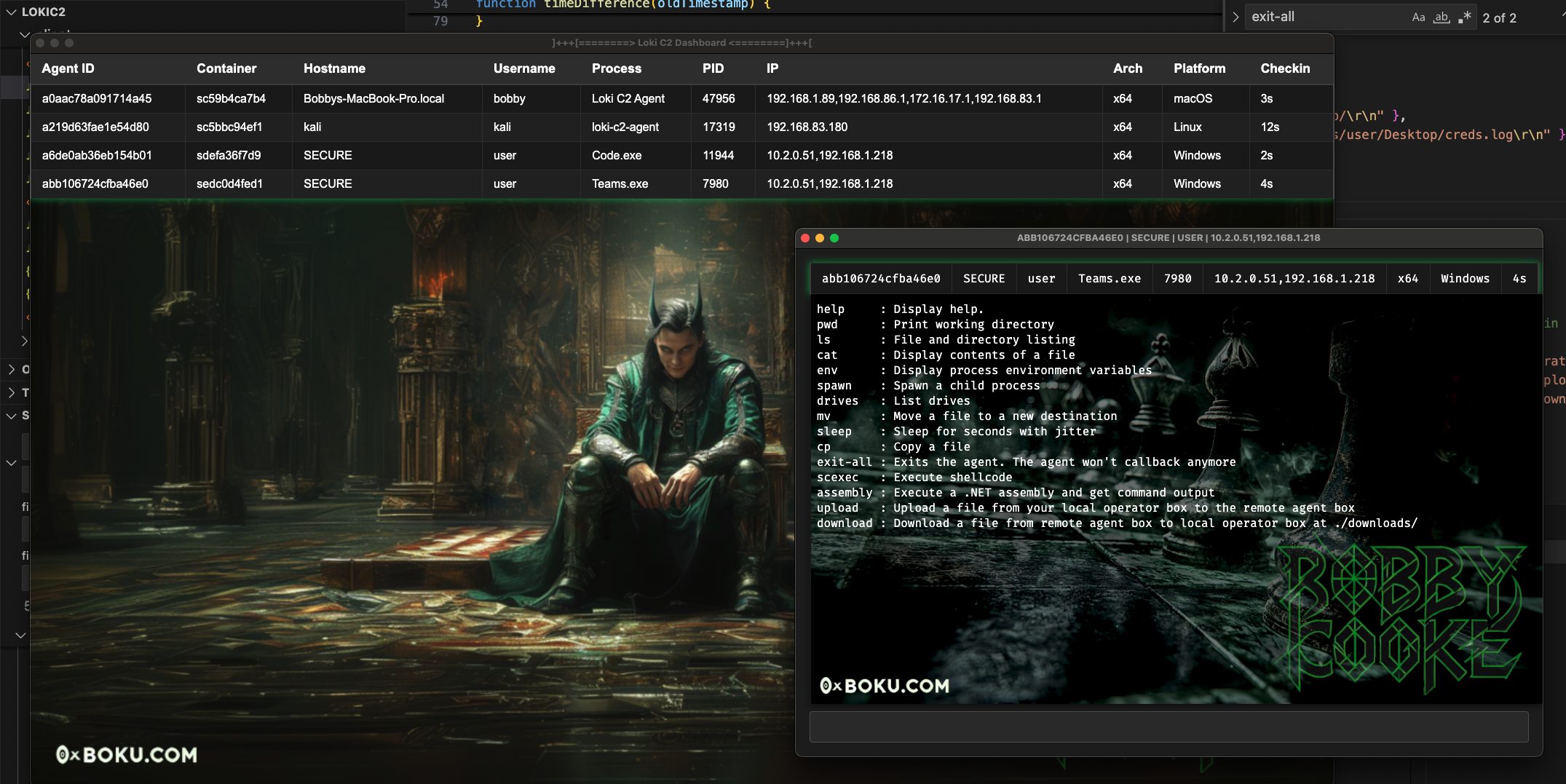
点击放大
Loki - 🧙♂️ Node.js Command & Control for Script-Jacking
项目说明
🧙♂️ Loki Command & Control
Loki is a stage-1 command and control (C2) framework written in Node.js, built to script-jack Electron apps _MITRE ATT&CK T1218.015_. De for red team operations, Loki enables e of security software and bypasses application controls by exploiting trusted, signed Electron apps.
Script-jacking hijacks the execution flow of an Electron app by modifying Ja files loaded in at runtime with arbitrary Node.js code. This technique can be le to:
_While several tools already address le script-jacking to chain execution to another process, Loki is the first to enable backdooring and hollowing of signed Electron apps without in their code signing signature._
For more details on how Loki works, checkout this blog post:

🚀 Contributors
| Name | Contributions |
|---------------------|-------------------------------|
| Bobby Cooke | Creator & Maintainer |
| Dylan Tran | Creator |
| Ellis Springe| Alpha Tester |
| Shawn Jones | Assembly Execution Code |
| Trusted Sec | COFFLoader Code |
| Simon Exley | Video Creator |
| Clinton Elves | Video Creator |
| John Hammond | Video Creator |
Check out this video by John Hammond on backdooring Cursor AI with Loki C2! 🎩
![I Backdoored Cursor AI]()
Check out this video by Simon Exley & Clinton Elves on getting up and running with Loki C2! 🧙♂️
![Bypassing Windows Defender Application Control with Loki C2]()
Features & Details
- SAS Token to protect C2 storage account
- Uses Chromium renderer child processes for agent, shellcode execution, and assembly fork-n-run style execution -- inherits proxy-aware capabilities of Chromium.
- Unlike traditional C2's where agents send messages to a Teamserver, there is no Teamserver
- The GUI client & agents both checkin to the same data-store
Commands
_All agent commands are written in native Node.JS and do not require additional dependencies or library load events. With the exception of the
scexec and assembly commands which do a library load on keytar.node and assembly.node_/, \ in paths will not work.| Command | Description |
|-------------|----------------------------------------------------------------------------|
| help | Display help. Usage: help or help scan |
| pwd | Print working directory |
| ls | File and directory listing |
| cat | Display contents of a file |
| env | Display process en |
| spawn | Spawn a child process |
| drives | List drives |
| mv | Move a file to a new destination |
| sleep | Sleep for seconds with jitter |
| cp | Copy a source file to a destination |
| exit-all | Exits the agent, agent won't callback anymore |
| load | Load a node PE file from disk into the process |
| scexec | Execute shellcode |
| assembly | Execute a .NET assembly and get command output |
| upload | Upload a file from your local operator box to the remote agent box |
| download | Download a file from remote agent box to local operator box |
| scan | Perform TCP network scan across CIDR range with selected ports |
| dns | DNS lookup. Le systems DNS configuration |
| set | Set the Node load paths for assembly node and scexec nodes |
| bof | Execute a COFF file and return output |
#### Set - Loading Nodes from Application Control Exclusion Paths
set command to change the load paths for assembly.node and scexec.node. ls, cat, cp and mv you may be able to enumerate the application control rules to discover a writable directory that is an exclusion. set command to change their load path to the exclusion directory to bypass the application control. Agent Features
For more information on Agent features click here
Client Features
For more information on Client features click here
🧙♂️ Deploy Illusions
First you need to identify a Electron application which does not do ASAR security integrity checks such as
Microsoft Teams. Newer applications may ha checks pre backdooring. Older of the target app are more likely to be . Simple Instructions
_You don't need to compile the agent when backdooring Electron apps. Just replace the contents of
{ELECTRONAPP}/resources/app/ with the Loki agent files._Detailed Instructions
#### Step 1 : Create Azure Storage Blob Account and get SAS Token
#### Step 2 : Create Obfuscated Loki Payload
cd into itja modulecreate_agent_payload.js script to create a Loki payload with your Storage Account info#### Step 3 : Backdoor Electron Application
./app/{ELECTRONAPP}/resources/ ./app/ folder to {ELECTRONAPP}/resources/app/#### Step 4 : Configure Loki Client
Loki Client > Configuration to open the Settings windowSave 
Backdooring Electron Apps and Keeping the real Application Working as Normal
The most straightforward way to use Loki is to replace the files in
{ELECTRONAPP}/resources/app/ with the Loki files. This hollows out the app, meaning the app won't function normally -- Loki replaced its functionality. If you really want to keep the Electron application running and have it also deploy Loki in the background all hope is not lost! John Hammond and I figured out a way to keep the real Electron application running. We' the file you will need to /loki/backdoor/init.js in this repo.
It is currently setup to work for Cursor, discovered to be by John Hammond.
For doing this you will need to:
package.json to cursor/resources/app/- Don't replace the real
package.json/loki/backdoor/init.js to cursor/resources/app/cursor/resources/app/package.json to:- set
"main":"init.js",- delete
"type":"module",- delete
"private":true,How this works
Cursor.exe will load in init.js on click / executioninit.js reads in package.jsoninit.js changes "main":"init.js", -> "main":"main.js",-
main.js is Lokiinit.js spawns and disowns a new Cursor.exe which points to Lokiinit.js reads in package.json againinit.js changes "main":"main.js", -> "main":"./out/main.js",-
./out/main.js" is the real Cursor applicationinit.js spawns and disowns a new Cursor.exe which points to the real Cursor-
init.js catches the exit-
init.js reads in package.json for a third time-
init.js changes "main":"./out/main.js", -> "main":"init.js",This way the app is persistently backdoored and operates as normal. If the cursor app is exited loki will continue to run in the background.
Future
I'll make a script to automate this in the future.
Opsec Recommendations
Compilation Guides
These are the compile instructions for building the agents & clients. The instructions co platforms, including Windows, Linux, and macOS. It is recommended to compile the client on the target platform and architecture.
Client
Agents
If you are backdooring an Electron application then you don't need to compile agents.
I do not recommend compiling the agent and using it for operations. Agent compile instructions are for de.
Detection Guidance
- MITRE ATT&CK T1218.015: Electron Applications
~/Downloads/Teams/Teams.exe*.blob.core.windows.netnetstat.exe or whoami.exepackage.json will be created in ~/AppData/Roaming/{NAME} when the Loki Ja executes in the Electron process.%LOCALAPPDATA%\Microsoft\Teams\current\app directory created%LOCALAPPDATA%\Microsoft\Teams\current\app.asar file created/modified by non-Teams installer/updaterReferences || Acknowledgements || Offensi Research
- Cocreator of the Loki agent. Created node modules for shellcode and assembly execution.
- Wild West Hackin’ Fest talk Statikk Shi Electron Applications for Post-Exploitation
- Microsoft Teams and other Electron Apps as LOLbins
- For Loki assembly execution Dylan ported Shawn’s public InlineExecute-Assembly code
- quASAR project, a tool designed for modifying Electron applications to enable command execution
- Quasar: Compromising Electron Apps
- The Security Con
- BSides : Abusing Electron Applications
- BEEMKA - Electron Exploitation Toolkit
License
This project is licensed under the Business Source License 1.1. Non-commercial use is permitted under the terms of the license. Commercial use requires the author's explicit permission. On April 3, 2030, this license will convert to Apache 2.0. See LICENSE for full details.
项目信息
开发语言:JavaScript
Star 数:1365
技术要点
该项目属于漏洞知识库方向的开源资源,代码结构清晰,适合安全研究人员学习参考。项目围绕🧙♂️ Node.js Command & Control for Script-Jacking Vulnerable Electron Applications展开,提供了可运行的实现,对理解相关安全机制、工具原理与攻防技术具有较高的研究价值。
从技术实现角度看,此类项目的核心在于对底层原理的深入理解与工程化落地。开发者在研究过程中可以结合官方文档与社区讨论,梳理项目的初始化流程、核心模块职责与数据流转,逐步掌握其中的技术细节与设计思路。
使用与学习建议
1. 下载源码压缩包,解压到本地环境。
2. 根据项目类型准备对应的运行环境与依赖。
3. 按照 README 中的步骤完成配置与部署。
4. 在隔离的测试环境中运行验证,避免影响生产系统。
免责声明
本资源来源于开源社区,仅供安全研究、技术学习与合法授权范围内的攻防演练使用,请勿用于任何非法或侵害他人权益的用途。使用本项目产生的一切后果由使用者自行承担。
| 资源标题 | Loki - 🧙♂️ Node.js Command & Control for Script-Jacking |
| 所属分类 | 漏洞知识库 |
| 发布作者 | admin |
| 发布时间 | 2026-10-06 01:01:02 |
| 下载权限 | 免费下载 |
| 附件数量 | 2 个下载链接 |
| 浏览次数 | 243 |
| 讨论数量 | 0 |
| 主题状态 | 正常讨论中 |