 漏洞知识库
点击放大
horusec - Horusec is an open source tool that improves ident
项目说明
<p align="center" margin="20 0"><a href="
<img src="assets/horusec_logo.png" alt="logo_header" width="65%" style="max-width:100%;"/></a></p>
<p align="center">
<a href=" alt="">
<img src="
<a href=" alt="activity">
<img src="
<a href=" alt="contributors">
<img src="
<a href=" alt="lint">
<img src="
<a href=" alt="test">
<img src="
<a href=" alt="security">
<img src="
<a href=" alt="co">
<img src="
<a href=" alt="e2e">
<img src="
<a href=" alt="build">
<img src="
<a href=" alt="license">
<img src="
<a href=" src="
</p>
Table of contents
1. About
2. Getting started
>#### 2.1. Requirements
>#### 2.2. Installation
3. Usage
>#### 3.1. CLI Usage
>#### 3.2. Using Docker
>#### 3.3. Older
>#### 3.4. Using Horusec-Web application
>#### 3.5. Using Studio Code
>#### 3.6. Using the Pipeline
4. Documentation
5. Roadmap
6. Contributing
7. Code of Conduct
8. License
9. Community
<br>
<br>
<br>
About
Horusec is an open source tool that performs a static code analysis to identify security flaws during the de process. Currently, the languages for analysis are C#, Ja, Python, Ruby, Golang, Terraform, Ja, Typescript, Kubernetes, PHP, C, HTML, JSON, Dart, Elixir, Shell, Nginx.
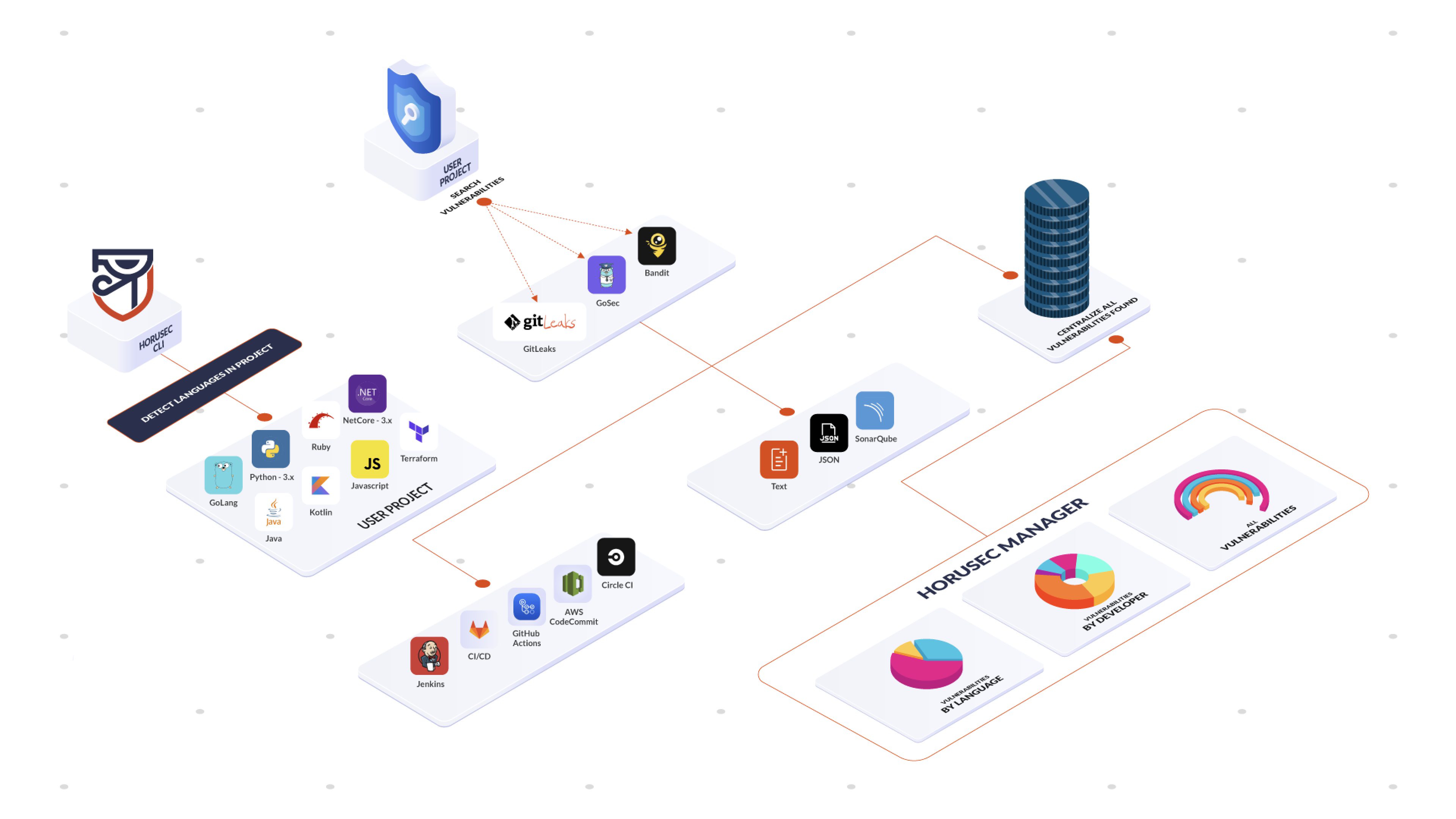
The tool has options to search for key leaks and security flaws in all your project's files, as well as in Git history. Horusec can be used by the de through the CLI and by the De team on CI /CD mats.
Check out our Documentation, you will see the complete list of tools and languages Horusec performs analysis.
<p align="center" margin="20 0"><img src="assets/horusec-complete-architecture.png" alt="architecture" width="100%" style="max-width:100%;"/></p>
See an Output example:
<img src="assets/usage_horusec.gif" alt="usage_gif" width="100%" style="max-width:100%;"/>
Getting started
Requirements
You need Docker installed in your machine in order to run Horusec with all the tools we use.
If you don't ha, we have a flag -D true that will disable the dependency, but it also loses much of the analysis power.
We recommend using it with Docker.
If you enable commit authors -G true, there is also a git dependency.
Installing Horusec
Mac or Linux
or
#### Check the installation
Windows
#### Check the installation
And more
Usage
CLI Usage
To use horusec-cli and check the application's , use the following command:
> When horusec starts an analysis, it creates a folder called .horusec. This folder is the basis for not changing your code. We recommend you to add the line .horusec into your .gitignore file so that this folder does not need to be sent to your git server.
Using Docker
It is possible to use Horusec through a docker image
horuszup/horusec-cli:latest.Run the following command to do it:
-v $(pwd):/src.With the docker image we ended up having two paths where the project can be found.
The -p flag will represent the project path inside the container, in our example /src.
The -P flag will represent the project outside the container, in our example is represented by $(pwd),
will be also needed to pass the project path to mount the -v $(pwd):/src.
Older
Horusec's v1 is still a.
WARNING: The endpoint with v1 will be deprecated, please upgrade your CLI to v2. Check out more details in the documentation.
Mac or Linux
Windows
v1.10.3. Using Horusec-Web application
Manage your through our web interface. You can have a dashboard of metrics about your , control of false positives, authorization token, update of and much more.
See the web application section to keep reading about it.
Check out the example below, it is sending an analysis to Horusec web services:
Check out the tutorial on how to create an authorization token through Horusec Manager Web Service.
WARNING: Our web services was moved to a new repository. You need to upgrade to v2, check out how to migrate from v1 to v2.
Using Studio Code
You can analyze your project using Horusec's Studio Code extension.
For more information, check out the documentation.
Using the Pipeline
You can perform an analysis of your project before you hold deployment in your en by ensuring maximum security in your organization.
For more information, check out the documentation:
Features
See below:
Documentation
You can find Horusec's documentation on our website.
Roadmap
We have a project roadmap, you can contribute with us!
Horusec has other repositories, check them out:
Contributing
Feel free to use, recommend impro, or contribute to new implementations.
Check out our contributing guide to learn about our de process, how to suggest bugfixes and impro.
De Certificate of Origin - DCO
This is a security layer for the project and for the de. It is mandatory.
Follow one of these two methods to add DCO to your commits:
1. Command line
Follow the steps:
Step 1: Configure your local git en adding the same name and e-mail configured at your GitHub account. It helps to sign commits manually during reviews and suggestions.
Step 2: Add the Signed-off-by line with the '-s' flag in the git commit command:
2. GitHub website
You can also manually sign your commits during GitHub reviews and suggestions, follow the steps below:
Step 1: When the commit changes box opens, manually type or paste your signature in the comment box, see the example:
For this method, your name and e-mail must be the same registered on your GitHub account.
Code of Conduct
Please follow the Code of Conduct in all your interactions with our project.
License
Apache License 2.0.
Community
Feel free to reach out to us at:
This project exists thanks to all the contributors. You rock! ❤️ 🚀
项目信息
开发语言:Go
Star 数:1342
技术要点
该项目属于漏洞知识库方向的开源资源,代码结构清晰,适合安全研究人员学习参考。项目围绕Horusec is an open source tool that improves identification of vulnerabilities in your project with just one command.展开,提供了可运行的实现,对理解相关安全机制、工具原理与攻防技术具有较高的研究价值。
从技术实现角度看,此类项目的核心在于对底层原理的深入理解与工程化落地。开发者在研究过程中可以结合官方文档与社区讨论,梳理项目的初始化流程、核心模块职责与数据流转,逐步掌握其中的技术细节与设计思路。
使用与学习建议
1. 下载源码压缩包,解压到本地环境。
2. 根据项目类型准备对应的运行环境与依赖。
3. 按照 README 中的步骤完成配置与部署。
4. 在隔离的测试环境中运行验证,避免影响生产系统。
免责声明
本资源来源于开源社区,仅供安全研究、技术学习与合法授权范围内的攻防演练使用,请勿用于任何非法或侵害他人权益的用途。使用本项目产生的一切后果由使用者自行承担。
| 资源标题 | horusec - Horusec is an open source tool that improves ident |
| 所属分类 | 漏洞知识库 |
| 发布作者 | admin |
| 发布时间 | 2026-10-06 01:01:14 |
| 下载权限 | 免费下载 |
| 附件数量 | 2 个下载链接 |
| 浏览次数 | 208 |
| 讨论数量 | 0 |
| 主题状态 | 正常讨论中 |