 漏洞知识库
点击放大
nebula - AI-powered penetration testing assistant for autom
项目说明
<di="center">
<br />
<h1>Nebula</h1>
<p>AI Powered Pentesting</p>
<br />
</div>
<p align="center">
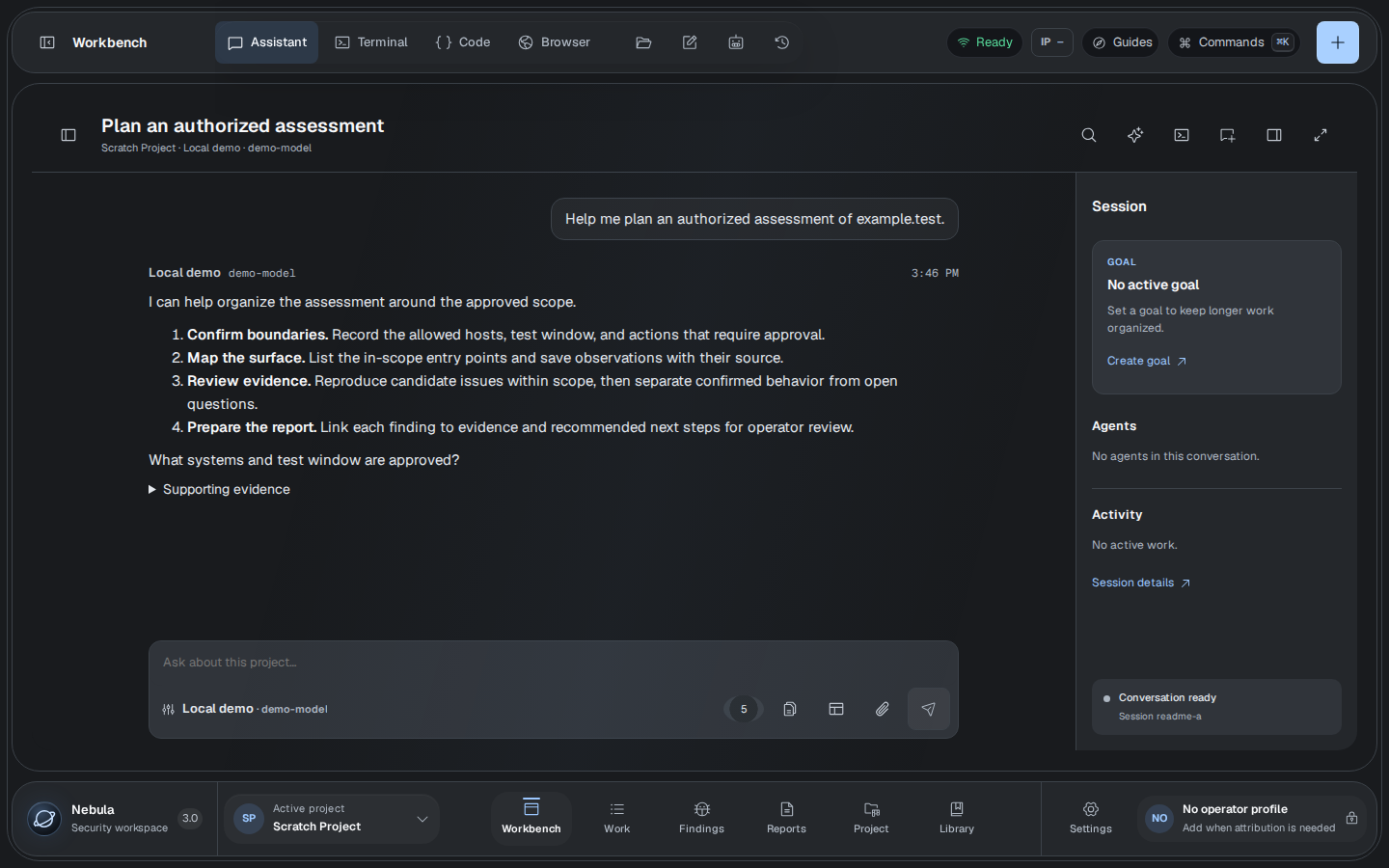
<img src="docs/images/nebula-3-assistant.png" alt="Nebula 3 Assistant view with a sample authorized assessment planning con" width="100%" />
</p>
<p align="center"><sub>Nebula 3 Assistant with a sample assessment con</sub></p>
<br />
Acknowledgement
First, I would like to thank Almighty God, who is the source of all knowledge. Without Him, this would not be possible.
Nebula brings the working parts of a security engagement into one desktop surface: terminal, code, browser, assistant, files, notes, missions, findings, and reports.
AI can in, organize, and write. The operator defines the scope, grants authority, and decides what runs.
Designed around the operator
Work in one place. Move from research to a contained terminal, preser output as e, and carry it into findings and reports without losing context.
Keep authority explicit. Scope enforcement, appro, hard budgets, and isolated OCI execution sit between AI assistance and the systems under test.
Leave a durable trail. Content-addressed artifacts, append-only events, execution pro, and integrity-manifested exports preserve how a conclusion was reached.
Nebula supports hosted, local, and OpenAI-compatible model runtimes. A model provider is optional; the human terminal, e workflow, notes, findings, and reports remain a without one.
> Use Nebula only on systems and networks you own or are explicitly authorized to test.
Install the preview
Nebula 3 preview builds for Linux x86_64 appear as nebula-v3.* prereleases on GitHub Releases. Choose a release with nati and read its published notes before installing; checked-in release notes may also describe unpublished candidates. Docker or Podman is required for the container terminal and Docker-mode automation. Features in a source checkout may be ahead of the published preview.
The preferred installation method is the signed Nebula APT repository. Its archi fingerprint is:
that fingerprint, add the current preview channel, and install:
The prerelease channel is intentional while Nebula 3 is in preview. The DEB
supports Debian, Ubuntu, Kali, and compatible systems. Future updates remain
under administrator control through the normal APT workflow.
<details>
<summary>Install a downloaded DEB manually instead</summary>
Download the DEB and SHA256SUMS-linux-x64.txt from GitHub Releases, then and install (replace <> with the published release ):
</details>
<details>
<summary>Use the portable AppImage instead</summary>
Download the AppImage and checksum file from the same release, then run:
The AppImage requires no system-wide installation and uses Nebula's signed direct-update channel.
</details>
After launch, inspect the bundled Core and local runtime boundary:
> First launch: Nebula may need to download, prepare, and the official Kali image before terminal and automation features are ready. This can take several minutes depending on your connection and container runtime.
> About preview builds
>
> A build exists only when a nebula-v3.* entry and its nati appear on GitHub Releases. Back up engagement data and review the release notes and checksums before use. Do not use pip install nebula-ai to install Nebula 3.
macOS, Windows, and Linux arm64 installers are not part of the current release matrix.
Run from source
Install Python 3.11–3.13, Poetry 2.1.3, Node.js 20 with npm, the stable Rust toolchain, and the Tauri prerequisites for your operating system.
The Playwright browser renders Ja URL knowledge sources. Signed
Linux installers include the locked Chromium headless runtime used by the
packaged desktop. Source checkouts require the explicit installation step above;
Nebula can also use an existing system Chrome or Chromium browser. The final
command builds the local Nebula Core sidecar, starts the UI de server,
and opens the nati directly from the checkout.
<details>
<summary>Browser-only de and focused checks</summary>
Build the workspace and let Core choose an a loopback port:
Check metadata and the UI build. Select and collect tests for the changed
journey using the focused test policy; a routine change
does not run the complete backend or UI suites.
</details>
Migrate from Nebula 2
Quit Nebula 2, preserve a backup of the engagement directory, and import it without modifying the source:
the imported project and its e before deleting the original data. See Migrating from Nebula 2 for the complete integrity and recovery procedure.
Read more
<br />
---
<p align="center"><sub>Built for deliberate security work.</sub></p>
项目信息
开发语言:Python
Star 数:1116
技术要点
该项目属于漏洞知识库方向的开源资源,代码结构清晰,适合安全研究人员学习参考。项目围绕AI-powered penetration testing assistant for automating recon, note-taking, and vulnerability analysis.展开,提供了可运行的实现,对理解相关安全机制、工具原理与攻防技术具有较高的研究价值。
从技术实现角度看,此类项目的核心在于对底层原理的深入理解与工程化落地。开发者在研究过程中可以结合官方文档与社区讨论,梳理项目的初始化流程、核心模块职责与数据流转,逐步掌握其中的技术细节与设计思路。
使用与学习建议
1. 下载源码压缩包,解压到本地环境。
2. 根据项目类型准备对应的运行环境与依赖。
3. 按照 README 中的步骤完成配置与部署。
4. 在隔离的测试环境中运行验证,避免影响生产系统。
免责声明
本资源来源于开源社区,仅供安全研究、技术学习与合法授权范围内的攻防演练使用,请勿用于任何非法或侵害他人权益的用途。使用本项目产生的一切后果由使用者自行承担。
| 资源标题 | nebula - AI-powered penetration testing assistant for autom |
| 所属分类 | 漏洞知识库 |
| 发布作者 | admin |
| 发布时间 | 2026-10-06 01:03:00 |
| 下载权限 | 免费下载 |
| 附件数量 | 2 个下载链接 |
| 浏览次数 | 219 |
| 讨论数量 | 0 |
| 主题状态 | 正常讨论中 |