 漏洞知识库
点击放大
mantis - Mantis is a security framework that automates the
项目说明
<img src="./images/mantis.png" align="middle">
<p align="center">
<a href="#features-rocket">Features</a> •
<a href="#modules-">Modules</a> •
<a href="#installation-%EF%B8%8F">Installation</a> •
<a href="#command-line-options-%EF%B8%8F">Command Line Options</a> •
<a href=" •
<a href="#contributors">Contributors</a> •
<a href=" Discord</a>
</p>
> We are in the beta phase of the tool and would like to know if you are facing any installation issues with our framework. If so, please post your issues on our discord.
Summary
Mantis is a command-line framework designed to automate the workflow of asset discovery, reconnaissance, and scanning. It takes the top-le as input, then seamlessly progresses to disco corresponding assets, including subdomains and certificates. The tool performs reconnaissance on acti and concludes with a comprehensive scan for , secrets, misconfigurations and phishing domains - all powered by a blend of open-source and custom tools.
Features :rocket:
Click here to know more about the features in detail.
Modules 🧰
- Subdomains
- Certificates
- Open Ports
- Technologies
- CDN
- WAF
- Web Server
- IP
- ASN Information
- Location
- Domain Le and Misconfigurations
- Secrets Scanning
- Phishing Domains
Installation ⚙️
Mantis supports multiple installation types. Installing Mantis would be a good start to get a hang of the framework.
Considering that Mantis also includes MongoDB and AppSmith, we ha a shell script that installs all the components.
Minimum System Requirements (Single Machine Scan) 🖥️
> Warning 🚨 - The framework combines a number of open source and custom tools and runs them in parallel, hence the framework is CPU intensive and is recommended to run the framework on a dedicated VM.
> The `-tc option controls the parallel processing. If you run it from a machine with low configuration, set the -tc to 1 or 2. If you have a machine with a higher configuration, you can increase the -tc count.
Docker
Setup Video - Click Here
Clone the Mantis repository
cd into the Mantis directory
Run the respecti setup file based on your OS
For uninstalling Mantis (remove all the resources created by installation), run the following command in the same directory
Dashboard Setup 📊
Once the docker setup is complete, please run a scan and follow the below instructions to setup the dashboard.
> Warning 🚨 - Run atleast one scan before setting up dashboard using the command
- host - mantis.db
- port - 27017
- default db - mantis
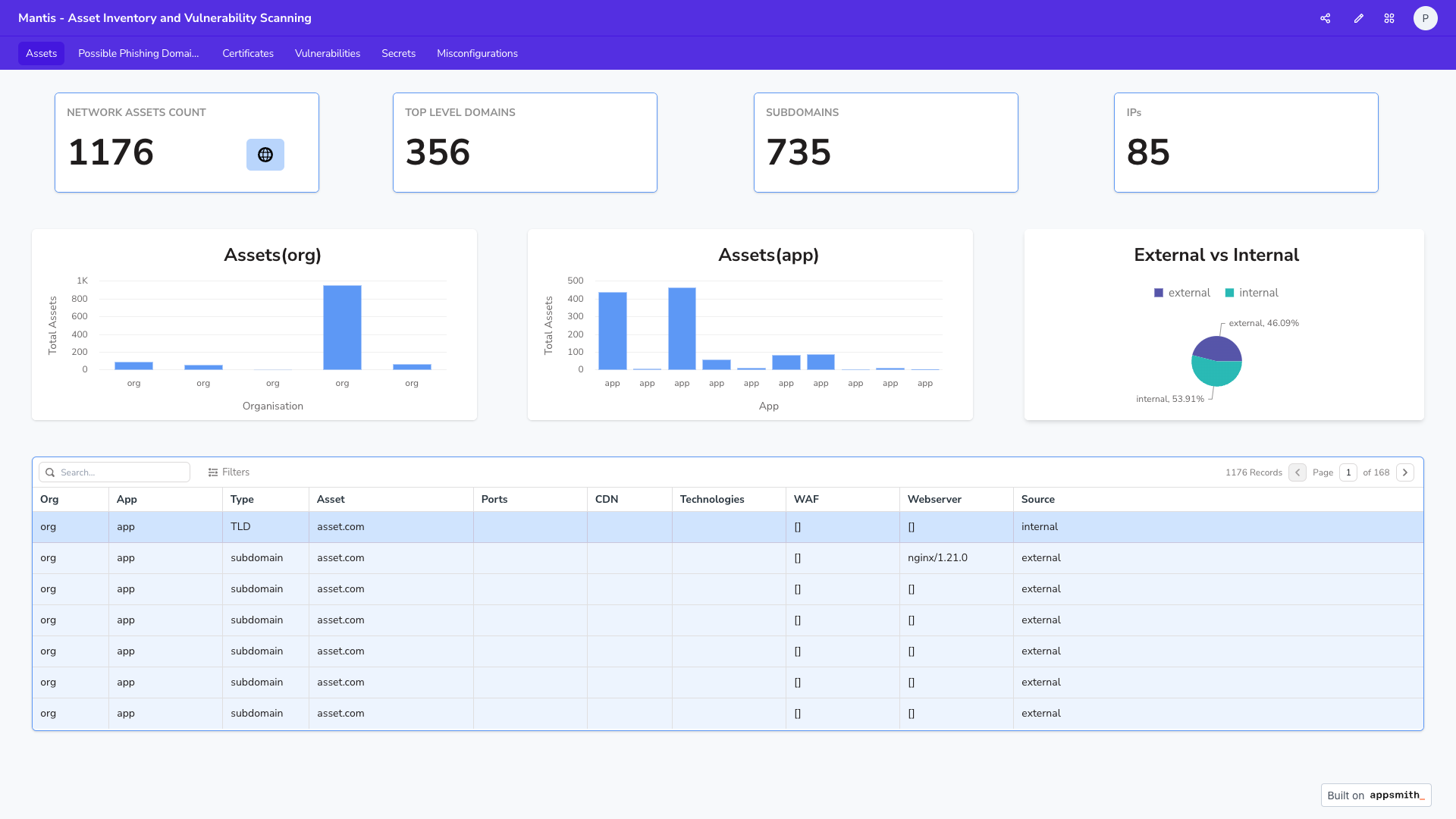
Assets
<img src="./images/Assets.png">
<img src="./images/.png">
Command Line Options 🖥️
Run a scan 🔍
You want to onboard an org with its TLDs/IPs/IP-CIDRs/IP Range for the first time, use the onboard mode. This runs the scan on the default workflow.
#### TLD
#### IP
#### IP-Range
#### IP-CIDR
Onboard Known Assets and Scan
Add a new subdomain to existing org
Scan on all assets belonging to an organisation
Now that you ha, you just need to run scheduled scans for an org, you can just use the scan mode
Scan on all assets belonging to an organisation and app
Scan an existing subdomain for an org
How to contribute ?
If you want to contribute to this project:
* Submit an issue if you found a bug, or a have a feature request.
* Make a Pull Request from de if you want to improve the code.
Need Help ? 🙋♂️
* Take a look at our documentation
* Please use Mantis Discussions forum for all your queries
* Please join our discord channel
Credits 🎖
De - Prateek Thakare
Recon Tools Design/Launch scripts - Bharath Kumar
Secret Scanning - Hitesh Kumar, Saddam Hussain
Dashboard - Saddam Hussain
Design Suggestions - Dhru, Santanu Sinha
Framework Design - Praveen Kanniah
Special Thanks - Ankur Bhargava
Contributors
<p align="left">
<a href="
<img src="
</a>
</p>
Disclaimer
Usage of this program for attacking targets without consent is illegal. It is the user's responsibility to obey all applicable laws. The de assumes no liability and is not responsible for any misuse or damage caused by this program. Please use responsibly.
The material contained in this repository is licensed under Apache2.
项目信息
开发语言:Python
Star 数:1038
技术要点
该项目属于漏洞知识库方向的开源资源,代码结构清晰,适合安全研究人员学习参考。项目围绕Mantis is a security framework that automates the workflow of discovery, reconnaissance, and vulnerability scanning.展开,提供了可运行的实现,对理解相关安全机制、工具原理与攻防技术具有较高的研究价值。
从技术实现角度看,此类项目的核心在于对底层原理的深入理解与工程化落地。开发者在研究过程中可以结合官方文档与社区讨论,梳理项目的初始化流程、核心模块职责与数据流转,逐步掌握其中的技术细节与设计思路。
使用与学习建议
1. 下载源码压缩包,解压到本地环境。
2. 根据项目类型准备对应的运行环境与依赖。
3. 按照 README 中的步骤完成配置与部署。
4. 在隔离的测试环境中运行验证,避免影响生产系统。
免责声明
本资源来源于开源社区,仅供安全研究、技术学习与合法授权范围内的攻防演练使用,请勿用于任何非法或侵害他人权益的用途。使用本项目产生的一切后果由使用者自行承担。
| 资源标题 | mantis - Mantis is a security framework that automates the |
| 所属分类 | 漏洞知识库 |
| 发布作者 | admin |
| 发布时间 | 2026-10-06 01:03:33 |
| 下载权限 | 免费下载 |
| 附件数量 | 2 个下载链接 |
| 浏览次数 | 448 |
| 讨论数量 | 0 |
| 主题状态 | 正常讨论中 |