 漏洞知识库
点击放大
dependency-review-action - A GitHub Action for detecting vulnerable dependenc
项目说明
dependency-re
- O
- the results
- Installation
- Installation (standard)
- Installation (GitHub Enterprise Server)
- Configuration
- Configuration options
- Configuration methods
- Option 1: Using inline configuration
- Option 2: Using an external configuration file
-
OTHER in license strings- Further information
- Using dependency review action to block a pull request from being merged
- Outputs
- Getting help
- Contributing
- License
O
The dependency review action scans your pull requests for dependency changes, and will raise an error if any or invalid licenses are being introduced.
The action is supported by an API endpoint that diffs the dependencies between any two re on your default branch.
The action is a for:
the results
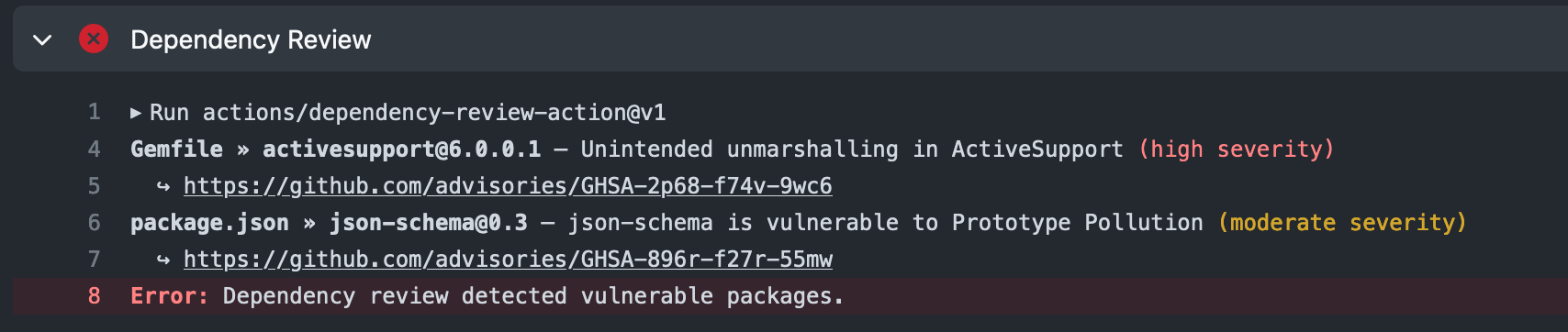
When the action runs, you can see the results on:
1. Go to the Actions tab for the repository and select the relevant workflow run.
1. Then under "Jobs", click dependency review.
<img width="850" alt="GitHub workflow run log showing Dependency Review job output" src="
1. Go to the Actions tab for the repository and select the relevant workflow run.
1. Click Summary, then scroll to "dependency-review summary".
<img width="850" alt="GitHub job summary showing Dependency Review output" src="
Installation
#### Installation (standard)
You can install the action on any public repository, or any organization-owned private repository, provided the organization has a GitHub Ad Security license.
> Note: Dependency Review Action v5.0.0 updates the runtime to node24. This requires a minimum Actions Runner v2.327.1 to run.
1. Add a new YAML workflow to your .github/workflows folder:
#### Installation (GitHub Enterprise Server)
You can install the action on repositories on GitHub Enterprise Server.
1. Ensure GitHub Ad Security and GitHub Connect are enabled for the enterprise.
2. Ensure you ha the dependency-re on the server.
3. Add a new YAML workflow to your .github/workflows folder:
4. In the workflow file, replace the runs-on value with the label of any of your runners. (The default value is self-hosted.)
Configuration
Configuration options
There are configuration options you can use to specify settings for the dependency review action.
All configuration options are optional.
| Option | Usage | Possible | Default value |
| -------------------------------------- | ------------------------------------------------------------------------------------------------------------------------------------------------------------------------------------------------------------------------------------------------------------------------------------------------------------------------------------------------------------------ | ------------------------------------------------------------------------------------------------------------ | ------------- |
| fail-on-se | Defines the threshold for the level of se. The action will fail on any pull requests that introduce of the specified se level or higher. | low, moderate, high, critical | low |
| allow-licenses\* | Contains a list of allowed licenses. The action will fail on pull requests that introduce dependencies with licenses that do not match the list. | Any SPDX-compliant identifier(s) | none |
| deny-licenses\* | ⚠️ This option is deprecated for possible removal in the next major release. See Deprecate the deny-licenses option #938 for more information. <br> Contains a list of prohibited licenses. The action will fail on pull requests that introduce dependencies with licenses that match the list. | Any SPDX-compliant identifier(s) | none |
| fail-on-scopes | Contains a list of strings of the build en you want to support. The action will fail on pull requests that introduce in the scopes that match the list. | runtime, de, unknown | runtime |
| allow-ghsas | Contains a list of GitHub Ad Database IDs that can be skipped during detection. | Any GHSAs from the GitHub Ad Database | none |
| license-check | Enable or disable the license check performed by the action. | true, false | true |
| | Enable or disable the check performed by the action. | true, false | true |
| allow-dependencies-licenses\* | Contains a list of packages that will be excluded from license checks. | Any package(s) in purl format | none |
| base-ref/head-ref | Provide custom git references for the git base/head when performing the comparison check. This is only used for event types other than pull_request and pull_request_target. | Any valid git ref(s) in your project | none |
| comment-summary-in-pr | Enable or disable reporting the review summary as a comment in the pull request. If enabled, you must give the workflow or job the pull-requests: write permission. With each execution, a new comment will o the existing one. | always, on-failure, never | never |
| deny-packages | Any number of packages to block in a PR. This option will match on the exact provided. If no is provided, the option will treat the specified package as a wildcard and deny all . | Package(s) in purl format | empty |
| deny-groups | Any number of groups (namespaces) to block in a PR. | Namespace(s) in purl format (no package name, no number) | empty |
| retry-on-snapshot-warnings\* | Enable or disable retrying the action every 10 seconds while waiting for dependency submission actions to complete. | true, false | false |
| retry-on-snapshot-warnings-timeout\* | Maximum amount of time (in seconds) to retry the action while waiting for dependency submission actions to complete. | Any positi | 120 |
| warn-only+ | When set to true, the action will log all as warnings regardless of the se, and the action will complete with a success status. This o the fail-on-se option. | true, false | false |
| show-openssf-scorecard | When set to true, the action will output information about all the known OpenSSF Scorecard scores for the dependencies changed in this pull request. | true, false | true |
| warn-on-openssf-scorecard-level | When show-openssf-scorecard-levels is set to true, this option lets you configure the threshold for when a score is considered too low and gets a :warning: warning in the CI. | Any positi | 3 |
| show-patched-\* | When set to true, the summary table will include an additional column showing the first patched for each . This requires additional API calls to fetch ad data. | true, false | false |
> [!NOTE]
>
> - \* Not supported for use with GitHub Enterprise Server. (Checking for licenses is not supported on GitHub Enterprise Ser the API does not return license information.)
> - \+ When warn-only is set to true, all , independently of the se, will be reported as warnings and the action will not fail.
> - The allow-licenses and deny-licenses options are mutually exclusive; an error will be raised if you provide both.
> - If we can't detect the license for a dependency we will inform you, but the action won't fail.
Configuration methods
To specify settings for the dependency review action, you can choose from two options:
#### Option 1: Using inline configuration
You can pass configuration options to the dependency review action using your workflow file.
1. In the same YAML workflow file you created during installation, use the with: key to specify your chosen settings:
#### Option 2: Using an external configuration file
You can use an external configuration file to specify settings for this action. The file can be a local file or a file in an external repository.
1. In the same YAML workflow file you created during installation, use config-file to specify that you are using an external configuration file.
| Option | Usage | Possible |
| ------------- | -------------------------------------------------------------------------------------------------------------------------------------------- | ------------------------------------------------------------------------------------------------------------------------------------ |
| config-file | A path to a file in the current repository or an external repository. Use this syntax for external files: OWNER/REPOSITORY/FILENAME | Local file: ./.github/dependency-re.yml <br> External repo: github/octorepo/dependency-re.yml |
2. Optionally, if the file resides in a private external repository, and for all GitHub Enterprise Ser, use external-repo-token to specify a token for fetching the file.
| Option | Usage | Possible |
| --------------------- | --------------------------------------------------------------------------------------------------------------------------------------------------------------------------------------------------------------------------------------------------------- | ---------------------------------------------------------------------------- |
| external-repo-token | Specifies a token for fetching the configuration file. It is required if the file resides in a private external repository and for all GitHub Enterprise Ser. Create a token in de settings. | Any token with read permissions to the repository hosting the config file. |
3. Create the configuration file in the path you specified for config-file.
4. In the configuration file, specify your chosen settings.
#### OTHER in license strings
License data comes from ClearlyDefined and you may sometimes see licenses displayed with the string OTHER in them. ClearlyDefined defines OTHER as:
> This indicates that a human confirmed that there is license information in the file but that the license is not an SPDX-identified license.
OTHER is not a valid SPDX license identifier, so we convert OTHER in a license string into LicenseRef-clearlydefined-OTHER, which _is_ valid in SPDX. If you want to add that to the deny or allow list, be sure to add LicenseRef-clearlydefined-OTHER to this list, because that is what we'll actually be comparing.
#### Further information
Using dependency review action to block a pull request from being merged
You can configure your repository to block a pull request from being merged if the pull request fails the dependency review action check. To do this, the repository owner must configure branch protection settings that require the check to pass before merging. For more information, see "Require status checks before merging" in GitHub Docs documentation.
Outputs
Dependency review action can create outputs, so that data from its execution can be used by other jobs in a workflow.
comment-content is generated with the same content as would be present in a Dependency Review Action comment.dependency-changes holds all dependency changes in a JSON format. The following outputs are subsets of dependency-changes filtered based on the configuration:-
-
in holds information about invalid or non-compliant license dependency changes in a JSON format.-
denied-changes holds information about denied dependency changes in a JSON format.> [!NOTE]
> Action outputs are unicode strings with a 1MB size limit.
>
> If you use these outputs in a run-step, you must store the output data in an en instead of using the output directly. Using an output directly might break shell scripts. For example:
>
>
>
> instead of direct echo '${{ steps.review.outputs. }}'.
> See examples for more.
Getting help
If you have bug reports, questions or suggestions please create a new issue.
Contributing
We are grateful for any contributions made to this project. Please read CONTRIBUTING.MD to get started.
License
This project is released under the MIT License.
项目信息
开发语言:TypeScript
Star 数:899
技术要点
该项目属于漏洞知识库方向的开源资源,代码结构清晰,适合安全研究人员学习参考。项目围绕A GitHub Action for detecting vulnerable dependencies and invalid licenses in your PRs展开,提供了可运行的实现,对理解相关安全机制、工具原理与攻防技术具有较高的研究价值。
从技术实现角度看,此类项目的核心在于对底层原理的深入理解与工程化落地。开发者在研究过程中可以结合官方文档与社区讨论,梳理项目的初始化流程、核心模块职责与数据流转,逐步掌握其中的技术细节与设计思路。
使用与学习建议
1. 下载源码压缩包,解压到本地环境。
2. 根据项目类型准备对应的运行环境与依赖。
3. 按照 README 中的步骤完成配置与部署。
4. 在隔离的测试环境中运行验证,避免影响生产系统。
免责声明
本资源来源于开源社区,仅供安全研究、技术学习与合法授权范围内的攻防演练使用,请勿用于任何非法或侵害他人权益的用途。使用本项目产生的一切后果由使用者自行承担。
| 资源标题 | dependency-review-action - A GitHub Action for detecting vulnerable dependenc |
| 所属分类 | 漏洞知识库 |
| 发布作者 | admin |
| 发布时间 | 2026-10-06 01:04:54 |
| 下载权限 | 免费下载 |
| 附件数量 | 2 个下载链接 |
| 浏览次数 | 459 |
| 讨论数量 | 0 |
| 主题状态 | 正常讨论中 |