 漏洞知识库
点击放大
security - Google's Security extension for the Gemini CLI tha
项目说明
Gemini CLI Security Extension
The Security extension is an open-source Gemini CLI extension, built to enhance your repository's security posture. The extension adds a new command to Gemini CLI that analyzes code changes to identify a of security risks and .
!Security Extension Workflow
Features
Installation
Install the Security extension by running the following command from your terminal *(requires Gemini CLI v0.4.0 or newer)*:
Use the extension
The Security extension adds the /security:analyze command to Gemini CLI which analyzes code changes on your current branch for common security and provides an intelligent, Gemini-powered security report to improve the repository's security posture.
Important: This report is a first-pass analysis, not a complete security audit. Use in combination with other tools and manual review.
Note: The /security:analyze command is currently designed for interactive use. Support for non-interacti is planned for a future release (tracked in issue #20).
Customize the /security:analyze command
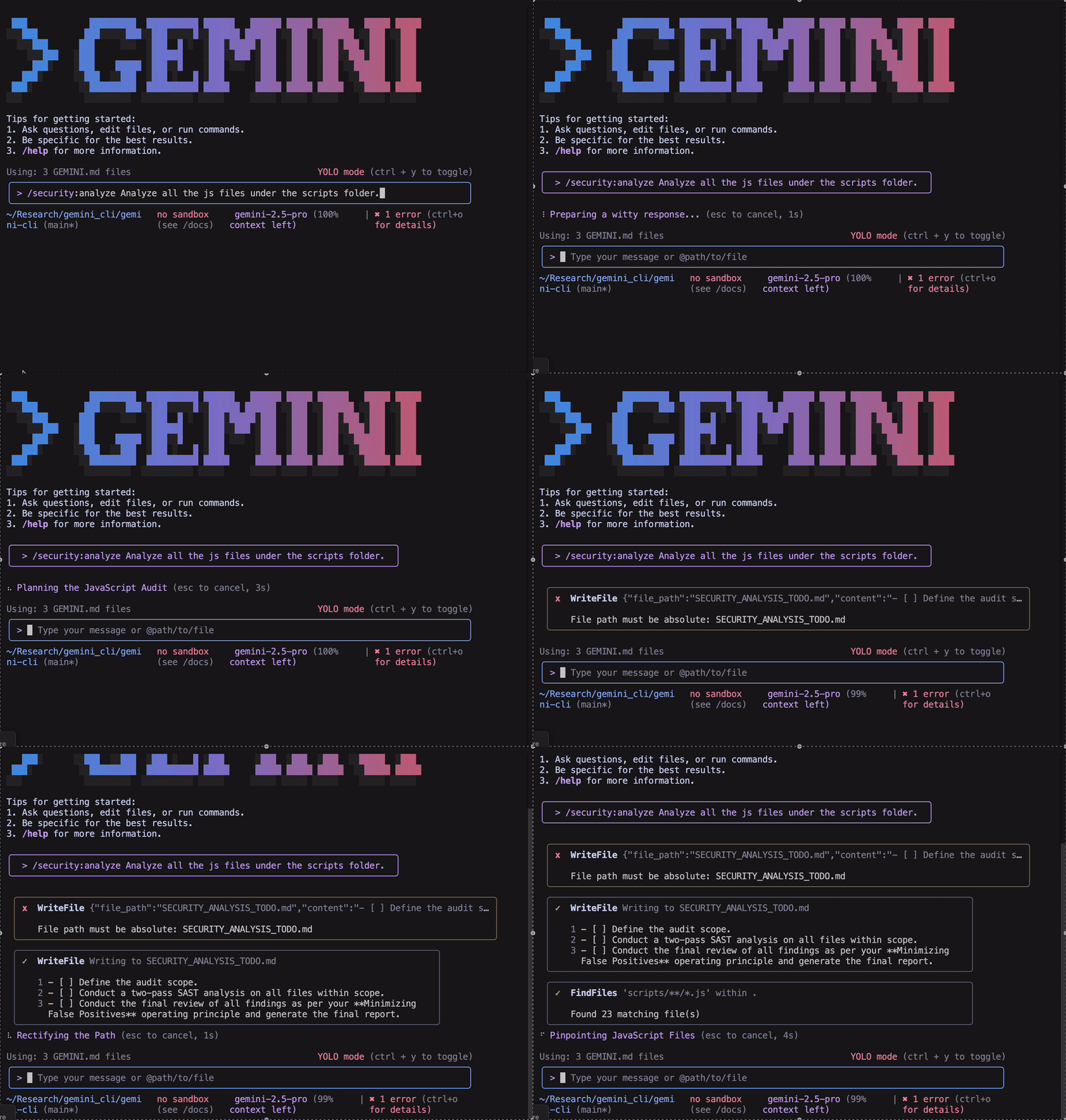
By default, the /security:analyze command determines the scope of the analysis using git diff --merge-base origin/HEAD. However, to customize the scope, you can add instructions to the command using natural language. For example, to analyze all files in scripts folder, you can run the command as
To get the security report in JSON format, you can use the --json flag or request JSON output using natural language:
Or alternatively:
!Customize analysis command
Scan for dependencies
Modern software is built on open-source dependencies, but this can introduce security risks if a dependency contains .
Regularly running a dependency scan is a critical step in securing your software supply chain and protecting your project from well-known attack .
The /security:scan-deps command automates this process by integrating OS, a tool that cross-references your project's dependencies with OSV.dev, a Google-maintained, open-source database. OSV.de precise data by aggregating information from a wide range of open-source ecosystems, ensuring comprehensive and reliable security ad.
To run a dependency scan, use the following command:
After running the command, you will receive a report listing:
GitHub Integration
I already use run-gemini-cli workflows in my repository:
* Replace your existing gemini-review.yml with this updated workflow, which includes the new Security Analysis step.
I don't use run-gemini-cli workflows in my repository yet:
1. Integrate the Gemini CLI Security Extension into your GitHub workflow to analyze incoming code:
2. Follow Steps 1-3 in this Quick Start.
3. Create a .github/workflows directory in your repository's root (if it doesn't already exist).
4. Copy this Example Workflow into the .github/workflows directory. See the run-gemini-cli configuration to make changes to the workflow.
5. Ensure the new workflow file is committed and pushed to GitHub.
6. Open a new pull request, or comment -cli /review on an existing PR, to run the Gemini CLI Code Review along with Security Analysis.
Benchmark
To e the quality and effecti of our security analysis, we benchmarked the extension against a real-world dataset of known .
Methodology
Our e process is designed to test the extension's ability to identify in code changes.
1. Dataset: We used the OpenSSF C, a dataset containing GitHub repositories of real applications in TypeScript / Ja. For each , the dataset provides the commit containing the code (prePatch) and the commit where the was fixed (postPatch).
2. Analysis Target: For each CVE, we set up the repository, found the introducing patch with the help of archeogit, and added that patch to our local en.
3. Report Generation: We ran the /security:analyze command on this diff to generate a security report.
4. : Since the dataset has a small number of repositories, we manually re all the generated security reports and compared with the ground truth to calculate the final precision and recall numbers.
We are now actively working to automate the e framework and enrich our datasets by adding new classes of .
Results
Our e on this dataset yielded a precision of 90% and a recall of 93%.
* Precision (90%) measures the accuracy of our detections. Of all the potential the extension identified, 90% were actual security risks.
* Recall (93%) measures the completeness of our co. The extension successfully identified 93% of all the known present in the dataset.
Types of
The Security extension scans files for the following :
Secrets management
Insecure data handling
Injection
Authentication
LLM Safety
eval(). Also flags code where security-sensiti are based on un LLM output.Resources
Legal
Star history
![Star History Chart]()
项目信息
开发语言:TypeScript
Star 数:793
技术要点
该项目属于漏洞知识库方向的开源资源,代码结构清晰,适合安全研究人员学习参考。项目围绕Google's Security extension for the Gemini CLI that finds vulnerabilities in your code changes and pull requests.展开,提供了可运行的实现,对理解相关安全机制、工具原理与攻防技术具有较高的研究价值。
从技术实现角度看,此类项目的核心在于对底层原理的深入理解与工程化落地。开发者在研究过程中可以结合官方文档与社区讨论,梳理项目的初始化流程、核心模块职责与数据流转,逐步掌握其中的技术细节与设计思路。
使用与学习建议
1. 下载源码压缩包,解压到本地环境。
2. 根据项目类型准备对应的运行环境与依赖。
3. 按照 README 中的步骤完成配置与部署。
4. 在隔离的测试环境中运行验证,避免影响生产系统。
免责声明
本资源来源于开源社区,仅供安全研究、技术学习与合法授权范围内的攻防演练使用,请勿用于任何非法或侵害他人权益的用途。使用本项目产生的一切后果由使用者自行承担。
| 资源标题 | security - Google's Security extension for the Gemini CLI tha |
| 所属分类 | 漏洞知识库 |
| 发布作者 | admin |
| 发布时间 | 2026-10-06 01:06:24 |
| 下载权限 | 免费下载 |
| 附件数量 | 2 个下载链接 |
| 浏览次数 | 171 |
| 讨论数量 | 0 |
| 主题状态 | 正常讨论中 |